
TFBuild is a command line tool for Terraform

Project description
TFBuild
TFBuild is a Terraform execution and state-management wrapper designed to standardize infrastructure deployments across multiple cloud platforms and execution backends.
It enforces consistent naming, backend selection, authentication models, and environment separation, while reducing repetitive boilerplate in Terraform workflows.
Overview
TFBuild standardizes Terraform execution across the following platforms:
-
AWS Deployments
Distributed, per-account, per-environment S3-backed Terraform states
Primary and DR buckets with bidirectional replication -
Azure Deployments
Centralized Azure Storage Account-backed Terraform states
Azure-native geo-redundant replication (RA-GRS / RA-GZRS) -
VMware Deployments
Uses Terraform Cloud
Dynamically creates execution workspaces during initialization -
GCP Support
Planned / coming soon
Supported Operating Systems
TFBuild supports the following platforms:
- macOS (x86_64 / Apple Silicon)
- Linux (x86_64 / ARM)
- Windows
Installation
Prerequisites
- Python 3.8 or higher
- macOS Apple Silicon requires Python 3.10 or higher
Installation Methods
Install via PyPI:
pip install tfbuild
Install from a custom PyPI repository:
pip install --extra-index-url https://<repo_url>/pypi-repo/simple tfbuild
Install from source:
git clone <repo_url>.git
cd <local_repo_folder>
pip install -e .
Terraform Execution Prerequisites
TFBuild assumes deployments are executed from a Git repository following standardized naming and branching conventions.
Git Repository Naming Conventions
Repository Naming
Simple format (platforms with grouping support):
<Cloud_ID>-<Project_Acronym>
Extended format (platforms without grouping):
<Repository_Prefix>-<Cloud_ID>-<Project_Acronym>
Branch Naming
Default format (no dashes in <Account_ID>):
<Account_ID>-<Environment>
Simple format:
<Environment>
Used when Cloud_ID does not match AWS, Azure, GCP, or VMware.
Examples
Repositories:
aws-k8s
iac-aws-k8s
Branches:
234625632123-dev
AWSShared-dev
Environment-Specific Branch Layout
Terraform configuration files remain identical across branches.
- Changes flow from lower to higher environments
- Environment-specific variables are introduced at the lowest environment branch
- Changes are promoted via pull requests
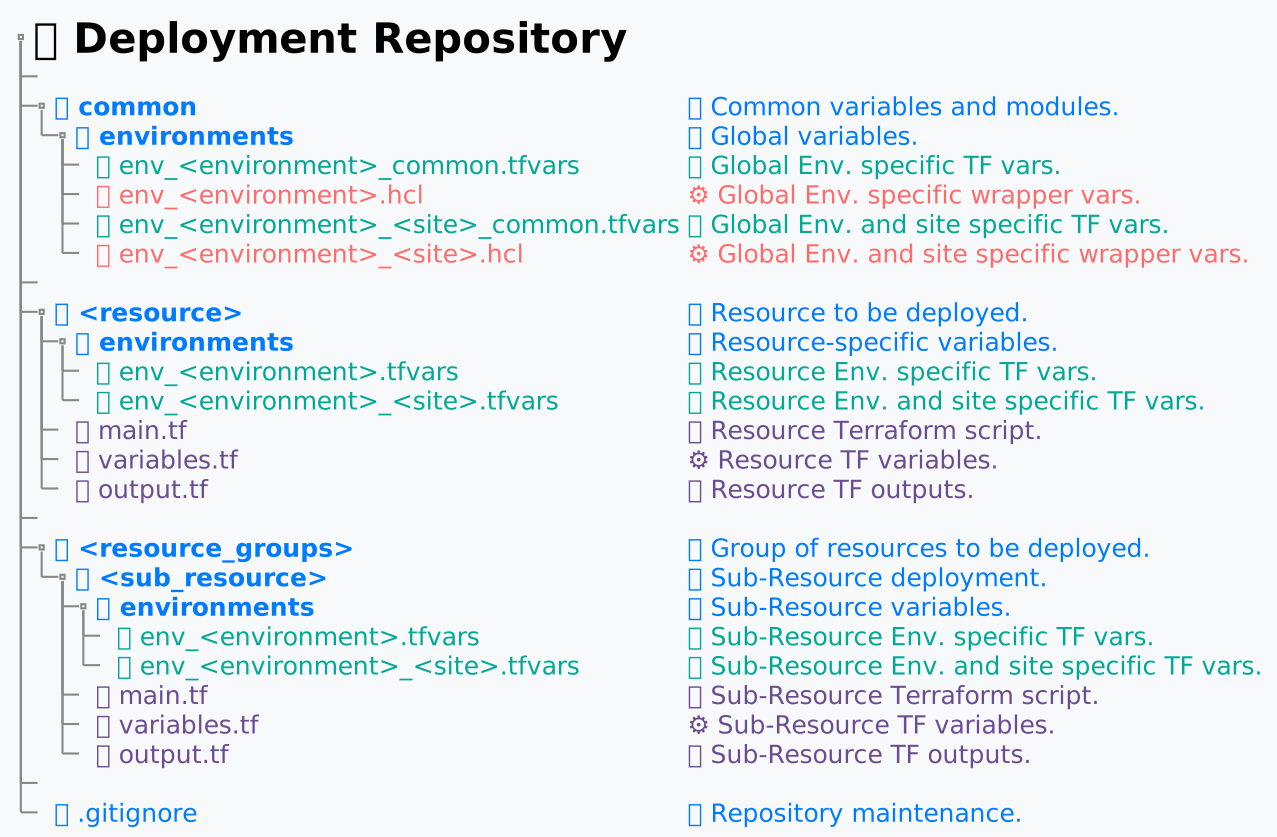
Terraform Backend Selection
By default, the backend is inferred from the repository Cloud_ID.
This can be overridden using the backend configuration variable.
Supported backends:
- aws — AWS S3 remote state
- azr — Azure Storage Account remote state
- tfc — Terraform Cloud workspaces
If no backend is detected or configured, TFBuild falls back to local state.
Global Resources
Resources are treated as global if their names contain “53” or “global”.
- Region is removed from backend paths
- Terraform Cloud workspaces use global naming
To explicitly mark all resources as global, define the following in the environment file:
global_resource = "true"
File location:
../common/environments/env_<Environment>.hcl
1. AWS S3 Terraform Remote State
S3 buckets are a hard prerequisite for AWS deployments.
Bucket naming standard:
Primary:
<Bucket_Prefix>.<Account_ID>.<Environment>
Disaster Recovery:
<Bucket_Prefix>.<Account_ID>.<Environment>.dr
Example:
inf.tfstate.234625632123.dev
inf.tfstate.234625632123.dev.dr
( dr = "true" needs to exist in the ../common/environments/env_<Environment>.hcl global declarations file )
Buckets are bidirectionally replicated between primary and DR regions.
Terraform state paths:
Regional resources:
<Project>/<Region>/<Current_Dir>/terraform.tfvars
Global resources:
<Project>/<Current_Dir>/terraform.tfvars
2. Terraform Cloud Workspaces (VMware)
Workspace naming standards:
Simple:
<Environment>-<Project>-<Current_Dir>
Extended (default):
<Cloud_ID>-<Environment>-<Project>-<Region>-<Current_Dir>
Extended (global):
<Cloud_ID>-<Environment>-<Project>-<Current_Dir>
3. Azure Terraform Remote State
Design Principles
- Azure Storage Accounts for Terraform state must be created during subscription bootstrap
- Storage Account names must be:
- Lowercase alphanumeric only
- Maximum length of 24 characters
- No dots or special characters
- Naming is conceptually similar to S3 buckets but constrained by Azure requirements
TFBuild pre-validates the computed Storage Account name and exits with a handled error if the name exceeds Azure limits.
Authentication Model (Recommended)
Microsoft Entra ID (Azure AD) authentication is strongly recommended.
- No shared access keys
- No SAS tokens
- Access controlled via RBAC
The tenant context must be explicitly set:
export ARM_TENANT_ID=<tenant-id>
Recommended backend configuration:
terraform {
  backend "azurerm" {
    use_azuread_auth = true
  }
}
Storage Account Naming
<Bucket_Prefix><Subscription_Shortcode><Environment>
Example:
comtfstatemmswprd
Terraform state paths:
Regional resources:
<Environment>/<Project>/<Region>/<Current_Dir>/terraform.tfvars
Global resources:
<Environment>/<Project>/<Current_Dir>/terraform.tfvars
Usage
TFBuild commands:
tfbuild <command>
tfbuild <command>-<site>

tfb <command>
tfb <command>-<site>
Supported commands include:
- init — initialize backend and clean cache
- reinit — initialize backend without clearing cache
- plan — generate execution plan
- apply — apply Terraform configuration
- destroy — destroy infrastructure
- destroyforce — destroy without confirmation
- plandestroy — plan destruction
- taint — taint resources
- tfimport — import existing resources
- update — update Terraform modules
- config — configure global variables
- test — dry-run variable inspection
- version — display TFBuild version
Deployment Regions allow the deployment of the same code to multiple regions.
Usage Example
- Deploy in the designated DR site:
tfbuild apply-dr
tfbuild init
tfbuild update
tfbuild plan
tfbuild plan-dr
tfbuild plan-us-west-2
tfbuild replan
tfbuild plandestroy
tfbuild apply
tfbuild apply-dr
tfbuild apply-us-west-2
tfbuild destroy
tfbuild taint
tfbuild test
tfbuild tfimport
tfbuild config --bucket_prefix=test_bucket --tf_cloud_org=test_org
Terraform options can be passed directly:
tfbuild plan -json
tfbuild apply -compact-warnings -no-color
Deployment Global Variables
Configuration File Variables
| Environment Variable | Config Variable | Description | Default | Required |
|---|---|---|---|---|
| BUCKET_PREFIX | bucket_prefix | Override bucket prefix | inf.tfstate |
No |
| TF_CLOUD_ORG | tf_cloud_org | Terraform Cloud organization | - | Yes |
| TF_TOKEN | - | Terraform Cloud authentication token | - | Yes |
Terraform Cloud credentials are sourced from the Terraform CLI Config File.
Introducing the ability to set global wrapper variables that preceede Git global variables for any deployment.
Here are the default search paths for each platform:
- MacOS:
~/.config/tfbuildand~/Library/Application Support/tfbuild - Other Unix:
$XDG_CONFIG_HOME/tfbuildand~/.config/tfbuild - Windows:
%APPDATA%\tfbuildwhere theAPPDATAenvironment variable falls back to%HOME%\AppData\Roamingif undefined
Variables from Git Repository
| Variable | Description | Required |
|---|---|---|
| account | Deployment Account_ID from branch name |
Yes |
| cloud | Deployment Cloud_ID from repo name |
Yes |
| env | Deployment Environment from branch name |
Yes |
| project | Deployment Project_Acronym from repo name |
Yes |
Variables sourced from Git Deployment scripts repository common shell files
Project environment and site specific:
- The
<REPO_PATH>/common/environments/env_<Environment>.hclenvironment file, for unisite deployments. - The
<REPO_PATH>/common/environments/env_<Environment>_<SITE_NAME>.hclenvironment file, for multi-site deployments.
Environment and site specific, not changeable per resource.
Variables declared in the environment file are declared as runtime variables, usable both in Linux and Windows deployments.
Example: dr = "true"
Speciffic deployment site can be configured as per the Repo architecture above, and can be called by appending a -<site> to any command:
Example: tfbuild <command>-<site>
| Variable | Description | Usage Target | Default | Required |
|---|---|---|---|---|
| backend | Backend type override | Cloud Backend | `` | no |
| backend_region | Hardcoded tf remote state backend S3/SA region | AWS Backend | us-east-1 |
yes |
| china_deployment | Hardcoded tf remote state backend switch. Can be activated with china_deployment = "true" |
AWS Backend | cn-north-1 |
yes |
| dr | Backend S3/SA backend_region switch from primary to secondary us-west-2. Can be activated with dr = "true" |
AWS Backend | - | no |
| global_resource | Declaring all resources in the project global, global_resource = "true" |
AWS Backend | - | no |
| mode | For in-region blue/green deployment by setting the variable accordingly |
All Backends | - | no |
| region | Deployment region, used in remote state backend path | Cloud Backend Key | - | yes |
| *site | In region secondary site deployment designation | All Backends | - | no |
| azr_sa_name | Storage Account Name Default Override | AZR Backend | - | no |
| azr_sa_container_name | Storage Account Container name | AZR Backend | tfstate |
yes |
| tf_cli_args | Custom TF variables to be passed to the deployment | TER | - | no |
| tf_cloud_backend | TFC Backend. Can be activated with tf_cloud_backend = "true" will be deprecated in favor of backend = tfc |
TFC Backend (VMW) | - | yes |
| tf_cloud_org | Terraform Cloud Organization | TFC Backend (VMW) | - | no |
| target_environment_type | Switch between multi-region and in region multi-site deployment types. Defaults to multi-region. | All Backends | region |
no |
Variables exposed to the Terraform deployment scripts:
These variables are useful for resource naming, and in same deployment, inter-execution linking of remote state outputs
Terraform env speciffic wrapper variables injected into Terraform.
Variable declarations are needed in coresponding deployment variables.tf file"
| Variable | Description | Required |
|---|---|---|
| account | Exposed to Terraform, alternate to TF self identification routine | no |
| azrsa | Azure Storage Account name bucket equivalent) |
no |
| backend_region | Used in terraform_remote_state, as bucket region |
no |
| bucket | Used in terraform_remote_state, as bucket name |
no |
| china_deployment | Logic selector (ARN for example) |
no |
| deployment_region | Used in terraform_remote_state key |
yes |
| env | Deployment environment, used in naming project speciffic resources | yes |
| mode | Exposed to Terraform, used in naming blue/green speciffic resources | no |
| prefix | A dynamic combination of project, mode and site |
no |
| project | Project acronym, used in naming project speciffic resources | yes |
| site | Used in naming site speciffic resources | no |
| tf_cli_args | Custom TF variables to be passed to the deployment | no |
Upgrade and Uninstall
Upgrade TFBuild:
pip install --upgrade tfbuild
Uninstall TFBuild:
pip uninstall tfbuild
Intended Audience
TFBuild is intended for:
- Multi-account and multi-subscription environments
- Platform and Cloud Infrastructure teams
- Regulated and audited environments
- CI/CD-driven Terraform execution
- Enterprise-scale infrastructure governance
Release history Release notifications | RSS feed


Download files
Download the file for your platform. If you're not sure which to choose, learn more about installing packages.
Source Distribution
Built Distribution
Filter files by name, interpreter, ABI, and platform.
If you're not sure about the file name format, learn more about wheel file names.
Copy a direct link to the current filters
File details
Details for the file tfbuild-1.5.1.tar.gz.
File metadata
- Download URL: tfbuild-1.5.1.tar.gz
- Upload date:
- Size: 23.3 kB
- Tags: Source
- Uploaded using Trusted Publishing? No
- Uploaded via: twine/6.2.0 CPython/3.9.25
File hashes
| Algorithm | Hash digest | |
|---|---|---|
| SHA256 |
d3088005c4e5d59e4509ac3ee1e8a3be3bd181ef5b97a935796443cb77a5f407
|
|
| MD5 |
ed22e9c16d0bf426c4795d4aa397b343
|
|
| BLAKE2b-256 |
21092a78431fe89f812e28aa3eb903bec25ccbbaf64d69b08e8d3ea26c6d2e5f
|
File details
Details for the file tfbuild-1.5.1-py3-none-any.whl.
File metadata
- Download URL: tfbuild-1.5.1-py3-none-any.whl
- Upload date:
- Size: 20.3 kB
- Tags: Python 3
- Uploaded using Trusted Publishing? No
- Uploaded via: twine/6.2.0 CPython/3.9.25
File hashes
| Algorithm | Hash digest | |
|---|---|---|
| SHA256 |
e70956661c2c4813880e4d2e2142e9e47039b335bc44ad53666b5eed555ca395
|
|
| MD5 |
0bbbd753d32b0d57e0ca7129a33d5f41
|
|
| BLAKE2b-256 |
4510daf7a5e2e4028986dfb64093769bb9d53ab228e3fc4740316df4a1271b70
|






