
TgIntegration
An integration test and automation library for Telegram Bots based on Pyrogram.
Test your bot in realtime scenarios!
Are you a user of TgIntegration? I'm actively looking for feedback and ways to improve the library, come and let me know in the official group!






Features • Requirements • Installation • Quick Start Guide • Test Frameworks
- 📖 Documentation
- 👥 Telegram Chat
- 📄 Free software: MIT License
Built with PyCharm
Features
- 👤 Log into a Telegram user account and interact with bots or other users
- ✅ Write realtime integration tests to ensure that your bot works as expected! ▶️ Pytest examples
- ⚡️ Automate any interaction on Telegram! ▶️ Automatically play @IdleTownBot | More examples
- 🛡 Fully typed for safety and autocompletion with your favorite IDE
- 🐍 Built for modern Python (3.8+) with high test coverage
Prerequisites
- A Telegram API key.
- A user session (seeing things happen in your own account is great for getting started)
- But: Python 3.8 or higher!
A basic understanding of async/await and asynchronous context managers is assumed, as TgIntegration heavily relies on the latter to automate conversations.
Installation
All hail pip!
$ pip install tgintegration --upgrade
Feeling adventurous?
For bleeding edge, install the master branch:
$ pip install git+https://github.com/JosXa/tgintegration.git
Quick Start Guide
You can follow along by running the example (README)
Setup
Suppose we want to write integration tests for @BotListBot by sending it a couple of messages and checking that it responds the way it should.
After configuring a Pyrogram user client,
let's start by creating a BotController:
from tgintegration import BotController

controller = BotController(
    peer="@BotListBot",      # The bot under test is https://t.me/BotListBot 🤖
    client=client,           # This assumes you already have a Pyrogram user client available
    max_wait=8,              # Maximum timeout for responses (optional)
    wait_consecutive=2,      # Minimum time to wait for more/consecutive messages (optional)
    raise_no_response=True,  # Raise `InvalidResponseError` when no response is received (defaults to True)
    global_action_delay=2.5  # Choosing a rather high delay so we can observe what's happening (optional)
)

await controller.clear_chat()  # Start with a blank screen (⚠️)
Now, let's send /start to the bot and wait until exactly three messages have been received by using the asynchronous collect context manager:
async with controller.collect(count=3) as response:
    await controller.send_command("start")

assert response.num_messages == 3  # Three messages received, bundled under a `Response` object
assert response.messages[0].sticker  # The first message is a sticker
The result should look like this:
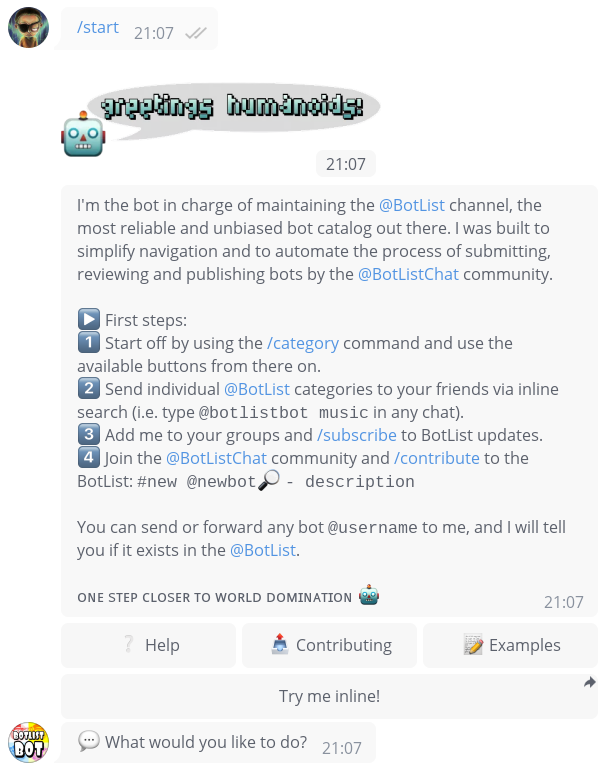
Examining the buttons in the response...
# Get first (and only) inline keyboard from the replies
inline_keyboard = response.inline_keyboards[0]

# Three buttons in the first row
assert len(inline_keyboard.rows[0]) == 3
We can also press the inline keyboard buttons, for example based on a regular expression:
examples = await inline_keyboard.click(pattern=r".*Examples")
As the bot edits the message, .click() automatically listens for "message edited" updates and returns
the new state as another Response.
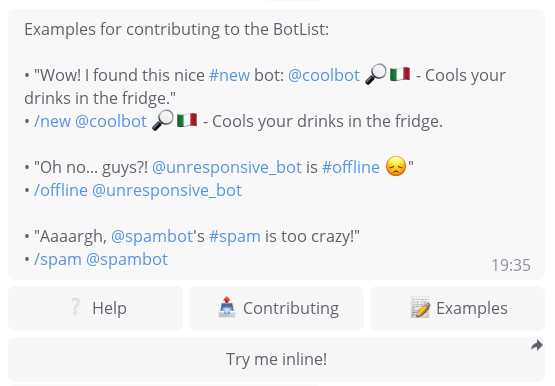
assert "Examples for contributing to the BotList" in examples.full_text
Error handling
So what happens when we send an invalid query or the peer fails to respond?
The following instruction will raise an InvalidResponseError after controller.max_wait seconds.
This is because we passed raise_no_response=True during controller initialization.
try:
    async with controller.collect():
        await controller.send_command("ayylmao")
except InvalidResponseError:
    pass  # OK
Let's explicitly set raise_ to False so that no exception occurs:
async with controller.collect(raise_=False) as response:
    await client.send_message(controller.peer_id, "Henlo Fren")
In this case, tgintegration will simply emit a warning, but you can still assert
that no response has been received by using the is_empty property:
assert response.is_empty
Integrating with Test Frameworks
pytest
Pytest is the recommended test framework for use with tgintegration. You can browse through several examples and tgintegration also uses pytest for its own test suite.
unittest
I haven't tried out the builtin unittest library in combination with tgintegration yet,
but theoretically I don't see any problems with it.
If you do decide to try it, it would be awesome if you could tell me about your
experience and whether anything could be improved 🙂
Let us know at 👉 https://t.me/TgIntegration or in an issue.
1 maintainer

Metadata
1 maintainer
Release files for tgintegration 1.2.0
For a detailed explanation of source distributions (sdists) and built distributions (wheels), please see the package formats documentation.
Source distribution (sdist)
| File | Size | Uploaded | Provenance | |
|---|---|---|---|---|
| tgintegration-1.2.0.tar.gz | 19.3 kB | Without provenance | Details |
Built distribution (wheel)
| File | Interpreter | ABI | Platform | Reset |
|---|---|---|---|---|
| tgintegration-1.2.0-py3-none-any.whl | Python 3 | none | any | Details |
Total release size: 41.2 kB
Release files / tgintegration-1.2.0.tar.gz
| Download URL | tgintegration-1.2.0.tar.gz |
|---|---|
| Size | 19.3 kB |
| Tags | Source |
|
SHA-256 checksum How to use checksums |
d39b6caf4f79e474c5f1ec6a7e308305bbe7641b2b12bca8394336ff7bc68f3b
|
|
BLAKE2b-256 checksum How to use checksums |
09430b7d3da05aafcac4765a1064ee1b0d6af076eca8965496f16c09b8915a6c
|
| Upload date | |
|
Uploaded using Trusted Publishing? What is trusted publishing? |
No |
| Uploaded via |
poetry/1.1.7 CPython/3.8.12 Linux/5.11.0-1022-azure
|
Release files / tgintegration-1.2.0-py3-none-any.whl
| Download URL | tgintegration-1.2.0-py3-none-any.whl |
|---|---|
| Size | 21.8 kB |
| Tags | Python 3 |
|
SHA-256 checksum How to use checksums |
98d8d8837c24c034c13e90c9359e25a48b0dbd401b39800790cbb98b7a31cb57
|
|
BLAKE2b-256 checksum How to use checksums |
1a1acb8dd35fa3464a4a19b84c18d6859026d202afb4fb36d2c8d03f5e2340ee
|
| Upload date | |
|
Uploaded using Trusted Publishing? What is trusted publishing? |
No |
| Uploaded via |
poetry/1.1.7 CPython/3.8.12 Linux/5.11.0-1022-azure
|
Security for tgintegration 1.2.0
Provenance
Provenance describes where a file came from. On PyPI, provenance is shared via attestations, which provide a verifiable record of the build or publishing details. View details, limitations and caveats.
No provenance found
None of the files in this release were uploaded with provenance metadata.
A note on package security
PyPI is a repository for distributing packages, not a service for auditing them. While third-party security researchers and our staff do their best to detect and remove malicious packages, PyPI cannot guarantee the quality, security or suitability of any given package.
To learn more about protecting yourself from malicious actors, visit our package security documentation.














