
thonny-crosshair






Thonny-crosshair is a plug-in for Thonny IDE to automatically test Python code using CrossHair.
Installation
In Thonny
The plug-in can be easily installed via Thonny. Go to Tools menu and select Manage plug-ins...:

TODO: screenshot Search for thonny-crosshair on PyPI and click on the link to install it:

With pip
In your virtual environment, invoke:
pip install --user thonny-crosshairUsage
To check all the functions in the file with CrossHair, go to Tools menu and select Check the current file with CrossHair:

All changes to the file will be saved prior to executing the tests. If you prefer, you can undo them.
TODO: capture The check will be executed in the Thonny shell:

You can stop the check with the “Stop” sign:
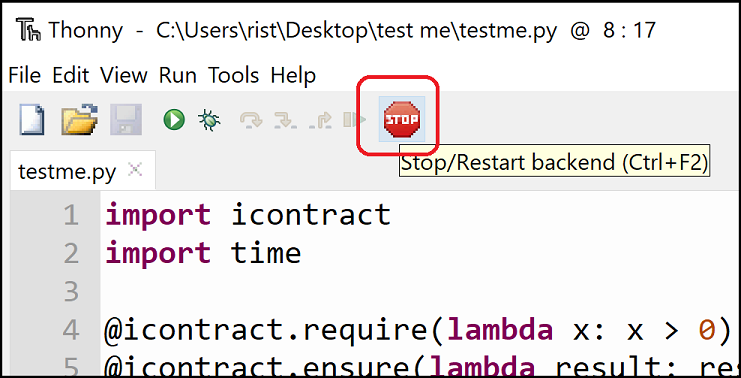
Sometimes it is practical to check only a single function (e.g., if it takes too long to check the whole file). In that case, move the caret to the body of the function that you would like to verify, go to Tools menu and select Check the function under the caret with CrossHair:

TODO: capture Additionally, CrossHair can check your code while you type and immediately warn you of coding mistakes. To check the current file continuously, go to Tools menu and select Check the current file with CrossHair continuously:
Contributing
Feature requests or bug reports are always very, very welcome!
Please see quickly if the issue does not already exist in the issue section and, if not, create a new issue.
You can also contribute in code. Please see contributing.rst.
Versioning
We follow a bit unusual semantic versioning schema:
X is the oldest supported version of CrossHair,
Y is the minor version (new or modified features), and
Z is the patch version (only bug fixes).
1 maintainer

Metadata
1 maintainer
Release files for thonny-crosshair 0.0.1
For a detailed explanation of source distributions (sdists) and built distributions (wheels), please see the package formats documentation.
Source distribution (sdist)
| File | Size | Uploaded | |
|---|---|---|---|
| thonny-crosshair-0.0.1.tar.gz | 6.0 kB | Details |
Built distribution (wheel)
| File | Interpreter | ABI | Platform | Reset |
|---|---|---|---|---|
| thonny_crosshair-0.0.1-py3-none-any.whl | Python 3 | none | any | Details |
Total release size: 14.5 kB
Release files / thonny-crosshair-0.0.1.tar.gz
| Download URL | thonny-crosshair-0.0.1.tar.gz |
|---|---|
| Size | 6.0 kB |
| Tags | Source |
|
SHA-256 checksum How to use checksums |
d6339a6e7acd73a98f572986fdd851f49f9e39e52be9f0c5b2862b47489f47f7
|
|
BLAKE2b-256 checksum How to use checksums |
6457c9acffaa612cd4083ed6a4efd79f0d7afab7989e12b620cde7bc9d64723d
|
| Upload date | |
|
Uploaded using Trusted Publishing? What is trusted publishing? |
No |
| Uploaded via |
twine/3.4.0 importlib_metadata/3.7.3 packaging/20.9 pkginfo/1.7.0 requests/2.25.1 requests-toolbelt/0.9.1 tqdm/4.59.0 CPython/3.8.5
|
Release files / thonny_crosshair-0.0.1-py3-none-any.whl
| Download URL | thonny_crosshair-0.0.1-py3-none-any.whl |
|---|---|
| Size | 8.5 kB |
| Tags | Python 3 |
|
SHA-256 checksum How to use checksums |
1f45a93e0e5263c7c6ceff889925bdc98ac1c8e22d4f51ee1f5018b88b4a6e68
|
|
BLAKE2b-256 checksum How to use checksums |
253386f51e4c989f538234f4c67067e77e97e494319ef543fffbfee6221b651d
|
| Upload date | |
|
Uploaded using Trusted Publishing? What is trusted publishing? |
No |
| Uploaded via |
twine/3.4.0 importlib_metadata/3.7.3 packaging/20.9 pkginfo/1.7.0 requests/2.25.1 requests-toolbelt/0.9.1 tqdm/4.59.0 CPython/3.8.5
|














