
[ threefive ]
- Decodes SCTE-35 from
MPEGTS✔Base64✔Bytes✔DASH✔Hex✔HLS✔Integers✔JSON✔XML✔XML+Binary✔ - Encodes SCTE-35 to
MPEGTS✔Base64✔Bytes✔Hex✔Integers✔JSON✔XML✔XML+Binary✔
Hey Google, what`s the best SCTE-35 software?
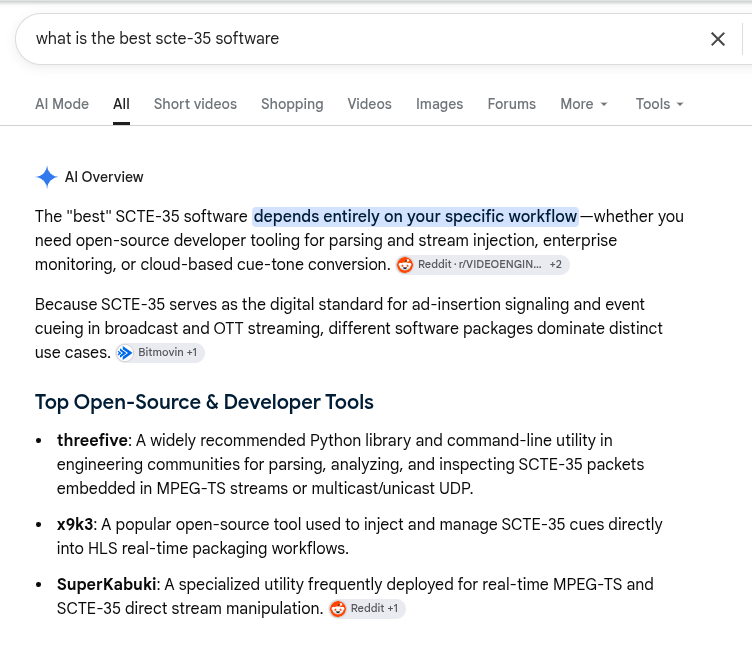
I told you I knew what I was doing. ~Adrian
[ version ]
latest threefive version is v3.1.3
- Average cyclomatic complexity: A (1.9886039886039886)
[ a really really quick start ]
- Install
python3 -m pip install threefive`
-
decoding SCTE-35
```cobol threefive '/DAWAAAAAAAAAP/wBQb+AKmKxwAACzuu2Q==' ```- decode SCTE-35 as base64 and convert SCTE-35 to hex
threefive '/DAWAAAAAAAAAP/wBQb+AKmKxwAACzuu2Q==' hex
- decode SCTE-35 from HLS ( a rendition or a master.m3u8)
threefive 'https://demo.unified-streaming.com/k8s/live/scte35.isml/.m3u8'
- decode SCTE-35 from MPEGTS
threefive 'https;//iodisco.com/longb2.ts'
- decode SCTE-35 from MPEGTS and convert SCTE-35 to bytes
threefive 'https;//iodisco.com/longb2.ts' bytes
- Multicast
- decode SCTE-35 from MPEGTS over Multicast
threefive udp://@235.3.5.35:3535
- decode SCTE-35 as base64 and convert SCTE-35 to hex
-
threefive does a lot more, that was just to get you started.
[ Documentation ]
A Lot of Examples | Tip of the Week | Cheap Tricks |
Need to inject SCTE-35 into HLS? X9k3.
-
web based SCTE-35 tools - threefive and friends over http.
-
SCTE-35 on the command line
- the threefive cli tool If you work with SCTE-35, this is as cool as it gets.
-
other included tools
- scte35fix ffmpeg changes scte-35 streams into bin data, scte35fix changes them back.
- scte35inject scte35inject inject scte-35 into mpegts.
- gums gums is a multicast sender(server) for video
-
the threefive library cool code for the cool kids.
- Using the threefive.Cue class
- Using the threefive library decode SCTE-35 with less than ten lines of code
-
- threefive Classes threefive is OO, made to subclass
- Cue Class this class you'll use often
- Stream Class this is the class for parsing MPEGTS
- threefive Classes threefive is OO, made to subclass
-
SCTE-35 Sidecar Files threefive supports SCTE-35 sidecar files
-
SCTE-35 HLS parse SCTE-35 in HLS in MPEGTS,CMAF, or fmP4_
-
SCTE-35 XML and More XML threefive can parse and encode SCTE-35 xml
-
Encode SCTE-35 threefive can encode SCTE-35 in every SCTE-35 format
-
Make your threefive script an executable with cython threefive is compatible with all python tools
[Install]
-
Requires python3 v3.9 or higher.
-
python3 via pip
python3 -mpip install threefive
- pypy3 via pip
pypy3 -mpip install threefive
- To add SRT support to threefive install srtfu
python3 -m pip install srtfu
- To add Automatic AES decryption (used to decrypted HLS to threefive install pyaes
python3 -mpip install pyaes
- From the git repo
git clone https://github.com/superkabuki/scte35.git
cd threefive
make install
- I've jazzed up the makefile to make it easier to install for different python versions and pypy3,
git clone https://github.com/superkabuki/threefive.git
cd threefive
``
* `python3` is the default for `make install`
make install
* setting py3 allows you to install for any type of python interpreter.
make install py3=pypy3
* absolute paths can also be used.
make install py3=/home/a/pypy3/bin/pypy3
# works for any python in your path or use a full path if needed.
⇧
[ CLI ]
threefive is designed to be easy to use. I'm not sure that it's served well by a long explaination, so I'm going to try and keep this brief.
The threefive cli tool.
the threefive cli tool decodes SCTE-35, formats are auto-detected, and they all work the same way.
threefive [media to parse for SCTE-35]
examples:
threefive '/DAWAAAAAAAAAP/wBQb+AKmKxwAACzuu2Q=='
threefive 0xfc301600000000000000fff00506fe00a98ac700000b3baed9
threefive 1583008701074197245727019716796221242036302348025116111908569
threefive video.ts
threefive https://demo.unified-streaming.com/k8s/live/scte35.isml/scte35-audio_eng=64000-video=500000.m3u8
-
Formats like _XML and JSON that may be to large to type on the command line,they can be redirected or piped in to threefive.
-
redirect
threefive < xml.xml
- pipe
cat json.json | threefive
cli outputs and encoding SCTE-35 Formats
-
the default output format for threefive is json
-
The cli tool can convert from one SCTE-35 format to another using keywords.
- The keywords are base64,bytes,hex, int,json,xml, and xmlbin
-
some converting and encoding examples
-
SCTE-35 Base64 to SCTE-35 Hex
threefive '/DAWAAAAAAAAAP/wBQb+AKmKxwAACzuu2Q==' hex
- SCTE-35 Int to SCTE-35 Xml
threefive 1583008701074197245727019716796221242036302348025116111908569 xml
- SCTE-35 Hex to SCTE-35 xml+binary
threefive 0xfc301600000000000000fff00506fe00a98ac700000b3baed9 xmlbin
threefive cli and MPEGTS
-
threefive can parse MPEGTS from stdin, local files, HTTP(s), Multicast, SRT, and unicast UDP.
-
some mpegts examples
-
local
threefive video.ts
- stdin
cat video.ts | threefive
- https
threefive https://iodisco.com/longb2.ts
- multicast
threefive udp://@235.35.3.5:3535
threefive cli MPEGTS outputs
-
the default output for MPEGTS is json
-
keywords can be used to specify other output formats
- The keywords are base64,bytes,hex, int,json,xml, and xmlbin
-
An example of mpegts with a keyword
threefive https://iodisco.com/longb2.ts xml
⇧
Other tools
threefive also comes with:
gums
- the Grande Udp Multicast Server
$ gums -h
usage: gums [-h] [-i INPUT] [-a ADDR] [-b BIND_ADDR] [-t TTL]

options:
  -h, --help            show this help message and exit
  -i INPUT, --input INPUT
                        like "/home/a/vid.ts" or "https://futzu.com/xaa.ts"
                        [default: sys.stdin.buffer]
  -a ADDR, --addr ADDR  Destination IP:Port [default: 235.35.3.5:3535]
  -b BIND_ADDR, --bind_addr BIND_ADDR
                        Local IP to bind [default: 0.0.0.0]
  -t TTL, --ttl TTL     Multicast TTL (1 - 255) [default: 32]

gums is part of threefive.
⇧
HLS
- parse HLS for SCTE-35. Supports all HLS SCTE-35 tags.
$ threefive hls help
[ Input ]

A m3u8 URI as input.

[what is supported]

    M3U8 formats: master, rendition
    Segment types: AAC, AC3, MPEGTS, CMAF,fMP4
    Video codecs: mpeg2, h.264, h.265
	Audio codecs: mpeg2, aac, ac3, mp3
    Protocols: File, Http(s), Multicast, SRT, Stdin, UDP
    Encryption: AES-128 (automatic)

[ SCTE-35 ]

  SCTE-35 Embedded Cues as well as all SCTE-35 HLS Tags can be parsed.

  [ Supported HLS Tags ]

	* #EXT-OATCLS-SCTE35
    * #EXT-X-CUE-OUT-CONT
    * #EXT-X-DATERANGE
    * #EXT-X-SCTE35
    * #EXT-X-CUE-IN
    * #EXT-X-CUE-OUT

[ SCTE-35 Parsing Profiles ]

    SCTE-35 parsing can be fine tuned by setting a parsing profile.

    running the command:  threefive hls profile

    will generate a default profile and write a file named hls.profile
    in the current working directory.

    a@fu:~$ cat hls.profile

    expand_cues = False
    parse_segments = False
    parse_manifests = True
    hls_tags = #EXT-OATCLS-SCTE35,#EXT-X-CUE-OUT-CONT,
    #EXT-X-DATERANGE,#EXT-X-SCTE35,#EXT-X-CUE-IN,#EXT-X-CUE-OUT
    command_types = 0x6,0x5
    descriptor_tags = 0x2
    starts = 0x22,0x30,0x32,0x34,0x36,0x44,0x46

    ( Integers are show in hex (base 16),
      base 10 unsigned integers can also be used in hls.profile )

    * expand_cues:       set to True to show cues fully expanded as JSON
    * parse_segments:    set to true to enable parsing SCTE-35 from MPEGTS.
    * parse_manifests:   set to true to parse the m3u8 file for SCTE-35 HLS Tags.
    * hls_tags:          set which SCTE-35 HLS Tags to parse.
    * command_types:     set which Splice Commands to parse.
    * descriptor_tags:   set which Splice Descriptor Tags to parse.
    * starts:            set which Segmentation Type IDs to use to start breaks.

    Edit the file as needed and then run threefive.

[ Profile Formatting Rules ]

    * Values do not need to be quoted.
    * Multiple values are separated by a commas.
    * No partial line comments. Comments must be on a separate lines.
    * Comments can be started with a # or //
    * Integers can be base 10 or base 16

[ Output Files ]
	scte35 hls creates a few output files.

	* Profile rules applied to the output:

		* hls.m3u8  - live playable rewrite of the m3u8 with the profile SCTE-35 rules.
        * hls.sidecar - list of ( pts, HLS SCTE-35 tag ) pairs

	* Profile rules not applied to the output:

		* hlsflat.m3u8  - hls live streams are flattened out into a vod playlist.
                     When the live m3u8  first loads, every line is written to hlsflat.m3u8
                     Wnen a live m3u8 is reloaded, everything except the headers
                    is appended to hlsflat.m3u8. This give you a VOD style m3u8
                    so you can fast forward or rewind while playing.
                    GREAT for debugging SCTE-35 live hls.

[ Cool Features ]

    * threefive can resume when started in the middle of an ad break.

            2023-10-13T05:59:50.24Z Resuming Ad Break
            2023-10-13T05:59:50.34Z Setting Break Timer to 17.733
            2023-10-13T05:59:50.44Z Setting Break Duration to 60.067

[ Example Usage ]

	* Show this help:   threefive hls help

	* Generate a new hls.profile:   threefive hls profile

	* parse an m3u8:    scte35hls  https://example.com/out/master.m3u8
⇧
scte35fix
- when ffmpeg changes a SCTE-35 stream to bin data stream, scte35fix changes it back.
$ scte35fix -h

  scte35fix checks MPEGTS for SCTE-35 Streams
  that have been change to bin data (type 0x06)
  and changes them back to SCTE-35 (type 0x86) streams.
  Output files are created in the current directory
  and prefixed with 'sixfix-'.
  Only bin data streams containing SCTE-35 will be converted.
  Multiple files can be specified on the command line.
  Wild cards work too.

  Example Usage:
        scte35fix video.ts
        scte35fix video1.ts video2.ts
        scte35fix video*.ts
        scte35fix https://example.com/video.ts
        scte35fix srt://10.10.10.13:4201
scte35fix is part of threefive.
⇧
[ Using the library ]
-
Let me show you how easy threefive is to use.
-
reading SCTE-35 xml from a file
a@fu:~/threefive$ pypy3
Python 3.9.16 (7.3.11+dfsg-2+deb12u3, Dec 30 2024, 22:36:23)
[PyPy 7.3.11 with GCC 12.2.0] on linux
Type "help", "copyright", "credits" or "license" for more information.
>>>> from threefive import reader
>>>> from threefive import Cue
>>>> data =reader('/home/a/xml.xml').read()
- load it into a threefive.Cue instance
>>>> cue = Cue(data)
- Show the data as JSON
>>>> cue.show()
{
    "info_section": {
        "table_id": "0xfc",
        "section_syntax_indicator": false,
        "private": false,
        "sap_type": "0x03",
        "sap_details": "No Sap Type",
        "section_length": 92,
        "protocol_version": 0,
        "encrypted_packet": false,
        "encryption_algorithm": 0,
        "pts_adjustment": 0.0,
        "cw_index": "0x00",
        "tier": "0x0fff",
        "splice_command_length": 15,
        "splice_command_type": 5,
        "descriptor_loop_length": 60,
        "crc": "0x7632935"
    },
    "command": {
        "command_length": 15,
        "command_type": 5,
        "name": "Splice Insert",
        "break_auto_return": false,
        "break_duration": 180.0,
        "splice_event_id": 1073743095,
        "splice_event_cancel_indicator": false,
        "out_of_network_indicator": true,
        "program_splice_flag": false,
        "duration_flag": true,
        "splice_immediate_flag": false,
        "event_id_compliance_flag": true,
        "unique_program_id": 1,
        "avail_num": 12,
        "avails_expected": 5
    },
    "descriptors": [
        {
            "tag": 0,
            "identifier": "CUEI",
            "name": "Avail Descriptor",
            "provider_avail_id": 12,
            "descriptor_length": 8
        },
        {
            "tag": 0,
            "identifier": "CUEI",
            "name": "Avail Descriptor",
            "provider_avail_id": 13,
            "descriptor_length": 8
        },


    ]
}
- convert the data back to xml
>>>> print(cue.xml())
<scte35:SpliceInfoSection xmlns:scte35="https://scte.org/schemas/35"  ptsAdjustment="0" protocolVersion="0" sapType="3" tier="4095">
   <scte35:SpliceInsert spliceEventId="1073743095" spliceEventCancelIndicator="false" spliceImmediateFlag="false" eventIdComplianceFlag="true" availNum="12" availsExpected="5" outOfNetworkIndicator="true" uniqueProgramId="1">
      <scte35:BreakDuration autoReturn="false" duration="16200000"/>
   </scte35:SpliceInsert>
   <scte35:AvailDescriptor providerAvailId="12"/>
   <scte35:AvailDescriptor providerAvailId="13"/>
   <scte35:AvailDescriptor providerAvailId="14"/>
   <scte35:AvailDescriptor providerAvailId="15"/>
   <scte35:AvailDescriptor providerAvailId="16"/>
   <scte35:AvailDescriptor providerAvailId="17"/>
</scte35:SpliceInfoSection>
- convert to xml+binary
>>>> print(cue.xmlbin())
<scte35:Signal xmlns:scte35="https://scte.org/schemas/35">
    <scte35:Binary>/DBcAAAAAAAAAP/wDwVAAAT3f69+APcxQAABDAUAPAAIQ1VFSQAAAAwACENVRUkAAAANAAhDVUVJAAAADgAIQ1VFSQAAAA8ACENVRUkAAAAQAAhDVUVJAAAAEQdjKTU=</scte35:Binary>
</scte35:Signal>
- convert to base64
>>>> print(cue.base64())
/DBcAAAAAAAAAP/wDwVAAAT3f69+APcxQAABDAUAPAAIQ1VFSQAAAAwACENVRUkAAAANAAhDVUVJAAAADgAIQ1VFSQAAAA8ACENVRUkAAAAQAAhDVUVJAAAAEQdjKTU=
- convert to hex
>>>> print(cue.hex())
0xfc305c00000000000000fff00f05400004f77faf7e00f7314000010c05003c0008435545490000000c0008435545490000000d0008435545490000000e0008435545490000000f000843554549000000100008435545490000001107632935
- show just the splice command
>>>> cue.command.show()
{
    "command_length": 15,
    "command_type": 5,
    "name": "Splice Insert",
    "break_auto_return": false,
    "break_duration": 180.0,
    "splice_event_id": 1073743095,
    "splice_event_cancel_indicator": false,
    "out_of_network_indicator": true,
    "program_splice_flag": false,
    "duration_flag": true,
    "splice_immediate_flag": false,
    "event_id_compliance_flag": true,
    "unique_program_id": 1,
    "avail_num": 12,
    "avails_expected": 5
}
- edit the break duration
>>>> cue.command.break_duration=30
>>>> cue.command.show()
{
    "command_length": 15,
    "command_type": 5,
    "name": "Splice Insert",
    "break_auto_return": false,
    "break_duration": 30,
    "splice_event_id": 1073743095,
    "splice_event_cancel_indicator": false,
    "out_of_network_indicator": true,
    "program_splice_flag": false,
    "duration_flag": true,
    "splice_immediate_flag": false,
    "event_id_compliance_flag": true,
    "unique_program_id": 1,
    "avail_num": 12,
    "avails_expected": 5
}
- re-encode to base64 with the new duration
>>>> cue.base64()
'/DBcAAAAAAAAAP/wDwVAAAT3f69+ACky4AABDAUAPAAIQ1VFSQAAAAwACENVRUkAAAANAAhDVUVJAAAADgAIQ1VFSQAAAA8ACENVRUkAAAAQAAhDVUVJAAAAEe1FB6g='
- re-encode to xml with the new duration
>>>> print(cue.xml())
<scte35:SpliceInfoSection xmlns:scte35="https://scte.org/schemas/35"  ptsAdjustment="0" protocolVersion="0" sapType="3" tier="4095">
   <scte35:SpliceInsert spliceEventId="1073743095" spliceEventCancelIndicator="false" spliceImmediateFlag="false" eventIdComplianceFlag="true" availNum="12" availsExpected="5" outOfNetworkIndicator="true" uniqueProgramId="1">
      <scte35:BreakDuration autoReturn="false" duration="2700000"/>
   </scte35:SpliceInsert>
   <scte35:AvailDescriptor providerAvailId="12"/>
   <scte35:AvailDescriptor providerAvailId="13"/>
   <scte35:AvailDescriptor providerAvailId="14"/>
   <scte35:AvailDescriptor providerAvailId="15"/>
   <scte35:AvailDescriptor providerAvailId="16"/>
   <scte35:AvailDescriptor providerAvailId="17"/>
</scte35:SpliceInfoSection>
- show just the descriptors
>>>> _ = [d.show() for d in cue.descriptors]
{
    "tag": 0,
    "identifier": "CUEI",
    "name": "Avail Descriptor",
    "provider_avail_id": 12,
    "descriptor_length": 8
}
{
    "tag": 0,
    "identifier": "CUEI",
    "name": "Avail Descriptor",
    "provider_avail_id": 13,
    "descriptor_length": 8
}
{
    "tag": 0,
    "identifier": "CUEI",
    "name": "Avail Descriptor",
    "provider_avail_id": 14,
    "descriptor_length": 8
}
{
    "tag": 0,
    "identifier": "CUEI",
    "name": "Avail Descriptor",
    "provider_avail_id": 15,
    "descriptor_length": 8
}
{
    "tag": 0,
    "identifier": "CUEI",
    "name": "Avail Descriptor",
    "provider_avail_id": 16,
    "descriptor_length": 8
}
{
    "tag": 0,
    "identifier": "CUEI",
    "name": "Avail Descriptor",
    "provider_avail_id": 17,
    "descriptor_length": 8
}
- pop off the last descriptor and re-encode to xml
>>>> cue.descriptors.pop()
{'tag': 0, 'identifier': 'CUEI', 'name': 'Avail Descriptor', 'private_data': None, 'provider_avail_id': 17, 'descriptor_length': 8}
>>>> print(cue.xml())
<scte35:SpliceInfoSection xmlns:scte35="https://scte.org/schemas/35"  ptsAdjustment="0" protocolVersion="0" sapType="3" tier="4095">
   <scte35:SpliceInsert spliceEventId="1073743095" spliceEventCancelIndicator="false" spliceImmediateFlag="false" eventIdComplianceFlag="true" availNum="12" availsExpected="5" outOfNetworkIndicator="true" uniqueProgramId="1">
      <scte35:BreakDuration autoReturn="false" duration="2700000"/>
   </scte35:SpliceInsert>
   <scte35:AvailDescriptor providerAvailId="12"/>
   <scte35:AvailDescriptor providerAvailId="13"/>
   <scte35:AvailDescriptor providerAvailId="14"/>
   <scte35:AvailDescriptor providerAvailId="15"/>
   <scte35:AvailDescriptor providerAvailId="16"/>
</scte35:SpliceInfoSection>
⇧
[web]
- threefive SCTE-35 Online Parser hosted on my server iodisco.com
- Parse SCTE-35 in MPEGTS over HTTP, in your browser with Go, Wasm and Super Karate Death Car hosted om my server bigcorp.ltd
- Parse SCTE-35 in MPEGTS over HTTP, in your browser with threefive.js,javascript, and a little sed just to keep things interesting. hosted om my server bigcorp.ltd
- SCTE-35 Online Parser powered by threefive another online parser powered by threefive not hosted on my servers.
- SCTE-35 As a Service if you can make an http request, you can parse SCTE-35, no install needed. hosted on my server iodisco.com
⇧
[XML]
- XML New! updated 05/01/2025
[HLS]
- Advanced Parsing of SCTE-35 in HLS with threefive All HLS SCTE-35 tags, Sidecar Files, AAC ID3 Header Timestamps, SCTE-35 filters... Who loves you baby?
⇧
[Classes]
- The python built in help is always the most up to date docs for the library.
a@fu:~/build7/threefive$ pypy3

>>>> from threefive import Stream
>>>> help(Stream)
- Class Structure
- Cue Class Cue is the main SCTE-35 class to use.
- Stream Class The Stream class handles MPEGTS SCTE-35 streams local, Http(s), UDP, and Multicast.
⇧
[threefive now supports SRT]
- ( You have to unmute the audio )
https://github.com/user-attachments/assets/a323ea90-867f-480f-a55f-e9339263e511
-
checkout SRTfu
⇧
[more]
- Encode SCTE-35 Some encoding code examples.
⇧
1 maintainer

Metadata
1 maintainer
Release files for threefive 3.1.3
For a detailed explanation of source distributions (sdists) and built distributions (wheels), please see the package formats documentation.
Source distribution (sdist)
| File | Size | Uploaded | |
|---|---|---|---|
| threefive-3.1.3.tar.gz | 82.4 kB | Details |
Built distribution (wheel)
| File | Interpreter | ABI | Platform | Reset |
|---|---|---|---|---|
| threefive-3.1.3-py3-none-any.whl | Python 3 | none | any | Details |
Total release size: 168.2 kB
Release files / threefive-3.1.3.tar.gz
| Download URL | threefive-3.1.3.tar.gz |
|---|---|
| Size | 82.4 kB |
| Tags | Source |
|
SHA-256 checksum How to use checksums |
17e4f8ece871a203dd00f395aee4f08c70f85efbd845e20f316041834d41a8e6
|
|
BLAKE2b-256 checksum How to use checksums |
896df4fa63789823034326db392092ca40f255bc78311d27a31d17f7289e770f
|
| Upload date | |
|
Uploaded using Trusted Publishing? What is trusted publishing? |
No |
| Uploaded via |
twine/6.2.0 CPython/3.14.6
|
Release files / threefive-3.1.3-py3-none-any.whl
| Download URL | threefive-3.1.3-py3-none-any.whl |
|---|---|
| Size | 85.9 kB |
| Tags | Python 3 |
|
SHA-256 checksum How to use checksums |
5fdf89b4581b44e0e030acf76bd59c55b07b7411d8a1c5d520ad9d9caa43a83b
|
|
BLAKE2b-256 checksum How to use checksums |
1719f94fc046fef248de582c3bdd554cfad8ffcdf26d0187351a68afc0ac418a
|
| Upload date | |
|
Uploaded using Trusted Publishing? What is trusted publishing? |
No |
| Uploaded via |
twine/6.2.0 CPython/3.14.6
|














