
Thumbnail Generator 🎬





What is This
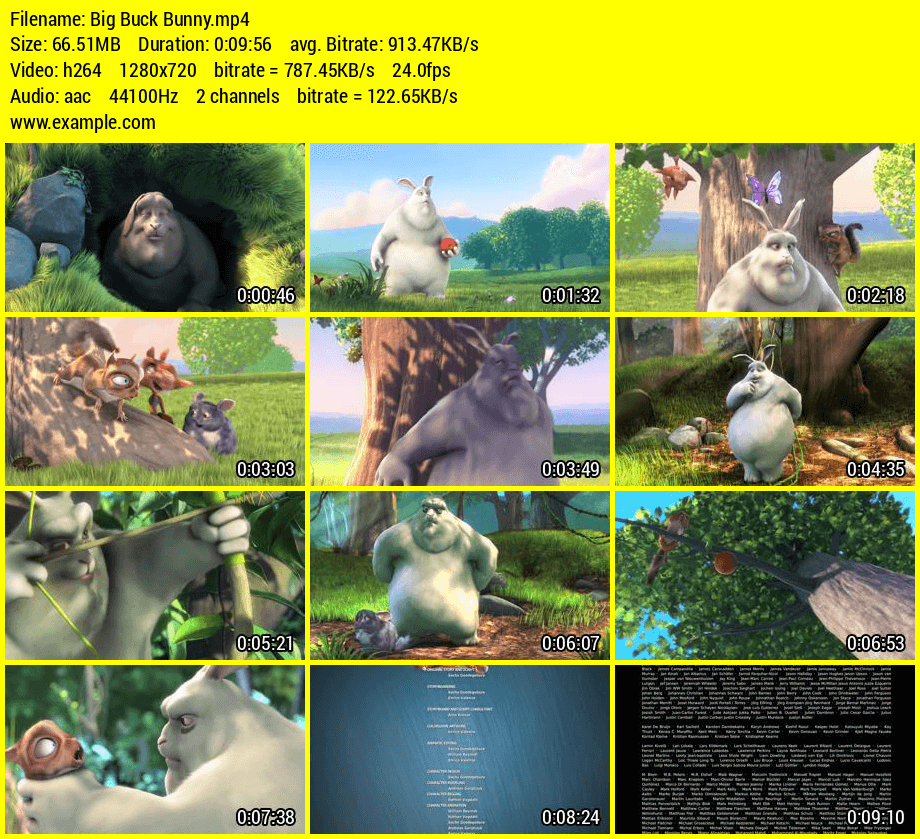
This is a Python application that can be used to generate video thumbnail for mp4 and mkv file types.
Installation
You can use pip:
~$ pip3 install thumb-gen
Configurations
- The number of screen images that should be included in the final thumbnail image
- Thumbnail image quality
- Font type in the video info panel. You can add a file path of a font file (.ttf) to this
- Font size in the video info panel
- Custom text in the video info panel
- Background color of the thumbnail (Hex codes are also supported)
- Font colour of the thumbnail (Hex codes are also supported)
Download font files : FontSquirrel
~$ thumb-gen -c
or
~$ thumb-gen --config
By program default:
IMAGES = 12
IMAGE_QUALITY = 80
FONT =
FONT_SIZE = 20
CUSTOM_TEXT =
BG_COLOUR = white
FONT_COLOUR = black
Usage
Usage options
Usage: thumb-gen file file
usage: thumb-gen dir dir

Options:
  -h, --help     show this help message and exit
  -c, --config   configurations (images, image quality, font, font size,
                 custom text, bg color, font color)
  -v, --version  show thumb-gen version and exit
Console
~$ thumb-gen -h
~$ thumb-gen --help

~$ thumb-gen -c
~$ thumb-gen --config

~$ thumb-gen -v
~$ thumb-gen --version

~$ thumb-gen input.mp4
~$ thumb-gen input.mp4 input2.mp4
~$ thumb-gen "d:/videos/input.mp4"

~$ thumb-gen "/videos"
~$ thumb-gen "/videos" "/videos2"
~$ thumb-gen "d:/videos"
Python
- If you don't set an output folder, thumbnail images will be saved in the video folder (video_path).
- If you don't need a custom text and custom font file (including font size) and you have already set these for the configuration file (using console or defaults), it will be added automatically. To avoid this set the
custom_textvalue toFalseand add a custom font file location. - If you do not set the
columnssize, it will use the default value (3)
Generator(video_path, output_path='', rows=0, columns=0, imgCount=0, custom_text='True', font_dir='', font_size=0, bg_colour='', font_colour='')
Example 1
from thumb_gen import Generator

app = Generator(video_path="C:/input/video.mp4",
                output_path="C:/output/",
                custom_text="www.example.com",
                font_dir="C:/Windows/Fonts/Arial.ttf",
                font_size=30)
app.run()
Example 2
import os
from thumb_gen import Generator

folder = 'C:/input'
for video in os.listdir(folder):
    if video.endswith('.mp4') or video.endswith('.mkv'):
        app = Generator(video_path=os.path.join(folder, video),
                        custom_text=False,
                        font_dir="C:/Project/font.ttf",
                        font_size=25,
                        bg_colour='blue',
                        font_colour='red')
        app.run()
Example 3
import os
from thumb_gen import Generator

folder = 'C:/input'
for video in os.listdir(folder):
    if video.endswith('.mp4') or video.endswith('.mkv'):
        app = Generator(video_path=os.path.join(folder, video),
                        columns=5,
                        rows=10,
                        custom_text=False,
                        font_dir="C:/Project/font.ttf",
                        font_size=25,
                        bg_colour='blue',
                        font_colour='red')
        app.run()
1 maintainer

Metadata
1 maintainer
Release files for thumb-gen 4.1.0
For a detailed explanation of source distributions (sdists) and built distributions (wheels), please see the package formats documentation.
Source distribution (sdist)
| File | Size | Uploaded | |
|---|---|---|---|
| thumb_gen-4.1.0.tar.gz | 87.5 kB | Details |
Built distribution (wheel)
| File | Interpreter | ABI | Platform | Reset |
|---|---|---|---|---|
| thumb_gen-4.1.0-py3-none-any.whl | Python 3 | none | any | Details |
Total release size: 173.3 kB
Release files / thumb_gen-4.1.0.tar.gz
| Download URL | thumb_gen-4.1.0.tar.gz |
|---|---|
| Size | 87.5 kB |
| Tags | Source |
|
SHA-256 checksum How to use checksums |
9d1cd27eb58a99ec4dc8bb1828fb2b9010f5e5eb92ff831ba896cbbcdadd5926
|
|
BLAKE2b-256 checksum How to use checksums |
574948f1cee4d64b3961b1d15fe910e88b1c1baa3b5a6a087c3535a9fb51f98d
|
| Upload date | |
|
Uploaded using Trusted Publishing? What is trusted publishing? |
Yes |
| Uploaded via |
twine/6.1.0 CPython/3.13.7
|
Provenance
Provenance describes where a file came from. On PyPI, provenance is shared via attestations, which provide a verifiable record of the build or publishing details. View details, limitations and caveats.


PyPI Publish Attestation
PyPI verified that this artifact, at this checksum, originated from the publisher listed below.
Signed by GitHub Actions, verified by PyPI on Feb 22, 2026.
Transparency logRelease files / thumb_gen-4.1.0-py3-none-any.whl
| Download URL | thumb_gen-4.1.0-py3-none-any.whl |
|---|---|
| Size | 85.8 kB |
| Tags | Python 3 |
|
SHA-256 checksum How to use checksums |
88908708e4e0ed9ca86fbf1b21eb24424746b1899b907ededb414ae75dcb8140
|
|
BLAKE2b-256 checksum How to use checksums |
bc4d449838e5a92cce8d71d0a1b25cf291484faa6077ece47896f355d87d54be
|
| Upload date | |
|
Uploaded using Trusted Publishing? What is trusted publishing? |
Yes |
| Uploaded via |
twine/6.1.0 CPython/3.13.7
|
Provenance
Provenance describes where a file came from. On PyPI, provenance is shared via attestations, which provide a verifiable record of the build or publishing details. View details, limitations and caveats.
PyPI Publish Attestation
PyPI verified that this artifact, at this checksum, originated from the publisher listed below.
Signed by GitHub Actions, verified by PyPI on Feb 22, 2026.
Transparency log













