
🖱️ 🛠️ Thunar Plugins
This Python package extends the Thunar file manager and provides a way for other Python packages to do the same without worrying about Thunar finding them.
✨ Features Added to Thunar
-
✅ a settings menu to en-/disable plugins added by this or other Python packages
-
🔗 creating links to a file or folder
-
☑️ Calculating various checksums of files
-
🗓️ planned: all features from
thunar-custom-actions -
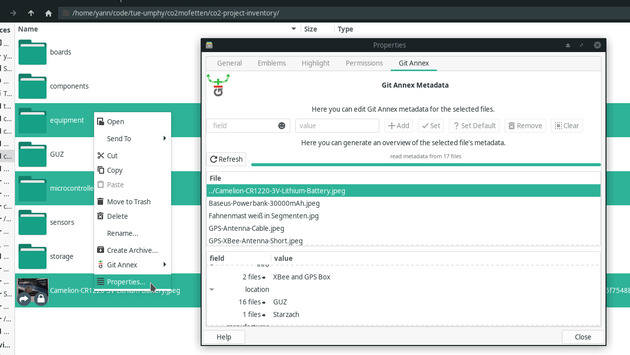
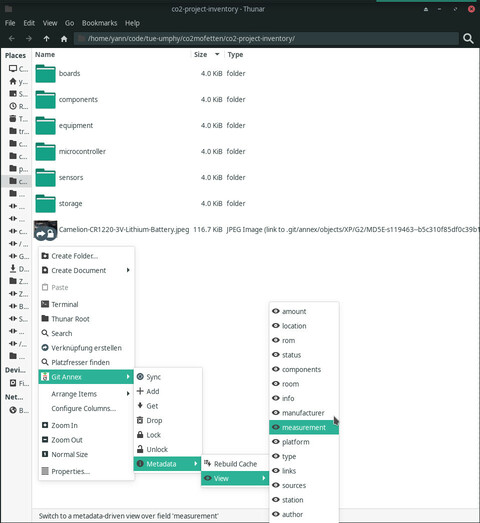
🔄 Git Annex support:
git annex sync|add|get|drop|lock|unlock- branch switching
- metadata-driven views
- editing metadata in the file properties dialog
📦 Installation


If you are on an Arch-based Linux, you can install the python-thunar-plugins-git package from the AUR:
# using yay, you may of course use your favourite AUR installer
pacman -Syu yay
yay -Syu python-thunar-plugins-git
In this case you might only have to restart Thunar to see the new plugins:
thunar -q
Other Platforms: Installation from PyPI
☝️ Prerequisites
For these Thunar plugins to work, you will need to have installed:
- Thunar (obviously)
- thunarx-python
# Install this package from PyPI:
pip install thunar-plugins

# Install the latest development version:
pip install git+https://gitlab.com/nobodyinperson/thunar-plugins

# Install from the repository root
git clone https://gitlab.com/nobodyinperson/thunar-plugins
cd thunar-plugins
pip install .
If that fails, try
python3 -m pip install --user ...instead of justpip install ...
⚡ Troubleshooting
- try
thunar -qor log out and back in if the plugins aren't shown in Thunar - run
thunar -qand thenTHUNARX_PYTHON_DEBUG=all THUNAR_PLUGINS_LOGLEVEL=debug thunarto debug - run
thunar-plugins activate(orpython3 -m thunar_plugins activate) to place the activator script (should be done upon installation) - run
thunar-plugins deactivateto deactivate plugins
➕ Adding More Plugins
This thunar_plugins package can act as a stepping stone for other packages
that add plugins to Thunar: The activator script loads all thunar_plugin
entry points provided by any installed Python package. So if another package
provides a Thunar plugin (e.g. a new context menu entry) with class
mypackage.mymodule.mysubmodule.MyThunarPlugin, that package may adjust its
setup.cfg like this and stop caring about how to tell Thunar where the plugin
can be found:
[options]
install_requires = thunar_plugins

[options.entry_points]
thunar_plugin =
    my-thunar-plugin = mypackage.mymodule.mysubmodule:MyThunarPlugin
For proper display in the
thunar-pluginssettings dialog, every Python Thunar plugin class registered like this should also have a shortnameand a one-sentencedescriptionstring attribute.
1 maintainer

Metadata
1 maintainer
Release files for thunar-plugins 1.4.0
For a detailed explanation of source distributions (sdists) and built distributions (wheels), please see the package formats documentation.
Source distribution (sdist)
| File | Size | Uploaded | Provenance | Actions |
|---|---|---|---|---|
| thunar-plugins-1.4.0.tar.gz | 137.0 kB | Without provenance | Details for thunar-plugins-1.4.0.tar.gz |
Built distribution (wheel)
| File | Interpreter | ABI | Platform | Actions Reset |
|---|---|---|---|---|
| thunar_plugins-1.4.0-py3-none-any.whl | Python 3 | none | any | Details for thunar_plugins-1.4.0-py3-none-any.whl |
Total release size: 187.9 kB
Release files / thunar-plugins-1.4.0.tar.gz
| Download URL | thunar-plugins-1.4.0.tar.gz |
|---|---|
| Size | 137.0 kB |
| Tags | Source |
|
SHA-256 checksum How to use checksums |
c4d72a64063952f7c89de9f708d0fbaa921e55d165821d4d95bd433f64a103a6
|
|
BLAKE2b-256 checksum How to use checksums |
8d843b2d1f21525fc0890a9f7f535ebd6ced20344c05ebce52130eb77eb9ea09
|
| Upload date | |
|
Uploaded using Trusted Publishing? What is trusted publishing? |
No |
| Uploaded via |
twine/4.0.2 CPython/3.11.1
|
Release files / thunar_plugins-1.4.0-py3-none-any.whl
| Download URL | thunar_plugins-1.4.0-py3-none-any.whl |
|---|---|
| Size | 50.9 kB |
| Tags | Python 3 |
|
SHA-256 checksum How to use checksums |
d7ce4b423a589bb1e96d8ad4a38b08eee5a2da413cd613ceea02ab903d05112d
|
|
BLAKE2b-256 checksum How to use checksums |
fad0bb0987e2adba33aa2650c8b92d04fa10dd9c732fb16c9e9e8ebb368eea8d
|
| Upload date | |
|
Uploaded using Trusted Publishing? What is trusted publishing? |
No |
| Uploaded via |
twine/4.0.2 CPython/3.11.1
|
Security for thunar-plugins 1.4.0
Provenance
Provenance describes where a file came from. On PyPI, provenance is shared via attestations, which provide a verifiable record of the build or publishing details. View details, limitations and caveats.
No provenance found
None of the files in this release were uploaded with provenance metadata.
A note on package security
PyPI is a repository for distributing packages, not a service for auditing them. While third-party security researchers and our staff do their best to detect and remove malicious packages, PyPI cannot guarantee the quality, security or suitability of any given package.
To learn more about protecting yourself from malicious actors, visit our package security documentation.














