
timetomodel
Time series forecasting is a modern data science & engineering challenge.
We noticed that these two worlds, data science and engineering of time series forecasting, are not very compatible. Often, work from the data scientist has to be re-implemented by engineers to be used in production.
timetomodel was created to change that. It describes the data treatment of a model, and also automates common data treatment tasks like building data for training and testing.
As a data scientist, experiment with a model in your notebook. Load data from static files (e.g. CSV) and try out lags, regressors and so on. Compare plots and mean square errors of the models you developed.
As an engineer, take over the model description and use it in your production code. Often, this would entail not much more than changing the data source (e.g from CSV to a column in the database).
timetomodel is supposed to wrap around any fit/predict type model, e.g. from statsmodels or scikit-learn (some work needed here to ensure support).
Features
Here are some features for both data scientists and engineers to enjoy:
- Describe how to load data for outcome and regressor variables. Load from Pandas objects, CSV files, Pandas pickles or databases via SQLAlchemy.
- Create train & test data, including lags.
- Timezone awareness support.
- Custom data transformations, after loading (e.g. to remove duplicate) or only for forecasting (e.g. to apply a BoxCox transformation).
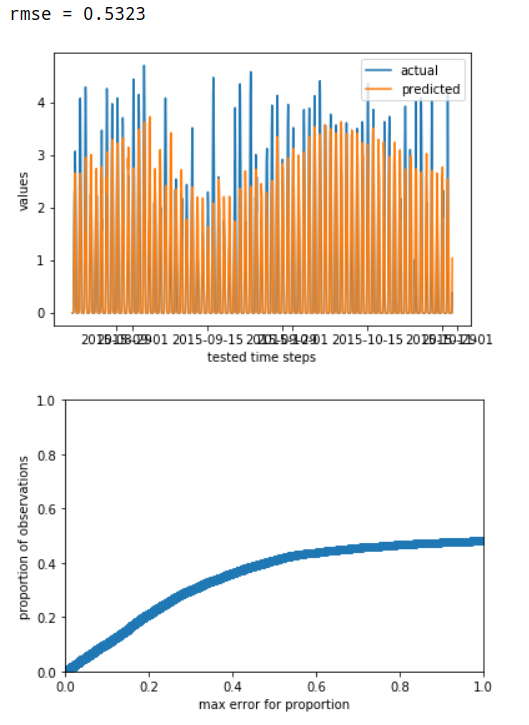
- Evaluate a model by RMSE, and plot the cumulative error.
- Support for creating rolling forecasts.
Installation
pip install timetomodel
Example
Here is an example where we describe a solar time series problem, and use statsmodels.OLS, a linear regression model, to forecast one hour ahead:
import pandas as pd
import pytz
from datetime import datetime, timedelta
from statsmodels.api import OLS
from timetomodel import speccing, ModelState, create_fitted_model, evaluate_models
from timetomodel.transforming import BoxCoxTransformation
from timetomodel.forecasting import make_rolling_forecasts

data_start = datetime(2015, 3, 1, tzinfo=pytz.utc)
data_end = datetime(2015, 10, 31, tzinfo=pytz.utc)

#### Solar model - 1h ahead  ####

# spec outcome variable
solar_outcome_var_spec = speccing.CSVFileSeriesSpecs(
    file_path="data.csv",
    time_column="datetime",
    value_column="solar_power",
    name="solar power",
    feature_transformation=BoxCoxTransformation(lambda2=0.1)
)
# spec regressor variable
regressor_spec_1h = speccing.CSVFileSeriesSpecs(
    file_path="data.csv",
    time_column="datetime",
    value_column="irradiation_forecast1h",
    name="irradiation forecast",
    feature_transformation=BoxCoxTransformation(lambda2=0.1)
)
# spec whole model treatment
solar_model1h_specs = speccing.ModelSpecs(
    outcome_var=solar_outcome_var_spec,
    model=OLS,
    frequency=timedelta(minutes=15),
    horizon=timedelta(hours=1),
    lags=[lag * 96 for lag in range(1, 8)],  # 7 days (data has daily seasonality)
    regressors=[regressor_spec_1h],
    start_of_training=data_start + timedelta(days=30),
    end_of_testing=data_end,
    ratio_training_testing_data=2/3,
    remodel_frequency=timedelta(days=14)  # re-train model every two weeks
)

solar_model1h = create_fitted_model(solar_model1h_specs, "Linear Regression Solar Horizon 1h")
# solar_model_1h is now an OLS model object which can be pickled and re-used.
# With the solar_model1h_specs in hand, your production code could always re-train a new one,
# if the model has become outdated.

# For data scientists: evaluate model
evaluate_models(m1=ModelState(solar_model1h, solar_model1h_specs))
# For engineers a): Change data sources to use database (hinted)
solar_model1h_specs.outcome_var = speccing.DBSeriesSpecs(query=...)
solar_model1h_specs.regressors[0] = speccing.DBSeriesSpecs(query=...)

# For engineers b): Use model to make forecasts for an hour
forecasts, model_state = make_rolling_forecasts(
    start=datetime(2015, 11, 1, tzinfo=pytz.utc),
    end=datetime(2015, 11, 1, 1, tzinfo=pytz.utc),
    model_specs=solar_model1h_specs
)
# model_state might have re-trained a new model automatically, by honoring the remodel_frequency
1 maintainer

Metadata
1 maintainer
Release files for timetomodel 0.7.3
For a detailed explanation of source distributions (sdists) and built distributions (wheels), please see the package formats documentation.
Source distribution (sdist)
| File | Size | Uploaded | |
|---|---|---|---|
| timetomodel-0.7.3.tar.gz | 142.0 kB | Details |
Built distribution (wheel)
| File | Interpreter | ABI | Platform | Reset |
|---|---|---|---|---|
| timetomodel-0.7.3-py2.py3-none-any.whl | Python 2, Python 3 | none | any | Details |
Total release size: 171.8 kB
Release files / timetomodel-0.7.3.tar.gz
| Download URL | timetomodel-0.7.3.tar.gz |
|---|---|
| Size | 142.0 kB |
| Tags | Source |
|
SHA-256 checksum How to use checksums |
dd57e20f1fea58240d8a93f38d0d9f598fc0600e88eeac5dceecbf34a750e08c
|
|
BLAKE2b-256 checksum How to use checksums |
9e51948aa9b4e8498924181eb3d17533eff0b43483d46ca9201b6c96d24b410c
|
| Upload date | |
|
Uploaded using Trusted Publishing? What is trusted publishing? |
No |
| Uploaded via |
twine/3.7.1 importlib_metadata/4.8.2 pkginfo/1.8.2 requests/2.25.1 requests-toolbelt/0.9.1 tqdm/4.62.3 CPython/3.9.5
|
Release files / timetomodel-0.7.3-py2.py3-none-any.whl
| Download URL | timetomodel-0.7.3-py2.py3-none-any.whl |
|---|---|
| Size | 29.8 kB |
| Tags | Python 2 Python 3 |
|
SHA-256 checksum How to use checksums |
031f0d2cd8d6320c9a8dfd35cf3d976bdc4f0d74f9322690d6ad74d05445ff05
|
|
BLAKE2b-256 checksum How to use checksums |
652d379105ee6650157b650c5a0da42ccab698fae50687d3ee481a2532bb1ba6
|
| Upload date | |
|
Uploaded using Trusted Publishing? What is trusted publishing? |
No |
| Uploaded via |
twine/3.7.1 importlib_metadata/4.8.2 pkginfo/1.8.2 requests/2.25.1 requests-toolbelt/0.9.1 tqdm/4.62.3 CPython/3.9.5
|














