
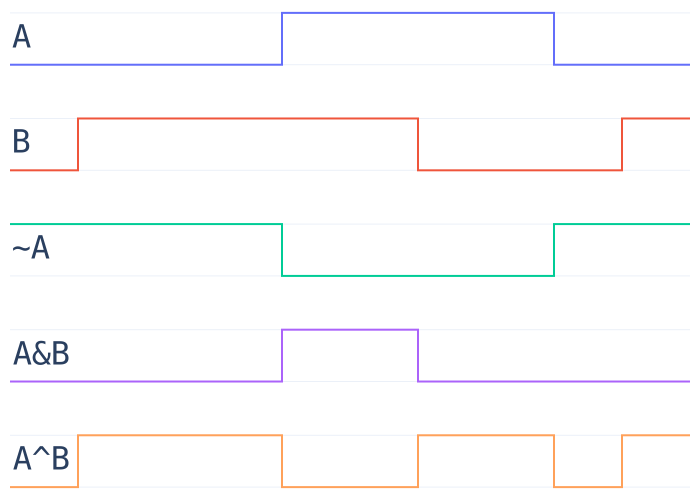
timingdiagram
Work with discrete state changes over time.
- Reduce data to state changes
- Compare diagrams over time
- Query state by time
- Use any ordered index
Install
From PyPI with pip:
pip install timingdiagram-alkasm
From source:
git clone https://github.com/alkasm/timingdiagram
cd timingdiagram
pip install .
Note that you must have pip >= 19.0 installed in your environment to install from source, since this project uses the pyproject.toml file defined in PEP-0517 instead of setup.py. More from PyPA here.
Try it out
>>> from timingdiagram import TimingDiagram
>>> d1 = TimingDiagram(enumerate([False, False, False, True, True, False, True]))
>>> d2 = TimingDiagram(enumerate([False, True, False, False, True, False, False]))
>>> d1 | d2
TimingDiagram([(0, False), (1, True), (2, False), (3, True), (5, False), (6, True)])
Example
Suppose you had a log of users signing in and out of a service, and the log included the time, user id, and action the user took. We can view each user's login/logout history as a timing diagram, and simply & them all together to see when all users were logged in at the same time:
log = """2019-08-27T19:38:50 001768bf-af44-46a6-890d-048f2c50aa29 login
2019-08-27T19:51:11 084c07f0-dd0d-46a3-8eb5-1d4cb13756a4 logout
2019-08-27T19:55:25 001768bf-af44-46a6-890d-048f2c50aa29 logout
2019-08-27T19:58:37 001768bf-af44-46a6-890d-048f2c50aa29 login
2019-08-27T20:17:21 a8118353-eb81-4ce0-8d10-6f3f9de6d7ca login
2019-08-27T20:45:19 001768bf-af44-46a6-890d-048f2c50aa29 logout
2019-08-27T21:01:45 001768bf-af44-46a6-890d-048f2c50aa29 login
2019-08-27T21:18:09 001768bf-af44-46a6-890d-048f2c50aa29 logout
2019-08-27T22:02:37 084c07f0-dd0d-46a3-8eb5-1d4cb13756a4 login
2019-08-27T22:55:54 001768bf-af44-46a6-890d-048f2c50aa29 login
2019-08-27T23:08:07 001768bf-af44-46a6-890d-048f2c50aa29 logout
2019-08-27T23:23:04 a8118353-eb81-4ce0-8d10-6f3f9de6d7ca logout
2019-08-27T23:47:50 001768bf-af44-46a6-890d-048f2c50aa29 login
2019-08-27T23:55:10 084c07f0-dd0d-46a3-8eb5-1d4cb13756a4 logout
2019-08-27T23:56:33 001768bf-af44-46a6-890d-048f2c50aa29 logout""".split("\n")


from collections import defaultdict
from functools import reduce
from timingdiagram import TimingDiagram


sessions = defaultdict(list)
for row in log:
    ts, userid, action = row.split()
    sessions[userid].append((ts, action == "login"))

all_logged_in = reduce(lambda d1, d2: d1 & d2, map(TimingDiagram, sessions.values()))
From just a few lines of code, we get a timing diagram corresponding to when all the users were logged in:
TimingDiagram([
  ('2019-08-27T19:38:50', False),
  ('2019-08-27T22:55:54', True),
  ('2019-08-27T23:08:07', False),
  ('2019-08-27T23:56:33', False)
 ])
So all users were logged in between 22:55:54 and 23:08:07 on 2019-08-27. The additional states at the beginning and end signify the start and end times of the logs.
1 maintainer

Metadata
1 maintainer
Release files for timingdiagram-alkasm 0.4.1
For a detailed explanation of source distributions (sdists) and built distributions (wheels), please see the package formats documentation.
Source distribution (sdist)
| File | Size | Uploaded | |
|---|---|---|---|
| timingdiagram-alkasm-0.4.1.tar.gz | 5.9 kB | Details |
Built distribution (wheel)
| File | Interpreter | ABI | Platform | Reset |
|---|---|---|---|---|
| timingdiagram_alkasm-0.4.1-py3-none-any.whl | Python 3 | none | any | Details |
Total release size: 10.4 kB
Release files / timingdiagram-alkasm-0.4.1.tar.gz
| Download URL | timingdiagram-alkasm-0.4.1.tar.gz |
|---|---|
| Size | 5.9 kB |
| Tags | Source |
|
SHA-256 checksum How to use checksums |
58bba8ba507863ccc2c72979fcb0036015018e495bceed251d53a6edaff5654b
|
|
BLAKE2b-256 checksum How to use checksums |
e37be7dd9f112158e6ec52b37cffb214c2db7636df9e0985357a51adca4d057e
|
| Upload date | |
|
Uploaded using Trusted Publishing? What is trusted publishing? |
No |
| Uploaded via |
python-requests/2.21.0
|
Release files / timingdiagram_alkasm-0.4.1-py3-none-any.whl
| Download URL | timingdiagram_alkasm-0.4.1-py3-none-any.whl |
|---|---|
| Size | 4.5 kB |
| Tags | Python 3 |
|
SHA-256 checksum How to use checksums |
0858e7040a94be737ab786002ca53a881b8d24c354c532286bfaee0e52567c81
|
|
BLAKE2b-256 checksum How to use checksums |
a1347e1345bc94443e11375b8d09f9d0f8eaec325b2686513fd184e8f68f1b1e
|
| Upload date | |
|
Uploaded using Trusted Publishing? What is trusted publishing? |
No |
| Uploaded via |
python-requests/2.21.0
|














