
TinyCrawler






An highly customizable crawler that uses multiprocessing and proxies to download one or more websites following a given filter, search and save functions.
REMEMBER THAT DDOS IS ILLEGAL. DO NOT USE THIS SOFTWARE FOR ILLEGAL PURPOSE.
Installing TinyCrawler
pip install tinycrawlerPreview (Test case)
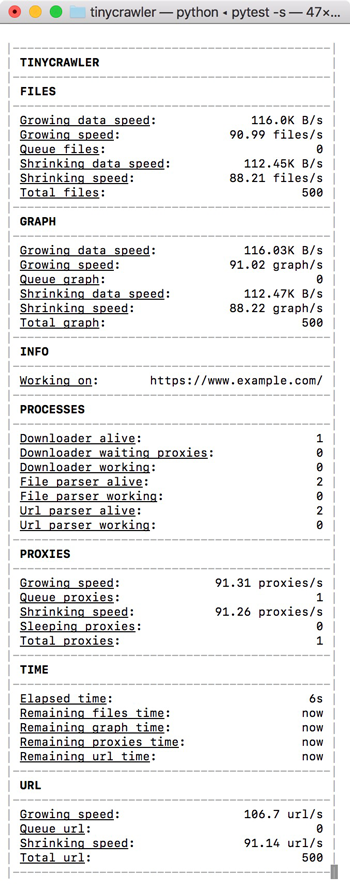
This is the preview of the console when running the test_base.py.
Usage example
from tinycrawler import TinyCrawler, Log, Statistics
from bs4 import BeautifulSoup, SoupStrainer
import pandas as pd
from requests import Response
from urllib.parse import urlparse
import os
import json


def html_sanitization(html: str) -> str:
    """Return sanitized html."""
    return html.replace("WRONG CONTENT", "RIGHT CONTENT")


def get_product_name(response: Response) -> str:
    """Return product name from given Response object."""
    return response.url.split("/")[-1].split(".html")[0]


def get_product_category(soup: BeautifulSoup) -> str:
    """Return product category from given BeautifulSoup object."""
    return soup.find_all("span")[-2].get_text()


def parse_tables(html: str, path: str, strainer: SoupStrainer):
    """Parse table at given strained html object saving them as csv at given path."""
    for table in BeautifulSoup(
            html, "lxml", parse_only=strainer).find_all("table"):
        df = pd.read_html(html_sanitization(str(table)))[0].drop(0)
        table_name = df.columns[0]
        df.set_index(table_name, inplace=True)
        df.to_csv("{path}/{table_name}.csv".format(
            path=path, table_name=table_name))


def parse_metadata(html: str, path: str, strainer: SoupStrainer):
    """Parse metadata from given strained html and saves them as json at given path."""
    with open("{path}/metadata.json".format(path=path), "w") as f:
        json.dump({
            "category":
            get_product_category(
                BeautifulSoup(html, "lxml", parse_only=strainer))
        }, f)


def parse(response: Response):
    path = "{root}/{product}".format(
        root=urlparse(response.url).netloc, product=get_product_name(response))
    if not os.path.exists(path):
        os.makedirs(path)
    parse_tables(
        response.text, path,
        SoupStrainer(
            "table",
            attrs={"class": "table table-hover table-condensed table-fixed"}))

    parse_metadata(
        response.text, path,
        SoupStrainer("span"))


def url_validator(url: str, logger: Log, statistics: Statistics)->bool:
    """Return a boolean representing if the crawler should parse given url."""
    return url.startswith("https://www.example.com/it/alimenti"")


def file_parser(response: Response, logger: Log, statistics):
    if response.url.endswith(".html"):
        parse(response)


seed = "https://www.example.com/it/alimenti"
crawler = TinyCrawler(follow_robots_txt=False)
crawler.set_file_parser(file_parser)
crawler.set_url_validator(url_validator)

crawler.load_proxies("http://mytestserver.domain", "proxies.json")

crawler.run(seed)
Proxies are expected to be in the following format:
[
  {
    "ip": "89.236.17.108",
    "port": 3128,
    "type": [
      "https",
      "http"
    ]
  },
  {
    "ip": "128.199.141.151",
    "port": 3128,
    "type": [
      "https",
      "http"
    ]
  }
]
License
The software is released under the MIT license.
1 maintainer

Metadata
1 maintainer
Release files for tinycrawler 1.7.5
For a detailed explanation of source distributions (sdists) and built distributions (wheels), please see the package formats documentation.
Source distribution (sdist)
| File | Size | Uploaded | Provenance | |
|---|---|---|---|---|
| tinycrawler-1.7.5.tar.gz | 16.2 kB | Without provenance | Details |
Release files / tinycrawler-1.7.5.tar.gz
| Download URL | tinycrawler-1.7.5.tar.gz |
|---|---|
| Size | 16.2 kB |
| Tags | Source |
|
SHA-256 checksum How to use checksums |
18059f7ada5aea225777f72dd3b119d44cc24ebc9174f0a09e4fbb41f141a517
|
|
BLAKE2b-256 checksum How to use checksums |
c2f74d10a49ea78f4c4c7ceab208c3d67fd60ad8436c02d636bf8ef3baafc40f
|
| Upload date | |
|
Uploaded using Trusted Publishing? What is trusted publishing? |
No |
| Uploaded via |
Python-urllib/3.6
|
Security for tinycrawler 1.7.5
Provenance
Provenance describes where a file came from. On PyPI, provenance is shared via attestations, which provide a verifiable record of the build or publishing details. View details, limitations and caveats.
No provenance found
None of the files in this release were uploaded with provenance metadata.
A note on package security
PyPI is a repository for distributing packages, not a service for auditing them. While third-party security researchers and our staff do their best to detect and remove malicious packages, PyPI cannot guarantee the quality, security or suitability of any given package.
To learn more about protecting yourself from malicious actors, visit our package security documentation.














