
Tisú

Tisú [tiˈsu, tissue in spanish] allows to manage your project's issue tracker, using a single text file. It support Github or Jira.
Install
You can use uvx directly
$ uvx tisu --help
To install it permanently,
$ uv tool install tisu
If you want to use it to manage jira issues,
$ uv tool install tisu[jira]
Usage
Tisú can import and export your issues using a simple markdown file, where each section is a different issue.
# issue title

issue body
If an issue already exists in your tracker, the number is a prefix in the title, wrapped by square brackets:
# [#1] issue title
In this case, Tisú will update that issue instead to create a new one.
This is the current command line help:
Tisú: your issue tracker, in a text file

Usage:
  tisu push <markdown_file> [--repo=<repo>] [(--username=<username> [--pass=<pass>]|--token=<token>)]
  tisu pull <markdown_file> [--repo=<repo>] [--state=<state>] [(--username=<username> [--pass=<pass>]|--token=<token>)]

Options:
  -h --help                 Show this screen.
  --version                 Show version.
  --repo=<repo>             Github repo (as: user/name). [default: inferred from git remote]
  --state=<state>           Filter by issue state [default: open].
  --username=<username>     Github username to send issues. Repo's username if no given.
  --pass=<pass>             Github password. Prompt if user is given and it is not.
  --token=<token>           Personal app token. Default to GITHUB_TOKEN environment variable.
                            Get one at https://github.com/settings/tokens
To access private repositories you need a personal access token.
Example
Suppose you want to push a couple of issues like in this TODO.md file.
$ tisu push TODO.md mgaitan/tisu
Github password:
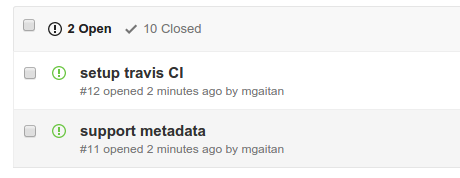
Created #11: support metadata
Created #12: setup travis CI
Result in:
Then, I can pull and overwrite the file.
$ tisu pull TODO.md
This is the result. As in this case I didn't change anything online, the content is (almost) the same, but note that each title has its ID number.
Working with metadata
Tisú can also synchronize the issue's metadata with ease.
The format is :<meta_var>: <value/s>, where <meta_var> is one assignee, labels
or milestone. These metadata lines can be in any position under the title (and not
neccesarily all, in this order nor all together) and if present,
they are removed from the issue's description sent.
For example, create a new issue with some metadata
# Make a video

:assignee: mgaitan
:labels: docs, idea
:milestone: sprint 1

Make an screencast showing how to use Tisú.
If later you want to close this issue, you can add mark it with :state: closed and push.
# [#13] Make a video

:assignee: mgaitan
:labels: docs, idea
:milestone: sprint 1

Make an screencast showing how to use Tisú.

:state: closed
Extra configuration for JIRA project
Since the version 0.3, tisu supports JIRA projects..
Most of the configuration could be set through environment variables.
export JIRA_API_LOGIN=your_login_email    # equivalent to --username
export JIRA_API_TOKEN=your_token          # equivalent to --token
export JIRA_API_SERVER=https://your.jira.server    # equivalent to --server
export JIRA_API_PROJECT=your_project_prefix    # equivalent to --project
If you also use the wonderful jira-cli, then this values
will try to be parsed automatically from its config file at ~/.config/.jira/.config.yml
1 maintainer

Metadata
1 maintainer
Release files for tisu 3.1
For a detailed explanation of source distributions (sdists) and built distributions (wheels), please see the package formats documentation.
Source distribution (sdist)
| File | Size | Uploaded | Provenance | |
|---|---|---|---|---|
| tisu-3.1.tar.gz | 9.0 kB | With provenance | Details |
Built distribution (wheel)
| File | Interpreter | ABI | Platform | Reset |
|---|---|---|---|---|
| tisu-3.1-py3-none-any.whl | Python 3 | none | any | Details |
Total release size: 18.5 kB
Release files / tisu-3.1.tar.gz
| Download URL | tisu-3.1.tar.gz |
|---|---|
| Size | 9.0 kB |
| Tags | Source |
|
SHA-256 checksum How to use checksums |
4c24cd25039f790b6601d32b6616295f284463592328c30d2ba26a05295613fc
|
|
BLAKE2b-256 checksum How to use checksums |
e9b56f20875cd39f89b02ac947dfeca83f745f1ddcd4a5c5a4c5167ac9bcb75b
|
| Upload date | |
|
Uploaded using Trusted Publishing? What is trusted publishing? |
Yes |
| Uploaded via |
twine/6.1.0 CPython/3.12.9
|
Provenance
Provenance describes where a file came from. On PyPI, provenance is shared via attestations, which provide a verifiable record of the build or publishing details. View details, limitations and caveats.


PyPI Publish Attestation
PyPI verified that this artifact, at this checksum, originated from the publisher listed below.
Signed by GitHub Actions, verified by PyPI on May 26, 2025.
Transparency logRelease files / tisu-3.1-py3-none-any.whl
| Download URL | tisu-3.1-py3-none-any.whl |
|---|---|
| Size | 9.5 kB |
| Tags | Python 3 |
|
SHA-256 checksum How to use checksums |
1bbc6aaab68f347f11a809d0f03034390a9382238a5d5c0ec7d7a56ab43c6055
|
|
BLAKE2b-256 checksum How to use checksums |
dd89191a4c131bb909529fdae0d38f564654972b143b0b1b1fbfc64c471b30b6
|
| Upload date | |
|
Uploaded using Trusted Publishing? What is trusted publishing? |
Yes |
| Uploaded via |
twine/6.1.0 CPython/3.12.9
|
Provenance
Provenance describes where a file came from. On PyPI, provenance is shared via attestations, which provide a verifiable record of the build or publishing details. View details, limitations and caveats.
PyPI Publish Attestation
PyPI verified that this artifact, at this checksum, originated from the publisher listed below.
Signed by GitHub Actions, verified by PyPI on May 26, 2025.
Transparency logSecurity for tisu 3.1
Provenance
Provenance describes where a file came from. On PyPI, provenance is shared via attestations, which provide a verifiable record of the build or publishing details. View details, limitations and caveats.
Full provenance
All 2 files in this release have been uploaded with provenance metadata.
Attestation for tisu-3.1.tar.gz
PyPI Publish Attestation
PyPI verified that this artifact, at this checksum, originated from the publisher listed below.
Signed by GitHub Actions, verified by PyPI on May 26, 2025.
Transparency logA note on package security
PyPI is a repository for distributing packages, not a service for auditing them. While third-party security researchers and our staff do their best to detect and remove malicious packages, PyPI cannot guarantee the quality, security or suitability of any given package.














