
Dynamic tkinter config editor for files created with ConfigParser
If you have a friend or a client who doesn’t know anything about python, but wants to change some settings without touching the py file,
you can use tkconfigeditor. Just add it on top of your python file.
pip install tkconfigeditor
Tested against Python 3.9.15 / Windows 10 / Anaconda
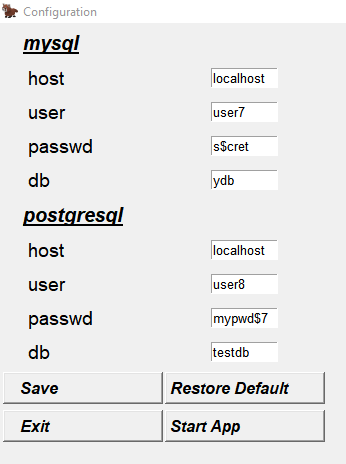
[mysql]

host = localhost

user = user7

passwd = s$cret

db = ydb


[postgresql]

host = localhost

user = user8

passwd = mypwd$7

db = testdb
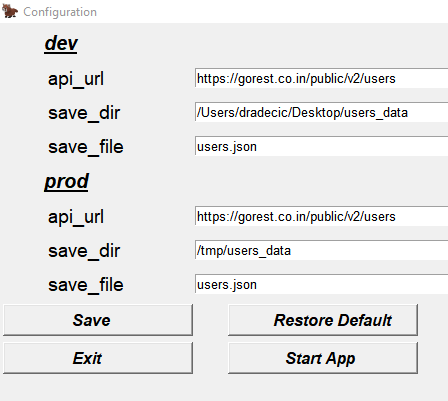
[dev]

api_url = https://gorest.co.in/public/v2/users

save_dir = /Users/dradecic/Desktop/users_data

save_file = users.json


[prod]

api_url = https://gorest.co.in/public/v2/users

save_dir = /tmp/users_data

save_file = users.json
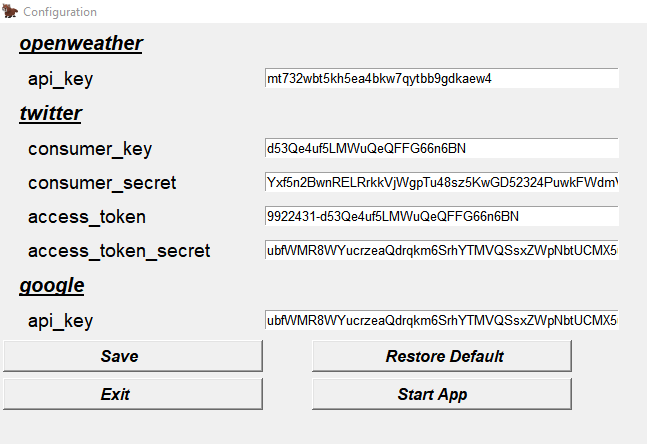
[openweather]

api_key = mt732wbt5kh5ea4bkw7qytbb9gdkaew4


[twitter]

consumer_key = d53Qe4uf5LMWuQeQFFG66n6BN

consumer_secret = Yxf5n2BwnRELRrkkVjWgpTu48sz5KwGD52324PuwkFWdmVGP4m

access_token = 9922431-d53Qe4uf5LMWuQeQFFG66n6BN

access_token_secret = ubfWMR8WYucrzeaQdrqkm6SrhYTMVQSsxZWpNbtUCMX5u


[google]

api_key = ubfWMR8WYucrzeaQdrqkm6SrhYTMVQSsxZWpNbtUCMX5u
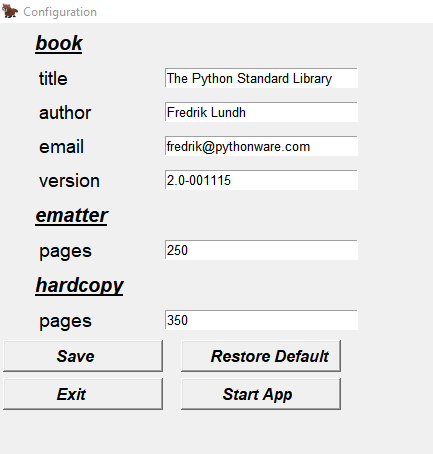
[book]

title: The Python Standard Library

author: Fredrik Lundh

email: fredrik@pythonware.com

version: 2.0-001115


[ematter]

pages: 250


[hardcopy]

pages: 350
[DEFAULT]

serverthreads = 45

content_type = text/html

content_length = 1024

autoscaling = no


[website_name.org]

username = your_name

login_mail = your_mail


[private.data.com]

password = secret_password

autoscaling = yes
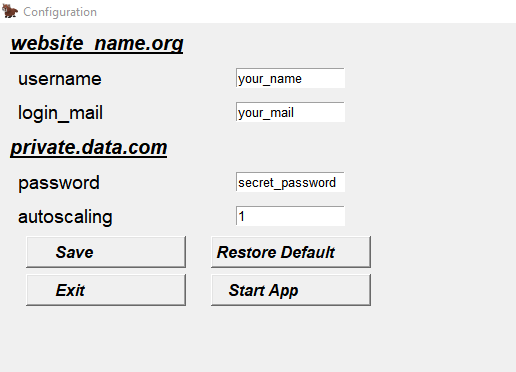
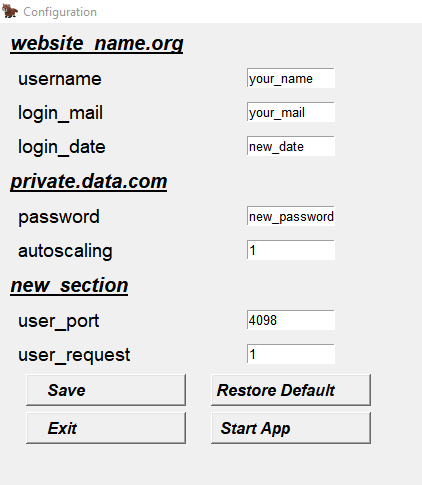
[DEFAULT]

serverthreads = 45

content_type = text/html

content_length = 1024

autoscaling = no


[website_name.org]

username = your_name

login_mail = your_mail

login_date = new_date


[private.data.com]

password = new_password

autoscaling = yes


[new_section]

user_port = 4098

user_request = yes
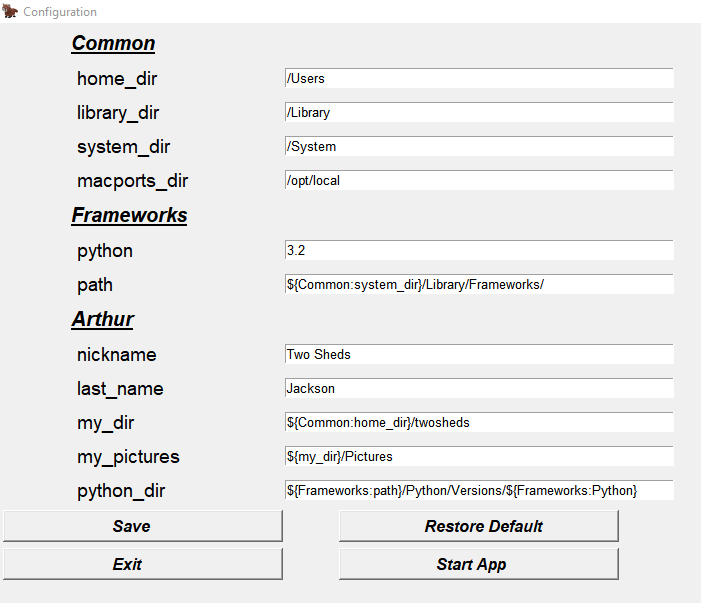
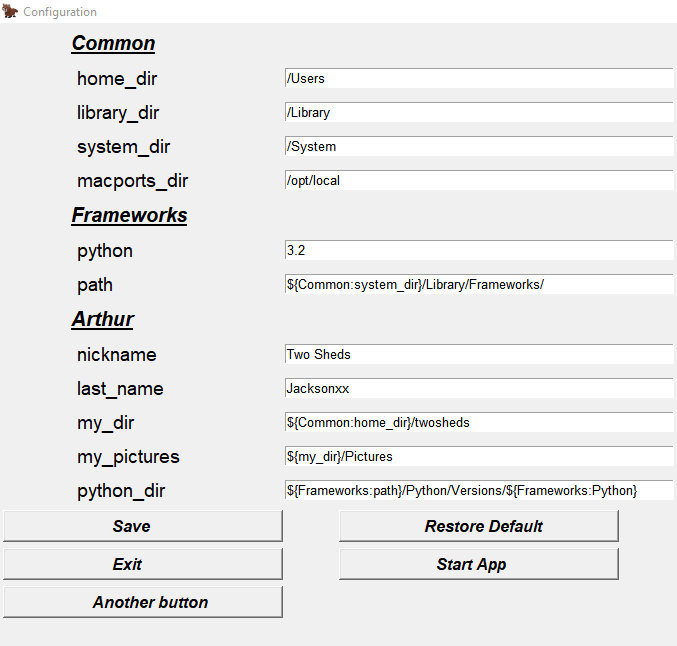
[Common]

home_dir: /Users

library_dir: /Library

system_dir: /System

macports_dir: /opt/local


[Frameworks]

Python: 3.2

path: ${Common:system_dir}/Library/Frameworks/


[Arthur]

nickname: Two Sheds

last_name: Jackson

my_dir: ${Common:home_dir}/twosheds

my_pictures: ${my_dir}/Pictures

python_dir: ${Frameworks:path}/Python/Versions/${Frameworks:Python}
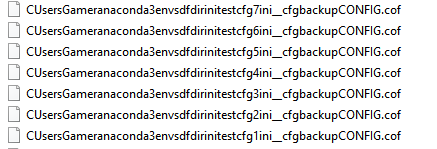
The first time you run it with a new config file, it will create a backup for the default settings:
from tkconfigeditor import start_config_and_load_vars, start_config


# This function opens the editor and adds the variables of the config file to the global dict.


start_config_and_load_vars(

    cfgfile=r"C:\Users\Gamer\anaconda3\envs\dfdir\initest\cfg7.ini", # the config file, when you run it the first time, it will create a backup for the default settings

    title="Configuration", # window title

    icon=r"C:\Users\Gamer\Pictures\5.png", # needs to be png or None

    res="1920x1080",

    addbuttons=(), # you can add some additional buttons

    mainlabelfont=("Helvetica", 15, "underline bold italic"),

    sublabelfont=("Helvetica", 14),

    varfont=("Helvetica", 10),

    buttonfont=("Helvetica", 12, "bold italic"),

    onezeroasboolean=True,  # 1 will be added as True to the global dict

)
# if you want to add a button

start_config_and_load_vars(

    cfgfile=r"C:\Users\Gamer\anaconda3\envs\dfdir\initest\cfg7.ini",

    title="Configuration",

    icon=r"C:\Users\Gamer\Pictures\5.png",

    res="1920x1080",

    addbuttons=(('Another button',lambda :os.system('start cmd')),),

    mainlabelfont=("Helvetica", 15, "underline bold italic"),

    sublabelfont=("Helvetica", 14),

    varfont=("Helvetica", 10),

    buttonfont=("Helvetica", 12, "bold italic"),

    onezeroasboolean=True,

)
# If you don't want to add the variables of the config file to the global dict

start_config(

    cfgfile=r"C:\Users\Gamer\anaconda3\envs\dfdir\initest\cfg7.ini",

    title="Configuration",

    icon=None,

    res="1024x768",

    addbuttons=(),

    mainlabelfont=("Helvetica", 15, "underline bold italic"),

    sublabelfont=("Helvetica", 14),

    varfont=("Helvetica", 10),

    buttonfont=("Helvetica", 12, "bold italic"),

)
1 maintainer

Metadata
1 maintainer
Release files for tkconfigeditor 0.12
For a detailed explanation of source distributions (sdists) and built distributions (wheels), please see the package formats documentation.
Source distribution (sdist)
| File | Size | Uploaded | Provenance | Actions |
|---|---|---|---|---|
| tkconfigeditor-0.12.tar.gz | 11.2 kB | Without provenance | Details for tkconfigeditor-0.12.tar.gz |
Built distribution (wheel)
| File | Interpreter | ABI | Platform | Actions Reset |
|---|---|---|---|---|
| tkconfigeditor-0.12-py3-none-any.whl | Python 3 | none | any | Details for tkconfigeditor-0.12-py3-none-any.whl |
Total release size: 22.9 kB
Release files / tkconfigeditor-0.12.tar.gz
| Download URL | tkconfigeditor-0.12.tar.gz |
|---|---|
| Size | 11.2 kB |
| Tags | Source |
|
SHA-256 checksum How to use checksums |
bcc12b28fa725937d1337f6258a05536b233cc71f1778b492e06c4a16b6202e0
|
|
BLAKE2b-256 checksum How to use checksums |
d322d0cafb5b30df1ce2881e4bda3ce8f37e2f8b69b19a24771de8218485025f
|
| Upload date | |
|
Uploaded using Trusted Publishing? What is trusted publishing? |
No |
| Uploaded via |
twine/4.0.1 CPython/3.9.13
|
Release files / tkconfigeditor-0.12-py3-none-any.whl
| Download URL | tkconfigeditor-0.12-py3-none-any.whl |
|---|---|
| Size | 11.7 kB |
| Tags | Python 3 |
|
SHA-256 checksum How to use checksums |
bfc50dac8759c477d6a098bb9ccffb29beb1176b97b0060a319f8a410685c947
|
|
BLAKE2b-256 checksum How to use checksums |
fa193565bcef48c0aae53a75b78af26ae9d773c054d0fd8bf243b48f8152b552
|
| Upload date | |
|
Uploaded using Trusted Publishing? What is trusted publishing? |
No |
| Uploaded via |
twine/4.0.1 CPython/3.9.13
|
Security for tkconfigeditor 0.12
Provenance
Provenance describes where a file came from. On PyPI, provenance is shared via attestations, which provide a verifiable record of the build or publishing details. View details, limitations and caveats.
No provenance found
None of the files in this release were uploaded with provenance metadata.
A note on package security
PyPI is a repository for distributing packages, not a service for auditing them. While third-party security researchers and our staff do their best to detect and remove malicious packages, PyPI cannot guarantee the quality, security or suitability of any given package.
To learn more about protecting yourself from malicious actors, visit our package security documentation.














