



tlaplus_jupyter
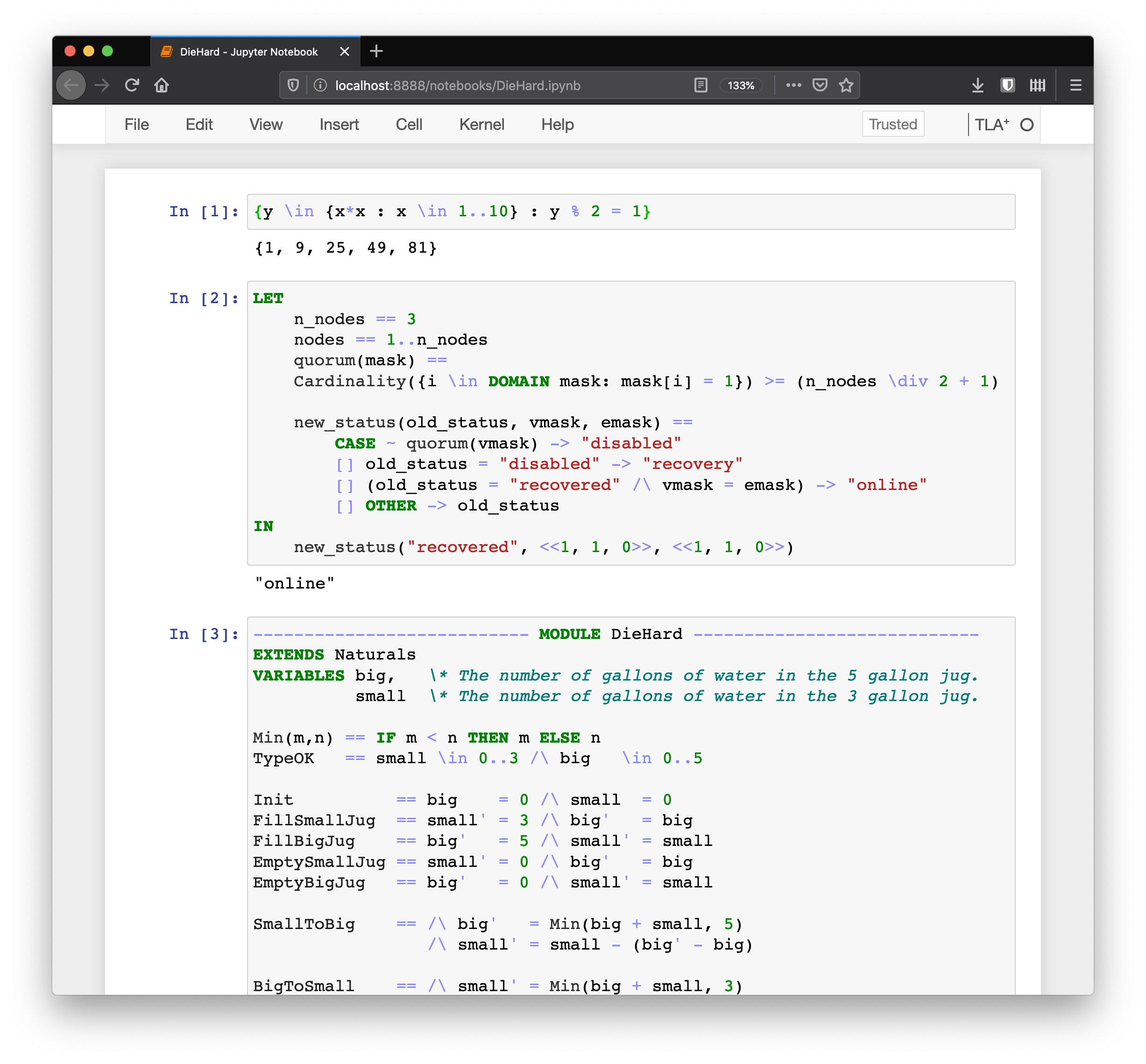
Jupyter kernel for TLA⁺ and Pluscal specification languages.
- Syntax highlight based on official lexer.
- REPL functionality for expressions.
- Can be executed online with Binder. Try it now!
- No need to install TLA Toolbox: Java and Python will be enough.
Installation
tlaplus_jupyter is a python package installable with pip. Python 2 and 3 are supported. To install run:
pip install tlaplus_jupyter
python -m tlaplus_jupyter.install
The last step will register tlaplus_jupyter as a Jupyter kernel in your system and will download tla2tools.jar. After that Jupyter can be started as usual:
jupyter notebook
To create a new TLA⁺ notebook click on the New button and select TLA⁺ in a dropdown menu. It is also handy to enable line numbering inside cells (View > Toggle Line Numbers) since syntax checker refers to problems by their line numbers.
Usage
Basic usage is explained in an intro notebook.
tlaplus_jupyter supports several types of cells with different behavior on execution:
-
Cells with
full module definition. Upon execution kernel will perform syntax check (with tla2sany.SANY) and report errors if any. If the module contains Pluscal program kernel will also translate it to TLA. -
Cell starting with
%tlc:ModuleNamewhereModuleNameis the name of one of the modules previously executed. In this case, the cell is treated as a config file for the TLC model checker. For example to check specSpecand invariantTypeOkof modelDieHardTLAexecute following:%tlc:DieHardTLA SPECIFICATION Spec INVARIANT TypeOKInit and next state formula can be set after keywords
INITandNEXTcorrespondingly. Constant definitions should followCONSTANTSkeyword separated by newline or commas. Description of possible config statements and syntax is given in chapter 14 of Specifying systems book.Custom TLC flags may be specified after the module name:
%tlc:DieHardTLA -deadlock
SPECIFICATION Spec
TLC evaluation happens in the context of all defined modules. So if model refers to another model that other model should be at some cell too.
-
Cells containing neither
%-magic nor module definition are treated as a constant expression and will print its results on execution. As with!tlcevaluation happens in the context of all defined modules, so the expression can refer to anything defined in evaluated modules. -
Command
%log/%log on/%log offcorrespondingly shows kernel log / enables logging / disables logging for currently open notebook.
Sharing executable models with Binder
TLA⁺ models shared on Github can be easily made runnable by coping Dockerfile to the repository root. After that, URL to such repo can be used at Binder to start a dynamic TLA⁺ environment.
Related Projects
vscode-tlaplus Cool plugin for VSCode editor with syntax highlight and custom widgets for displaying traces.
License
1 maintainer

Release files for tlaplus-jupyter 0.1.1
For a detailed explanation of source distributions (sdists) and built distributions (wheels), please see the package formats documentation.
Source distribution (sdist)
| File | Size | Uploaded | |
|---|---|---|---|
| tlaplus_jupyter-0.1.1.tar.gz | 11.5 kB | Details |
Built distribution (wheel)
| File | Interpreter | ABI | Platform | Reset |
|---|---|---|---|---|
| tlaplus_jupyter-0.1.1-py3-none-any.whl | Python 3 | none | any | Details |
Total release size: 23.0 kB
Release files / tlaplus_jupyter-0.1.1.tar.gz
| Download URL | tlaplus_jupyter-0.1.1.tar.gz |
|---|---|
| Size | 11.5 kB |
| Tags | Source |
|
SHA-256 checksum How to use checksums |
0f96419bdfea18438f91aa40ffdd4ace63d81660cade7719e3a8f4a771c99457
|
|
BLAKE2b-256 checksum How to use checksums |
4fe26a9bd91c6d13e5cc6a03544229b35a153399335041673d150c53c1de4f1c
|
| Upload date | |
|
Uploaded using Trusted Publishing? What is trusted publishing? |
No |
| Uploaded via |
twine/3.1.1 pkginfo/1.5.0.1 requests/2.22.0 setuptools/41.6.0 requests-toolbelt/0.9.1 tqdm/4.40.0 CPython/3.7.5
|
Release files / tlaplus_jupyter-0.1.1-py3-none-any.whl
| Download URL | tlaplus_jupyter-0.1.1-py3-none-any.whl |
|---|---|
| Size | 11.5 kB |
| Tags | Python 3 |
|
SHA-256 checksum How to use checksums |
47a2ce7b0a2f3bdb188cbda0e45af85059ffac3aeb273a7ce9731f05a6a4f213
|
|
BLAKE2b-256 checksum How to use checksums |
858e90046bddfb9076e4e96c2b40171b9680be96c7356a3ef1b394d454a7367b
|
| Upload date | |
|
Uploaded using Trusted Publishing? What is trusted publishing? |
No |
| Uploaded via |
twine/3.1.1 pkginfo/1.5.0.1 requests/2.22.0 setuptools/41.6.0 requests-toolbelt/0.9.1 tqdm/4.40.0 CPython/3.7.5
|














