
toggl2moneybird
A user-friendly command-line tool for synchronizing time entries from Toggl Track to Moneybird.
Installation
pip install toggl2moneybird
Running
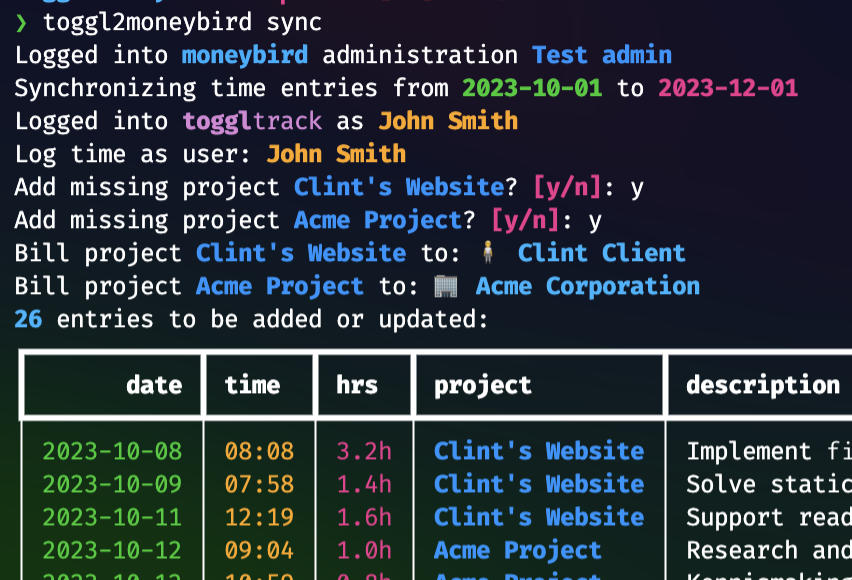
Using the tool is self-explanatory. On first-time use, a browser window will open asking you to authorize the tool to access your Moneybird administration. It will also ask you for your Toggl Track email address and password as needed, but you may alternatively enter the API token listed at the bottom of your profile page.
To start the synchronization, type the following command. The tool will always ask you to confirm any changes, so you do not need to worry about the tool automatically making changes to your administration.
toggl2moneybird sync
Only time entries corresponding to a project are synced. By default, only
billable items are synced, but you can add the --include-unbillable flag to
include unbillable items as well.
You can also automatically create a draft invoice for a particular contact and period using the following command:
toggl2moneybird invoice
The invoice will not be sent out automatically. Instead, a browser window will open with the draft invoice in Moneybird, allowing you to send it from there.
Billable flag
By default, only entries marked "Billable" in Toggl Track are synchronized.
There are two options to control this behaviour. The --include-unbillable
flag will cause all entries to be synchronized. The "Billable" flag is only
set in moneybird for entries that are marked "Billable" in Toggl Track.
Since the "Billable" tag requires a paid Toggl Track subscription, there is an
option to use a custom tag instead. If you use --unbillable-tag "My Tag",
then all Toggl Track entries will be considered billable, except those with
the tag "My Tag". The option may be repeated for every tag that marks an
unbillable entry. If you would like to mark all imported entries billable in
moneybird, simply use this option with a silly tag name that doesn't exist.
The options are independent of each other and may be used together, in which
case all entries (except those specified by --exclude-tag) are imported,
but only the ones without the tags specified by --unbillable-tag are marked
as "Billable" in the moneybird administration.
Advanced Filters
You can use --project with most commands to limit the effect of those
commands to only the specified projects.
You can use --exclude-tag "My Tag" to entirely ignore Toggl Track entries
with the specified tag.
Limitations
The Toggl Track API only allows accessing the last three months worth of data. It is highly advised to run the sync at least once every month!
Currently, there is no mapping done between users - all time entries will be logged under the same user (you will be asked which one if there are multiple).
It's not likely that you'll hit the rate limit of the Moneybird API using this tool, but if you do, the tool does not handle it gracefully and will quit with an exception. Simply try again at a later time if you encounter this issue.
If you encounter any problems, please do not hesitate to report them in the issue tracker. Feature requests are also welcome!
1 maintainer

Metadata
1 maintainer
Release files for toggl2moneybird 0.5.2
For a detailed explanation of source distributions (sdists) and built distributions (wheels), please see the package formats documentation.
Source distribution (sdist)
| File | Size | Uploaded | |
|---|---|---|---|
| toggl2moneybird-0.5.2.tar.gz | 23.2 kB | Details |
Built distribution (wheel)
| File | Interpreter | ABI | Platform | Reset |
|---|---|---|---|---|
| toggl2moneybird-0.5.2-py3-none-any.whl | Python 3 | none | any | Details |
Total release size: 47.7 kB
Release files / toggl2moneybird-0.5.2.tar.gz
| Download URL | toggl2moneybird-0.5.2.tar.gz |
|---|---|
| Size | 23.2 kB |
| Tags | Source |
|
SHA-256 checksum How to use checksums |
9bd6f6b3a5c167f8cffa2b39dd8a276dfed34e1c05a23c80a0319f232e2a7f3e
|
|
BLAKE2b-256 checksum How to use checksums |
6929bde97d4150b2cef01f4e518e3ad652bbc5b56b92fe1ce8018e38e4b02be8
|
| Upload date | |
|
Uploaded using Trusted Publishing? What is trusted publishing? |
No |
| Uploaded via |
twine/5.1.1 CPython/3.9.20
|
Release files / toggl2moneybird-0.5.2-py3-none-any.whl
| Download URL | toggl2moneybird-0.5.2-py3-none-any.whl |
|---|---|
| Size | 24.4 kB |
| Tags | Python 3 |
|
SHA-256 checksum How to use checksums |
efd48c35b2b6ff0f49ca35d0b048ea3b6a4ca8b0b1b36f2e6d0f209ea01f09b3
|
|
BLAKE2b-256 checksum How to use checksums |
0232cc924dfd069bb01b843bfe64d3a0fed27169355792231980a40da9fd0db9
|
| Upload date | |
|
Uploaded using Trusted Publishing? What is trusted publishing? |
No |
| Uploaded via |
twine/5.1.1 CPython/3.9.20
|














