
topcat
topological concatenation of files
Description
topcat is a simple tool to concatenate files in a topological order. It is useful when you have a set of files that
depend on each other and you want to concatenate them in the right order.
For my use case this is SQL files.
I like to treat my SQL files as a set of functions and views that depend on each other. I like to keep them in separate files and concatenate them in the right order to create a single file that I can run in my database.
Installation
pip:
pip install topcat
poetry:
poetry add topcat
Usage
The quick version
topcat -i /path/to/input -o /path/to/output.sql
Where /path/to/input is the directory containing the files to concatenate and /path/to/output.sql will be where the
concatenated file will be written.
The long version
USAGE:
    topcat [FLAGS] [OPTIONS] --output <FILE>

FLAGS:
        --dry        Only print the output, do not write to file.
    -h, --help       Prints help information
    -V, --version    Prints version information
    -v, --verbose    Print debug information

OPTIONS:
        --comment-str <comment-str>
            The string used to denote a comment. eg '--' [default: --]

        --ensure-each-file-ends-with <ensure-each-file-ends-with-str>
            Add this string to the end of files if it does not exist. eg ';' [default: ;]

    -x, --exclude <PATTERN>...                                           Exclude files matching given glob pattern
        --file-separator-str <file-separator-str>
            Add this between each concatenated file in the output. eg '---' [default:
            ------------------------------------------------------------------------------------------------------------------------]
    -n, --include <PATTERN>...                                           Only include files matching glob pattern
    -i, --input_dir <DIR>...
            Path to directory containing files to be concatenated

    -o, --output <FILE>                                                  Path to generate combined output file
Some quirks here:
-iis the input directory. You can have multiple input directories. This is useful if you have a set of files in different directories that depend on each other.-ois the output file. This is where the concatenated file will be written.-xand-nare used to exclude and include files respectively. These are glob patterns. For example-x **/tests/*will exclude all files in anytestsdirectory.-n **/functions/*will only include files in thefunctionsdirectory. You can use these together to include and exclude files as you need. You can use these multiple times.--comment-stris the string used to denote a comment. This is used to find thename,requires,dropped_byandexistscomments in the files. The default is--. In SQL this is--but in other languages it might be//or#.--ensure-each-file-ends-withis the string to add to the end of each file if it doesn't exist. This is useful for SQL files where you might want to ensure each file ends with a;. The default is;.--file-separator-stris the string to add between each concatenated file in the output. The default is a long line of dashes. This is just visually useful to see where one file ends and the next begins.--drywill only print the output, it will not write to the output file.-vwill print debug information and a.dotformat of the dependency graph.
What a file needs to include to be concatenated
name
The only requirement for a file to be included in the concatenation is that it needs to have a name comment at the top
of the file.
This can be anything you want, but it needs to be unique. This is used to define a node in the dependency graph.
For example:
-- name: my_schema
requires
If a file requires another file to be concatenated before it, you can add a requires comment to the file.
An alias for requires is dropped_by. I use dropped_by in SQL files for clarity to show that the DDL in the file
gets dropped so I don't need to use CREATE OR REPLACE FUNCTION or the like.
For example:
-- name: my_schema.b
-- dropped_by: my_schema
-- requires: my_schema.a
exists
exists is for soft dependencies. For example in plpgsql functions, the body isn't parsed until the function is called.
So any dependent objects you can't use requires for, you can use exists to ensure the file is included in the
concatenated file but order of creation doesn't matter.
For example:
-- name: my_schema.b
-- dropped_by: my_schema
-- requires: my_schema.a
-- exists: my_schema.c
Example
Lets say you have a directory with the following files:
sql
├── my_other_schema
│ ├── functions
│ │ ├── a.sql
│ │ ├── b.sql
│ │ └── c.sql
│ └── schema.sql
└── my_schema
├── functions
│ └── a.sql
└── schema.sql
And the content of the files is:
sql/my_schema/schema.sql:
-- name: my_schema

DROP SCHEMA IF EXISTS my_schema CASCADE;
CREATE SCHEMA IF NOT EXISTS my_schema;
sql/my_schema/functions/a.sql:
-- name: my_schema.a
-- dropped_by: my_schema

CREATE FUNCTION my_schema.a() RETURNS INT AS
$$
SELECT 1;
$$ LANGUAGE SQL IMMUTABLE
                PARALLEL SAFE;
sql/my_schema/functions/b.sql:
-- name: my_schema.b
-- dropped_by: my_schema
-- requires: my_schema.a

CREATE FUNCTION my_schema.b() RETURNS INT AS
$$
SELECT my_schema.a() + 1
$$ LANGUAGE SQL;
sql/my_schema/functions/c.sql:
-- name: my_schema.c
-- dropped_by: my_schema
-- requires: my_schema.b

CREATE FUNCTION my_schema.c() RETURNS INT AS
$$
SELECT my_schema.b() + 1
$$ LANGUAGE SQL IMMUTABLE
                PARALLEL SAFE;
sql/my_other_schema/schema.sql:
-- name: my_other_schema

DROP SCHEMA IF EXISTS my_schema CASCADE;
CREATE SCHEMA IF NOT EXISTS my_schema;
sql/my_other_schema/functions/a.sql:
-- name: my_other_schema.a
-- dropped_by: my_other_schema
-- requires: my_schema.b

CREATE FUNCTION my_other_schema.a() RETURNS INT AS
$$
SELECT my_schema.b() + 1
$$ LANGUAGE SQL IMMUTABLE
                PARALLEL SAFE;
So the dependency graph looks like:
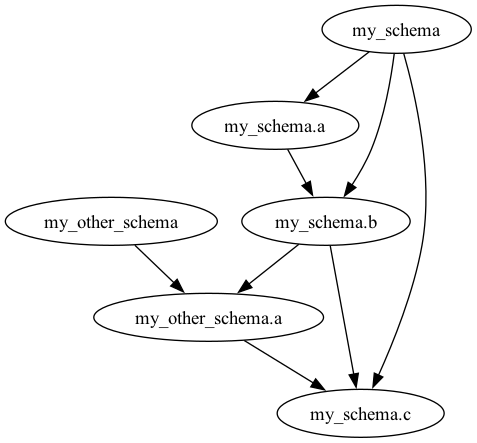
Now you can run topcat to concatenate the files in the right order:
topcat -i tests/input/sql -o tests/output/sql/output.sql
The content of output.sql will be:
-- This file was generated by topcat. To regenerate run:
--
-- topcat -i tests/input/sql -o tests/output/sql/output.sql -v

------------------------------------------------------------------------------------------------------------------------
-- tests/input/sql/my_other_schema/schema.sql
-- name: my_schema

DROP SCHEMA IF EXISTS my_schema CASCADE;
CREATE SCHEMA IF NOT EXISTS my_schema;

------------------------------------------------------------------------------------------------------------------------
-- tests/input/sql/my_other_schema/functions/a.sql
-- name: my_schema.a
-- dropped_by: my_schema

CREATE FUNCTION my_schema.a() RETURNS INT AS
$$
SELECT 1;
$$ LANGUAGE SQL;

------------------------------------------------------------------------------------------------------------------------
-- tests/input/sql/my_other_schema/functions/b.sql
-- name: my_schema.b
-- dropped_by: my_schema
-- requires: my_schema.a

CREATE FUNCTION my_schema.b() RETURNS INT AS
$$
SELECT my_schema.a() + 1
$$ LANGUAGE SQL;

------------------------------------------------------------------------------------------------------------------------
-- tests/input/sql/my_schema/schema.sql
-- name: my_other_schema

DROP SCHEMA IF EXISTS my_other_schema CASCADE;
CREATE SCHEMA IF NOT EXISTS my_other_schema;

------------------------------------------------------------------------------------------------------------------------
-- tests/input/sql/my_schema/functions/a.sql
-- name: my_other_schema.a
-- dropped_by: my_other_schema
-- requires: my_schema.b

CREATE FUNCTION my_other_schema.a() RETURNS INT AS
$$
SELECT my_schema.b() + 1
$$ LANGUAGE SQL IMMUTABLE
                PARALLEL SAFE;

------------------------------------------------------------------------------------------------------------------------
-- tests/input/sql/my_other_schema/functions/c.sql
-- name: my_schema.c
-- dropped_by: my_schema
-- requires: my_schema.b
-- requires: my_other_schema.a

CREATE FUNCTION my_schema.c() RETURNS INT AS
$$
SELECT my_schema.b() + my_other_schema.a() + 1
$$ LANGUAGE SQL;
1 maintainer

Release files for topcat 0.2.3
For a detailed explanation of source distributions (sdists) and built distributions (wheels), please see the package formats documentation.
Source distribution (sdist)
| File | Size | Uploaded | |
|---|---|---|---|
| topcat-0.2.3.tar.gz | 117.8 kB | Details |
Built distributions (wheels)
Total release size: 6.7 MB
Release files / topcat-0.2.3.tar.gz
| Download URL | topcat-0.2.3.tar.gz |
|---|---|
| Size | 117.8 kB |
| Tags | Source |
|
SHA-256 checksum How to use checksums |
5730a72d368e93a7bfd60520b6947fec083cfb1609408553bf68e280f97eb0c3
|
|
BLAKE2b-256 checksum How to use checksums |
87809df01ea7543069b968ca7fb74eabdfe8826dd29bc7960aaef6133dcdb2bc
|
| Upload date | |
|
Uploaded using Trusted Publishing? What is trusted publishing? |
Yes |
| Uploaded via |
twine/6.1.0 CPython/3.12.9
|
Provenance
Provenance describes where a file came from. On PyPI, provenance is shared via attestations, which provide a verifiable record of the build or publishing details. View details, limitations and caveats.


PyPI Publish Attestation
PyPI verified that this artifact, at this checksum, originated from the publisher listed below.
Signed by GitHub Actions, verified by PyPI on Apr 23, 2025.
Transparency logRelease files / topcat-0.2.3-py3-none-win_arm64.whl
| Download URL | topcat-0.2.3-py3-none-win_arm64.whl |
|---|---|
| Size | 429.7 kB |
| Tags | Python 3 Windows ARM64 |
|
SHA-256 checksum How to use checksums |
a5d1fb9338cafb6a8a13c7e142043f30c95d6035d6d180367c062a48963e8474
|
|
BLAKE2b-256 checksum How to use checksums |
03c9b0f633f362c0798ba008c3ab2f1b1028f125ae19fd7c43a9268d185f9897
|
| Upload date | |
|
Uploaded using Trusted Publishing? What is trusted publishing? |
Yes |
| Uploaded via |
twine/6.1.0 CPython/3.12.9
|
Provenance
Provenance describes where a file came from. On PyPI, provenance is shared via attestations, which provide a verifiable record of the build or publishing details. View details, limitations and caveats.
PyPI Publish Attestation
PyPI verified that this artifact, at this checksum, originated from the publisher listed below.
Signed by GitHub Actions, verified by PyPI on Apr 23, 2025.
Transparency logRelease files / topcat-0.2.3-py3-none-win_amd64.whl
| Download URL | topcat-0.2.3-py3-none-win_amd64.whl |
|---|---|
| Size | 460.4 kB |
| Tags | Python 3 Windows x86-64 |
|
SHA-256 checksum How to use checksums |
6a0a283e15b609d5367188e7037e5f45d4ee63626e2e5753d1f5912bf49cda49
|
|
BLAKE2b-256 checksum How to use checksums |
b45a2452f8f9334f3c42e0a5270c2da4b54df72312ec1d089b3dc656f3e89683
|
| Upload date | |
|
Uploaded using Trusted Publishing? What is trusted publishing? |
Yes |
| Uploaded via |
twine/6.1.0 CPython/3.12.9
|
Provenance
Provenance describes where a file came from. On PyPI, provenance is shared via attestations, which provide a verifiable record of the build or publishing details. View details, limitations and caveats.
PyPI Publish Attestation
PyPI verified that this artifact, at this checksum, originated from the publisher listed below.
Signed by GitHub Actions, verified by PyPI on Apr 23, 2025.
Transparency logRelease files / topcat-0.2.3-py3-none-win32.whl
| Download URL | topcat-0.2.3-py3-none-win32.whl |
|---|---|
| Size | 444.6 kB |
| Tags | Python 3 Windows x86-32 |
|
SHA-256 checksum How to use checksums |
2273c94c4f3f0b5ac3157ddea457eb034891649c74136f6516ebcf93cbc24610
|
|
BLAKE2b-256 checksum How to use checksums |
1480998b20301d39f1247b3440c33437829bb3e23e548b15f10b0cbdb112e5c4
|
| Upload date | |
|
Uploaded using Trusted Publishing? What is trusted publishing? |
Yes |
| Uploaded via |
twine/6.1.0 CPython/3.12.9
|
Provenance
Provenance describes where a file came from. On PyPI, provenance is shared via attestations, which provide a verifiable record of the build or publishing details. View details, limitations and caveats.
PyPI Publish Attestation
PyPI verified that this artifact, at this checksum, originated from the publisher listed below.
Signed by GitHub Actions, verified by PyPI on Apr 23, 2025.
Transparency logRelease files / topcat-0.2.3-py3-none-musllinux_1_2_x86_64.whl
| Download URL | topcat-0.2.3-py3-none-musllinux_1_2_x86_64.whl |
|---|---|
| Size | 690.3 kB |
| Tags | Linux musl 1.2+ x86-64 Python 3 |
|
SHA-256 checksum How to use checksums |
330ef09fa51bf16d988863308c1961b19823828fc3ad2181e4ab75f53bdca0fc
|
|
BLAKE2b-256 checksum How to use checksums |
4055ef0816a67c304b1ced5e267b92eff50302da8c8a8af6cc7134b134cd4606
|
| Upload date | |
|
Uploaded using Trusted Publishing? What is trusted publishing? |
Yes |
| Uploaded via |
twine/6.1.0 CPython/3.12.9
|
Provenance
Provenance describes where a file came from. On PyPI, provenance is shared via attestations, which provide a verifiable record of the build or publishing details. View details, limitations and caveats.
PyPI Publish Attestation
PyPI verified that this artifact, at this checksum, originated from the publisher listed below.
Signed by GitHub Actions, verified by PyPI on Apr 23, 2025.
Transparency logRelease files / topcat-0.2.3-py3-none-musllinux_1_2_i686.whl
| Download URL | topcat-0.2.3-py3-none-musllinux_1_2_i686.whl |
|---|---|
| Size | 707.7 kB |
| Tags | Linux musl 1.2+ x86-32 Python 3 |
|
SHA-256 checksum How to use checksums |
795068cd889643033b0bf8055b5d519314646b06bfd1145266e8c8836ec8405a
|
|
BLAKE2b-256 checksum How to use checksums |
2f3ab46667ac25b12580e147bc8b80ddd1e5d155bf6ccfb794694d9e9df2e5ec
|
| Upload date | |
|
Uploaded using Trusted Publishing? What is trusted publishing? |
Yes |
| Uploaded via |
twine/6.1.0 CPython/3.12.9
|
Provenance
Provenance describes where a file came from. On PyPI, provenance is shared via attestations, which provide a verifiable record of the build or publishing details. View details, limitations and caveats.
PyPI Publish Attestation
PyPI verified that this artifact, at this checksum, originated from the publisher listed below.
Signed by GitHub Actions, verified by PyPI on Apr 23, 2025.
Transparency logRelease files / topcat-0.2.3-py3-none-musllinux_1_2_armv7l.whl
| Download URL | topcat-0.2.3-py3-none-musllinux_1_2_armv7l.whl |
|---|---|
| Size | 659.0 kB |
| Tags | Linux musl 1.2+ ARMv7l Python 3 |
|
SHA-256 checksum How to use checksums |
67812134032fe55b6343befafa43927f5a15977e5665ecfebaa62ae9aaf01b90
|
|
BLAKE2b-256 checksum How to use checksums |
79dc41c984a10f7ed9bf0082b6b6701a0e8ac8faba6a7887f3eaf698055de5ca
|
| Upload date | |
|
Uploaded using Trusted Publishing? What is trusted publishing? |
Yes |
| Uploaded via |
twine/6.1.0 CPython/3.12.9
|
Provenance
Provenance describes where a file came from. On PyPI, provenance is shared via attestations, which provide a verifiable record of the build or publishing details. View details, limitations and caveats.
PyPI Publish Attestation
PyPI verified that this artifact, at this checksum, originated from the publisher listed below.
Signed by GitHub Actions, verified by PyPI on Apr 23, 2025.
Transparency logRelease files / topcat-0.2.3-py3-none-musllinux_1_2_aarch64.whl
| Download URL | topcat-0.2.3-py3-none-musllinux_1_2_aarch64.whl |
|---|---|
| Size | 654.4 kB |
| Tags | Linux musl 1.2+ ARM64 Python 3 |
|
SHA-256 checksum How to use checksums |
3283470cdd7109405034a55364fdcb8abe16b8c4caf76aa9a646a9baa1d21756
|
|
BLAKE2b-256 checksum How to use checksums |
736c12c463700632f61d392e85ab3ad075a079d63cb7fd2d7f013c3d3ff29083
|
| Upload date | |
|
Uploaded using Trusted Publishing? What is trusted publishing? |
Yes |
| Uploaded via |
twine/6.1.0 CPython/3.12.9
|
Provenance
Provenance describes where a file came from. On PyPI, provenance is shared via attestations, which provide a verifiable record of the build or publishing details. View details, limitations and caveats.
PyPI Publish Attestation
PyPI verified that this artifact, at this checksum, originated from the publisher listed below.
Signed by GitHub Actions, verified by PyPI on Apr 23, 2025.
Transparency logRelease files / topcat-0.2.3-py3-none-manylinux_2_17_x86_64.manylinux2014_x86_64.whl
| Download URL | topcat-0.2.3-py3-none-manylinux_2_17_x86_64.manylinux2014_x86_64.whl |
|---|---|
| Size | 638.5 kB |
| Tags | Linux glibc 2.17+ x86-64 Python 3 |
|
SHA-256 checksum How to use checksums |
1035e0bd0ba98a0b88aef3972f333757a508e9e8da71da18eaddda0750a82d96
|
|
BLAKE2b-256 checksum How to use checksums |
c1a8d696dd1427a057e19eeaaf8caf28bd3aa7c616d8d549350eb1cb062dcbf2
|
| Upload date | |
|
Uploaded using Trusted Publishing? What is trusted publishing? |
Yes |
| Uploaded via |
twine/6.1.0 CPython/3.12.9
|
Provenance
Provenance describes where a file came from. On PyPI, provenance is shared via attestations, which provide a verifiable record of the build or publishing details. View details, limitations and caveats.
PyPI Publish Attestation
PyPI verified that this artifact, at this checksum, originated from the publisher listed below.
Signed by GitHub Actions, verified by PyPI on Apr 23, 2025.
Transparency logRelease files / topcat-0.2.3-py3-none-manylinux_2_17_i686.manylinux2014_i686.whl
| Download URL | topcat-0.2.3-py3-none-manylinux_2_17_i686.manylinux2014_i686.whl |
|---|---|
| Size | 687.2 kB |
| Tags | Linux glibc 2.17+ x86-32 Python 3 |
|
SHA-256 checksum How to use checksums |
f4f964e813d5dcccb336248640b252aba4f60ea94745201d8444b59b45fde1b1
|
|
BLAKE2b-256 checksum How to use checksums |
639fdce5c4d1e6c2113d5e58eb1c5c940186af508ac760947fc2288659b40ef3
|
| Upload date | |
|
Uploaded using Trusted Publishing? What is trusted publishing? |
Yes |
| Uploaded via |
twine/6.1.0 CPython/3.12.9
|
Provenance
Provenance describes where a file came from. On PyPI, provenance is shared via attestations, which provide a verifiable record of the build or publishing details. View details, limitations and caveats.
PyPI Publish Attestation
PyPI verified that this artifact, at this checksum, originated from the publisher listed below.
Signed by GitHub Actions, verified by PyPI on Apr 23, 2025.
Transparency logRelease files / topcat-0.2.3-py3-none-macosx_10_12_x86_64.macosx_11_0_arm64.macosx_10_12_universal2.whl
| Download URL | topcat-0.2.3-py3-none-macosx_10_12_x86_64.macosx_11_0_arm64.macosx_10_12_universal2.whl |
|---|---|
| Size | 1.2 MB |
| Tags | Python 3 macOS 10.12+ universal2 (ARM64, x86-64) macOS 10.12+ x86-64 macOS 11.0+ ARM64 |
|
SHA-256 checksum How to use checksums |
d522665227d5bdec9678461ac9e5657feff6cb3e14ead4c52bd20e896ddb8723
|
|
BLAKE2b-256 checksum How to use checksums |
76aa4f21f7cbcb2d94309ea8f2dc9f236c61502ccd806dcf6a75aa55ca9de13b
|
| Upload date | |
|
Uploaded using Trusted Publishing? What is trusted publishing? |
Yes |
| Uploaded via |
twine/6.1.0 CPython/3.12.9
|
Provenance
Provenance describes where a file came from. On PyPI, provenance is shared via attestations, which provide a verifiable record of the build or publishing details. View details, limitations and caveats.
PyPI Publish Attestation
PyPI verified that this artifact, at this checksum, originated from the publisher listed below.
Signed by GitHub Actions, verified by PyPI on Apr 23, 2025.
Transparency log













