
torchtrail



torchtrail provides an external API to trace pytorch models and extract the graph of torch functions and modules that were executed. The graphs can then be visualized or used for other purposes.
Installation Instructions
On MacOs
brew install graphviz
pip install torchtrail
On Ubuntu
sudo apt-get install graphviz
pip install torchtrail
Examples
Tracing a function
import torch
import torchtrail

with torchtrail.trace():
    input_tensor = torch.rand(1, 64)
    output_tensor = torch.exp(input_tensor)
torchtrail.visualize(output_tensor, file_name="exp.svg")
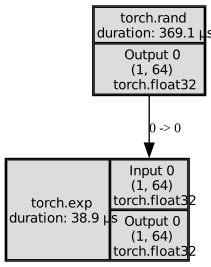
The graph could be obtained as a networkx.MultiDiGraph using torchtrail.get_graph:
graph: "networkx.MultiDiGraph" = torchtrail.get_graph(output_tensor)
Tracing a module
import torch
import transformers

import torchtrail

model_name = "google/bert_uncased_L-4_H-256_A-4"
config = transformers.BertConfig.from_pretrained(model_name)
config.num_hidden_layers = 1
model = transformers.BertModel.from_pretrained(model_name, config=config).eval()

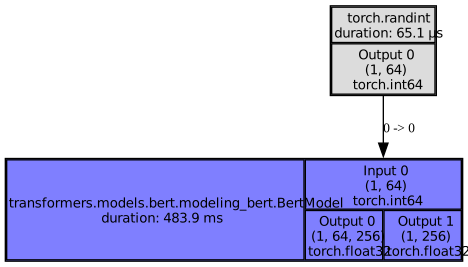
with torchtrail.trace():
    input_tensor = torch.randint(0, model.config.vocab_size, (1, 64))
    output = model(input_tensor).last_hidden_state

torchtrail.visualize(output, max_depth=1, file_name="bert_max_depth_1.svg")
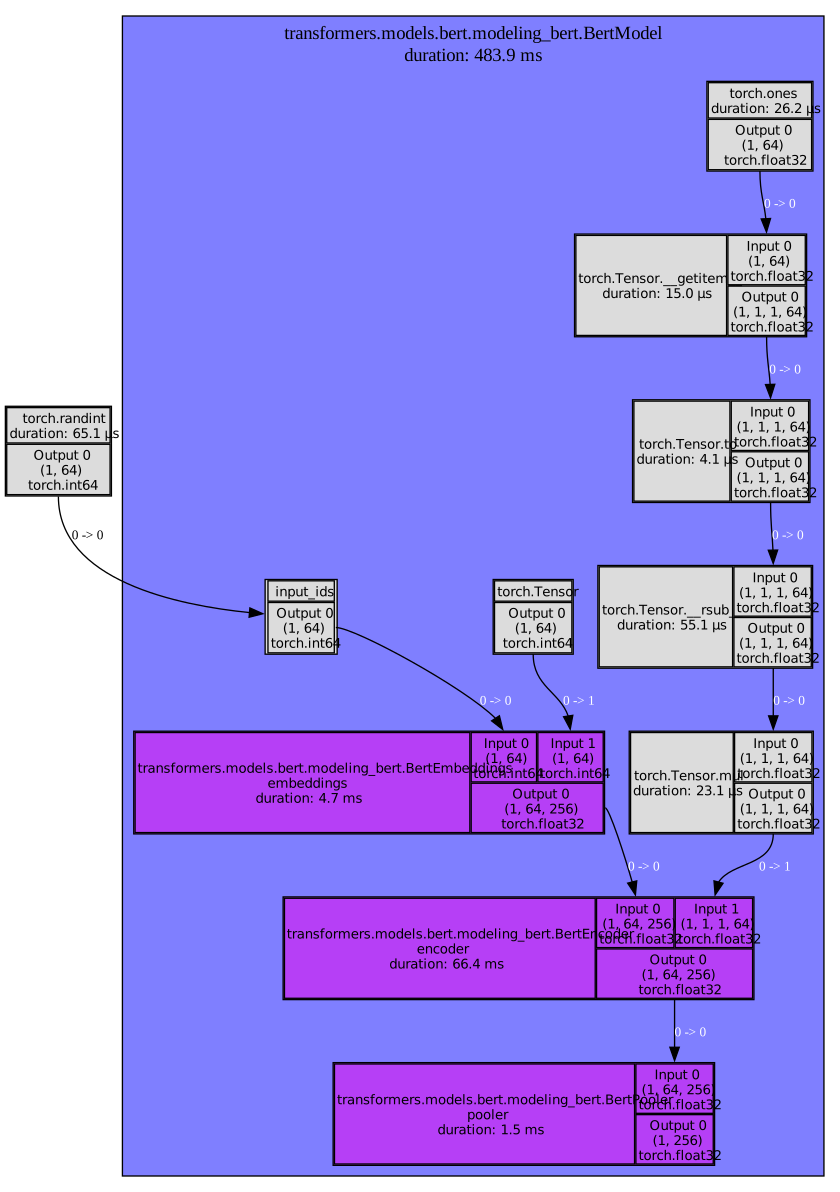
torchtrail.visualize(output, max_depth=2, file_name="bert_max_depth_2.svg")
The graph of the full module can be visualized by omitting max_depth argument
torchtrail.visualize(output, file_name="bert.svg")
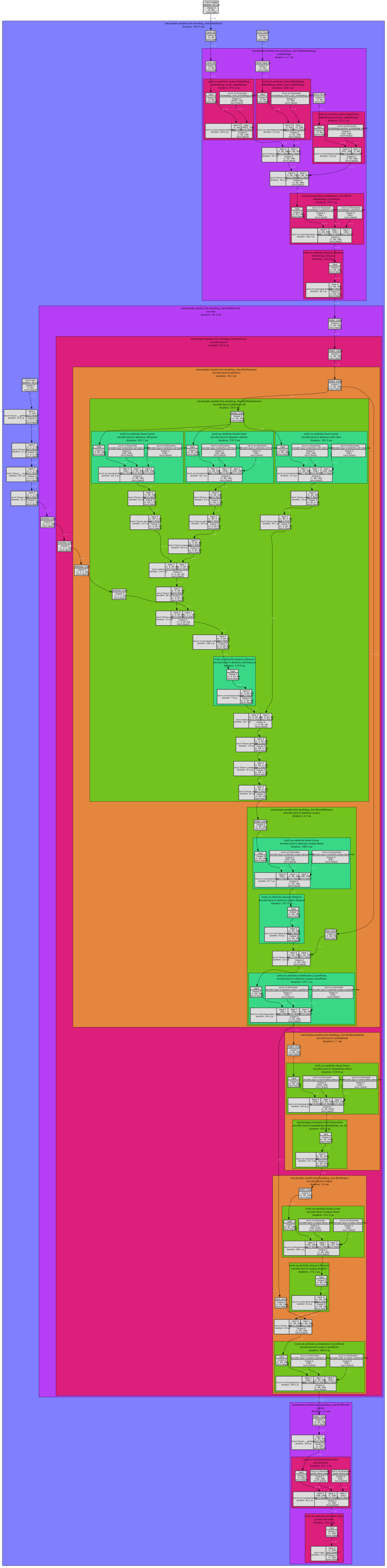
The graph could be obtained as a networkx.MultiDiGraph using torchtrail.get_graph:
graph: "networkx.MultiDiGraph" = torchtrail.get_graph(output_tensor)
Alternatively, visualization of the modules can be turned off completely using show_modules=False
torchtrail.visualize(output, show_modules=False, file_name="bert_show_modules_False.svg")
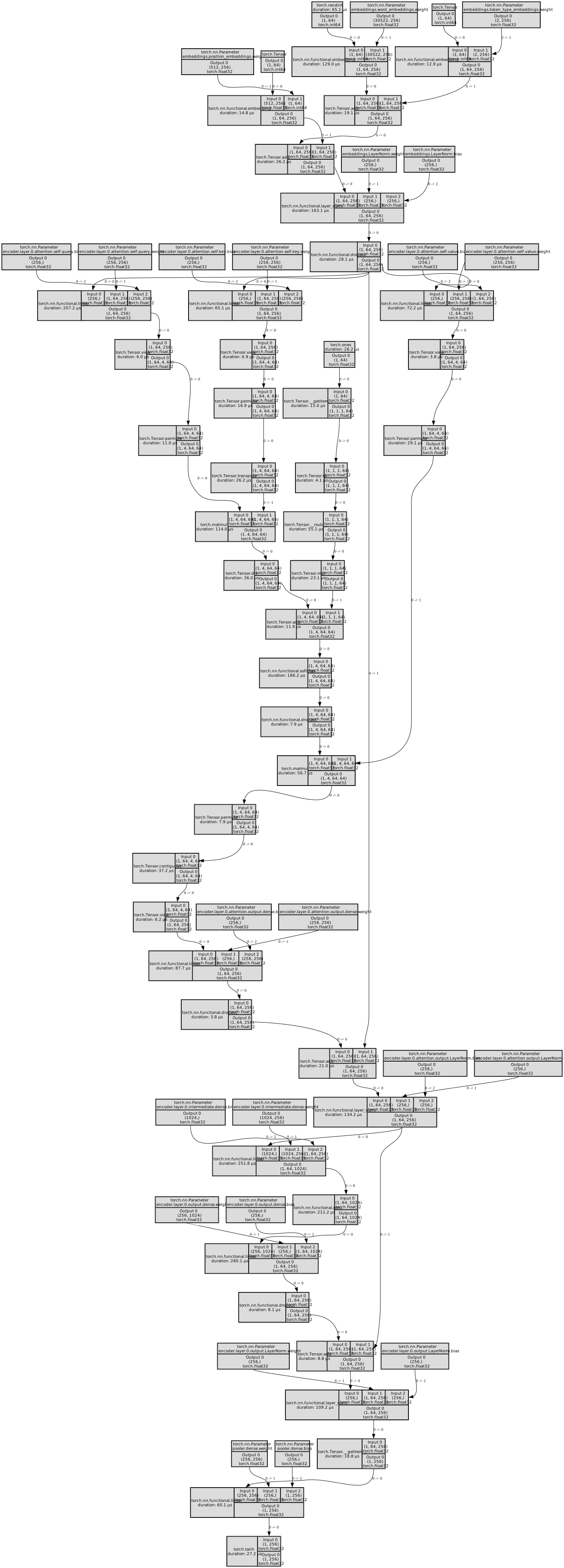
The flattened graph could be obtained as a networkx.MultiDiGraph using torchtrail.get_graph:
graph: "networkx.MultiDiGraph" = torchtrail.get_graph(output_tensor, flatten=True)
Reference
torchtrailwas inspired by torchview. mert-kurttutan did an amazing job with displaying torch graphs. However, one of the goals oftorchtrailincluded producing networkx-compatible graph, thereforetorchtrailwas written.- The idea to use persistent MultiDiGraph to trace torch operations was taken from composit
1 maintainer

Metadata
1 maintainer
Release files for torchtrail 0.0.20
For a detailed explanation of source distributions (sdists) and built distributions (wheels), please see the package formats documentation.
Source distribution (sdist)
| File | Size | Uploaded | Provenance | |
|---|---|---|---|---|
| torchtrail-0.0.20.tar.gz | 17.1 kB | Without provenance | Details |
Release files / torchtrail-0.0.20.tar.gz
| Download URL | torchtrail-0.0.20.tar.gz |
|---|---|
| Size | 17.1 kB |
| Tags | Source |
|
SHA-256 checksum How to use checksums |
29ac923cac1bb8eaa750b317e888113a5e1b2953c8963cbde76c9f4f46e4c17c
|
|
BLAKE2b-256 checksum How to use checksums |
3cf66f87f3632e165acc75769a81e702adfb4ee5d6ee6b022429db0b5c1bce2c
|
| Upload date | |
|
Uploaded using Trusted Publishing? What is trusted publishing? |
No |
| Uploaded via |
twine/4.0.2 CPython/3.11.7
|
Security for torchtrail 0.0.20
Provenance
Provenance describes where a file came from. On PyPI, provenance is shared via attestations, which provide a verifiable record of the build or publishing details. View details, limitations and caveats.
No provenance found
None of the files in this release were uploaded with provenance metadata.
A note on package security
PyPI is a repository for distributing packages, not a service for auditing them. While third-party security researchers and our staff do their best to detect and remove malicious packages, PyPI cannot guarantee the quality, security or suitability of any given package.














