
This release is a pre-release and may not be stable for production use.
transmogrify.wppolls
Life, the Universe, and Everything
Transmogrifier pipeline sections to import WordPress polls created with the WP-Polls plugin into Plone. This package depends on collective.polls.
Mostly Harmless


Got an idea? Found a bug? Let us know by opening a support ticket.
Don’t Panic
Installation
To enable this package in a buildout-based installation:
Edit your buildout.cfg and add add the following to it:
[buildout]
...
eggs =
    transmogrify.wppolls
After updating the configuration you need to run ‘’bin/buildout’’, which will take care of updating your system.
Usage
Export as CSV the following tables from your WordPress site usign the phpMyAdmin interface:
wp_pollsa
wp_pollsq
Use the following options for all:
Fields terminated by ‘\t’
Remove CRLF characters within fields
Put field names in the first row
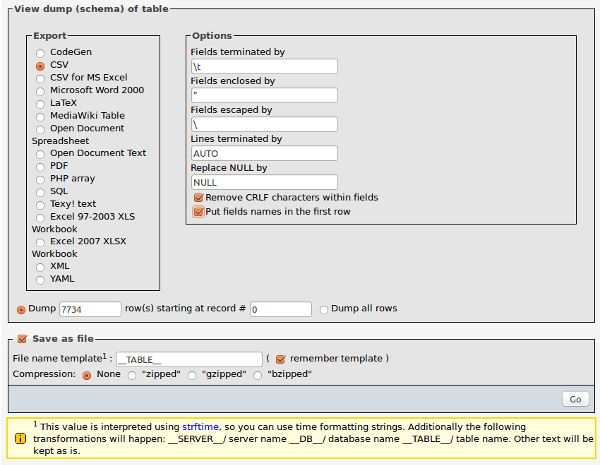
Export from phpMyAdmin as CSV.
Edit the ‘wppolls.cfg’ file and set the options: ‘source’, ‘path’, ‘locale’ and ‘transitions’
On the ZMI, got to ‘portal_setup/Import’ and select the profile ‘transmogrify.wppolls’
Click on ‘Import all steps’ and wait for the process to finish
Sections
transmogrify.wppolls.csvsource
This source section generates a list of polls and its results; it doesn’t takes care of any information about the voters.
[csvsource]
blueprint = transmogrify.wppolls.csvsource
source = /home/customer/site/data/
path = /polls
locale = pt-br
transitions = open- source:
full path to the WordPress CSV export files.
- path:
path, relative to the site root, of the folder where polls should be created; defaults to ‘/polls’.
- locale:
if you want the id normalizer to be aware of locale; defaults to ‘en’.
- transitions:
a sequence of workflow transition names that will be executed. By default, polls are opened and then closed (‘open, close’).
transmogrify.wppolls.voteupdater
This section is needed to update the results of a poll as the schema updater section doesn’t know how to deal with it. It must be used after the constructor.
[voteupdater]
blueprint = transmogrify.wppolls.voteupdaterChangelog
There’s a frood who really knows where his towel is.
1.0a1 (2015-08-05)
Initial release.
2 maintainers


Metadata
2 maintainers
Release files for transmogrify.wppolls 1.0a1
For a detailed explanation of source distributions (sdists) and built distributions (wheels), please see the package formats documentation.
Source distribution (sdist)
| File | Size | Uploaded | Provenance | Actions |
|---|---|---|---|---|
| transmogrify.wppolls-1.0a1.tar.gz | 17.1 kB | Without provenance | Details for transmogrify.wppolls-1.0a1.tar.gz |
Release files / transmogrify.wppolls-1.0a1.tar.gz
| Download URL | transmogrify.wppolls-1.0a1.tar.gz |
|---|---|
| Size | 17.1 kB |
| Tags | Source |
|
SHA-256 checksum How to use checksums |
04ac015e1dc12193c26fa3193e204856cb536fb069a04c04c83d0339a569e76b
|
|
BLAKE2b-256 checksum How to use checksums |
8ecaa5471f556d8c87a3141f66b042866f4e64e0d85e1e97a572e9730ae7e94d
|
| Upload date | |
|
Uploaded using Trusted Publishing? What is trusted publishing? |
No |
Security for transmogrify.wppolls 1.0a1
Provenance
Provenance describes where a file came from. On PyPI, provenance is shared via attestations, which provide a verifiable record of the build or publishing details. View details, limitations and caveats.
No provenance found
None of the files in this release were uploaded with provenance metadata.
A note on package security
PyPI is a repository for distributing packages, not a service for auditing them. While third-party security researchers and our staff do their best to detect and remove malicious packages, PyPI cannot guarantee the quality, security or suitability of any given package.
To learn more about protecting yourself from malicious actors, visit our package security documentation.













