



Table of Contents
About The Project
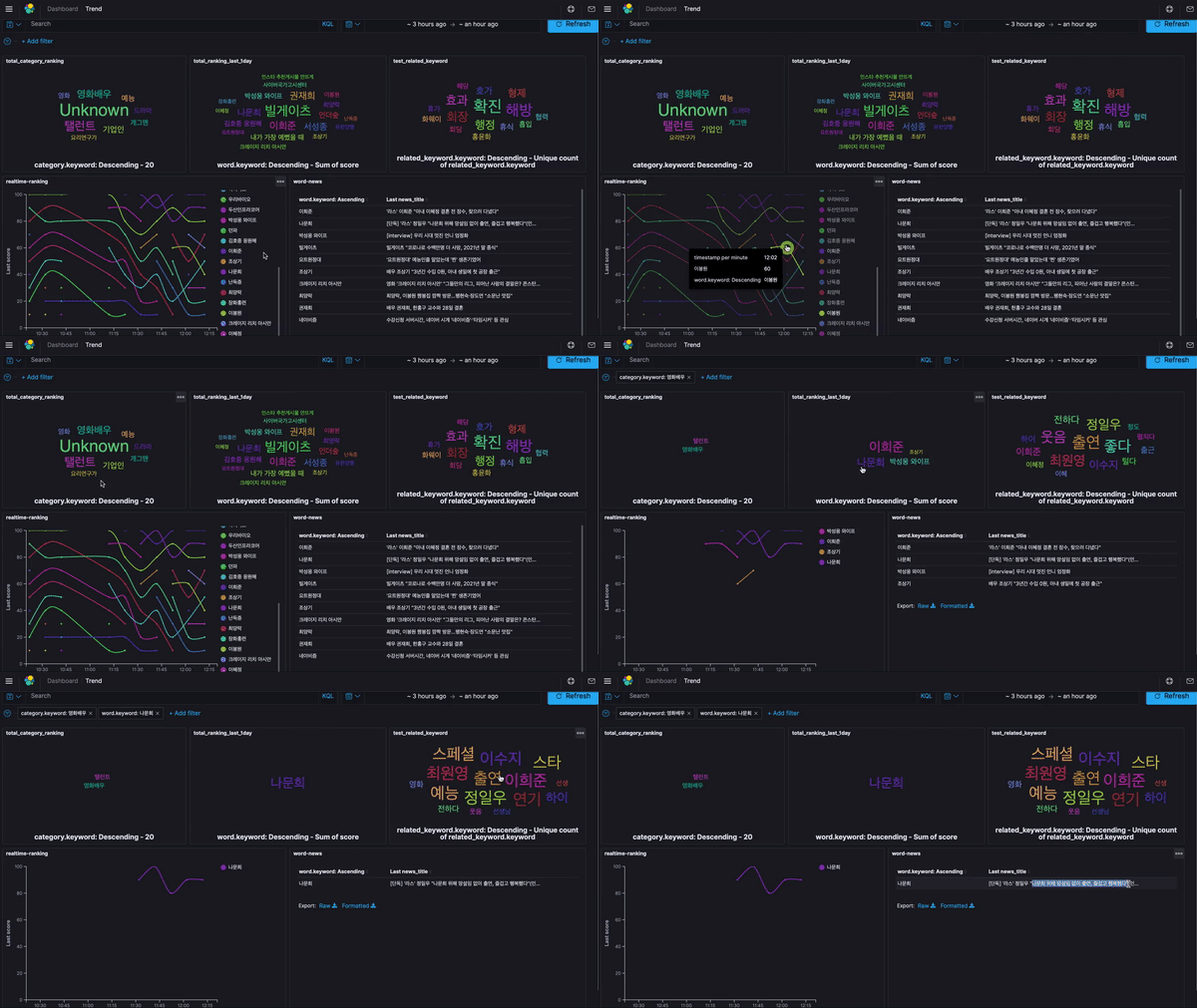
Dashboard that can analyze/monitor the trends of entertainment characteristics occurring in complex situations
Getting Started
This is an example of how you may give instructions on setting up your project locally. To get a local copy up and running follow these simple example steps.
Prerequisites
This is an example of how to list things you need to use the software and how to install them.
- Python
Python > 3.7
Installation
- Homebrew
/usr/bin/ruby -e "$(curl -fsSL https://raw.githubusercontent.com/Homebrew/install/master/install)"
- ElasticSearch
brew install elasticsearch
- Kibana
brew install kibana
- Install packages via pip https://pypi.org/project/tremo/
pip install tremo
Usage
- Run with/without ElasticSearch
from tremo.run import run
result = run(elastic_search=False)
The run function collects trends, news data, and keywords from the top 10. The data type of result is list of 10 lengths of the dictionary.
- Example of result data
from tremo.run import run
result = run(elastic_search=False)
print(result[0])
{
    "ranking": 1,
    "word": "걸캅스",
    "category": [
      "영화"
    ],
    "related_search_word": [
      "영화 걸캅스",
      "걸캅스 주우재",
      "라미란 이성경",
      "이성경",
      "이성경 라미란",
      "위하준",
      "라미란",
      "걸캅스 이레",
      "걸캅스 하정우",
      "정직한 후보"
    ],
    "related_keyword": [
      "사건",
      "라미란",
      "스타트렉",
      "콤비",
      "다크니스",
      "기록",
      "이성",
      "수사",
      "성범죄",
      "검사"
    ],
    "news_title": "[집에서 볼만한 영화추천] 걸캅스, 검사외전, 스타트렉 다크니스&비욘드",
    "timestamp": "2020-08-17T03:35:28.942994"
}
- Repeat with/without ElasticSearch
from tremo.run import repeat
repeat(elastic_search=True, interval_second=600)
The repeat function executes the run function by thread timer every interval_second
elastic_search and interval_second default value is True and 600
If you set elastic_search to True, You can use the dashboard visualized in Kibana for the data stored in ElasticSearch.
- import kibana dash board
You can import our JSON file from Kibana UI under Management > Saved Objects > Import.
1. Click Import.
2. Navigate to the JSON file that represents the objects to import.
3. Import ./kibana_import/{version}.ndjson file
4. Indicate whether to overwrite objects already in Kibana.
5. Click Import.
If you import json file, you can use dash board like this
Contributing
Contributions are what make the open source community such an amazing place to be learn, inspire, and create. Any contributions you make are greatly appreciated.
- Fork the Project
- Create your Feature Branch (
git checkout -b feature/contribution) - Commit your Changes (
git commit -m 'Add some contribution') - Push to the Branch (
git push origin feature/contribution) - Open a Pull Request
License
Distributed under the MIT License. See LICENSE for more information.
Contact
Jihoon Kang - jihoon522@sk.com
Project Link: https://github.com/thisishoon/trend-monitoring
Linkedin:
1 maintainer

Metadata
1 maintainer
Release files for tremo 1.0.1
For a detailed explanation of source distributions (sdists) and built distributions (wheels), please see the package formats documentation.
Built distribution (wheel)
| File | Interpreter | ABI | Platform | Reset |
|---|---|---|---|---|
| tremo-1.0.1-py3-none-any.whl | Python 3 | none | any | Details |
Release files / tremo-1.0.1-py3-none-any.whl
| Download URL | tremo-1.0.1-py3-none-any.whl |
|---|---|
| Size | 13.6 kB |
| Tags | Python 3 |
|
SHA-256 checksum How to use checksums |
404aeebcbd52aa171a42e771bef31d628c9cd993f2d107c8afe5a03e389d801d
|
|
BLAKE2b-256 checksum How to use checksums |
19ed6db25c1798afaf0fdfa612ffa3d539fe3c2b90bc2b7a655be8172693931f
|
| Upload date | |
|
Uploaded using Trusted Publishing? What is trusted publishing? |
No |
| Uploaded via |
twine/3.2.0 pkginfo/1.5.0.1 requests/2.24.0 setuptools/49.6.0 requests-toolbelt/0.9.1 tqdm/4.48.2 CPython/3.8.5
|














