
trilogy
Python library for converting astronomical FITS images into beautiful color or grayscale images.

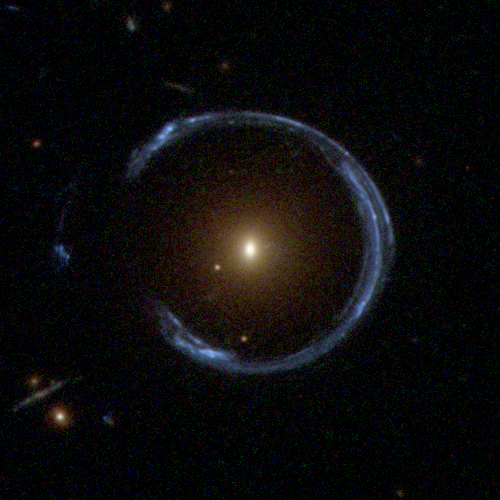
Cosmic Horseshoe gravitational lens imaged by Hubble WFC3
RGB composite using filters F475W (blue), F606W (green), and F814W (red)
Try it!

Installation
pip install trilogy
Or from source:
git clone https://github.com/oliveirara/trilogy.git
cd trilogy
pip install -e .
Quick Start
Grayscale Image (Single Band)
from trilogy import Trilogy

trilogy = Trilogy(
    images="galaxy.fits",
    outname="galaxy"
)
img = trilogy.save()  # Saves galaxy.png
RGB Color Image (Multi-Band)
from trilogy import Trilogy

trilogy = Trilogy(
    images={
        "R": ["i_band.fits"],
        "G": ["r_band.fits"],
        "B": ["g_band.fits"]
    },
    outname="galaxy_rgb"
)
img = trilogy.save()  # Saves galaxy_rgb.png
Adjusting Brightness and Contrast
trilogy = Trilogy(
    images="galaxy.fits",
    outname="galaxy_adjusted",
    noiselum=0.10,      # Lower = darker background (0.05-0.5)
    satpercent=0.0001   # Lower = less saturation (0.0001-0.01)
)
Boosting Colors (RGB)
trilogy = Trilogy(
    images={"R": ["r.fits"], "G": ["g.fits"], "B": ["b.fits"]},
    outname="colorful",
    colorsatfac=1.5     # >1 boosts colors, <1 reduces
)
Key Parameters
Essential Parameters
| Parameter | Default | Range | Effect |
|---|---|---|---|
noiselum |
0.15 | 0.05-0.5 | Background brightness (lower = darker) |
satpercent |
0.001 | 0.0001-0.01 | % of pixels to saturate (lower = more detail) |
colorsatfac |
1.0 | 0.5-2.0 | Color saturation (RGB only, >1 = more vivid) |
Common Adjustments
Image too dark?
noiselum=0.25        # Increase background brightness
satpercent=0.005     # Allow more saturation
Image too bright/washed out?
noiselum=0.08        # Decrease background brightness
satpercent=0.0001    # Preserve more highlights
Colors too weak? (RGB only)
colorsatfac=1.5 # Boost color saturation
Advanced Usage
Per-Channel Control (RGB)
trilogy = Trilogy(
    images={"R": [...], "G": [...], "B": [...]},
    noiselums={
        "R": 0.20,   # Brighter red channel
        "G": 0.15,   # Balanced green
        "B": 0.10    # Darker blue channel
    }
)
Combining Multiple Images
# Average multiple exposures
trilogy = Trilogy(
    images=["exposure1.fits", "exposure2.fits", "exposure3.fits"],
    combine="average"
)

# Or sum them
trilogy = Trilogy(
    images=["exp1.fits", "exp2.fits"],
    combine="sum"
)
Using Configuration Object
from trilogy import Trilogy, TrilogyConfig

config = TrilogyConfig(
    noiselum=0.12,
    satpercent=0.0005,
    colorsatfac=1.3,
    samplesize=2000,
    combine="average"
)

trilogy = Trilogy(images=my_images, config=config)
Manual Control (Disable Auto-Adjustment)
By default, trilogy automatically adjusts problematic parameters. To use exact values:
trilogy = Trilogy(
    images="galaxy.fits",
    noiselum=0.147,      # Will use exactly this value
    satpercent=0.000823,
    auto_adjust=False    # Disable auto-adjustment
)
Use auto_adjust=False when:
- Replicating results from papers/publications
- You've manually fine-tuned parameters visually
- You need specific parameter values
Jupyter Notebooks
Trilogy works seamlessly in notebooks:
from trilogy import Trilogy

t = Trilogy(images="galaxy.fits", noiselum=0.15)
img = t.run()  # Returns PIL Image, displays automatically
See examples/with_notebook/notebook.ipynb for complete examples.
Examples
The examples/ directory contains real FITS data from various surveys:
- cosmic_horseshoe/ - HST WFC3 RGB composite
- single_band/ - Grayscale examples (CS82, CFHTLenS, DES)
- multiple_bands/ - RGB examples (HSC, KIDS, Legacy Survey, RCSLenS)
- with_notebook/ - Jupyter notebook examples
Each example includes a example.py script you can run:
cd examples/cosmic_horseshoe
python example.py
All Parameters
Input/Output
images: str, list, or dict - Input FITS file(s)indir: Path - Input directory (default: current directory)outdir: Path - Output directory (default: current directory)outname: str - Output filename without extension
Image Scaling
noiselum: float - Noise luminosity 0-1 (default: 0.15)noiselums: dict - Per-channel noise luminositysatpercent: float - Percentage of pixels to saturate (default: 0.001)colorsatfac: float - Color saturation factor (default: 1.0)noisesig: float - Noise sigma for output (default: 1.0)noisesig0: float - Noise sigma for measurement (default: 2.0)correctbias: bool - Correct for background bias (default: False)
Processing
combine: "average" or "sum" - How to combine multiple images (default: "average")samplesize: int - Sample region size for determining scaling (default: 1000)stampsize: int - Processing stamp size (default: 1000)maxstampsize: int - Maximum stamp size (default: 6000)bscale: float - Multiply all pixel values (default: 1.0)bzero: float - Add to all pixel values (default: 0.0)
Advanced
auto_adjust: bool - Automatically adjust problematic parameters (default: True)noise: float - Manual noise level (overrides automatic detection)saturate: float - Manual saturation level (overrides automatic)invert: bool - Invert luminosity (default: False)legend: bool - Add filter legend to RGB images (default: False)
Supported File Formats
- Standard FITS (
.fits) - Compressed FITS (
.fits.gz,.fits.fz) - Multi-extension FITS (specify with
image.fits[1]) - Automatic extension detection
Requirements
- Python >= 3.11
- astropy >= 6.1.7
- numpy >= 2.2.4
- pillow >= 11.2.1
- scipy >= 1.15.2
Troubleshooting
Image is too dark
trilogy = Trilogy(images=..., noiselum=0.25, satpercent=0.005)
Image is too bright/washed out
trilogy = Trilogy(images=..., noiselum=0.08, satpercent=0.0001)
Colors are too weak (RGB)
trilogy = Trilogy(images=..., colorsatfac=1.5)
Getting warnings about parameter adjustments
The auto-adjustment system is helping you avoid problematic values. To use exact values:
trilogy = Trilogy(images=..., your_params, auto_adjust=False)
Image appears blank/black
- Check that FITS files have data (not empty)
- Try increasing
noiselumandsatpercent - Verify FITS extension if using multi-extension files
Images with many NaN pixels
Trilogy automatically handles NaN (Not a Number) and Inf pixels:
✅ Smart NaN handling:
- NaN/Inf pixels are set to 0 (black) in output
- Statistics calculated only from valid pixels
- Warning displayed if >10% of pixels are NaN
- No crashes or numerical errors from NaN pixels
Example output:
⚠️ Warning: 50.0% of pixels are NaN/Inf
Recommendation:
- Images with >50% NaN pixels will appear mostly black
- Use quality filtering before processing (e.g.,
filter-empty-cutouts.py) - Consider cropping to regions with valid data
Why NaN pixels occur:
- Edge effects from mosaicking/reprojection
- Missing detector data
- Masked pixels in processed images
- Image cutouts extending beyond original field
Resources
- Lupton's Algorithm: http://www.astro.princeton.edu/~rhl/PrettyPictures/
- Original Trilogy: https://www.stsci.edu/~dcoe/trilogy/
- ASCL Entry: https://ascl.net/1508.009
Citation
If you use trilogy in your research, please cite:
@MISC{2012ascl.soft08009C,
  author = {{Coe}, D.},
  title = "{Trilogy: Image composition software}",
  keywords = {Software},
  year = 2012,
  month = aug,
  eid = {ascl:1508.009},
  pages = {ascl:1508.009},
  archivePrefix = {ascl},
  eprint = {1508.009},
  adsurl = {https://ui.adsabs.harvard.edu/abs/2012ascl.soft08009C},
}
License
See LICENSE file.
Contributing
Contributions are welcome! Please open an issue or pull request on GitHub.
1 maintainer

Metadata
1 maintainer
Release files for trilogy 1.1.0
For a detailed explanation of source distributions (sdists) and built distributions (wheels), please see the package formats documentation.
Source distribution (sdist)
| File | Size | Uploaded | Provenance | Actions |
|---|---|---|---|---|
| trilogy-1.1.0.tar.gz | 39.1 kB | With provenance | Details for trilogy-1.1.0.tar.gz |
Built distribution (wheel)
| File | Interpreter | ABI | Platform | Actions Reset |
|---|---|---|---|---|
| trilogy-1.1.0-py3-none-any.whl | Python 3 | none | any | Details for trilogy-1.1.0-py3-none-any.whl |
Total release size: 75.5 kB
Release files / trilogy-1.1.0.tar.gz
| Download URL | trilogy-1.1.0.tar.gz |
|---|---|
| Size | 39.1 kB |
| Tags | Source |
|
SHA-256 checksum How to use checksums |
a381554e721f3852c4d3f1751af2b5043a3c9a4165c9e28b078959697bf0b4b2
|
|
BLAKE2b-256 checksum How to use checksums |
5789e762ca9b8522ff04910f6a7622c0e4ded8288d13ad2b58bc95195a99baa0
|
| Upload date | |
|
Uploaded using Trusted Publishing? What is trusted publishing? |
Yes |
| Uploaded via |
twine/6.1.0 CPython/3.13.12
|
Provenance
Provenance describes where a file came from. On PyPI, provenance is shared via attestations, which provide a verifiable record of the build or publishing details. View details, limitations and caveats.


PyPI Publish Attestation
PyPI verified that this artifact, at this checksum, originated from the publisher listed below.
Signed by GitHub Actions, verified by PyPI on Apr 18, 2026.
Transparency logRelease files / trilogy-1.1.0-py3-none-any.whl
| Download URL | trilogy-1.1.0-py3-none-any.whl |
|---|---|
| Size | 36.4 kB |
| Tags | Python 3 |
|
SHA-256 checksum How to use checksums |
d3be7cb4d8fcbfef107085bd5899b7924ea415e16461e1bc2d2b75930d8ba3c9
|
|
BLAKE2b-256 checksum How to use checksums |
cf2c190e4b00801b444b1eab334fcbfa641aeb17b0d694275686086e67d1373b
|
| Upload date | |
|
Uploaded using Trusted Publishing? What is trusted publishing? |
Yes |
| Uploaded via |
twine/6.1.0 CPython/3.13.12
|
Provenance
Provenance describes where a file came from. On PyPI, provenance is shared via attestations, which provide a verifiable record of the build or publishing details. View details, limitations and caveats.
PyPI Publish Attestation
PyPI verified that this artifact, at this checksum, originated from the publisher listed below.
Signed by GitHub Actions, verified by PyPI on Apr 18, 2026.
Transparency logSecurity for trilogy 1.1.0
Provenance
Provenance describes where a file came from. On PyPI, provenance is shared via attestations, which provide a verifiable record of the build or publishing details. View details, limitations and caveats.
Full provenance
All 2 files in this release have been uploaded with provenance metadata.
Attestation for trilogy-1.1.0.tar.gz
PyPI Publish Attestation
PyPI verified that this artifact, at this checksum, originated from the publisher listed below.
Signed by GitHub Actions, verified by PyPI on Apr 18, 2026.
Transparency logA note on package security
PyPI is a repository for distributing packages, not a service for auditing them. While third-party security researchers and our staff do their best to detect and remove malicious packages, PyPI cannot guarantee the quality, security or suitability of any given package.
To learn more about protecting yourself from malicious actors, visit our package security documentation.














