
This release is a pre-release and may not be stable for production use.
Welcome to TruLens-Eval!

Evaluate and track your LLM experiments with TruLens. As you work on your models and prompts TruLens-Eval supports the iterative development and of a wide range of LLM applications by wrapping your application to log key metadata across the entire chain (or off chain if your project does not use chains) on your local machine.
Using feedback functions, you can objectively evaluate the quality of the responses provided by an LLM to your requests. This is completed with minimal latency, as this is achieved in a sequential call for your application, and evaluations are logged to your local machine. Finally, we provide an easy to use Streamlit dashboard run locally on your machine for you to better understand your LLM’s performance.
Value Propositions
TruLens-Eval has two key value propositions:
- Evaluation:
- TruLens supports the the evaluation of inputs, outputs and internals of your LLM application using any model (including LLMs).
- A number of feedback functions for evaluation are implemented out-of-the-box such as groundedness, relevance and toxicity. The framework is also easily extensible for custom evaluation requirements.
- Tracking:
- TruLens contains instrumentation for any LLM application including question answering, retrieval-augmented generation, agent-based applications and more. This instrumentation allows for the tracking of a wide variety of usage metrics and metadata. Read more in the instrumentation overview.
- TruLens' instrumentation can be applied to any LLM application without being tied down to a given framework. Additionally, deep integrations with LangChain and Llama-Index allow the capture of internal metadata and text.
- Anything that is tracked by the instrumentation can be evaluated!
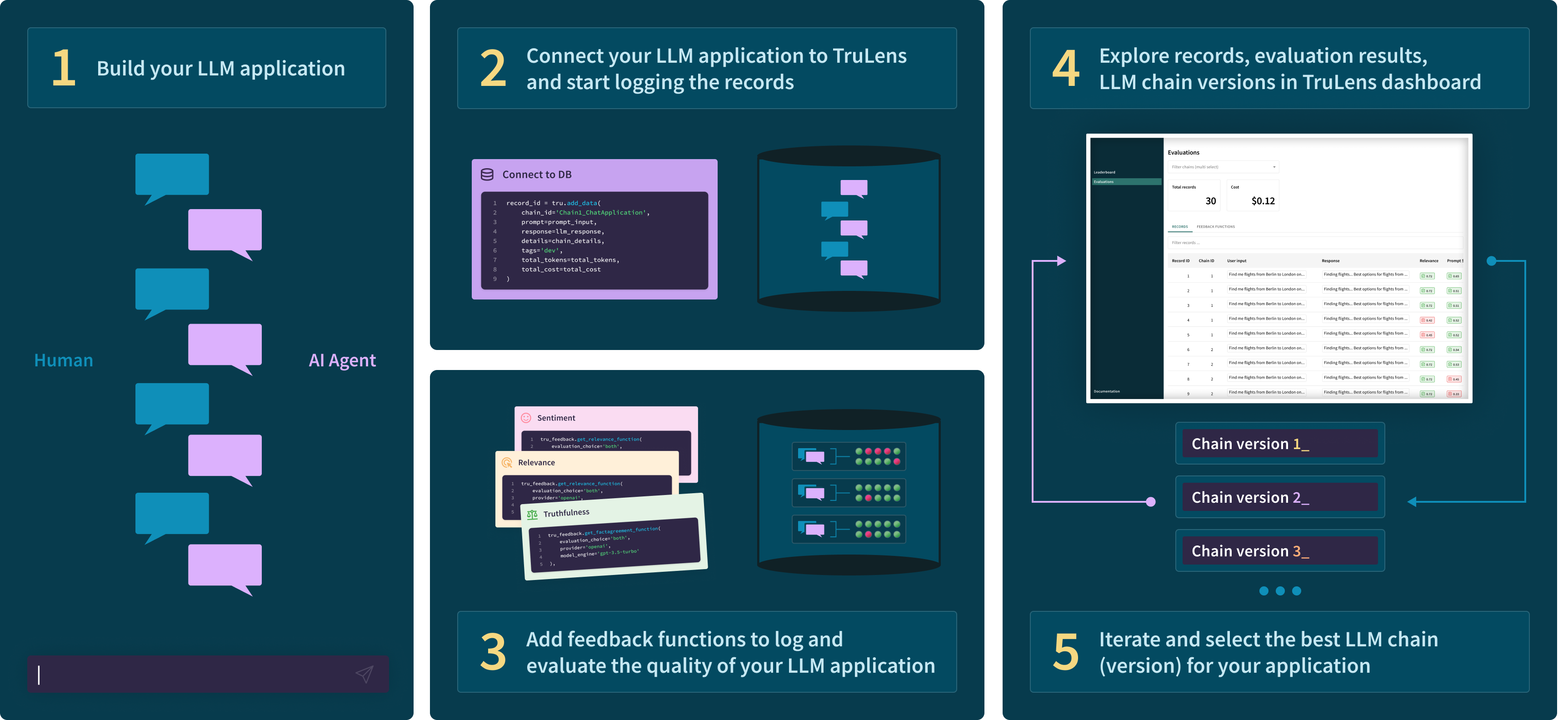
The process for building your evaluated and tracked LLM application with TruLens is below 👇
Installation and Setup
Install the trulens-eval pip package from PyPI.
pip install trulens-eval
Setting Keys
In any of the quickstarts, you will need OpenAI and Huggingface keys. You can add keys by setting the environmental variables:
import os
os.environ["OPENAI_API_KEY"] = "..."
os.environ["HUGGINGFACE_API_KEY"] = "..."
Quick Usage
TruLens supports the evaluation of tracking for any LLM app framework. Choose a framework below to get started:
Langchain

Llama-Index
Custom Text to Text Apps
💡 Contributing
Interested in contributing? See our contribution guide for more details.
1 maintainer

Metadata
1 maintainer
Release files for trulens-eval 0.17.0b0
For a detailed explanation of source distributions (sdists) and built distributions (wheels), please see the package formats documentation.
Built distribution (wheel)
| File | Interpreter | ABI | Platform | Actions Reset |
|---|---|---|---|---|
| trulens_eval-0.17.0b0-py3-none-any.whl | Python 3 | none | any | Details for trulens_eval-0.17.0b0-py3-none-any.whl |
Release files / trulens_eval-0.17.0b0-py3-none-any.whl
| Download URL | trulens_eval-0.17.0b0-py3-none-any.whl |
|---|---|
| Size | 621.6 kB |
| Tags | Python 3 |
|
SHA-256 checksum How to use checksums |
7743080ce393e901bc292ed24a406adbe4e355944e57782b11541d38e8b84a79
|
|
BLAKE2b-256 checksum How to use checksums |
5a531fa274df6aa0d24abc71e61316569d0ec3564fa5578771f9dc6c606df0e4
|
| Upload date | |
|
Uploaded using Trusted Publishing? What is trusted publishing? |
No |
| Uploaded via |
twine/4.0.2 CPython/3.11.5
|
Security for trulens-eval 0.17.0b0
Provenance
Provenance describes where a file came from. On PyPI, provenance is shared via attestations, which provide a verifiable record of the build or publishing details. View details, limitations and caveats.
No provenance found
None of the files in this release were uploaded with provenance metadata.
A note on package security
PyPI is a repository for distributing packages, not a service for auditing them. While third-party security researchers and our staff do their best to detect and remove malicious packages, PyPI cannot guarantee the quality, security or suitability of any given package.
To learn more about protecting yourself from malicious actors, visit our package security documentation.














