
TWC - TaskWarrior Controller (previously TaskWarrior Curses) is interactive terminal frontend for task and TODO manager - TaskWarrior.
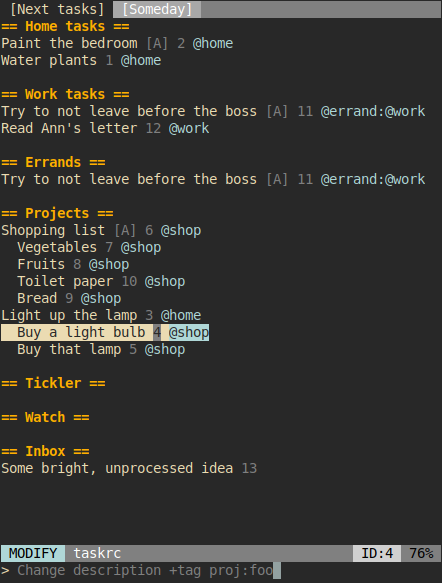
For full documentation please refer to the User Manual. There’s also built-in help available after pressing F1.
Features
agendas - display several filters on a single screen simultaneously (influenced by org-mode)
create, modify, delete, annotate tasks
bulk edits: select arbitrary tasks and modify them all at the same time
autocomplete and tab-complete writing task descriptions, annotations, tags etc.
styling and task formatting
tasks and sub-tasks grouping (influenced by taskwiki)
synchronize tasks with task server
status line showing arbitrary informations
configurable key bindings
search and incremental search of tasks - search can be case-sensitive, case-insensitive or smart-case (case sensitivite only when there are upper case characters in searched term)
on-demand filtering of displayed tasks
history of commands (scrolled with up and down arrows)
Introduction
TWC works with a concept of “agendas” influenced and borrowed from the mighty org-mode. Agenda is basically a view of several TaskWarrior filters (called blocks) displayed on a single screen simultaneously. You can jump between blocks and single tasks.
To add agenda, first create a configuration file inside ~/.config/twc/config.py. It is a regular Python file with exposed variable c which references a configuration object. You can add new blocks like that:
c.add_block(
    agenda='My Agenda',
    title='Next Tasks',
    filter='status:pending',
    sort='priority+,urgency-')

c.add_block(
    agenda='My Agenda',
    title='Projects',
    filter='-WAITING and (+BLOCKING or +BLOCKED) and -INSTANCE',
    sort='project-,priority-,order+,urgency-',
    items='* description,tags:info:')
Style and colors
TWC can be styled in any way you want. To change its colors use c.set_style():
c.set_style('highlight', 'bg:ansiblue bold')
c.set_style('error', 'fg:white bg:red')
Style examples:
fg:white (white foreground, named color)
bg:#000000 (black background, hexadecimal notation)
bold italic underline blink reverse hidden (supported style flags)
Any style name can be used in task formatting. Some interface elements however use specific style names.
Formatting
Block’s items and statusleft and statusright parameters are composed of lists of displayed items; they can be separated by comma, which will produce space between items, or by “+” sign, which will concatenate items to each other without leaving space between them.
Each item can be optionally followed by a name of style which should be applied to this item and item-specific string formatting. When style or formatting are added, they must be separated and ended by a colon “:”: name:style:format:.
All TaskWarrior’s attribute names work as item names and there are some additional names defined for either blocks and status line.
Example format strings are:
items = '[priority:warning:],(due:comment:%Y-%m-%d:),description'
items = '[flags::%a%s%d:]+id,description,tags:info:
Items will be only displayed when they are present. For example if there are no tags defined for a task, tags item will not produce any output.
Items might contain additional characters in place of their names and TWC will try to intelligently/magically (with regular expressions ;)) guess name. These additional charactes will be printed only when item is present so they can be used e.g. to visually delimit some items from the others (e.g. surround tags with braces, delimit items with “|” etc.)
Key bindings
By default you can navigate with arrows or vim-style j and k. Exit TWC with q.
You can bind and unbind keys with c.bind(key, command) and c.unbind(key). Refer to User Manual for a list of commands and other default key bindings.
Status line
Bottom status line displays arbitrary informations and is configurable by two variables: statusleft and statusright. They describe format similar to the one described in Formatting The main difference is that task attributes are referenced by task.<attribute> placeholder and that there additional placeholders available.
c.set('statusleft', 'COMMAND,task.id')
c.set('statusright', 'flags::%a:')
Status line items also include: taskrc, command, COMMAND, agenda.pos, agenda.size, agenda.ppos, flags.
Installation
First, make sure that TaskWarrior is installed on your system. TaskWarrior is packaged for most of Linux distributions. Please refer to TaskWarrior’s documentation for details.
TWC is distributed via pypi. You can install it with pip:
$ pip3 install --user twcor with pip wrapper like pipsi:
$ pipsi install --python python3 twcTWC reads your taskrc. It’ll use the default one, which is usually located in ~/.taskrc, but you can change it with -t switch:
$ twc -t ~/dotfiles/my_taskrcTermux
TWC works on Termux, although there’s currently a bug in tzlocal - a library indirectly used by TWC to get local timezone information.
Before running TWC on Termux you have to export the following environment variable:
export TZ=$(getprop persist.sys.timezone)Termux emulates scroll events as key presses. You can bind them for easier navigation:
c.bind('right', 'next-agenda')
c.bind('left', 'prev-agenda')
License
TWC was created by Michał Góral.
TWC is free software, published under the terms of GNU GPL3 or any later version. See LICENSE file for details.
1 maintainer

Metadata
1 maintainer
Release files for twc 0.10.1
For a detailed explanation of source distributions (sdists) and built distributions (wheels), please see the package formats documentation.
Source distribution (sdist)
| File | Size | Uploaded | |
|---|---|---|---|
| twc-0.10.1.tar.gz | 121.1 kB | Details |
Built distribution (wheel)
| File | Interpreter | ABI | Platform | Reset |
|---|---|---|---|---|
| twc-0.10.1-py3-none-any.whl | Python 3 | none | any | Details |
Total release size: 184.4 kB
Release files / twc-0.10.1.tar.gz
| Download URL | twc-0.10.1.tar.gz |
|---|---|
| Size | 121.1 kB |
| Tags | Source |
|
SHA-256 checksum How to use checksums |
90fd5e22d501ee3c001d9f9c0580bbebd2abf2bc6567748d4132ff83aabe3e4b
|
|
BLAKE2b-256 checksum How to use checksums |
7a624ea55cd399273e4344b334cd1c9120a648b6d5496e15b38222cc1ca10af6
|
| Upload date | |
|
Uploaded using Trusted Publishing? What is trusted publishing? |
No |
| Uploaded via |
twine/3.1.1 pkginfo/1.5.0.1 requests/2.23.0 setuptools/46.1.3 requests-toolbelt/0.9.1 tqdm/4.45.0 CPython/3.7.7
|
Release files / twc-0.10.1-py3-none-any.whl
| Download URL | twc-0.10.1-py3-none-any.whl |
|---|---|
| Size | 63.3 kB |
| Tags | Python 3 |
|
SHA-256 checksum How to use checksums |
dd2e9f22079a4df2b59081cc29da49852d135676b2c8b6a5d9c4137bfa071823
|
|
BLAKE2b-256 checksum How to use checksums |
b2434029c218720ed92a0d783278f3d09eb198045105bb4e759cbb0857068786
|
| Upload date | |
|
Uploaded using Trusted Publishing? What is trusted publishing? |
No |
| Uploaded via |
twine/3.1.1 pkginfo/1.5.0.1 requests/2.23.0 setuptools/46.1.3 requests-toolbelt/0.9.1 tqdm/4.45.0 CPython/3.7.7
|














