
txs (test x264 settings) is a command line tool that can generate different combinations of x264 settings and make short test encodings with ffmpeg. It also comes with a Lua script for mpv that allows you to visually compare the test encodes and find the best one based on quality, estimated file size and estimated encoding time. It looks like this:
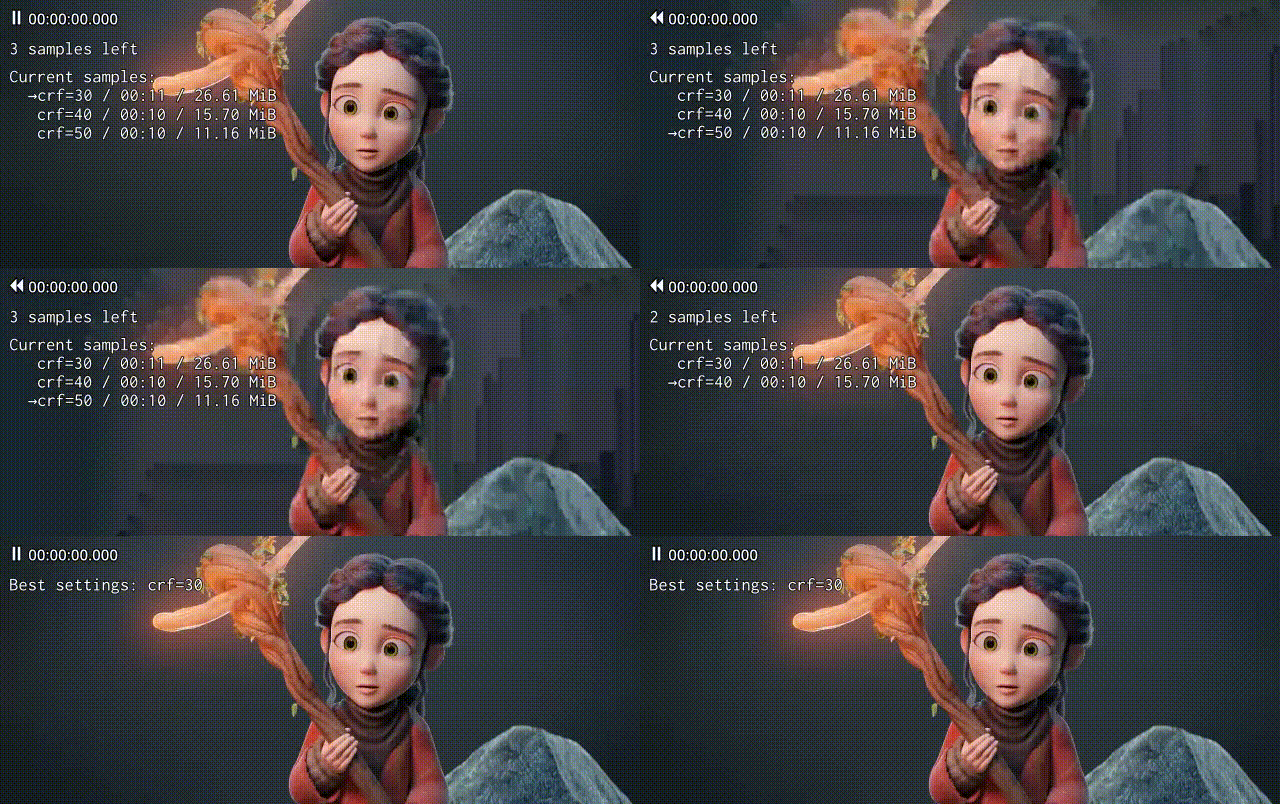
This is the output of txs tutorial:
This is a tutorial that should get you started. Run txs -h and
txs SUBCOMMAND -h for more information.
$ txs -s source.mkv -r 25:00 10 -x crf=19:me=umh samples \
  -xs subme=9/10:deblock=-2,-1/-3,-3:no-fast-pskip
The above command creates test encodes or samples with all possible combinations of the given values for "subme", "deblock" and "no-fast-pskip" in the directory "samples.orig@25:00-1.subme:deblock:no-fast-pskip". The samples are all encoded with "crf=19:me=umh", they are all 10 seconds long and start at 25 minutes in source.mkv:
source.sample@25:00-10.crf=19:me=umh:subme=10:deblock=-2,-1.mkv
source.sample@25:00-10.crf=19:me=umh:subme=10:deblock=-2,-1:no-fast-pskip.mkv
source.sample@25:00-10.crf=19:me=umh:subme=10:deblock=-3,-3.mkv
source.sample@25:00-10.crf=19:me=umh:subme=10:deblock=-3,-3:no-fast-pskip.mkv
source.sample@25:00-10.crf=19:me=umh:subme=9:deblock=-2,-1.mkv
source.sample@25:00-10.crf=19:me=umh:subme=9:deblock=-2,-1:no-fast-pskip.mkv
source.sample@25:00-10.crf=19:me=umh:subme=9:deblock=-3,-3.mkv
source.sample@25:00-10.crf=19:me=umh:subme=9:deblock=-3,-3:no-fast-pskip.mkv
By providing multiple sets of sample settings to -xs you can limit the number of combinations:
$ txs -s source.mkv -r 25:00 10 -x crf=19:me=umh samples \
  -xs subme=10/11:no-deblock deblock=-2,-1/-3,-3
This creates the following samples:
source.sample@25:00-10.crf=19:me=umh:deblock=-2,-1.mkv
source.sample@25:00-10.crf=19:me=umh:deblock=-3,-3.mkv
source.sample@25:00-10.crf=19:me=umh:subme=10.mkv
source.sample@25:00-10.crf=19:me=umh:subme=10:no-deblock.mkv
source.sample@25:00-10.crf=19:me=umh:subme=11.mkv
source.sample@25:00-10.crf=19:me=umh:subme=11:no-deblock.mkv
To compare encodes, use the "compare" subcommand:
$ txs -s source.mkv compare samples.orig@25:00-1.subme:deblock:no-fast-pskip
This opens mpv in fullscreen mode with a playlist of two samples. Switch between samples with "j" and "k" or toggle the original source with "o". Pick the better sample with "b", the worse with "w" or mark them as equal with "e". New samples are loaded automatically every time you make a decision. After you've rated all samples once, any samples that were marked as equal are loaded again. This process will leave you with the best sample and its settings in the end.
You can adjust the playlist size with the -p (--playlist-size) option if you want to compare more than two samples.
"Shift+w" does the same thing as "w", but it also removes the sample and its log file from the file system.
Show and hide the playlist overlay with "`".
Some final notes you might find useful:
-
Choose your sample range carefully. It should be representative of the full video. 10 seconds or less is fine to check something quickly, but use 60 seconds or more for fine tuning.
-
Increasing gamma with "6" to around 10 to 15 makes differences more obvious. (Decrease with "5".) Don't go too high or you'll watch pixels dance that nobody else will ever see.
-
Try switching between samples while playing. txs should preserve playback time, but there is a small delay when mpv seeks.
-
You can seek forward and backward by single frames with "." and ",".
Installation
Install pipx with your distro's package manager or with pip:
$ python3 -m pip install --user pipx
Then install txs with pipx:
$ pipx install txs
Upgrade:
$ pipx upgrade txs
Install development version over current release:
$ pipx upgrade --spec git+https://github.com/plotski/txs.git txs
Install development version without an existing txs installation:
$ pipx install --spec git+https://github.com/plotski/txs.git txs
Uninstall:
$ pipx uninstall pipx
1 maintainer

Metadata
1 maintainer
Release files for txs 0.1.3
For a detailed explanation of source distributions (sdists) and built distributions (wheels), please see the package formats documentation.
Source distribution (sdist)
| File | Size | Uploaded | |
|---|---|---|---|
| txs-0.1.3.tar.gz | 18.0 kB | Details |
Built distribution (wheel)
| File | Interpreter | ABI | Platform | Reset |
|---|---|---|---|---|
| txs-0.1.3-py3-none-any.whl | Python 3 | none | any | Details |
Total release size: 36.4 kB
Release files / txs-0.1.3.tar.gz
| Download URL | txs-0.1.3.tar.gz |
|---|---|
| Size | 18.0 kB |
| Tags | Source |
|
SHA-256 checksum How to use checksums |
7450e1e0e56a15659866872290110250dcd85e10b448b3e5242da5ba383252aa
|
|
BLAKE2b-256 checksum How to use checksums |
c95251b4c776a80150502220ac8bf2b091ff9e1f40ac2312a70a683f5d557076
|
| Upload date | |
|
Uploaded using Trusted Publishing? What is trusted publishing? |
No |
| Uploaded via |
twine/3.1.1 pkginfo/1.4.2 requests/2.23.0 setuptools/46.1.3 requests-toolbelt/0.8.0 tqdm/4.43.0 CPython/3.8.3
|
Release files / txs-0.1.3-py3-none-any.whl
| Download URL | txs-0.1.3-py3-none-any.whl |
|---|---|
| Size | 18.4 kB |
| Tags | Python 3 |
|
SHA-256 checksum How to use checksums |
37edc184cbcaa26ed3310c395142196553ef0b0c73b0451c18042b1f90b6b964
|
|
BLAKE2b-256 checksum How to use checksums |
172cf3e3a14e63bfce1bada5c891954e057b100135cdd9138586bf1701f84a64
|
| Upload date | |
|
Uploaded using Trusted Publishing? What is trusted publishing? |
No |
| Uploaded via |
twine/3.1.1 pkginfo/1.4.2 requests/2.23.0 setuptools/46.1.3 requests-toolbelt/0.8.0 tqdm/4.43.0 CPython/3.8.3
|














