

Highlight text in documents






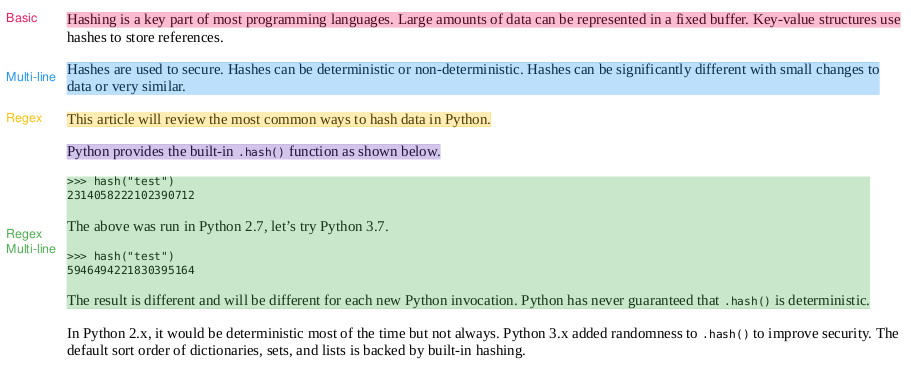
txtmarker highlights text in documents. txtmarker takes a list of (name, text) pairs, scans an input document and creates a modified version with highlights embedded.
Current file formats supported:
Installation
The easiest way to install is via pip and PyPI
pip install txtmarker
Python 3.9+ is supported. Using a Python virtual environment is recommended.
txtmarker can also be installed directly from GitHub to access the latest, unreleased features.
pip install git+https://github.com/neuml/txtmarker
Python 3.9+ is supported
Examples
The examples directory has a series of examples and notebooks giving an overview of txtmarker. See the list of notebooks below.
Notebooks
| Notebook | Description | |
|---|---|---|
| Introducing txtmarker | Overview of the functionality provided by txtmarker |  |
| Highlighting with Transformers | AI-driven highlighting with Transformers | |
Configuration
The following section gives an overview of highlighters and available methods/configuration. See the notebooks above for detailed examples.
Create a new highlighter
Creates a new highlighter instance.
from txtmarker.factory import Factory
highlighter = Factory.create("pdf")
extension
extension: string
Type of highlighter to create (i.e. pdf)
Optional constructor arguments:
formatter
formatter: callable
Formats queries and input text using this method. Helps with cleanup of files with lots of symbols and other content.
chunks
chunks: int
Splits queries into multiple chunks. This is designed for very long text matches.
Page text
Extracts page text from infile and returns as a generator. This enables analysis on the text exactly as it will appear to the highlighter.
highlighter.pages("input.pdf")
infile
infile: string
Full path to input file
Highlight text
Highlights using provided annotations. Annotated file is stored as outfile.
highlighter.highlight("input.pdf", "output.pdf", [("name", "text to highlight")])
infile
infile: string
Full path to input file
outfile
outfile: string
Full path to output file, i.e. the highlighted file
highlights
highlights: list of (string, string|regex)
List of highlight elements. Each pair has a name (can be None) and text value. The text can either be a string or a regular expression. When using string matching, make sure to escape regular expressions (i.e. call re.escape).
1 maintainer

Metadata
1 maintainer
Release files for txtmarker 1.1.0
For a detailed explanation of source distributions (sdists) and built distributions (wheels), please see the package formats documentation.
Source distribution (sdist)
| File | Size | Uploaded | Provenance | |
|---|---|---|---|---|
| txtmarker-1.1.0.tar.gz | 12.7 kB | Without provenance | Details |
Built distribution (wheel)
| File | Interpreter | ABI | Platform | Reset |
|---|---|---|---|---|
| txtmarker-1.1.0-py3-none-any.whl | Python 3 | none | any | Details |
Total release size: 24.4 kB
Release files / txtmarker-1.1.0.tar.gz
| Download URL | txtmarker-1.1.0.tar.gz |
|---|---|
| Size | 12.7 kB |
| Tags | Source |
|
SHA-256 checksum How to use checksums |
eeba11e6835a0a2ad6073dba5816f338f4136f6c9773e27a818e8c3d7591b05a
|
|
BLAKE2b-256 checksum How to use checksums |
20e5b2d638be7575b10620dc06816fe68707c9c4aad6da462f23ffb443453cd1
|
| Upload date | |
|
Uploaded using Trusted Publishing? What is trusted publishing? |
No |
| Uploaded via |
twine/5.1.1 CPython/3.9.21
|
Release files / txtmarker-1.1.0-py3-none-any.whl
| Download URL | txtmarker-1.1.0-py3-none-any.whl |
|---|---|
| Size | 11.8 kB |
| Tags | Python 3 |
|
SHA-256 checksum How to use checksums |
372a01c6808ead16974522260cbe232fb546cde1601a1ef930f960d0be5cc63f
|
|
BLAKE2b-256 checksum How to use checksums |
bab1dfa1daf40cce4a85d2a1363c3e1afd27718f273b20ebe8a08756a0ac6966
|
| Upload date | |
|
Uploaded using Trusted Publishing? What is trusted publishing? |
No |
| Uploaded via |
twine/5.1.1 CPython/3.9.21
|
Security for txtmarker 1.1.0
Provenance
Provenance describes where a file came from. On PyPI, provenance is shared via attestations, which provide a verifiable record of the build or publishing details. View details, limitations and caveats.
No provenance found
None of the files in this release were uploaded with provenance metadata.
A note on package security
PyPI is a repository for distributing packages, not a service for auditing them. While third-party security researchers and our staff do their best to detect and remove malicious packages, PyPI cannot guarantee the quality, security or suitability of any given package.
To learn more about protecting yourself from malicious actors, visit our package security documentation.














