
typro
Typing practice game on console with user's file



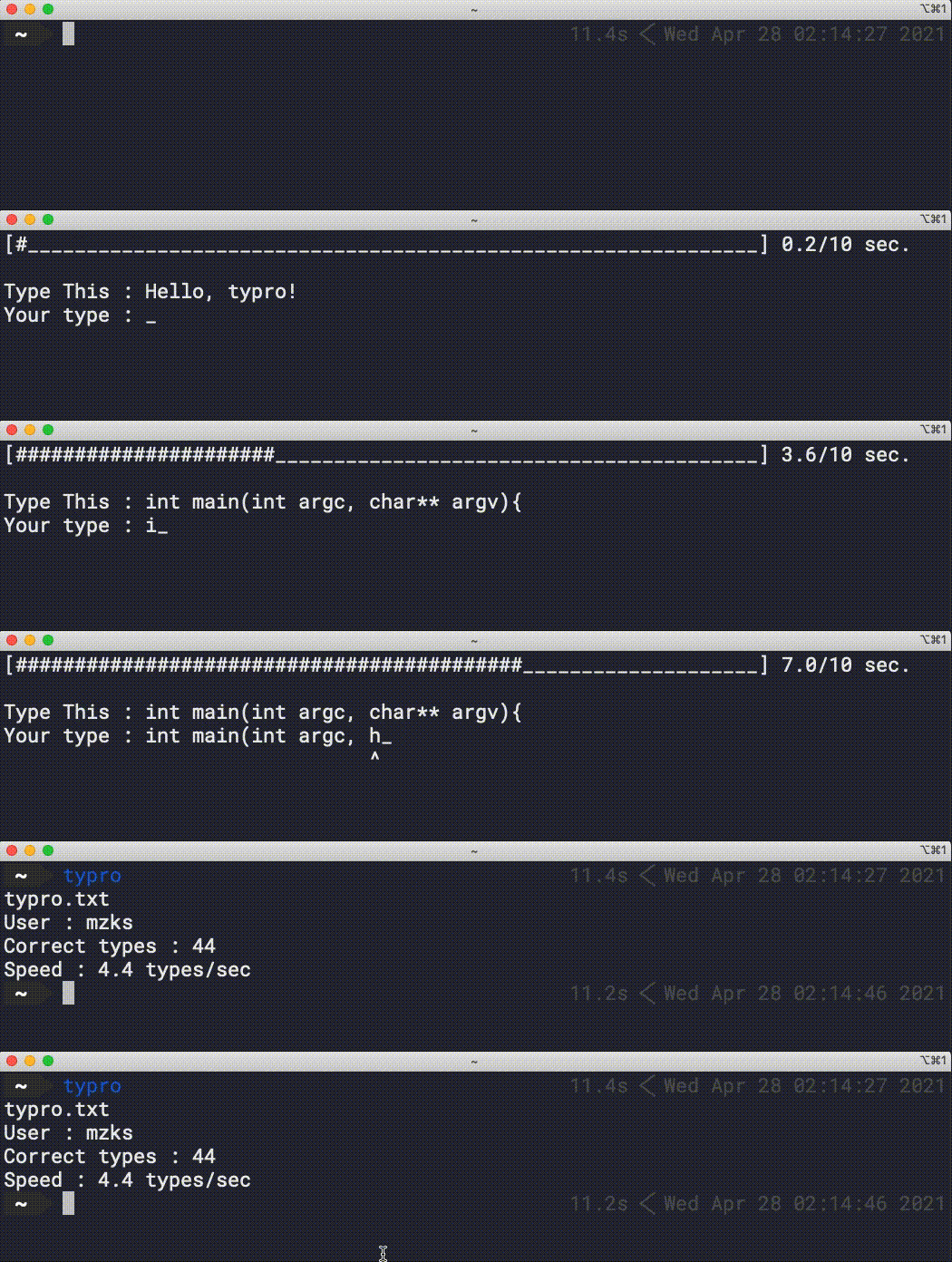
Features
- Working on console
- Training with user's file (code, document, etc.)
- Storing results and providing DataFrame of pandas
Install and Usage
pip install typro
Execute typro on your console.
The display of the game like
[#################                  ] 30.0/60 sec.
Type This : import numpy as np
Your type : import nm_
                    ^
The top line shows the time bar.
Type like the "Type This" line.
If you mistype, the game points that with ^.
You have to remove the wrong character with Backspace.
When you fill the line correctrly, you can go the next line with Enter
Press Esc to quit.
Available options
optional arguments:
  -h, --help            show this help message and exit
  -t TIME, --time TIME  Practice time (sec.)
  -p PATH, --path PATH  Path to training file
  -f FILE, --file FILE  Training filename
  -w URL, --www URL     Training file URL
  -l LOGFILE, --logfile LOGFILE Log filename
  -m LOGPATH, --logpath LOGPATH Path to log file
  -u USER, --user USER  User name
  -q, --quiet           Run without writing log
  -o, --order           Not shuffle the training data
  -r, --ranking         Show ranking
  -s, --summary         Show user summary
  -d DATE, --date DATE  Date to collect data
Environment variables are used when you don't specify the options.
| Environment varibale | option |
|---|---|
TYPRO_FILE |
-f |
TYPRO_PATH |
-l |
TYPRO_LOG_PATH |
-m |
Available training files
| Name | description |
|---|---|
| default | C++ simple code (used as default) |
| cmd | Basic unix command and descriptions |
| pyplot | Simple plotting with python |
| root | ROOT (cern) hist examples |
| fortune | Random short fortune |
The -f option switch the file like typro -f cmd.
If you want to use your own file, (1) use option (-p and -f) or (2) use environment variables.
Examples
training with ROOT code without shuffle
typro -f root -o
training with your code
typro -p /path/to/your/file -f your_file
training with file on www
typro -w https://raw.githubusercontent.com/mzks/typro/main/typro/cli.py
The online file will be cached.
show your weak keys
typro -s
show user ranking in the privious 3 days
typro -r -d 3
I'm welcome for your contributions!
For example,
- Add training file to
data. - Enhance training modes (infinitity mode, etc.)
Please freely submit your contribution for GitHub pull request.
Analysis
As a default, the typing game generates output log in LOGFILE (default: typro_results.csv)
The format is csv, pandas friendlly style.
The numeric indexes mean the ASCII code of key which you mistouched.
Users can obtain DataFrame as
import typro
df = typro.get_df()
Simple drawing is plt.plot(df.index, df['speed'])
1 maintainer

Release files for typro 0.2.5
For a detailed explanation of source distributions (sdists) and built distributions (wheels), please see the package formats documentation.
Built distribution (wheel)
| File | Interpreter | ABI | Platform | Reset |
|---|---|---|---|---|
| typro-0.2.5-py3-none-any.whl | Python 3 | none | any | Details |
Release files / typro-0.2.5-py3-none-any.whl
| Download URL | typro-0.2.5-py3-none-any.whl |
|---|---|
| Size | 47.3 kB |
| Tags | Python 3 |
|
SHA-256 checksum How to use checksums |
2460fceaf5b3524a9e022e5db0876fd05877eeaf56182eca3467135f0697eb4e
|
|
BLAKE2b-256 checksum How to use checksums |
59ca5f2e927b32e94bcb6320735cfda3c84183924d0848f2a461cc3c0cf36700
|
| Upload date | |
|
Uploaded using Trusted Publishing? What is trusted publishing? |
No |
| Uploaded via |
twine/4.0.1 CPython/3.8.13
|














