
UltraSync Python Tool
This tool is designed to allow 'API' access through a CLI wrapper to several types of alarm system IP modules that utilise the UltraSync+ mobile app. These modules are generally found in or can be added to systems produced by the below vendors:
- Hills Ltd (Business defunct in 2023, now operating as Aritech (a division of Kidde Global Solutions))
- United Technologies Corporation (Alarm division defunct in 2021)
The tool can be leveraged by other scripts/integrations such as HA UltraSync for integration into Home Automation systems.
Compatibility
The tool is written to be compatible with the Hills/Aritech NX-595E ComNav, Interlogix xGen/xGen8 (such as NXG-8-Z-BO and Caddx NXG64IP), and ZeroWire UltraSync-based alarm solutions. It is possible that more systems are supported that utilise the UltraSync+ app and share similar code structure, however any not explicitly listed here are untested by the code author/contributors.
Note: ComNav modules runinng firmware version P004000-12 and above disable access to programming menus for cybersecurity reasons. To enable programming menus permanently, turn on Feature Location 19 Option 6. With programming menus disabled, users will only be allowed access through remote/online login (over the internet). Compatibility for remote login cannot be added to this tool due to there being no public API available, and no official vendor support for this method outside of the UltraSync+ mobile app. Later model Aritech Reliance XR series alarm systems include a built-in IP module that allows local network access as it is not affected by the same vulnerabilities.
ComNav Product Security Advisory
As the original manufacturer(s) are mostly defunct, new software development is generally not expected at the vendor level. Newer Aritech ATS alarm systems utilise the Advisor Advanced Pro mobile app instead of UltraSync+ and are unlikely to be supported by this tool.
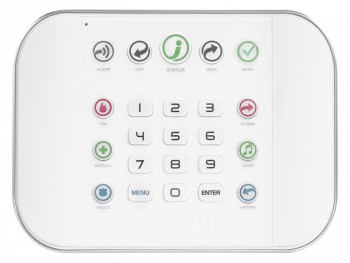
UltraSync Hub






How Does It Work?
-
First you need to install it; this part is easy:
# Install ultrasync onto your system
pip install ultrasync
-
Create a configuration file that identifies:
- The hostname or IP address of the alarm system on your local network.
- Your alarm system login User ID (case-sensitive)
- Your alarm system login pin.
Note: You can generally only be logged into the alarm system with the same user once; a subsequent login with the same user logs out the other. Since this tool actively polls and maintains a login session to your system, it can prevent you from being able to log into at the same time elsewhere (via it's website). It is strongly recommended that you create a second user account on your system dedicated to just this service.
# An example of what would be found in your configuration file:
# Use hashtags/pound symbols (#) to optionally add comments
# Syntax is simply <key>: <value>
#
# For local network login you must specify an ip/hostname, user, and pin
#
host: 192.168.0.30
user: My Username (case-sensitive)
pin: 1234
-
Use the --scene (-s) to set your security system's alarm scene. The possible options are:
disarm,away,stay,fire,medical, andpanic. The latter 3 are only available for NX-595E currently.# By default if no --config= (-c) is specified, one will be automatically # loaded from the following location (if present): # ~/.ultrasync # ~/.config/ultrasync # Windows users can store their default configuration files here: # %APPDATA%/UltraSync/config # %LOCALAPPDATA%/UltraSync/config # Disarm your security system ultrasync --scene disarm # Arm your security system and activate all of your sensors when setting the # away mode macro ultrasync --scene away # Arm your security system and only activate your perimeter sensors: ultrasync --scene stay # Trigger the fire alarm (ComNav Only): ultrasync --scene fire # Trigger the medical alarm (ComNav Only): ultrasync --scene medical # Trigger the panic alarm (ComNav Only): ultrasync --scene panic
What Else Can It Do?
-
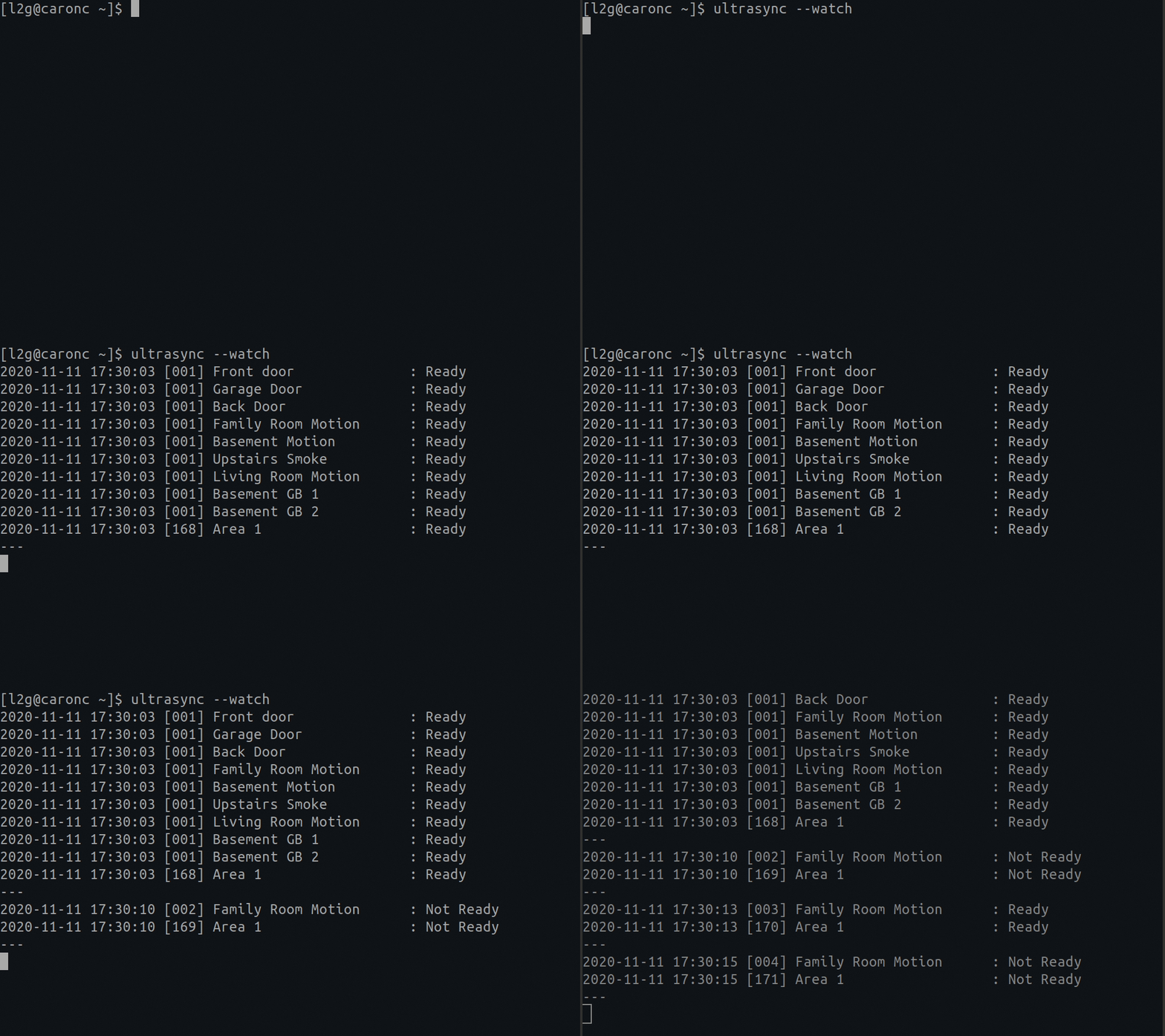
You can put up a live monitor of your device by typing the following:
# A live monitoring of your home security system:
ultrasync --watch
-
You can generate a snapshot (in JSON format) that greatly details everything taking place through your security home setup. It provides MUCH greater detail than the
--watchwhich allows it to also be integrated with Home Assistant.# Print a JSON formatted snapshot of all home security details ultrasync --details
Each area includes an
arm_stateofaway,stayordisarm. Use it when you only want to know whether the alarm is armed. Thestatusof an area is what the keypad would show, so it can also be something likeBurglar Alarm,Exit Delay 1orNot Ready.# Print the arm state of the first area (requires jq) ultrasync --details | jq -r '.areas[0].arm_state'
--detailsonly writes JSON to the screen (messages go to stderr), and exits with an error code if the panel could not be read. -
You can perform a dump of all of the web based files (that I've found to be useful so far) to disk. This makes troubleshooting much easier.
# Extracts information from your system that can be
# incredibly useful in debugging and/or adding enhancements
# later on:
ultrasync --debug-dump
The debug content gets written to a zip file (residing in the same folder you ran this command from) in the form of:
YYYYmmddHHMMSS.ultrasync-dump.zip.
Reverse Proxy
If you've exposed your panel to the internet, you can access it by setting your host to the full URL to it (instead of just the hosthame/ip). For example:
# A sample UltraSync configuration that requires you to pass through
# a proxy in order to get to your destination:
host: https://your.security.panel/
user: My Username
pin: 1234
If you've also protected your panel behind an additional user/pass combo using Basic Auth at the reverse proxy level, you can pass through it like so:
# A sample ultrasync configuration that requires you to pass through
# a proxy expecting authentication in order to get to your destination:
host: https://user:pass@your.security.panel/
user: My Username
pin: 1234
# You can also optionally turn off the secure hostname verification
# by using the verify switch.  But default this is set to yes if not
# specified:
verify: no
Global Variables
You can also (optionally) set the following global variables to provide the equivalent of what the configuration file could have. If a configuration file is also loaded, it's settings will always prevail. If an entry is missing, then the environment variable is used instead (if it's defined):
| Global Variable | Description |
|---|---|
| ULTRASYNC_PIN | Provides the pin variable to the library |
| ULTRASYNC_USER | Provides the user variable to the library |
| ULTRASYNC_HOST | Provides the host variable to the library |
| ULTRASYNC_SSL_VERIFY | Provides the verify variable to the library (optional, defaults to yes if not set) |
Disclaimer
This tool was created through reverse engineering and has been expanded through crowdsourced data. All of this code was generated through trial and error since there is no official documentation available that explains the registers. If you can help out by filling in some of the blanks throughout the code base, I would be greatly appreciative of it! Alternatively buying me a coffee greatly inspires me to continue improving the application.
1 maintainer

Metadata
1 maintainer
Release files for ultrasync 1.0.5
For a detailed explanation of source distributions (sdists) and built distributions (wheels), please see the package formats documentation.
Source distribution (sdist)
| File | Size | Uploaded | Provenance | Actions |
|---|---|---|---|---|
| ultrasync-1.0.5.tar.gz | 99.2 kB | Without provenance | Details for ultrasync-1.0.5.tar.gz |
Built distribution (wheel)
| File | Interpreter | ABI | Platform | Actions Reset |
|---|---|---|---|---|
| ultrasync-1.0.5-py3-none-any.whl | Python 3 | none | any | Details for ultrasync-1.0.5-py3-none-any.whl |
Total release size: 132.9 kB
Release files / ultrasync-1.0.5.tar.gz
| Download URL | ultrasync-1.0.5.tar.gz |
|---|---|
| Size | 99.2 kB |
| Tags | Source |
|
SHA-256 checksum How to use checksums |
0647ac968ffc005bea1b2d94ce3ffa17fbc65642b47628ce1d6fb21951898eb2
|
|
BLAKE2b-256 checksum How to use checksums |
4863b30607b717caa994f470846020a965a084a048af9e52fc35d0f2fde82752
|
| Upload date | |
|
Uploaded using Trusted Publishing? What is trusted publishing? |
No |
| Uploaded via |
twine/6.2.0 CPython/3.14.7
|
Release files / ultrasync-1.0.5-py3-none-any.whl
| Download URL | ultrasync-1.0.5-py3-none-any.whl |
|---|---|
| Size | 33.7 kB |
| Tags | Python 3 |
|
SHA-256 checksum How to use checksums |
627fa8beb839512f469877965e47ef82335e1fcc65a1d9f4aba27e5788178395
|
|
BLAKE2b-256 checksum How to use checksums |
19b045b3ef23322e08eb381933230416c32315e3ad9c2fddbff8963ec3cd906a
|
| Upload date | |
|
Uploaded using Trusted Publishing? What is trusted publishing? |
No |
| Uploaded via |
twine/6.2.0 CPython/3.14.7
|
Security for ultrasync 1.0.5
Provenance
Provenance describes where a file came from. On PyPI, provenance is shared via attestations, which provide a verifiable record of the build or publishing details. View details, limitations and caveats.
No provenance found
None of the files in this release were uploaded with provenance metadata.
A note on package security
PyPI is a repository for distributing packages, not a service for auditing them. While third-party security researchers and our staff do their best to detect and remove malicious packages, PyPI cannot guarantee the quality, security or suitability of any given package.
To learn more about protecting yourself from malicious actors, visit our package security documentation.














