

Urlbox Python Library



The Urlbox Python library provides easy access to the Urlbox website screenshot API from your Python application.
Now there's no need to muck around with http clients, etc...
Just initialise the UrlboxClient and make a screenshot of a URL in seconds.
Documentation
See the Urlbox API Docs.
Requirements
Python 3.x
Installation
pip install urlbox
Usage
First, grab your Urlbox API key* found in your Urlbox Dashboard, to initialise the UrlboxClient instance.
* and grab your API secret - if you want to make authenticated requests. Requests will be automatically authenticated when you supply YOUR_API_SECRET. So you really should.
Quick Start: Generate a Screenshot URL
For use directly in HTML templates, the browser etc.
In your python_code.py:
from urlbox import UrlboxClient

# Initialise the UrlboxClient (YOUR_API_SECRET is optional but recommended)
urlbox_client = UrlboxClient(api_key="YOUR_API_KEY", api_secret="YOUR_API_SECRET")

screenshot_url = urlbox_client.generate_url({"url": "http://example.com/"})
In your html template:
<img src="{{ screenshot_url }}"/>
Quick Start: Quickly Get a Screenshot of a URL
from urlbox import UrlboxClient

# Initialise the UrlboxClient (YOUR_API_SECRET is optional but recommended)
urlbox_client = UrlboxClient(api_key="YOUR_API_KEY", api_secret="YOUR_API_SECRET")

# Make a request to the UrlBox API
response = urlbox_client.get({"url": "http://example.com/"})

response.content # Your screenshot 🎉 as binary image data

# save screenshot image to screenshot.png:
with open("screenshot.png", "wb") as f:
    f.write(response.content)
All UrlboxClient methods require at least one argument: a dictionary that must include either a "url", or "html" entry, which the Urlbox API will render as a screenshot.
Additional options in the dictionary include:
"format" can be either: png, jpg or jpeg, avif, webp ,pdf, svg, html (defaults to png if not provided).
"full_page", "width", and many more. See all available options here: https://urlbox.io/docs/options
eg:
{"url": "http://example.com/", "full_page": True, "width": 300}
A More Extensive Get Request
from urlbox import UrlboxClient

urlbox_client = UrlboxClient(api_key="YOUR_API_KEY", api_secret="YOUR_API_SECRET")

options = {
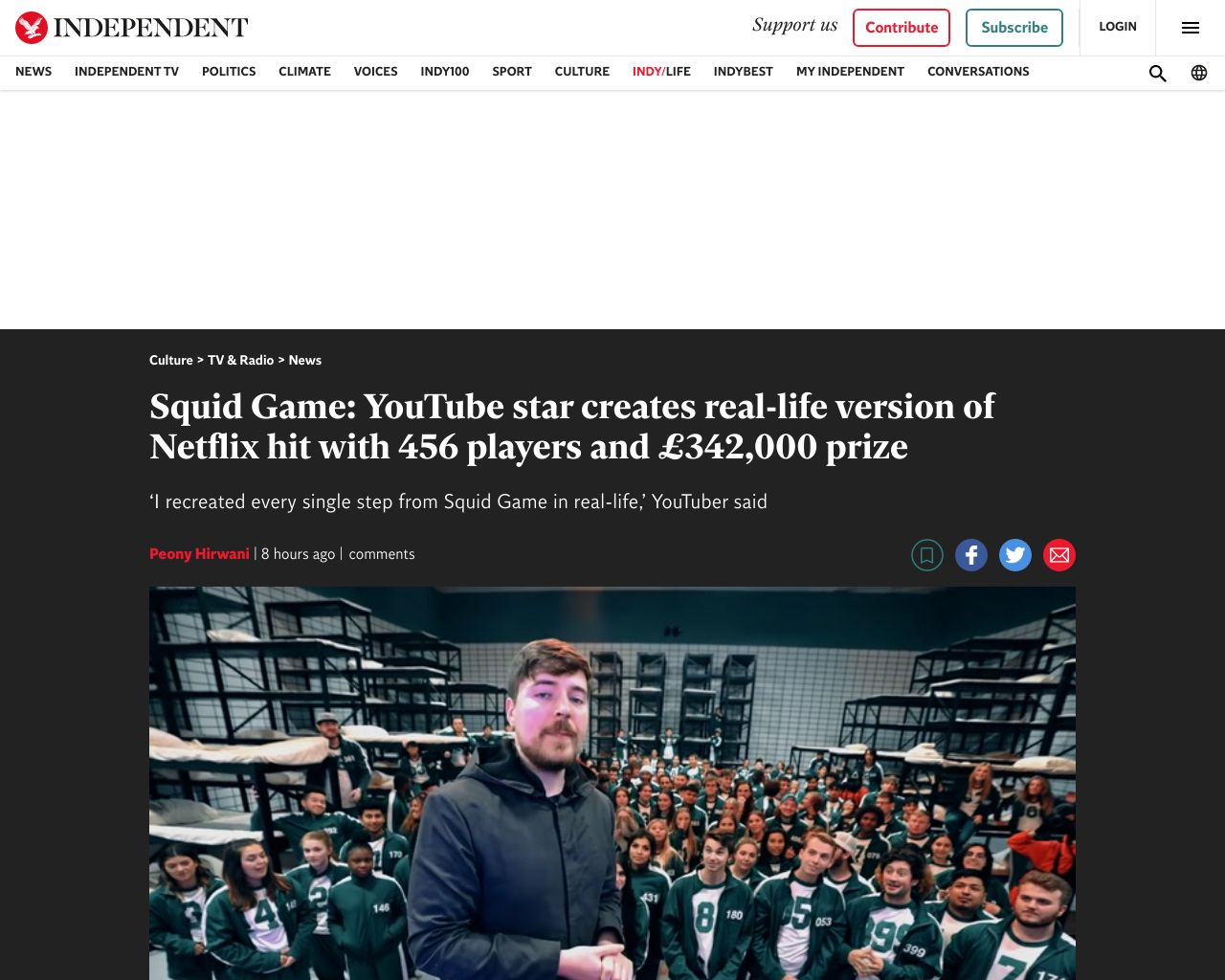
	"url": "https://www.independent.co.uk/arts-entertainment/tv/news/squid-game-real-youtube-mrbeast-b1964007.html",
	"format": "jpg",
	"full_page": False,
	"hide_cookie_banners": True,
	"block_ads": True
}

response = urlbox_client.get(options)

# The Urlbox API will return binary data as the response with the
# Content-Type header set to the relevant mime-type for the format requested.
# For example, if you requested jpg format, the Content-Type will be image/jpeg
# and response body will be the actual jpg binary data.

response.content # Your screenshot. Which looks like 👇
Other Methods/Requests
The UrlboxClient has the following public methods:
get(options)
(as detailed in the above examples) Makes a GET request to the Urlbox API to create a screenshot for the url or html passed in the options dictionary.
Example request:
response = urlbox_client.get({"url": "http://example.com/"})
response.content # Your screenshot 🎉
delete(options)
Removes a previously created screenshot from the cache.
Example request:
urlbox_client.delete({"url": "http://example.com/"})
head(options)
If you just want to get the response status/headers without pulling down the full response body.
Example request:
response = urlbox_client.head({"url": "http://example.com/"})

print(str(response.headers))
Example response headers:
{
   "Date":"Fri, 26 Nov 2021 16:22:56 GMT",
   "Content-Type":"image/png",
   "Content-Length":"1268491",
   "Connection":"keep-alive",
   "Cache-Control":"public, max-age=2592000",
   "Expires":"Sun, 26 Dec 2021 16:16:09 GMT",
   "Last-Modified":"Fri, 26 Nov 2021 16:14:56 GMT",
   "X-Renders-Used":"60",
   "X-Renders-Reset":"Sun Dec 05 2021 09:58:00 GMT+0000 (Coordinated Universal Time)",
   "X-Renders-Allowed":"22000"
}
You can use these headers to check how many renders you have used or your current rate limiting status, etc.
post(options)
Uses Urlbox's webhook functionality to initialise a render of a screenshot. You will need to provide a "webhook_url" entry in the options which Urlbox will post back to when the rendering of the screenshot is complete.
Example request:
urlbox_client.post({"url": "http://twitter.com/", "webhook_url": "http://yoursite.com/webhook"})
Give it a couple of seconds, and you should receive, posted to the webhook_url specified in your request above, a post request with a JSON body similar to:
{
  "event": "render.succeeded",
  "renderId": "2cf5ffe2-7736-4d41-8c30-f13e16d35248",
  "result": {
    "renderUrl": "https://renders.urlbox.io/urlbox1/renders/61431b47b8538a00086c29dd/2021/11/25/e2dcec18-8353-435c-ba17-b549c849eec5.png"
  },
  "meta": {
    "startTime": "2021-11-25T16:32:32.453Z",
    "endTime": "2021-11-25T16:32:38.719Z"
  }
}
You can then parse the renderUrl value to access the your screenshot.
Secure Webhook Posts
The Urlbox API post to your webhook endpoint will include a header that you can use to ensure this is a genuine request from the Urlbox API, and not a malicious actor.
Using your http client of choice, access the x-urlbox-signature header. Its value will be something similar to:
t=1637857959,sha256=1d721f99aa03122d494f8b49f201fdf806efaec609c614f0a0ec7b394f1d403a
Use the webhook_validator helper function that is included, for no extra charge, in the urlbox package to verify that the webhook post is indeed a genuine request from the Urlbox API. Like so:
from urlbox import webhook_validator

# extracted from the x-urlbox-signature header
header_signature = "t=1637857959,sha256=1d721f..."

# the raw JSON payload from the webhook request body
payload = {
	"event": "render.succeeded",
	"renderId": "794383cd-b09e-4aef-a12b-fadf8aad9d63",
	"result": {
		"renderUrl": "https://renders.urlbox.io/urlbox1/renders/foo.png"
	},
	"meta": {
		"startTime": "2021-11-24T16:49:48.307Z",
		"endTime": "2021-11-24T16:49:53.659Z",
	},
}

# Your webhook secret - coming soon.
# NB: This is NOT your api_secret, that's different.
webhook_secret = "YOUR_WEBHOOK_SECRET"

# This will either return true (if the signature is genuinely from Urlbox)
#   or it will raise a InvalidHeaderSignatureError (if the signature is not from Urlbox)
webhook_validator.call(header_signature, payload, webhook_secret)
Feedback
Feel free to contact us if you spot a bug or have any suggestions at: support[at]urlbox.io.
2 maintainers


Metadata
2 maintainers
Release files for urlbox 1.0.6
For a detailed explanation of source distributions (sdists) and built distributions (wheels), please see the package formats documentation.
Source distribution (sdist)
| File | Size | Uploaded | Provenance | Actions |
|---|---|---|---|---|
| urlbox-1.0.6.tar.gz | 13.0 kB | Without provenance | Details for urlbox-1.0.6.tar.gz |
Built distribution (wheel)
| File | Interpreter | ABI | Platform | Actions Reset |
|---|---|---|---|---|
| urlbox-1.0.6-py3-none-any.whl | Python 3 | none | any | Details for urlbox-1.0.6-py3-none-any.whl |
Total release size: 25.8 kB
Release files / urlbox-1.0.6.tar.gz
| Download URL | urlbox-1.0.6.tar.gz |
|---|---|
| Size | 13.0 kB |
| Tags | Source |
|
SHA-256 checksum How to use checksums |
63288161932156a79d2504b6fcd472222a9432de19e90592fc92b920329f3ff6
|
|
BLAKE2b-256 checksum How to use checksums |
663e3dec49443e58a91efe8220e239c9593f0593cc884484c300a8f6ce47f879
|
| Upload date | |
|
Uploaded using Trusted Publishing? What is trusted publishing? |
No |
| Uploaded via |
twine/3.7.1 importlib_metadata/4.8.1 pkginfo/1.8.1 requests/2.26.0 requests-toolbelt/0.9.1 tqdm/4.62.3 CPython/3.7.11
|
Release files / urlbox-1.0.6-py3-none-any.whl
| Download URL | urlbox-1.0.6-py3-none-any.whl |
|---|---|
| Size | 12.8 kB |
| Tags | Python 3 |
|
SHA-256 checksum How to use checksums |
f5d7497a96356417718852e9e05d6687cdd62a50ace7f42bd7c0befdc63a9b3f
|
|
BLAKE2b-256 checksum How to use checksums |
1e39cd69e5b0ecb3b76d63b80d2b29584f80c73236a758680d7afe753185918c
|
| Upload date | |
|
Uploaded using Trusted Publishing? What is trusted publishing? |
No |
| Uploaded via |
twine/3.7.1 importlib_metadata/4.8.1 pkginfo/1.8.1 requests/2.26.0 requests-toolbelt/0.9.1 tqdm/4.62.3 CPython/3.7.11
|
Security for urlbox 1.0.6
Provenance
Provenance describes where a file came from. On PyPI, provenance is shared via attestations, which provide a verifiable record of the build or publishing details. View details, limitations and caveats.
No provenance found
None of the files in this release were uploaded with provenance metadata.
A note on package security
PyPI is a repository for distributing packages, not a service for auditing them. While third-party security researchers and our staff do their best to detect and remove malicious packages, PyPI cannot guarantee the quality, security or suitability of any given package.
To learn more about protecting yourself from malicious actors, visit our package security documentation.














