
uuRest library and its two main functions "call" and "fetch" are designed to allow users to rapidly scrape/automate web applications designed and developed by Unicorn Systems (Unicorn.com).

Project description
uurest
Library that allows developers to easily integrate their application(s) with Unicorn Systems solutions and products using REST API.
!!!!! DEPRECATED. DO NOT USE THIS LIBRARY !!!!!
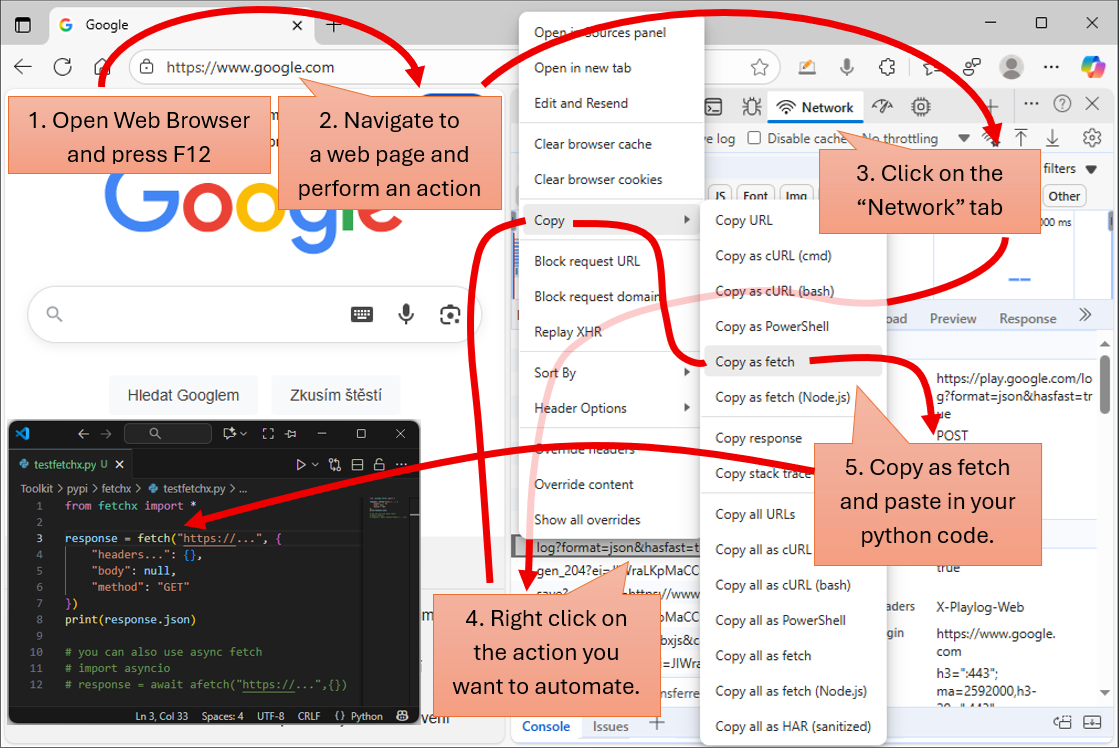
How To Use the Library
from uurest import *

# fetch function behavior can be setup globally or by every "fetch" call
fetch_global_setup(raise_exception_on_error=False, timeout=120, verbose=True)

response = fetch("https://www.websitewhichdoesnotexist.net") # fetch non existing web page
# response.json = {"__error__": "Unknown response type received when calling \"https://www.websitewhichdoesnotexist.net\" ...
response = fetch("http://devserver.com/tsMetadataTransfer/get") # fetch data without authorization / without sending a token
# response.json = {"__error__": "Http/Https error code \"403\" occured. Cannot process text data ...
response = fetch("https://upload.wikimedia.org/wikipedia/commons/c/cd/Google_Logo_%281998%29.png") # fetch binary file
# response.json = {"__base64__": "iVBORw0KGgoAAAANSUhEUgAAC0AAAAMWEAYAAAAy59uuAAAABGdBTUEAALGPC/xhBQAAACBjSFJNAAB6JgAAgIQ ...
response = fetch("https://upload.wikimedia.org/wikipedia/commons/2/2f/Google_2015_logo.svg") # fetch svg, html, css, js,  ...
# response.json = {"__text__": "<?xml version=\"1.0\" encoding=\"UTF-8\" standalone=\"no\"?>\n<svg xmlns=\"http://www.w3  ...

# open web browser (Chrome, Edge). On the keyboard press F12 to open "DevTools". Click on the "Network" tab in the menu
# Select the request in the list. Right click on the selected item. In the popup menu click on the "Copy" -> "Copy as fetch"
# Paste the copied command from the clipboard directly into the source code. It should look like the code below.
response = fetch("https://jsonplaceholder.typicode.com/todos/1", {
    "headers": {
        "accept": "*/*",
    },
    "referrer": "https://jsonplaceholder.typicode.com/",
    "body": null,
    "method": "GET"
})
# response.json = {"userId": 1, "id": 1, "title": "delectus aut autem", "completed": false}
You can play with the response using following inbuild methods
from uurest import *

response = fetch("https://jsonplaceholder.typicode.com/todos/1", {
    "headers": {
        "accept": "*/*",
    },
    "referrer": "https://jsonplaceholder.typicode.com/",
    "body": null,
    "method": "GET"
})
# prints formatted json
print(response) # {"userId": 1, "id": 1, "title": "delectus aut autem", "completed": false}
print(response.json["title"])  # delectus aut autem
json_object = response.json.parse() # transforms dictionary into the object
if json_object.completed:
    print("Successfully competed")
else:
    print("Not completed")
print(str(response.http_status_code))
print(response.content_type)
response.save_json("./test.json")
response.save_raw_content("./raw_content.raw")
Check out: https://www.youtube.com/
Release history Release notifications | RSS feed


Download files
Download the file for your platform. If you're not sure which to choose, learn more about installing packages.
Source Distribution
Built Distribution
Filter files by name, interpreter, ABI, and platform.
If you're not sure about the file name format, learn more about wheel file names.
Copy a direct link to the current filters
File details
Details for the file uurest-1.0.25.tar.gz.
File metadata
- Download URL: uurest-1.0.25.tar.gz
- Upload date:
- Size: 41.6 kB
- Tags: Source
- Uploaded using Trusted Publishing? No
- Uploaded via: twine/6.1.0 CPython/3.8.1
File hashes
| Algorithm | Hash digest | |
|---|---|---|
| SHA256 |
552a3c1e835f3570962e14e30ae9e6e93c65ed5858bb43b6be5b25a675b40351
|
|
| MD5 |
ed9b3888be24d2dc0947418af45070e8
|
|
| BLAKE2b-256 |
1e317309021fb267ca4605d4f4eb03ee2a9cca84c3191185a7665b36297ca4b6
|
File details
Details for the file uurest-1.0.25-py3-none-any.whl.
File metadata
- Download URL: uurest-1.0.25-py3-none-any.whl
- Upload date:
- Size: 42.8 kB
- Tags: Python 3
- Uploaded using Trusted Publishing? No
- Uploaded via: twine/6.1.0 CPython/3.8.1
File hashes
| Algorithm | Hash digest | |
|---|---|---|
| SHA256 |
2a591dbab7993d3bffea6442fbcbca5b3deb1ee3f5ce01e78059e6fb5c56592a
|
|
| MD5 |
46bd89d6094755acf333c0fac08d3a8a
|
|
| BLAKE2b-256 |
16348a44e5d7462106e162342961ef7ba5d004e94fa29e296aea0669476919b7
|






