
uwsgi-sloth
uwsgi-sloth is a realtime uwsgi log analyer, designed for helping optimization of uwsgi app’s performance.
It can both generates a static report file or analyze your log file in realtime(demo).
Image preview:
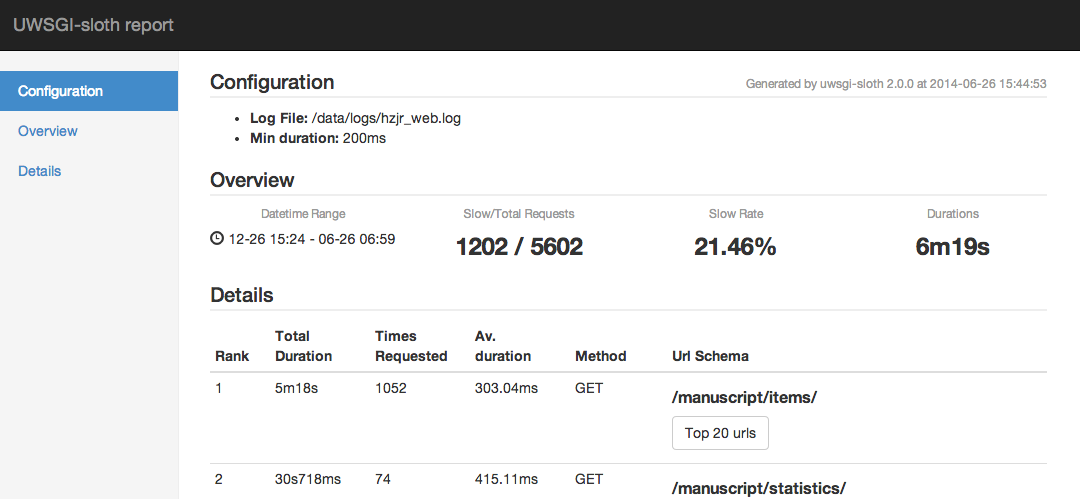
You should consider using uwsgi-sloth if your website are running under uwsgi and have no conception of how slow/fast your website is.
QuickStart
Install
uwsgi-sloth is written in python, to install it, simply use pip:
# Install a stable version
$ pip install uwsgi-sloth

# Install the latest version from github
$ pip install -e git+https://github.com/piglei/uwsgi-sloth#egg=uwsgi-sloth
uwsgi-sloth now only supports Python3.5 and above, for Python2 users, please install uwsgi-sloth<3.0.0 instead.
Static report
After installation, you can analyzing your uwsgi log using uwsgi-sloth analyze command.
# Generate a report
$ uwsgi-sloth analyze -f uwsgi_access.log --output=report.html

# Specify threshold for request process time
$ uwsgi-sloth analyze -f uwsgi_access.log --output=report.html --min-msecs=400
Check more: uwsgi-sloth analyze
Realtime reports
We do support a more powerful feature: realtime uwsgi log report. It’s a little more complicated to configure.
First, create a default config file using uwsgi-sloth echo_conf:
uwsgi-sloth echo_conf > /data/uwsgi_sloth/myblog.confThe default config file are like this:
# A sample uwsgi-sloth config file

# uwsgi log path, only support default log format
uwsgi_log_path = '/your_uwsgi_logs/web.log'

# All HTML files and data files will store here, must have read/write permissions
data_dir = '/you_data/uwsgi-sloth/'

# Minimal msecs for detect slow requests, default to 200
# min_msecs = 200

# Domain for your website, best given
domain = 'http://www.yourwebsite.com/'

# Custom url regular expressions file
# url_file = '/your_custom_url_file_path'
After modified uwsgi_log_path and data_dir, your can start uwsgi-sloth worker via uwsgi-sloth start -c /data/uwsgi_sloth/myblog.conf command, if everything goes fine, you will see some messages like this:
[2014-06-26 01:32:56,851] uwsgi_sloth INFO: Start from last savepoint, last_log_datetime: 2014-06-26 09:32:04
[2014-06-26 01:32:58,859] uwsgi_sloth INFO: Rendering HTML file /data/uwsgi_sloth/myblog/html/latest_5mins.html...
... ...
This may take several seconds if your log file are big.
Demonize
uwsgi-sloth does not support built-in deamonize option, so you may need tools like supervisor to manage this process.
Serve your reports
Now, HTML files have been generated, we should configure our webserver so we can visit it, this configuration is for nginx:
$ cat /etc/nginx/sites-enabled/sloth_myblog.conf
server {

    listen   80;
    server_name  uwsgi-sloth.zlovezl.cn;

    location / {
        root /data/uwsgi_sloth/myblog/html/;
        index "latest_5mins.html";
    }
}
After reloading your nginx config, open your browser then you will see the fancy reports waiting for you.
Commands
uwsgi-sloth analyze
Available arguments
usage: uwsgi-sloth analyze [-h] -f FILEPATH [--output OUTPUT]
                           [--min-msecs MIN_MSECS] [--domain DOMAIN]
                           [--url-file URL_FILE]

optional arguments:
  -h, --help            show this help message and exit
  -f FILEPATH, --filepath FILEPATH
                        Path of uwsgi log file
  --output OUTPUT       HTML report file path
  --min-msecs MIN_MSECS
                        Request serve time lower than this value will not be
                        counted, default: 200
  --domain DOMAIN       Make url in report become a hyper-link by settings a
                        domain
  --url-file URL_FILE   Customized url rules in regular expression
  --limit-url-groups LIMIT_URL_GROUPS
                        Number of url groups considered, default: 200
  --limit-per-url-group LIMIT_PER_URL_GROUP
                        Number of urls per group considered, default: 20
Using a customized url rules
First, get a list of url regular expressions.
$ cat url_rules
# A valid url_rules file are seperated regular expressions
^club/(?P<place>\w+)/(?P<year>\d+)/(?P<issue>\d+)/signup/$
^club/signup/success/$
^club/checkin/success/$
Using –url-file to specify this url_rules
$ uwsgi-sloth analyze -f uwsgi_access.log --output=report.html --url-file=url_rules
uwsgi-sloth echo_conf
Print a default config file
uwsgi-sloth start
Start uwsgi-sloth worker to generate realtime report
$ uwsgi-sloth start -h
usage: uwsgi-sloth start [-h] -c CONFIG

optional arguments:
  -h, --help            show this help message and exit
  -c CONFIG, --config CONFIG
                        uwsgi-sloth config file, use "uwsgi-sloth echo_conf"
                        for a default one
Notes
Only default uwsgi log format is supported at present.
Tested under python 2.6/2.7
By default, uwsgi-sloth will classify url_path by replacing sequential digits part by ‘(d+)’: /users/3074/ -> /users/(\d+)
Any feedbacks are greatly welcomed!
1 maintainer

Metadata
1 maintainer
Release files for uwsgi-sloth 3.0.2
For a detailed explanation of source distributions (sdists) and built distributions (wheels), please see the package formats documentation.
Source distribution (sdist)
| File | Size | Uploaded | Provenance | Actions |
|---|---|---|---|---|
| uwsgi-sloth-3.0.2.tar.gz | 21.3 kB | Without provenance | Details for uwsgi-sloth-3.0.2.tar.gz |
Release files / uwsgi-sloth-3.0.2.tar.gz
| Download URL | uwsgi-sloth-3.0.2.tar.gz |
|---|---|
| Size | 21.3 kB |
| Tags | Source |
|
SHA-256 checksum How to use checksums |
8ac36bca138238ce1ae8a93eabb444e746a237ea364c874d3e2e185e93e33b3e
|
|
BLAKE2b-256 checksum How to use checksums |
8315e16bed6bd7dbb063c5634c73a7f20382cc44f7c66833fed2e2a910738a8b
|
| Upload date | |
|
Uploaded using Trusted Publishing? What is trusted publishing? |
No |
| Uploaded via |
twine/1.12.1 pkginfo/1.4.2 requests/2.18.1 setuptools/40.6.2 requests-toolbelt/0.8.0 tqdm/4.28.1 CPython/3.7.1
|
Security for uwsgi-sloth 3.0.2
Provenance
Provenance describes where a file came from. On PyPI, provenance is shared via attestations, which provide a verifiable record of the build or publishing details. View details, limitations and caveats.
No provenance found
None of the files in this release were uploaded with provenance metadata.
A note on package security
PyPI is a repository for distributing packages, not a service for auditing them. While third-party security researchers and our staff do their best to detect and remove malicious packages, PyPI cannot guarantee the quality, security or suitability of any given package.
To learn more about protecting yourself from malicious actors, visit our package security documentation.














