
validclust
Validate clustering results



Motivation
Clustering algorithms often require that the analyst specify the number of clusters that exist in the data, a parameter commonly known as k. One approach to determining an appropriate value for k is to cluster the data using a range of values for k, then evaluate the quality of the resulting clusterings using a cluster validity index (CVI). The value of k that results in the best partitioning of the data according to the CVI is then chosen. validclust handles this process for the analyst, making it very easy to quickly determine an optimal value for k.
Installation
You can get the stable version from PyPI:
pip install validclust
Or the development version from GitHub:
pip install git+https://github.com/crew102/validclust.git
Basic usage
1. Load libraries.
import matplotlib.pyplot as plt
from sklearn.datasets import make_blobs
from validclust import ValidClust
2. Create some synthetic data. The data will be clustered around 4 centers.
data, _ = make_blobs(n_samples=500, centers=4, n_features=5, random_state=0)
3. Use ValidClust to determine the optimal number of clusters. The code below will partition the data into 2-7 clusters using two different clustering algorithms, then calculate various CVIs across the results.
vclust = ValidClust(
    k=list(range(2, 8)),
    methods=['hierarchical', 'kmeans']
)
cvi_vals = vclust.fit_predict(data)
print(cvi_vals)
#>                                    2            3            4            5  \
#> method       index
#> hierarchical silhouette     0.645563     0.633970     0.747064     0.583724
#>              calinski    1007.397799  1399.552836  3611.526187  2832.925655
#>              davies         0.446861     0.567859     0.361996     1.025296
#>              dunn           0.727255     0.475745     0.711415     0.109312
#> kmeans       silhouette     0.645563     0.633970     0.747064     0.602562
#>              calinski    1007.397799  1399.552836  3611.526187  2845.143428
#>              davies         0.446861     0.567859     0.361996     0.988223
#>              dunn           0.727255     0.475745     0.711415     0.115113
#>
#>                                    6            7
#> method       index
#> hierarchical silhouette     0.435456     0.289567
#>              calinski    2371.222506  2055.323553
#>              davies         1.509404     1.902413
#>              dunn           0.109312     0.116557
#> kmeans       silhouette     0.468945     0.334379
#>              calinski    2389.531071  2096.945591
#>              davies         1.431102     1.722117
#>              dunn           0.098636     0.072423
It's hard to see what the optimal value of k is from the raw CVI values shown above. Not all of the CVIs are on a 0-1 scale, and lower scores are actually associated with better clusterings for some of the indices. ValidClust's plot() method solves this problem by first normalizing the CVIs and then displaying the results in a heatmap.
vclust.plot()
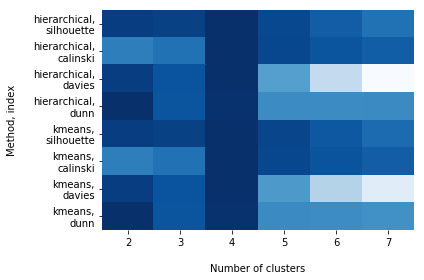
For each row in the above grid (i.e., for each clustering method/CVI pair), darker cells are associated with higher-quality clusterings. From this plot we can see that each method/index pair seems to be pointing to 4 as being an optimal value for k.
1 maintainer

Release files for validclust 0.1.1
For a detailed explanation of source distributions (sdists) and built distributions (wheels), please see the package formats documentation.
Source distribution (sdist)
| File | Size | Uploaded | |
|---|---|---|---|
| validclust-0.1.1.tar.gz | 8.1 kB | Details |
Built distribution (wheel)
| File | Interpreter | ABI | Platform | Reset |
|---|---|---|---|---|
| validclust-0.1.1-py2.py3-none-any.whl | Python 2, Python 3 | none | any | Details |
Total release size: 16.3 kB
Release files / validclust-0.1.1.tar.gz
| Download URL | validclust-0.1.1.tar.gz |
|---|---|
| Size | 8.1 kB |
| Tags | Source |
|
SHA-256 checksum How to use checksums |
71aef56caf2a8eecb15aff1c299b756ff1a1acca405672fbe8ee346e68d55e86
|
|
BLAKE2b-256 checksum How to use checksums |
15633e5db7bdd159dbfee03745f385a53e6bca2b3691cf648059abe8efbe0cf1
|
| Upload date | |
|
Uploaded using Trusted Publishing? What is trusted publishing? |
No |
| Uploaded via |
twine/3.4.1 importlib_metadata/4.2.0 pkginfo/1.7.0 requests/2.25.1 requests-toolbelt/0.9.1 tqdm/4.61.0 CPython/3.8.2
|
Release files / validclust-0.1.1-py2.py3-none-any.whl
| Download URL | validclust-0.1.1-py2.py3-none-any.whl |
|---|---|
| Size | 8.1 kB |
| Tags | Python 2 Python 3 |
|
SHA-256 checksum How to use checksums |
f4926952d289334f6f4ceaccec231f1d91e7c95073c15a631c0de620cff88b02
|
|
BLAKE2b-256 checksum How to use checksums |
e993fabe0ee375a3293935f489180eda9baaa22be75bf924f266e094cfafa2b2
|
| Upload date | |
|
Uploaded using Trusted Publishing? What is trusted publishing? |
No |
| Uploaded via |
twine/3.4.1 importlib_metadata/4.2.0 pkginfo/1.7.0 requests/2.25.1 requests-toolbelt/0.9.1 tqdm/4.61.0 CPython/3.8.2
|














