
VAX Method
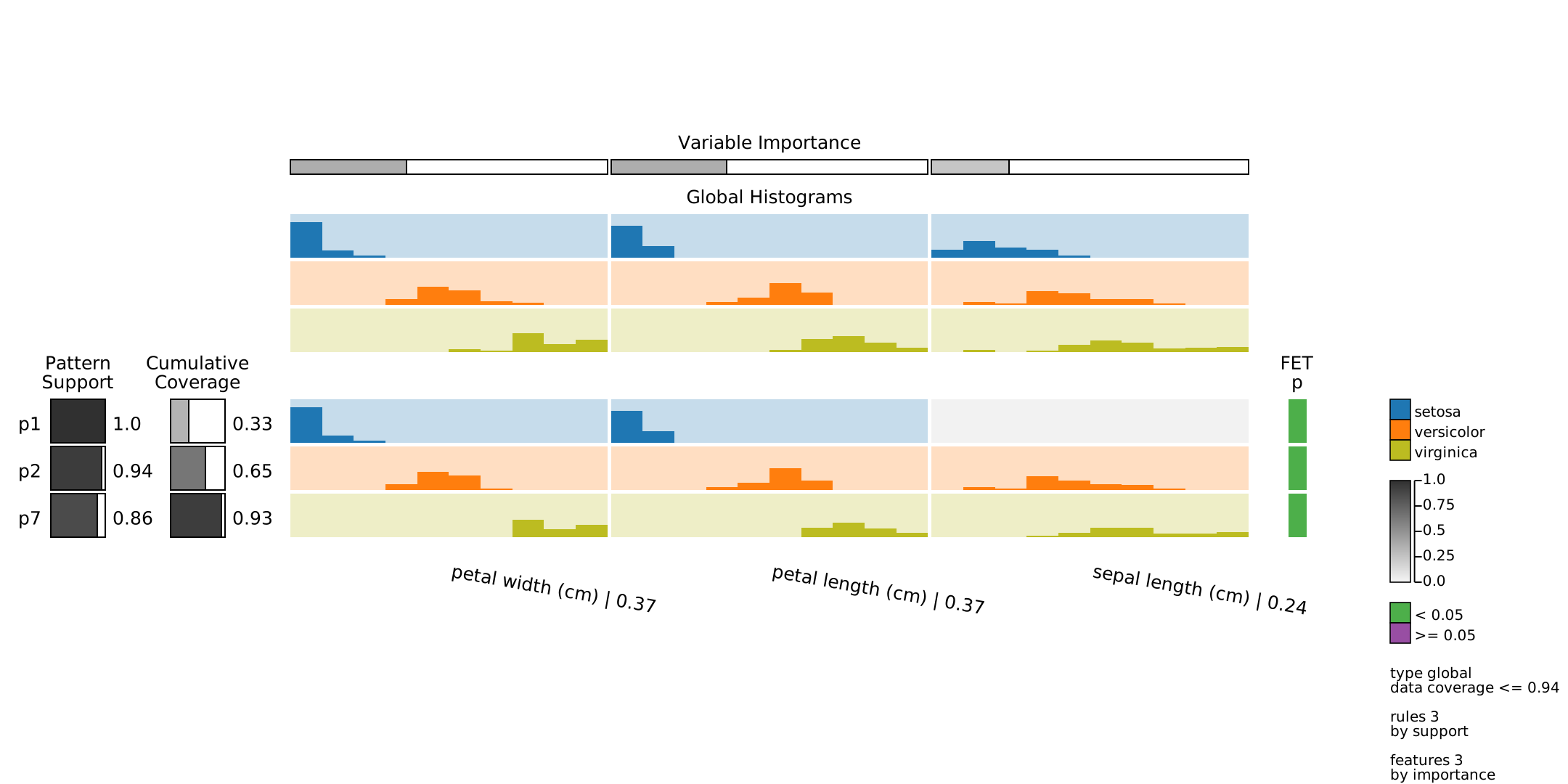
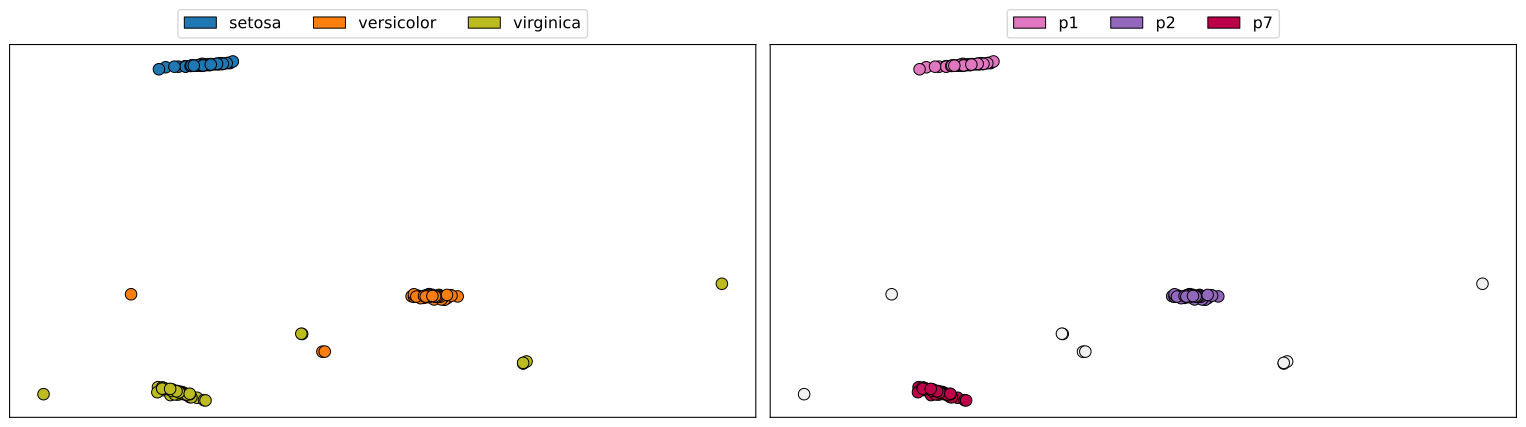
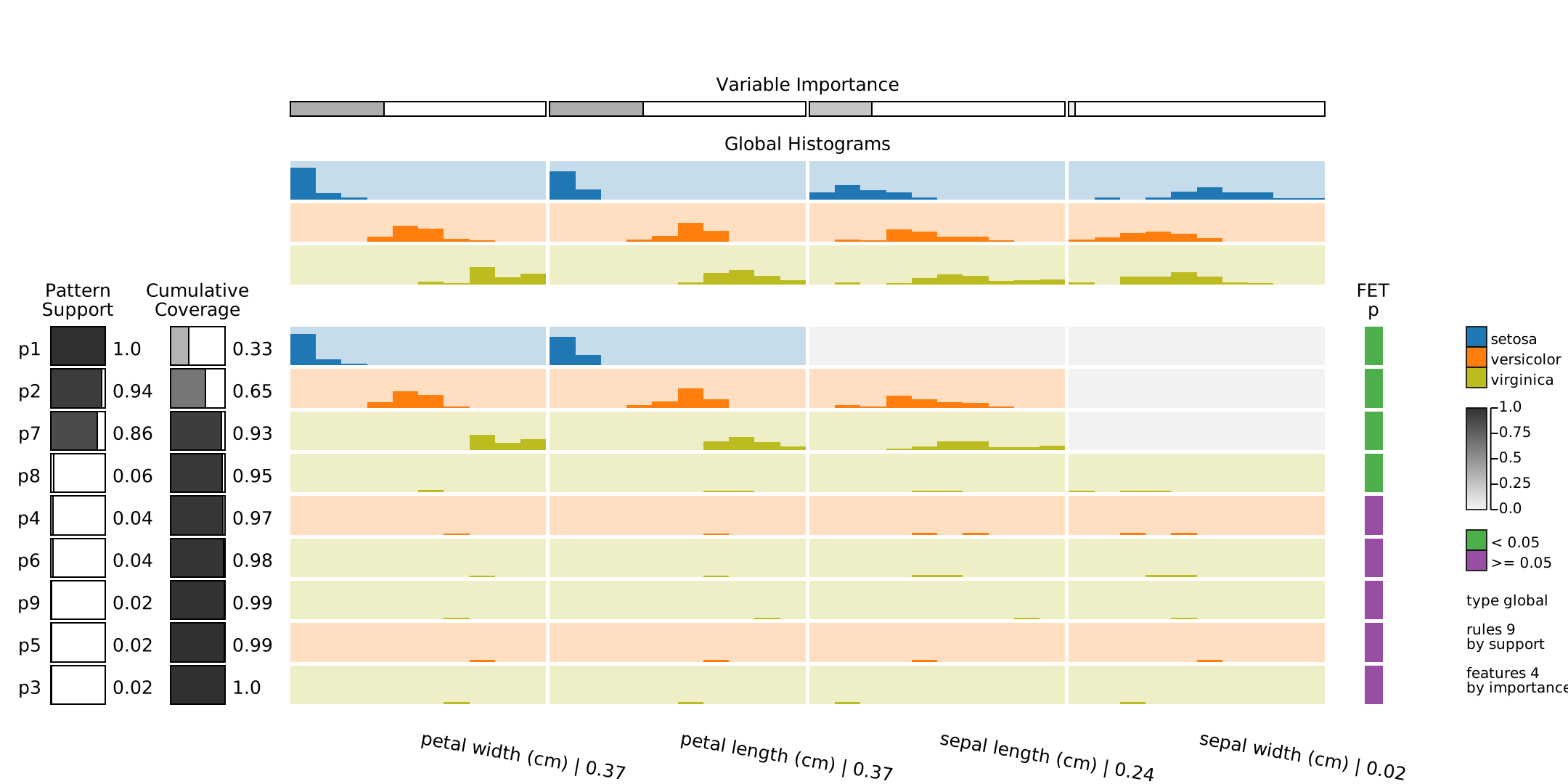
The multiVariate dAta eXplanation (VAX) is a new Visual Analytics (VA) method to support identifying and visual interpreting patterns in multivariate datasets. VAX uses the concept of Jumping Emerging Patterns, inherent interpretable logic statements representing class-variable relationships (patterns) derived from random Decision Trees. VAX employs aggregated Jumping Emerging Patterns (JEPs) to capture intricate patterns in class-labeled datasets. A matrix-like visual metaphor is used for JEPs visualization, where patterns are rows, variables are columns, and data distribution conveyed using histograms are matrix cells. Based on matrix visualization, meaningful visual representations can be reached by filtering and ordering patterns (rows) and variables (columns). Furthermore, VAX supports similarity maps produced by Dimensionality Reduction (DR) techniques to convey a better overall image of a dataset (e.g., clusters and outliers) using the JEPs lens.
For presenting the method here, the Iris Dataset is employed.
Cite us: M. Popolin Neto and F. V. Paulovich, "Multivariate Data Explanation by Jumping Emerging Patterns Visualization," in IEEE Transactions on Visualization and Computer Graphics, 2022, doi: 10.1109/TVCG.2022.3223529.
BibTeX: @article{PopolinNeto:2022:VAX, author={Popolin{ }Neto, Mário and Paulovich, Fernando V.}, journal={IEEE Transactions on Visualization and Computer Graphics}, title={Multivariate Data Explanation by Jumping Emerging Patterns Visualization}, year={2022}, volume={}, number={}, pages={1-16}, doi={10.1109/TVCG.2022.3223529}}
Iris Dataset
import numpy as np
import sklearn.datasets as datasets


dataset = datasets.load_iris()

X = dataset.data
y = dataset.target

feature_names = dataset.feature_names
target_names = dataset.target_names
VAX
JEPs Extraction, Selection, and Aggregation
from vaxm import VAX


dtm = VAX( n_features = len( feature_names ), n_classes = len( target_names ), feature_names = np.array( feature_names ), class_names = np.array( target_names ), bins = 10, verbose = 0 )

dtm.fit( X, y, k_trees = 1024, save_stages = True, file_name = './IRIS-VAX-k1024', n_jobs = 4, random_seed = 1988 )
print('dtm.n_rules_', dtm.n_rules_)
dtm.n_rules_ 9
Similarity Map Creation
from sklearn.manifold import MDS


X_ext, y_pclass = dtm.extend_X( X, lam = 0.90 )

embedding = MDS( n_components = 2, dissimilarity = 'euclidean', normalized_stress = 'auto', n_jobs = 1, random_state = 1988  )
X_emb = embedding.fit_transform( X_ext )
94% Data Coverage
JEPs Visualization
exp = dtm.explanation( r_order = 'support', f_order = 'importance', data_coverage_max = 0.94 )

exp.create_svg( draw_row_labels = True, draw_col_labels = True, draw_rows_line = False, draw_cols_line = False, col_label_degrees = 10, draw_box_frame = False, inner_pad_row = 5, inner_pad_col = 5, cell_background = 'all', cell_background_color = '#f2f2f2',  draw_frame_top_legend = False, draw_box_row_left_legend = True, draw_frame_left_legend = False, rows_left_legend_show_value = True, draw_frame_right_legend = False, draw_box_row_right_legend = False, rows_right_legend_width = 75/3, binary_legend = [ '< 0.05', '>= 0.05' ], margin_left = 400, margin_top = 550, margin_right = 450, margin_bottom = 350, matrix_legend_ratio = 0.80 )

exp.save( 'JEPs-3P.png', pixel_scale = 5 )
exp.save( 'JEPs-3P.svg' )
exp.display_jn()
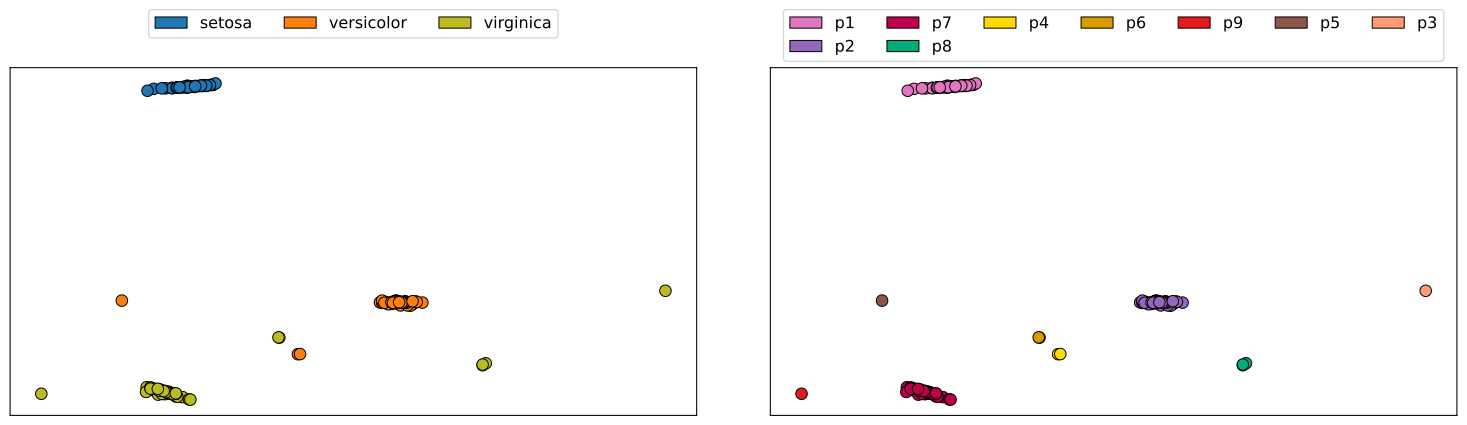
Similarity Map Visualization
import matplotlib.pyplot as plt


dtm.plot_map( X_emb, y, exp.rules_, plt, mode = 'horizontal', color_map1 = np.array( [ '#f2f2f2ff', '#1f77b3', '#ff7e0e', '#bcbc21' ] ), color_map2 = np.array( [ '#f2f2f2ff', '#e277c1', '#9367bc', '#bc0049', '#00aa79', '#ffdb00', '#d89c00', '#e41a1c', '#8c564b', '#ff9a75' ] ) )

plt.tight_layout()
plt.savefig( 'MAP-3P.png', dpi = 300, bbox_inches = 'tight' )
plt.savefig( 'MAP-3P.svg', bbox_inches = 'tight' )
plt.show()
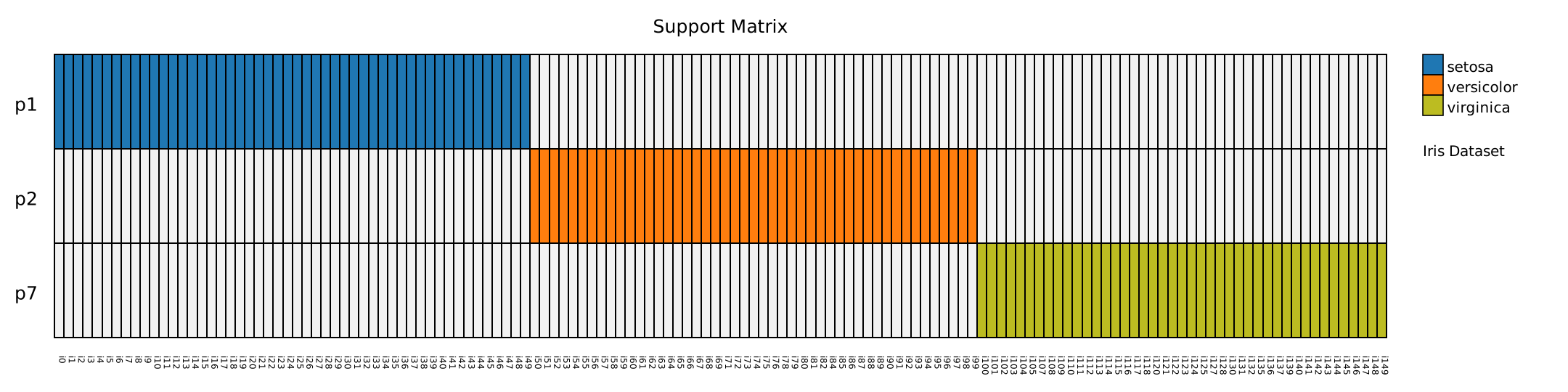
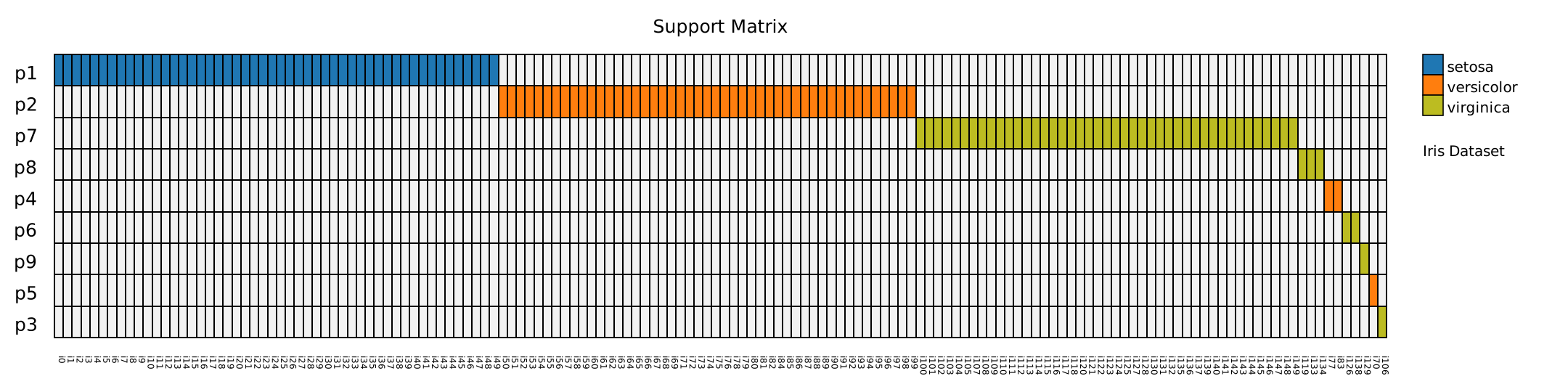
Support Matrix Visualization
instance_names = np.array( [ 'i' + str( i ) for i in range( X.shape[ 0 ] ) ] )

exp.smatrix( y = y, instance_names = instance_names )

exp.create_svg_smatrix( height = 540, draw_row_labels = True, draw_col_labels = True, draw_box_frame = True, draw_cell_frame = True, inner_pad_row = 0, inner_pad_col = 0, cell_background_color = '#f2f2f2', col_label_degrees = 90, col_label_font_size = 12, info_text = 'Iris Dataset', margin_bottom = 75, margin_right = 250, matrix_legend_ratio = 0.80 )

exp.save_smatrix( 'SMATRIX-3P.png', pixel_scale = 5 )
exp.save_smatrix( 'SMATRIX-3P.svg' )
exp.display_smatrix_jn()
100% Data Coverage
JEPs Visualization
exp = dtm.explanation( r_order = 'support', f_order = 'importance' )

exp.create_svg( draw_row_labels = True, draw_col_labels = True, draw_rows_line = False, draw_cols_line = False, col_label_degrees = 10, draw_box_frame = False, inner_pad_row = 5, inner_pad_col = 5, cell_background = 'all', cell_background_color = '#f2f2f2',  draw_frame_top_legend = False, draw_box_row_left_legend = True, draw_frame_left_legend = False, rows_left_legend_show_value = True, draw_frame_right_legend = False, draw_box_row_right_legend = False, rows_right_legend_width = 75/3, binary_legend = [ '< 0.05', '>= 0.05' ], margin_left = 400, margin_top = 450, margin_right = 350, margin_bottom = 150, matrix_legend_ratio = 0.80 )

exp.save( 'JEPs.png', pixel_scale = 5 )
exp.save( 'JEPs.svg' )
exp.display_jn()
Similarity Map Visualization
dtm.plot_map( X_emb, y, exp.rules_, plt, mode = 'horizontal', color_map1 = np.array( [ '#f2f2f2ff', '#1f77b3', '#ff7e0e', '#bcbc21' ] ), color_map2 = np.array( [ '#f2f2f2ff', '#e277c1', '#9367bc', '#bc0049', '#00aa79', '#ffdb00', '#d89c00', '#e41a1c', '#8c564b', '#ff9a75' ] ), ncol_map2 = 7, bbox_to_anchor = ( 0.5, 1.19 ) )

plt.tight_layout()
plt.savefig( 'MAP.png', dpi = 300, bbox_inches = 'tight' )
plt.savefig( 'MAP.svg', bbox_inches = 'tight' )
plt.show()
Support Matrix Visualization
exp.smatrix( y = y, instance_names = instance_names )

exp.create_svg_smatrix( height = 540, draw_row_labels = True, draw_col_labels = True, draw_box_frame = True, draw_cell_frame = True, inner_pad_row = 0, inner_pad_col = 0, cell_background_color = '#f2f2f2', col_label_degrees = 90, col_label_font_size = 12, info_text = 'Iris Dataset', margin_bottom = 75, margin_right = 250, matrix_legend_ratio = 0.80 )

exp.save_smatrix( 'SMATRIX.png', pixel_scale = 5 )
exp.save_smatrix( 'SMATRIX.svg' )
exp.display_smatrix_jn()
References
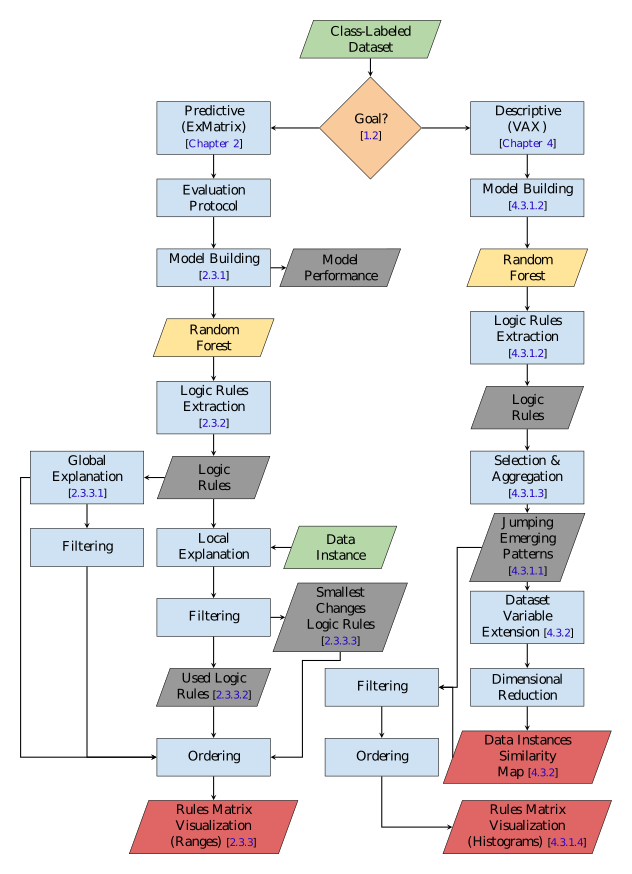
VAX uses the Logic Rules Matrix package, which also supports the Explainable Matrix - ExMatrix method. Both ExMatrix and VAX employ a matrix-like visual metaphor for logic rules visualization, where rules are rows, features (variables) are columns, and rules predicates are cells.
The ExMatrix must be used for model (predictive) explanations (model interpretability/explainability), while VAX must be employed for data (descriptive) explanations (phenomenon understanding).
[1] Popolin Neto, M. (2021). Random Forest interpretability - explaining classification models and multivariate data through logic rules visualizations. Doctoral Thesis, Instituto de Ciências Matemáticas e de Computação, University of São Paulo, São Carlos. doi:10.11606/T.55.2021.tde-03032022-105725.
BibTeX: @phdthesis{PopolinNeto:2021:Thesis, doi = {10.11606/t.55.2021.tde-03032022-105725}, publisher = {Universidade de Sao Paulo, Agencia {USP} de Gestao da Informacao Academica ({AGUIA})}, author = {M{'{a}}rio Popolin{ }Neto}, title = {Random Forest interpretability - explaining classification models and multivariate data through logic rules visualizations}}
[2] M. Popolin Neto and F. V. Paulovich, "Explainable Matrix - Visualization for Global and Local Interpretability of Random Forest Classification Ensembles," in IEEE Transactions on Visualization and Computer Graphics, vol. 27, no. 2, pp. 1427-1437, Feb. 2021, doi: 10.1109/TVCG.2020.3030354.
BibTeX: @article{PopolinNeto:2020:ExMatrix, author={Popolin{ }Neto, Mário and Paulovich, Fernando V.}, journal={IEEE Transactions on Visualization and Computer Graphics}, title={Explainable Matrix - Visualization for Global and Local Interpretability of Random Forest Classification Ensembles}, year={2021}, volume={27}, number={2}, pages={1427-1437}, doi={10.1109/TVCG.2020.3030354}}
[3] M. Popolin Neto and F. V. Paulovich, "Multivariate Data Explanation by Jumping Emerging Patterns Visualization," in IEEE Transactions on Visualization and Computer Graphics, 2022, doi: 10.1109/TVCG.2022.3223529.
BibTeX: @article{PopolinNeto:2022:VAX, author={Popolin{ }Neto, Mário and Paulovich, Fernando V.}, journal={IEEE Transactions on Visualization and Computer Graphics}, title={Multivariate Data Explanation by Jumping Emerging Patterns Visualization}, year={2022}, volume={}, number={}, pages={1-16}, doi={10.1109/TVCG.2022.3223529}}
1 maintainer

Download files
Download the file for your platform. If you're not sure which to choose, learn more about installing packages.
Source Distributions
Built Distribution
Filter files by name, interpreter, ABI, and platform.
If you're not sure about the file name format, learn more about wheel file names.
Copy a direct link to the current filters
File details
Details for the file vaxm-0.1.4-py3-none-any.whl.
File metadata
- Download URL: vaxm-0.1.4-py3-none-any.whl
- Upload date:
- Size: 11.6 kB
- Tags: Python 3
- Uploaded using Trusted Publishing? No
- Uploaded via:
twine/6.1.0 CPython/3.12.3
File hashes
| Algorithm | Hash digest | |
|---|---|---|
| SHA256 |
92f354bca32cc310190768fdaff92e528bd6befad197c38ece1e3f6695cbabe7
|
|
| MD5 |
48e3aa2e761b0b9d6ee6286ad7d12fa9
|
|
| BLAKE2b-256 |
7795e7a39302b510994460db1db27755e35199bdeb9e070ae98b1ec89351f9da
|














