
vcolorpicker
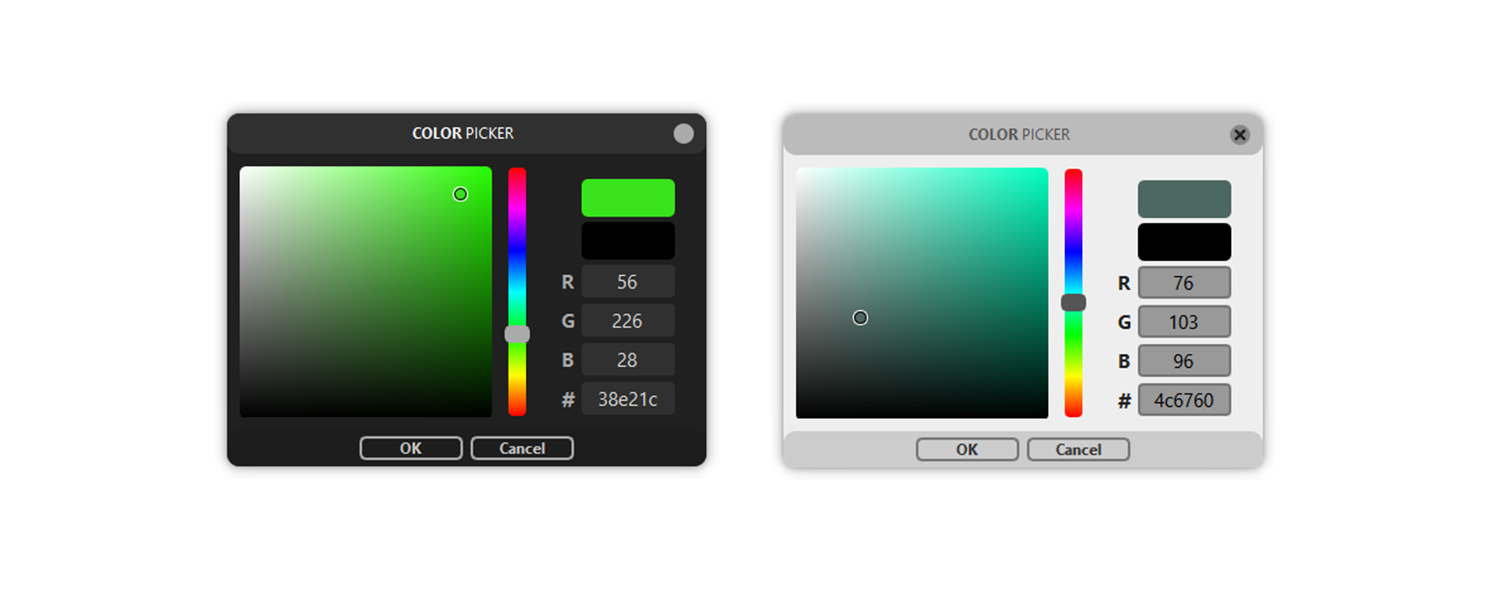
Simple visual Color Picker with a modern UI created with Qt to easily get color input from the user.
Installation
-
Install using pip:
pip install vcolorpickeror clone the repository yourself and run:
pip install .
Usage
-
To ask for a color, import the
getColorfunction and run it:from vcolorpicker import getColor color = getColor()
Customization
-
Showing custom last color:
old_color = (255,255,255)
picked_color = getColor(old_color)
-
Changing the UI Theme
from vcolorpicker import useLightTheme

useLightTheme(True)
-
Adding Alpha selection
from vcolorpicker import useAlpha

useAlpha(True)
When the ColorPicker uses Alpha, you have to pass a RGBA tuple
as the last color, otherwise there wil be an error.old_color = (255,255,255,100) picked_color = getColor(old_color) # => (r,g,b,a)
Color Formats and Conversion
-
The default format
getColorwill give you is RGB(A),
but you can use vcolorpickers color conversion functions
if you have a different format like HSV or HEX.hsv2rgbHSV(A) to RGB(A)
rgb2hsvRGB(A) to HSV(A)
rgb2hexRGB(A) to HEX
hex2rgbHEX to RGB
hex2hsvHEX to HSV
hsv2hexHSV(A) to HEX -
Example:
from vcolorpicker import getColor, hsv2rgb, rgb2hsv

old_color = hsv2rgb((50,50,100,100))  # => (127,255,255,100)

picked_color = rgb2hsv(getColor(old_color))
-
Color Formats:
RGB values range from 0 to 255
HSV values range from 0 to 100
HEX values should be in format:"XXXXXX"or"xxxxxx"
Alpha values range from 0 to 100
Compatibility
This package is compatible with Python 3.7+ and above. It uses qtpy under the hood, so it should work with all Qt bindings (PyQt5, PySide2, PySide6, PyQt6).
Previous versions
In previous versions you had to create a ColorPicker object first and then
call it's getColor method. This is still supported, you just have to
import the ColorPicker class.
The color conversion functions are not methods anymore, you can import them
directly with from vcolorpicker import hsv2rgb, rgb2hsv.
You also had to create a QApplication object before being able to run the
ColorPicker, now it automatically creates one by itself if there isn't one yet.
If you need to get the auto-created application, you can use this:
from PyQt5.QtWidgets import QApplication
app = QApplication.instance()
Bugs and Improvement ideas
If you find a bug, you can open an issue or write me an email (nlfmt@gmx.de)
and I will try to get to it as fast as possible, or you can implement it
yourself and create a pull request.
License
This software is licensed under the MIT License.
More information is provided in the dedicated LICENSE file.
1 maintainer

Download files
Download the file for your platform. If you're not sure which to choose, learn more about installing packages.
Source Distribution
Built Distribution
Filter files by name, interpreter, ABI, and platform.
If you're not sure about the file name format, learn more about wheel file names.
Copy a direct link to the current filters
File details
Details for the file vcolorpicker-1.4.4.tar.gz.
File metadata
- Download URL: vcolorpicker-1.4.4.tar.gz
- Upload date:
- Size: 15.9 kB
- Tags: Source
- Uploaded using Trusted Publishing? No
- Uploaded via:
twine/4.0.2 CPython/3.11.10
File hashes
| Algorithm | Hash digest | |
|---|---|---|
| SHA256 |
17f68f7bb8d0170a0d7d0f304419a9fc4ac22121bc2a7727df1283d74d91afa3
|
|
| MD5 |
8299196cc8c184dbfb7e44a01d759090
|
|
| BLAKE2b-256 |
838aaa085b7f24473349881064c4a1deca3727ca7a64dfd4a28fdb9f5d20529c
|
File details
Details for the file vcolorpicker-1.4.4-py3-none-any.whl.
File metadata
- Download URL: vcolorpicker-1.4.4-py3-none-any.whl
- Upload date:
- Size: 22.9 kB
- Tags: Python 3
- Uploaded using Trusted Publishing? No
- Uploaded via:
twine/4.0.2 CPython/3.11.10
File hashes
| Algorithm | Hash digest | |
|---|---|---|
| SHA256 |
7e74f71b07204b12b76be5bf979c06a19d9d39fd77609737864643df7feeae9d
|
|
| MD5 |
31847172d531fb158ac8bfdfaf0192c7
|
|
| BLAKE2b-256 |
3c31f19ae4aa56ff202cbc300eeed3fc7be2ad1e4ddeb7d4e13dbae4b83eaf54
|














