
Visual Automata




Copyright 2021 Lewi Lie Uberg
Released under the MIT license
Visual Automata is a Python 3 library built as a wrapper for the Automata library to add more visualization features.
Contents
- Visual Automata
Prerequisites
pip install automata-lib
pip install pandas
pip install graphviz
pip install colormath
pip install jupyterlab
Installing
Finite Automaton (FA)
VisualDFA
Importing
Import needed classes.
from automata.fa.dfa import DFA

from visual_automata.fa.dfa import VisualDFA
Instantiating DFAs
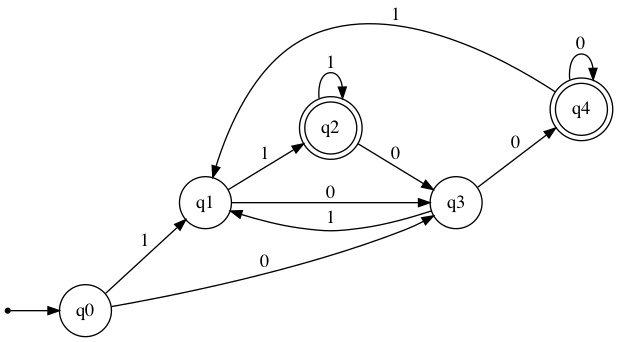
Define an visual_automata DFA that can accept any string ending with 00 or 11.
dfa = VisualDFA(
    states={"q0", "q1", "q2", "q3", "q4"},
    input_symbols={"0", "1"},
    transitions={
        "q0": {"0": "q3", "1": "q1"},
        "q1": {"0": "q3", "1": "q2"},
        "q2": {"0": "q3", "1": "q2"},
        "q3": {"0": "q4", "1": "q1"},
        "q4": {"0": "q4", "1": "q1"},
    },
    initial_state="q0",
    final_states={"q2", "q4"},
)
Converting
An automata-lib DFA can be converted to a VisualDFA.
Define an automata-lib DFA that can accept any string ending with 00 or 11.
dfa = DFA(
    states={"q0", "q1", "q2", "q3", "q4"},
    input_symbols={"0", "1"},
    transitions={
        "q0": {"0": "q3", "1": "q1"},
        "q1": {"0": "q3", "1": "q2"},
        "q2": {"0": "q3", "1": "q2"},
        "q3": {"0": "q4", "1": "q1"},
        "q4": {"0": "q4", "1": "q1"},
    },
    initial_state="q0",
    final_states={"q2", "q4"},
)
Convert automata-lib DFA to VisualDFA.
dfa = VisualDFA(dfa)
Transition Table
Outputs the transition table for the given DFA.
dfa.table
       0    1
→q0   q3   q1
q1    q3  *q2
*q2   q3  *q2
q3   *q4   q1
*q4  *q4   q1
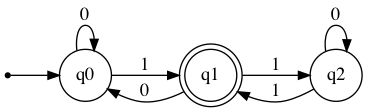
Minimal-DFA
Creates a minimal DFA which accepts the same inputs as the old one. Unreachable states are removed and equivalent states are merged. States are renamed by default.
new_dfa = VisualDFA(
    states={'q0', 'q1', 'q2'},
    input_symbols={'0', '1'},
    transitions={
        'q0': {'0': 'q0', '1': 'q1'},
        'q1': {'0': 'q0', '1': 'q2'},
        'q2': {'0': 'q2', '1': 'q1'}
    },
    initial_state='q0',
    final_states={'q1'}
)
new_dfa.table
      0    1
→q0  q0  *q1
*q1  q0   q2
q2   q2  *q1
new_dfa.show_diagram()
minimal_dfa = VisualDFA.minify(new_dfa)
minimal_dfa.show_diagram()
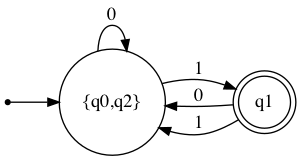
minimal_dfa.table
                0        1
→{q0,q2}  {q0,q2}      *q1
*q1       {q0,q2}  {q0,q2}
Check input strings
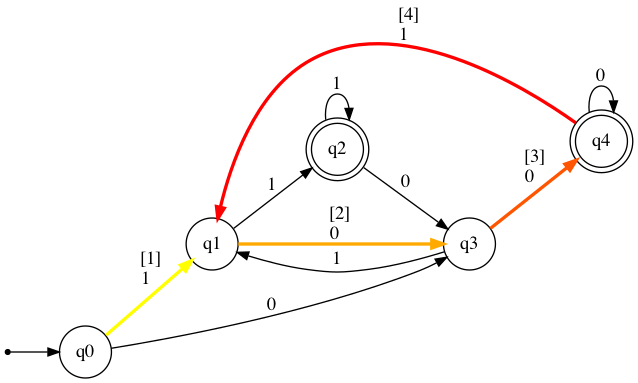
1001 does not end with 00 or 11, and is therefore Rejected
dfa.input_check("1001")
          [Rejected]
Step: Current state: Input symbol: New state:
1                →q0             1         q1
2                 q1             0         q3
3                 q3             0        *q4
4                *q4             1         q1
10011 does end with 11, and is therefore Accepted
dfa.input_check("10011")
          [Accepted]
Step: Current state: Input symbol: New state:
1                →q0             1         q1
2                 q1             0         q3
3                 q3             0        *q4
4                *q4             1         q1
5                 q1             1        *q2
Show Diagram
For IPython dfa.show_diagram() may be used.
For a python script dfa.show_diagram(view=True) may be used to automatically view the graph as a PDF file.
dfa.show_diagram()
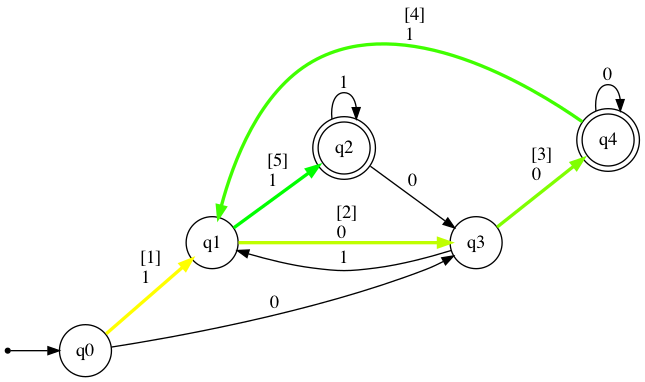
The show_diagram method also accepts input strings, and will return a graph with gradient red arrows for Rejected results, and gradient green arrows for Accepted results. It will also display a table with transitions states stepwise. The steps in this table will correspond with the [number] over each traversed arrow.
Please note that for visual purposes additional arrows are added if a transition is traversed more than once.
dfa.show_diagram("1001")
          [Rejected]
Step: Current state: Input symbol: New state:
1                →q0             1         q1
2                 q1             0         q3
3                 q3             0        *q4
4                *q4             1         q1
dfa.show_diagram("10011")
          [Accepted]
Step: Current state: Input symbol: New state:
1                →q0             1         q1
2                 q1             0         q3
3                 q3             0        *q4
4                *q4             1         q1
5                 q1             1        *q2
VisualNFA
Importing
Import needed classes.
from automata.fa.nfa import NFA

from visual_automata.fa.nfa import VisualNFA
Instantiating NFAs
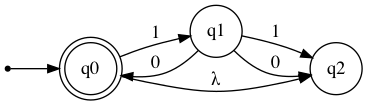
Define an visual_automata NFA that can accept any string with the pattern 10, 1010, 101010.
nfa = VisualNFA(
    states={"q0", "q1", "q2"},
    input_symbols={"0", "1"},
    transitions={
        "q0": {"": {"q2"}, "1": {"q1"}},
        "q1": {"1": {"q2"}, "0": {"q0", "q2"}},
        "q2": {},
    },
    initial_state="q0",
    final_states={"q0"},
)
Converting
An automata-lib NFA can be converted to a VisualNFA.
Define an automata-lib NFA that can accept any string with the pattern 10, 1010, 101010.
nfa = NFA(
    states={"q0", "q1", "q2"},
    input_symbols={"0", "1"},
    transitions={
        "q0": {"": {"q2"}, "1": {"q1"}},
        "q1": {"1": {"q2"}, "0": {"q0", "q2"}},
        "q2": {},
    },
    initial_state="q0",
    final_states={"q0"},
)
Convert automata-lib NFA to VisualNFA.
nfa = VisualNFA(nfa)
Transition Table
Outputs the transition table for the given DFA.
nfa.table
             0   1   λ
→*q0         ∅  q1  q2
q1    {*q0,q2}  q2   ∅
q2           ∅   ∅   ∅
Eliminate lambda/epsilon
Creates a NFA with lambda transitions removed.
nfa_eliminated = VisualNFA.eliminate_lambda(nfa)
nfa_eliminated.table
             0   1
→*q0         ∅  q1
q1    {*q0,q2}  q2
q2           ∅   ∅
nfa_eliminated.show_diagram()

Check input strings
101 does not correspond with the pattern 10, 1010, 101010, and is therefore Rejected
nfa.input_check("101")
          [Rejected]
Step: Current state: Input symbol: New state:
1               →*q0             1         q1
2                 q1             0         q2
3                 q2             1          ∅
1010 does correspond with the pattern 10, 1010, 101010, and is therefore Accepted
nfa.input_check("1010")
          [Accepted]
Step: Current state: Input symbol: New state:
1               →*q0             1         q1
2                 q1             0       →*q0
3               →*q0             1         q1
4                 q1             0       →*q0
Show Diagram
For IPython nfa.show_diagram() may be used.
For a python script nfa.show_diagram(view=True) may be used to automatically view the graph as a PDF file.
nfa.show_diagram()
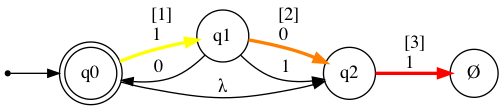
The show_diagram method also accepts input strings, and will return a graph with gradient red arrows for Rejected results, and gradient green arrows for Accepted results. It will also display a table with transitions states stepwise. The steps in this table will correspond with the [number] over each traversed arrow.
Please note that for visual purposes additional arrows are added if a transition is traversed more than once.
nfa.show_diagram("101")
          [Rejected]
Step: Current state: Input symbol: New state:
1               →*q0             1         q1
2                 q1             0         q2
3                 q2             1          ∅
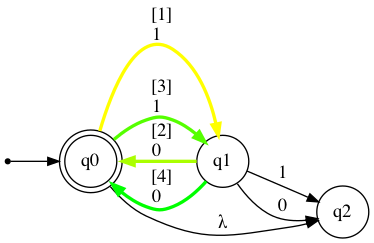
nfa.show_diagram("1010")
          [Accepted]
Step: Current state: Input symbol: New state:
1               →*q0             1         q1
2                 q1             0       →*q0
3               →*q0             1         q1
4                 q1             0       →*q0
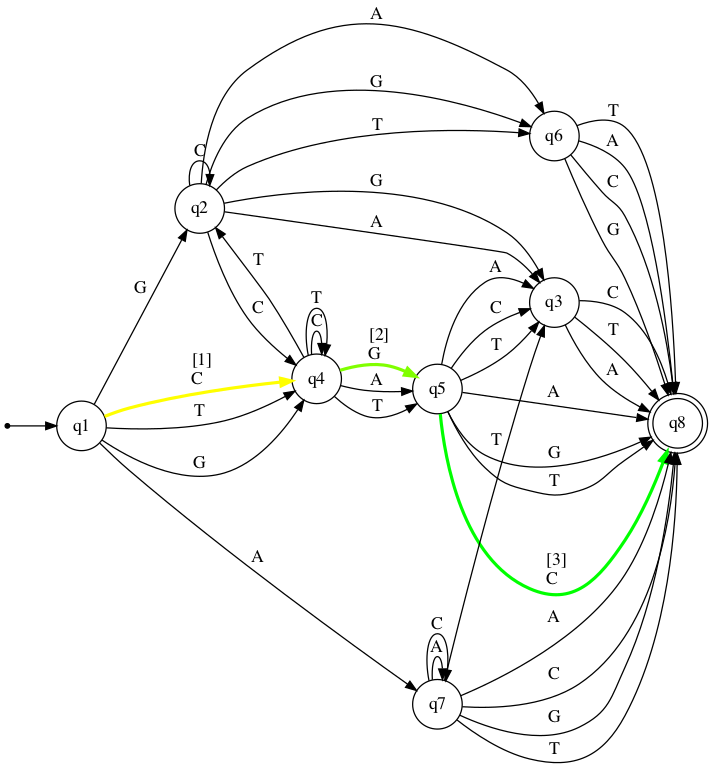
Please note that for long input strings, the path calculations may take some time.
big_nfa = VisualNFA(
    states={"q1", "q2", "q3", "q4", "q5", "q6", "q7", "q8"},
    input_symbols={"A", "C", "G", "T"},
    transitions={
        "q1": {"A": {"q7"}, "C": {"q4"}, "G": {"q4", "q2"}, "T": {"q4"}},
        "q2": {"A": {"q3", "q6"}, "C": {"q2", "q4"}, "G": {"q3", "q6"}, "T": {"q6"}},
        "q3": {"A": {"q8"}, "C": {"q8"}, "T": {"q8"}},
        "q4": {"A": {"q5"}, "C": {"q4"}, "G": {"q5"}, "T": {"q2", "q4", "q5"}},
        "q5": {"A": {"q3", "q8"}, "C": {"q3", "q8"}, "G": {"q8"}, "T": {"q3", "q8"}},
        "q6": {"A": {"q8"}, "C": {"q8"}, "G": {"q8"}, "T": {"q8"}},
        "q7": {"A": {"q7", "q8"}, "C": {"q7", "q8"}, "G": {"q8"}, "T": {"q3", "q8"}},
        "q8": {},
    },
    initial_state="q1",
    final_states={"q8"},
)
big_nfa.table
big_nfa.show_diagram("CGC")
          [Accepted]
Step: Current state: Input symbol: New state:
1                →q1             C         q4
2                 q4             G         q5
3                 q5             C        *q8
Authors
License
This project is licensed under the MIT License - see the LICENSE.md file for details
Acknowledgments
- Caleb Evans for his work on automata-lib.
- Geir Arne Hjelle, Michal Porteš, and Bart Willems for their general counsel.
- Dr. Seifedine Kadry. My Further Discrete Mathematics professor at Noroff University College, for teaching me Automata.
- JFLAP for their work on a GUI based Automata application.
1 maintainer

Metadata
1 maintainer
Release files for visual-automata 1.1.1
For a detailed explanation of source distributions (sdists) and built distributions (wheels), please see the package formats documentation.
Source distribution (sdist)
| File | Size | Uploaded | Provenance | |
|---|---|---|---|---|
| visual-automata-1.1.1.tar.gz | 16.1 kB | Without provenance | Details |
Built distribution (wheel)
| File | Interpreter | ABI | Platform | Reset |
|---|---|---|---|---|
| visual_automata-1.1.1-py3-none-any.whl | Python 3 | none | any | Details |
Total release size: 32.0 kB
Release files / visual-automata-1.1.1.tar.gz
| Download URL | visual-automata-1.1.1.tar.gz |
|---|---|
| Size | 16.1 kB |
| Tags | Source |
|
SHA-256 checksum How to use checksums |
3fb1715aa9e0f893c68050ba88764f0848b1e347a8fa01f370a2943600519e07
|
|
BLAKE2b-256 checksum How to use checksums |
9b0b70964289727c39c01545fcf129a6aaac24ad192ddccebb161159f8d2a0c1
|
| Upload date | |
|
Uploaded using Trusted Publishing? What is trusted publishing? |
No |
| Uploaded via |
twine/3.4.1 importlib_metadata/3.10.1 pkginfo/1.7.0 requests/2.25.1 requests-toolbelt/0.9.1 tqdm/4.60.0 CPython/3.9.4
|
Release files / visual_automata-1.1.1-py3-none-any.whl
| Download URL | visual_automata-1.1.1-py3-none-any.whl |
|---|---|
| Size | 15.9 kB |
| Tags | Python 3 |
|
SHA-256 checksum How to use checksums |
7f760fe0cf77ed2e5a8ebc8992144ed5285868cacb9c5d542c25e5052a20f704
|
|
BLAKE2b-256 checksum How to use checksums |
36f8e21824f14c8b0475ee74405ad57c6f856873c9f3bb3c88ded0d610f83472
|
| Upload date | |
|
Uploaded using Trusted Publishing? What is trusted publishing? |
No |
| Uploaded via |
twine/3.4.1 importlib_metadata/3.10.1 pkginfo/1.7.0 requests/2.25.1 requests-toolbelt/0.9.1 tqdm/4.60.0 CPython/3.9.4
|
Security for visual-automata 1.1.1
Provenance
Provenance describes where a file came from. On PyPI, provenance is shared via attestations, which provide a verifiable record of the build or publishing details. View details, limitations and caveats.
No provenance found
None of the files in this release were uploaded with provenance metadata.
A note on package security
PyPI is a repository for distributing packages, not a service for auditing them. While third-party security researchers and our staff do their best to detect and remove malicious packages, PyPI cannot guarantee the quality, security or suitability of any given package.














