
VLC-Radio Python script
A tool for streamers to cleanly display song info from VLC Media Player.
Built for Python 3.6
install with
pip install VLCtagExporter
and run with
python -m VLCtagExporter
Requirements
The following python packages need to be installed, you can install them using these commands:
pip install Image
pip install requests
How to use
Firstly, change the image and text file save directories.
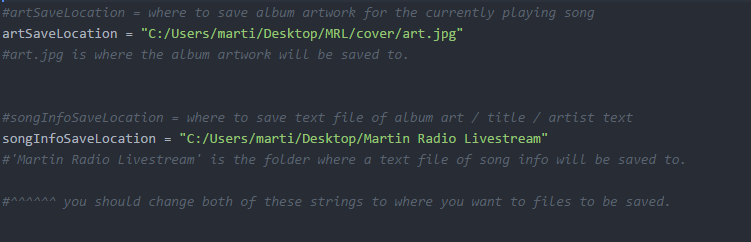
Then, while VLC Media player is playing audio, run the program. The song info will be exported into a text file at the location for 'songInfoSaveLocation' specified in the image above. The album art will be resized and exported to the location specified in the 'artSaveLocation' value shown above.
You can see a working example by clicking on the image or link below.
[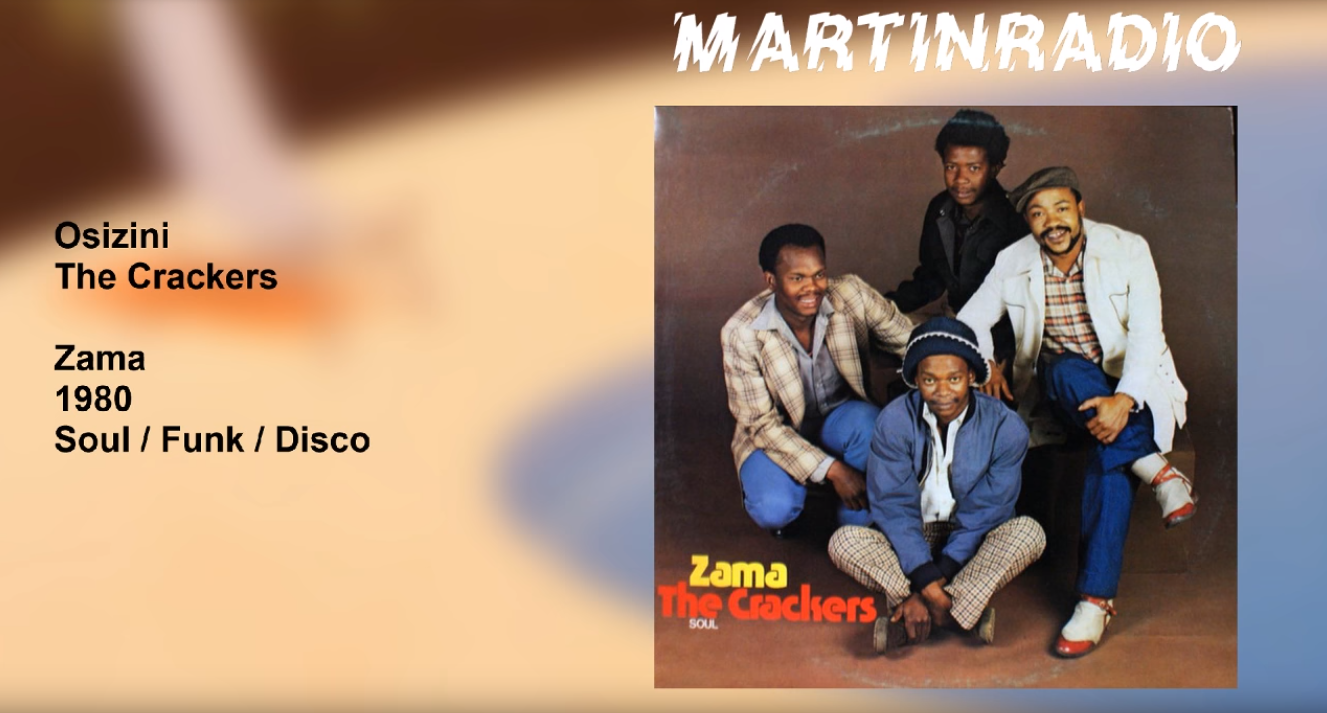
I used OBS studio for broadcasting, and set it up to display the jpg titled art.jpg in a folder, as well as display the contents of a specific text file. The album art and text file are automatically updated when their contents are changed.
VLC Setup
You will need to enable a web interface for VLC media player for this program. You can find instructions on how to do so in this post: https://stackoverflow.com/questions/24178980/how-to-monitor-vlc-media-player-on-windows-7-using-python
This link will describe how to:
- Activating web interface: Open VLC goto Tools--->Preferences-----> Main Interface as shown below tick mark the web option.
- Then click on Lua option on the left pane. Enter the password in the password field and enter C:\Program Files\VideoLAN\VLC\lua\http in the source directory field as shown below. Verify that you have status.xml file at the location that you provided in the source directory.
- Start the VLC player and play some file. Visit http://localhost:8080/requests/status.xml and you shall see a login page, leave the username field blank and enter the password that you entered in the VLC. If you logged in successfully you shall see the XML file! If you don't see any thing then do the following as shown in the image below: goto View--->Add Interface----->Select web
1 maintainer

Metadata
1 maintainer
Release files for vlcradio 0.0.3
For a detailed explanation of source distributions (sdists) and built distributions (wheels), please see the package formats documentation.
Built distribution (wheel)
| File | Interpreter | ABI | Platform | Reset |
|---|---|---|---|---|
| vlcradio-0.0.3-py3-none-any.whl | Python 3 | none | any | Details |
Release files / vlcradio-0.0.3-py3-none-any.whl
| Download URL | vlcradio-0.0.3-py3-none-any.whl |
|---|---|
| Size | 7.9 kB |
| Tags | Python 3 |
|
SHA-256 checksum How to use checksums |
6b628a45a76185121c6266db8c9d740153d599b59be0905cee71d78b4e16bd60
|
|
BLAKE2b-256 checksum How to use checksums |
89e99fb656931e84a78f63e6e645c8f4d377786927bd51401897f0929f7c78a8
|
| Upload date | |
|
Uploaded using Trusted Publishing? What is trusted publishing? |
No |
| Uploaded via |
twine/1.13.0 pkginfo/1.5.0.1 requests/2.18.4 setuptools/41.0.1 requests-toolbelt/0.8.0 tqdm/4.19.5 CPython/3.6.8
|














