

vprof
vprof is a Python package providing rich and interactive visualizations for various Python program characteristics such as running time and memory usage. It supports Python 3.4+ and distributed under BSD license.
The project is in active development and some of its features might not work as expected.
Screenshots
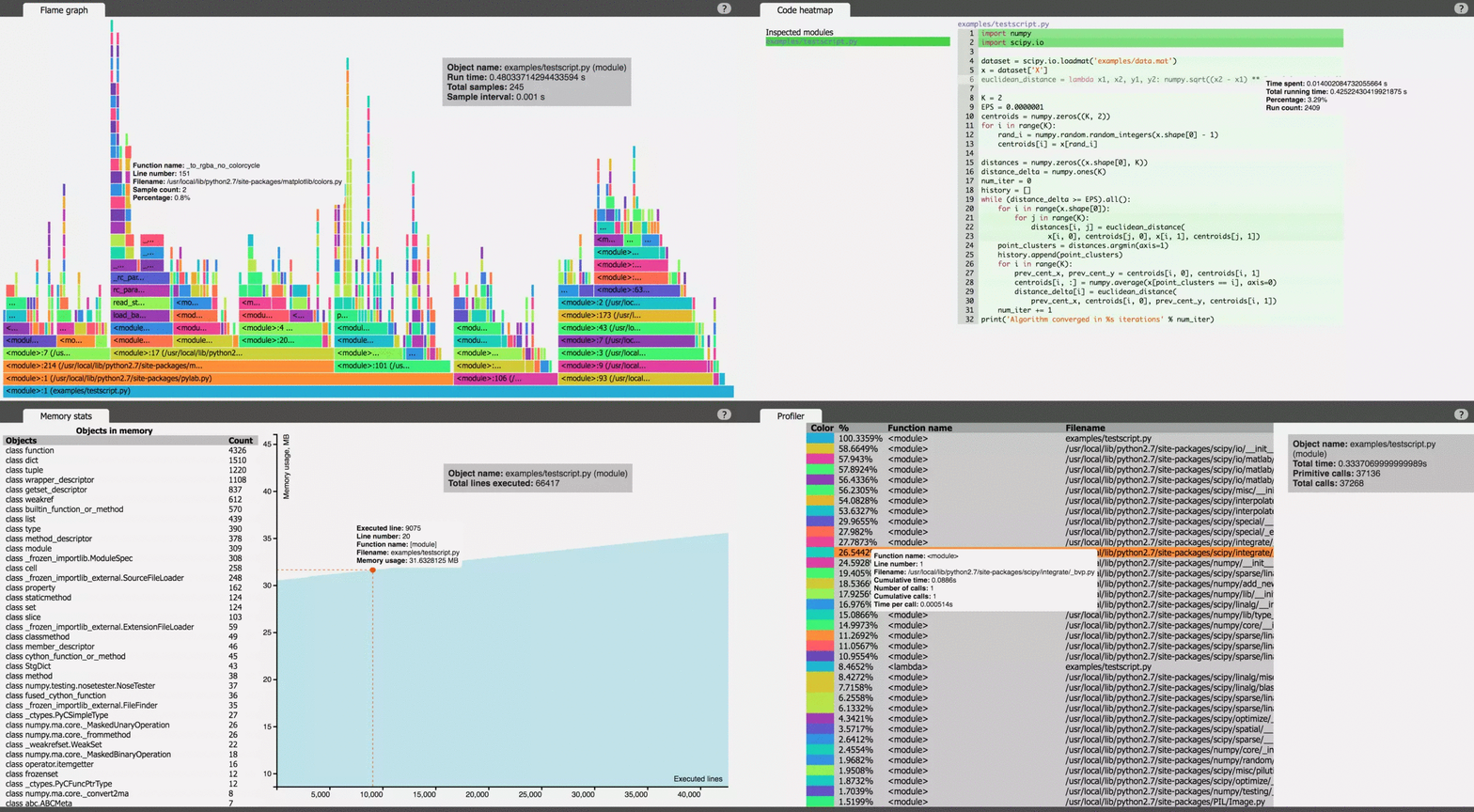
Contributing
All contributions are highly encouraged! You can add new features, report and fix existing bugs and write docs and tutorials. Feel free to open an issue or send a pull request!
Prerequisites
Dependencies to build vprof from source code:
- Python 3.4+
pipnpm>= 3.3.12
npm is required to build vprof from sources only.
Dependencies
All Python and npm module dependencies are listed in package.json and
requirements.txt.
Installation
vprof can be installed from PyPI
pip install vprof
To build vprof from sources, clone this repository and execute
python3 setup.py deps_install && python3 setup.py build_ui && python3 setup.py install
To install just vprof dependencies, run
python3 setup.py deps_install
Usage
vprof -c <config> <src>
<config> is a combination of supported modes:
c- CPU flame graph ⚠️ Not available for windows #62
Shows CPU flame graph for <src>.
p- profiler
Runs built-in Python profiler on <src> and displays results.
m- memory graph
Shows objects that are tracked by CPython GC and left in memory after code
execution. Also shows process memory usage after execution of each line of <src>.
h- code heatmap
Displays all executed code of <src> with line run times and execution counts.
<src> can be Python source file (e.g. testscript.py) or path to package
(e.g. myproject/test_package).
To run scripts with arguments use double quotes
vprof -c cmh "testscript.py --foo --bar"
Modes can be combined
vprof -c cm testscript.py
vprof can also profile functions. In order to do this,
launch vprof in remote mode:
vprof -r
vprof will open new tab in default web browser and then wait for stats.
To profile a function run
from vprof import runner

def foo(arg1, arg2):
    ...

runner.run(foo, 'cmhp', args=(arg1, arg2), host='localhost', port=8000)
where cmhp is profiling mode, host and port are hostname and port of
vprof server launched in remote mode. Obtained stats will be rendered in new
tab of default web browser, opened by vprof -r command.
vprof can save profile stats to file and render visualizations from
previously saved file.
vprof -c cmh src.py --output-file profile.json
writes profile to file and
vprof --input-file profile.json
renders visualizations from previously saved file.
Check vprof -h for full list of supported parameters.
To show UI help, press h when visualizations are displayed.
Also you can check examples directory for more profiling examples.
Testing
python3 setup.py test_python && python3 setup.py test_javascript && python3 setup.py e2e_test
License
BSD
1 maintainer

Metadata
1 maintainer
Release files for vprof 0.38
For a detailed explanation of source distributions (sdists) and built distributions (wheels), please see the package formats documentation.
Source distribution (sdist)
| File | Size | Uploaded | |
|---|---|---|---|
| vprof-0.38.tar.gz | 318.2 kB | Details |
Built distribution (wheel)
| File | Interpreter | ABI | Platform | Reset |
|---|---|---|---|---|
| vprof-0.38-py3-none-any.whl | Python 3 | none | any | Details |
Total release size: 637.3 kB
Release files / vprof-0.38.tar.gz
| Download URL | vprof-0.38.tar.gz |
|---|---|
| Size | 318.2 kB |
| Tags | Source |
|
SHA-256 checksum How to use checksums |
7f1000912eeb7a450c7c94d3cc96739af45ad0ff01d5abcc0b09a175d40ffadb
|
|
BLAKE2b-256 checksum How to use checksums |
ee3e80bebf83110f1919a876efca66d0812fde9905e926c740bb75382f2ac626
|
| Upload date | |
|
Uploaded using Trusted Publishing? What is trusted publishing? |
No |
| Uploaded via |
twine/3.1.1 pkginfo/1.5.0.1 requests/2.23.0 setuptools/45.2.0 requests-toolbelt/0.9.1 tqdm/4.43.0 CPython/3.7.6
|
Release files / vprof-0.38-py3-none-any.whl
| Download URL | vprof-0.38-py3-none-any.whl |
|---|---|
| Size | 319.1 kB |
| Tags | Python 3 |
|
SHA-256 checksum How to use checksums |
91b91d8868176c29e0fe3426c9239d11cd192c7144c7baf26a211e48923a5ee8
|
|
BLAKE2b-256 checksum How to use checksums |
735eb249cb0560455c2fe346800772afa086b015f3e9dfaff91fb591d27df580
|
| Upload date | |
|
Uploaded using Trusted Publishing? What is trusted publishing? |
No |
| Uploaded via |
twine/3.1.1 pkginfo/1.5.0.1 requests/2.23.0 setuptools/45.2.0 requests-toolbelt/0.9.1 tqdm/4.43.0 CPython/3.7.6
|














