
============================================
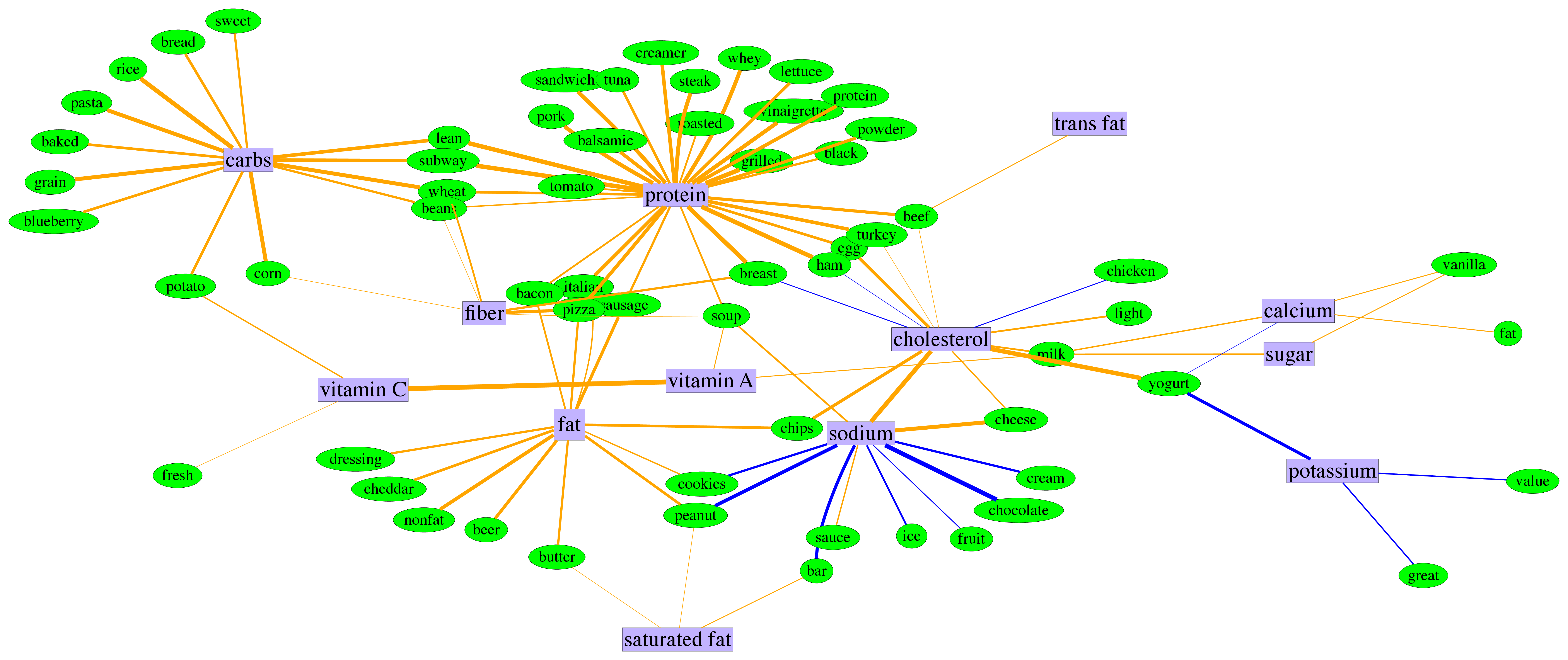
This package provides support for learning MRFs where each node-conditional can be any generic exponential family distribution. Currently supported node-conditionals are Bernoulli, Gamma, Gaussian, Dirichlet, and Point-Inflated models. See `exponential_families.py` for guidance on how to add a custom node-conditional distribution.
Installation
------------
`pip install vsmrfs`
Requires `numpy`, `scipy`, and `matplotlib`.
Running
-------
### 0) Experiment directory structure
The `vsmrfs` package is very opinionated. It assumes you have an experiment directory with a very specific structure. If your experiment directory is `exp`, then you need the following structure:
```
exp/
args/
data/
nodes.csv
sufficient_statistics.csv
edges/
metrics/
plots/
weights/
```
Note that all you really need at first is the `exp/data/` structure and the two files. If you generate your data from the synthetic dataset creator, the structure will be created for you.
### 1a) Generating synthetic data (optional)
If you are just trying to run the package or conduct some benchmarks on the algorithm, you can create a synthetic dataset which will setup all of the experiment structure for you. For example, say you wanted to run an experiment with two Bernoulli nodes and a three-dimensional Dirichlet node, and you want to use `foo/` as your experiment directory:
`vsmrf-gen foo --nodes b b d3`
This will generate a `foo` directory and all of the structure from step 0, using some default parameters for sparsity and sample sizes. You can see the full list of options with `vsmrf-gen --help`.
### 1b) Preparing your data (alternative to 1a)
If you actually have some data that you're trying to model, you need to get it into the right format. Assuming you know your data types, and your experiment directory is `foo`, you need to generate two files:
`foo/data/nodes.csv`: This is a single-line CSV file containing the data-types of all your node-conditionals. Currently supported options:
- `b`: Bernoulli node
- `n`: Normal or Gaussian node
- `g`: Gamma node
- `d#`: Dirichlet node, where # is replaced with the dimensionality of the Dirichlet, e.g. `d3` for a 3-parameter Dirichlet
- `ziX`: Zero-inflated or generic point-inflated node, where `X` is replaced by the inflated distribution. This is a recursive definition, so you can have multiple inflated points, e.g., `zizig` would be a two-point inflated Gamma distribution.
`foo/data/sufficient_statistics.csv`: A CSV matrix of sufficient statistics for all of the node-conditionals. The first line should be the column-to-node-ID mapping. So for example if you have a dataset of two Bernoulli nodes and a 3-dimensional Dirichlet, your header would look like `0,1,2,2,2` since `node0` and `node1` are both Bernoulli (i.e. univariate sufficient statistics) and `node2` is your Dirichlet, with 3 sufficient statistics. Every subsequent row in the file then corresponds to a data sample.
### 2) MLE via Pseudo-likelihood
To learn a VS-MRF, we make a pseudo-likelihood approximation that effectively decouples all the nodes. This makes the problem convex and separable, enabling us to learn each node independently. If you have access to a cluster or distributed compute environment, this makes the process very fast since you can learn each node on a different machine, then stitch the whole graph back together in step 3.
Say you want to learn the Dirichlet node from step 2, using a solution path approach so you can avoid hyperparameter setting:
`vsmrf-learn foo --target 2 --solution_path`
This will load the data from the `foo` experiment directory and learn the pseudo-edges for `node2`, which is our Dirichlet node. You can see the full list of options with `vsmrf-learn --help`.
### 3) Stitching the MRF together
Once all the nodes have been learned, the pseudo-edges need to be combined back together to form a single graph. Since we are learning approximate models, there will be times when a pseudo-edge for `nodeA-nodeB` exists but `nodeB-nodeA` does not. In that case, we have to decide whether to include the edge in the final graph or not; that is, should we `OR` the edges together or `AND` them? The package will create both, but empirically it seems performance is slightly better with the `AND` graph.
Continuing our example, to stitch together our three node MRF:
`vsmrf-stitch foo --nodes b b d3`
If you generated your data synthetically, such that you know the ground truth of the model, you can evaluate the resulting graph:
`vsmrf-stitch foo --nodes b b d3 --evaluate`
See `vsmrf-stitch --help` for a full list of options.
Reference
---------
```
@inproceedings{tansey:etal:2015,
title={Vector-Space Markov Random Fields via Exponential Families},
author={Tansey, Wesley and Madrid-Padilla, Oscar H and Suggala, Arun and Ravikumar, Pradeep},
booktitle={Proceedings of the 32nd International Conference on Machine Learning (ICML-15)},
year={2015}
}
```
1 maintainer

Metadata
1 maintainer
Release files for vsmrfs 0.9.0
For a detailed explanation of source distributions (sdists) and built distributions (wheels), please see the package formats documentation.
Source distribution (sdist)
| File | Size | Uploaded | Provenance | |
|---|---|---|---|---|
| vsmrfs-0.9.0.tar.gz | 4.0 kB | Without provenance | Details |
Built distribution (wheel)
| File | Interpreter | ABI | Platform | Reset |
|---|---|---|---|---|
| vsmrfs-0.9.0-cp27-none-macosx_10_9_x86_64.whl | CPython 2.7 | none | macOS 10.9+ x86-64 | Details |
Total release size: 10.9 kB
Release files / vsmrfs-0.9.0.tar.gz
| Download URL | vsmrfs-0.9.0.tar.gz |
|---|---|
| Size | 4.0 kB |
| Tags | Source |
|
SHA-256 checksum How to use checksums |
96bd461ba3b8d2d7b0312c2de3fc1a14084ae15fb1eb83750cfea5ab8d887cb4
|
|
BLAKE2b-256 checksum How to use checksums |
3036a6c4f77e801fc14e0eb40eb4c37231aebc0791e492e18a48d767562d736f
|
| Upload date | |
|
Uploaded using Trusted Publishing? What is trusted publishing? |
No |
Release files / vsmrfs-0.9.0-cp27-none-macosx_10_9_x86_64.whl
| Download URL | vsmrfs-0.9.0-cp27-none-macosx_10_9_x86_64.whl |
|---|---|
| Size | 6.9 kB |
| Tags | CPython 2.7 macOS 10.9+ x86-64 |
|
SHA-256 checksum How to use checksums |
eb5214fcbc879fa032f3568c56592cdb25e2e69ab8ed086430fce6749b3d7f0b
|
|
BLAKE2b-256 checksum How to use checksums |
5f82d2fa222730bdcdea98e73ff0dd19f58e20cc0d3e5ef798ea51916235ed1d
|
| Upload date | |
|
Uploaded using Trusted Publishing? What is trusted publishing? |
No |
Security for vsmrfs 0.9.0
Provenance
Provenance describes where a file came from. On PyPI, provenance is shared via attestations, which provide a verifiable record of the build or publishing details. View details, limitations and caveats.
No provenance found
None of the files in this release were uploaded with provenance metadata.
A note on package security
PyPI is a repository for distributing packages, not a service for auditing them. While third-party security researchers and our staff do their best to detect and remove malicious packages, PyPI cannot guarantee the quality, security or suitability of any given package.
To learn more about protecting yourself from malicious actors, visit our package security documentation.













