
Watchconf is a simple tool to quickly audit the configurations of a collection of servers, namely:
Have a list of all config files that must be present in the servers.
Check these in all servers, and make sure that they are all equal, and if they are different, see why they are different and whether that’s what we want.
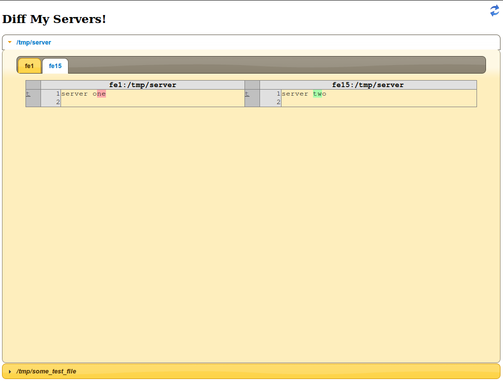
This tool retrieves the files contents via ssh and displays, for each configuration file:
Which servers have it and which don’t (servers that don’t have the file will appear in italics.)
The servers that do have the file, will be grouped so that servers with identical file contents are together.
For each group of servers, you’ll see a diff of the file against the same file in the previous group of servers.
Files that are equal in all servers will appear in italics.
The app is in a single file. To get it running either download the watchconf.py or install it with pip install watchconf.
Here’s how to use it:
watchconf -f FILES -s SERVERS [-p PORT] [-u|--username USERNAME] [-d|--debug]

Starts an HTTP server that shows the differences between the specified files in the specified servers.

options:

 -f --files     Files to compare
 -s --servers   Servers to compare
 -p --port      Port to listen to (default: 5000)
 -u --username  ssh username (default: use the current user)
 -d --debug     Debug mode
 -h --help      display help
For example:
watchconf -s server1,server2 -f file1,file2
Watchconf expects a memcache daemon listening to the default port on localhost.
1 maintainer

Metadata
1 maintainer
Release files for watchconf 1.12
For a detailed explanation of source distributions (sdists) and built distributions (wheels), please see the package formats documentation.
Source distribution (sdist)
| File | Size | Uploaded | |
|---|---|---|---|
| watchconf-1.12.tar.gz | 1.9 kB | Details |
Release files / watchconf-1.12.tar.gz
| Download URL | watchconf-1.12.tar.gz |
|---|---|
| Size | 1.9 kB |
| Tags | Source |
|
SHA-256 checksum How to use checksums |
234e65de0736332e4e5233db3c7f8d3b7d5b94d1034cfba307fef4ffe8682049
|
|
BLAKE2b-256 checksum How to use checksums |
3b245eb8ecde17261db0fb2d89fa2283b9c57ed237eacb05fa0f9e1848593e2e
|
| Upload date | |
|
Uploaded using Trusted Publishing? What is trusted publishing? |
No |














