
 Oscilloscope Waveform Capture Viewer




wavebin reads binary capture files generated by Agilent, Keysight and Rigol oscilloscopes and renders the waveforms in an interactive plot. Waveforms can be inspected, filtered, clipped, subsampled and exported to sigrok PulseView or WAV files.
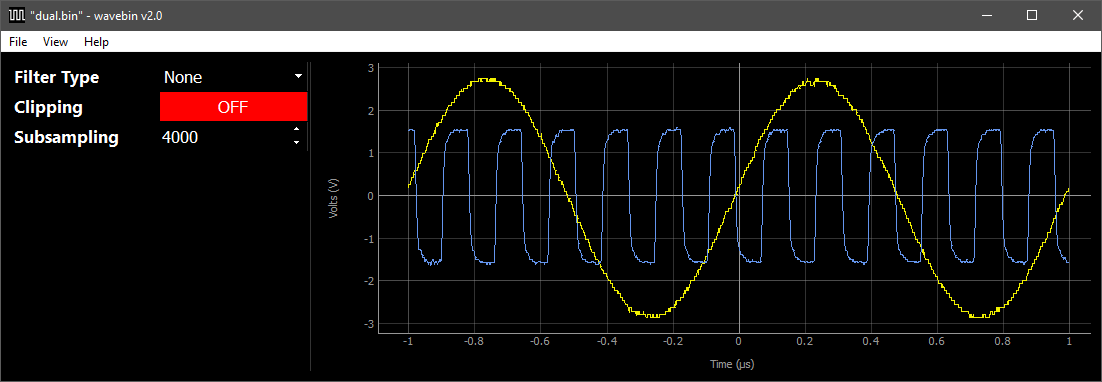
wavebin has been tested with capture files from a Keysight DSO-X 1102G, Keysight MSO-X 4154A, Rigol MSO5074, and Rigol DHO804. If you have access to waveform files from other Agilent, Keysight or Rigol oscilloscopes, please submit them for testing through the Sample Waveforms issue.
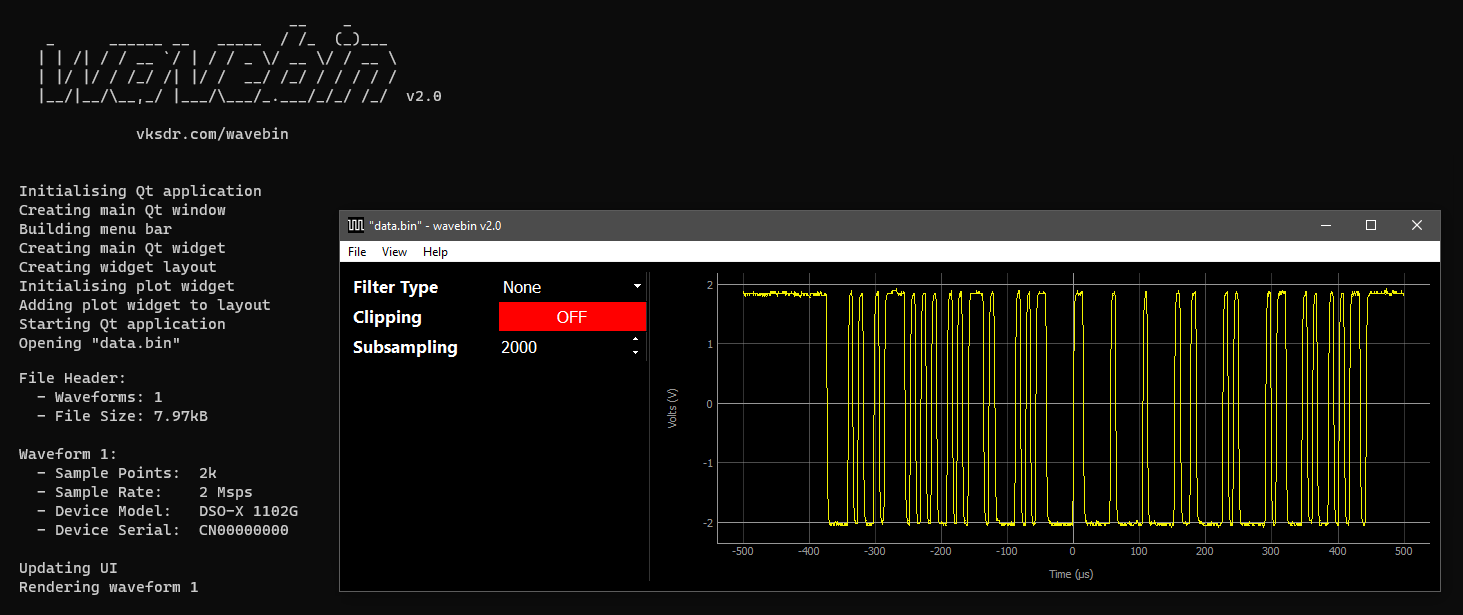
Getting Started
wavebin is available via the Python Package Index (PyPI) and is installed using pip.
> pip3 install wavebin
Keysight oscilloscopes save capture files to external USB Mass Storage devices for easy transfer to a PC. These files use the .bin extension.
To open a capture file in wavebin, start the application by running:
> python3 -m wavebin
Next, click File → Open and navigate to the .bin file.
Alternatively a capture file path can be specified when running wavebin using the -i argument.
> python3 -m wavebin -i [PATH TO BIN FILE]
For more information about the wavebin command-line arguments run:
> python3 -m wavebin -h
                              __    _
   _      ______ __   _____  / /_  (_)___
  | | /| / / __ `/ | / / _ \/ __ \/ / __ \
  | |/ |/ / /_/ /| |/ /  __/ /_/ / / / / /
  |__/|__/\__,_/ |___/\___/_.___/_/_/ /_/  v2.3.1

             vksdr.com/wavebin


usage: wavebin [-h] [-i FILE] [-v] [--no-opengl] [--no-limit]

Waveform capture viewer for Keysight oscilloscopes.

optional arguments:
  -h, --help   show this help message and exit
  -i FILE      path to Keysight waveform capturefile (.bin)
  -v           enable verbose logging mode
  --no-opengl  disable hardware accelerated rendering with OpenGL
  --no-limit   disable subsampling limit (may cause slow frame rates with large captures)
Features
Export to PulseView
PulseView by sigrok is a logic analysis tool typically used with hardware logic analyser devices. It is capable of decoding many serial and parallel protocols with its built-in decoders.
Below is a 115200bd UART waveform captured on a DSO-X 1102G, loaded into wavebin with clipping enabled to create a clean digital waveform, exported to PulseView and decoded using the PulseView UART protocol decoder.
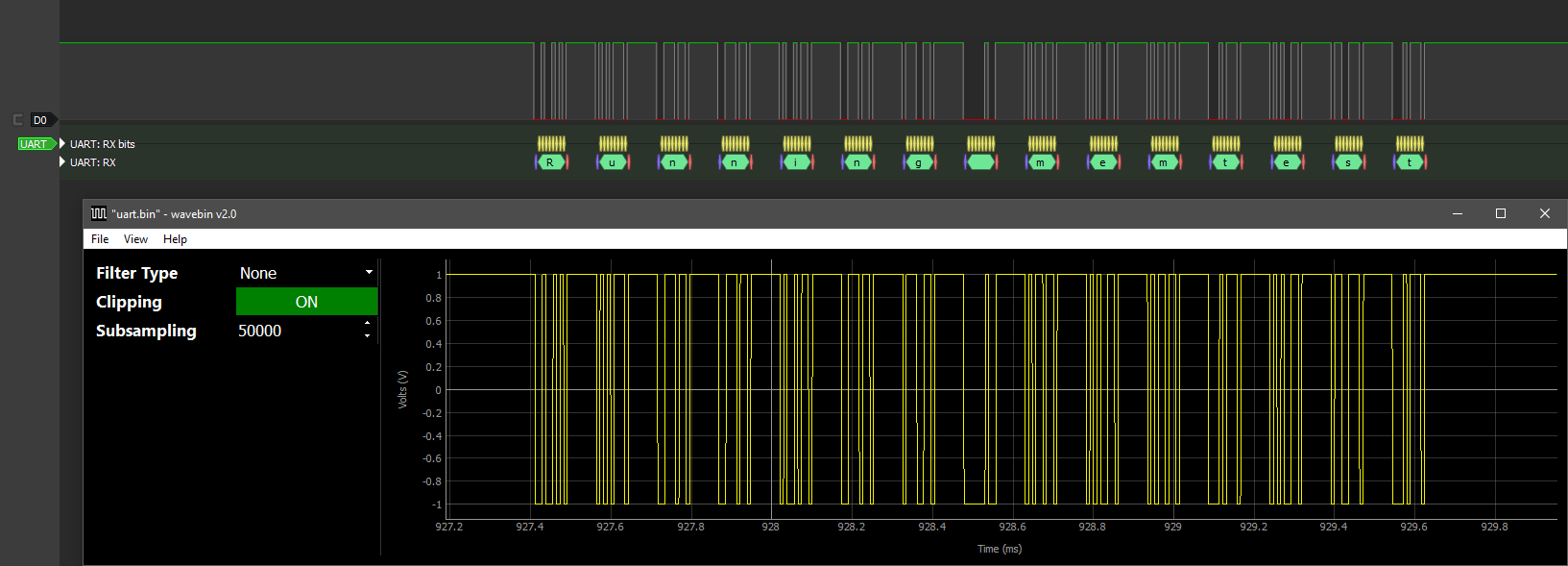
To export waveforms to PulseView, click File → Export to PulseView then navigate to a save location. The produced .sr file can then be opened directly in PulseView.
Export to WAV
WAV files can be opened in most media players (e.g. VLC) and audio editors (e.g. Audacity).
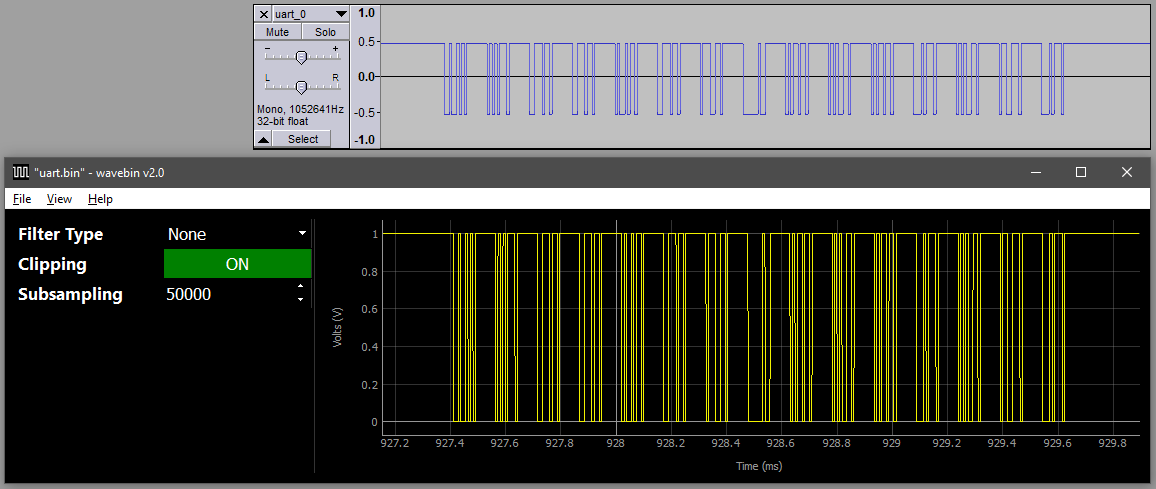
To export waveforms to WAV files, click File → Export to WAV file then navigate to a save location. This will produce a mono .wav file for each waveform. The WAV files names follow the format *_[n].wav, where n is the waveform number starting at 0.
Filtering
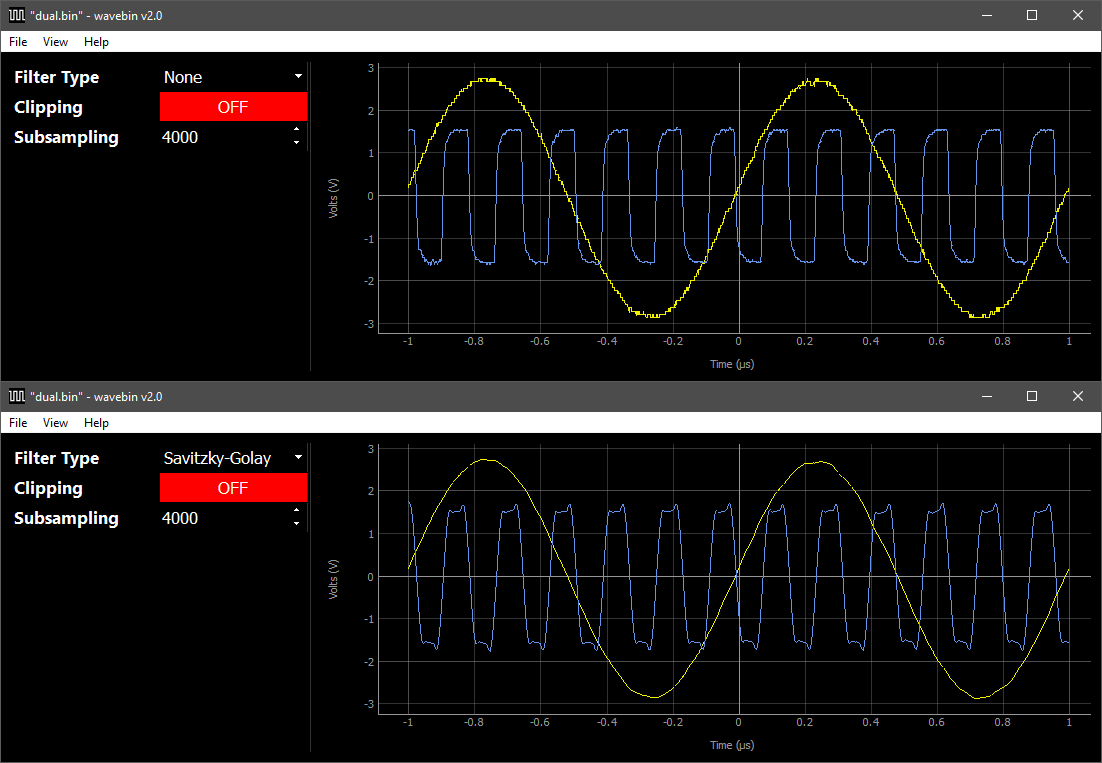
A Savitzky-Golay low pass filter is included in wavebin for smoothing waveforms. This filter can be enabled using the Filter Type dropdown menu.
Clipping
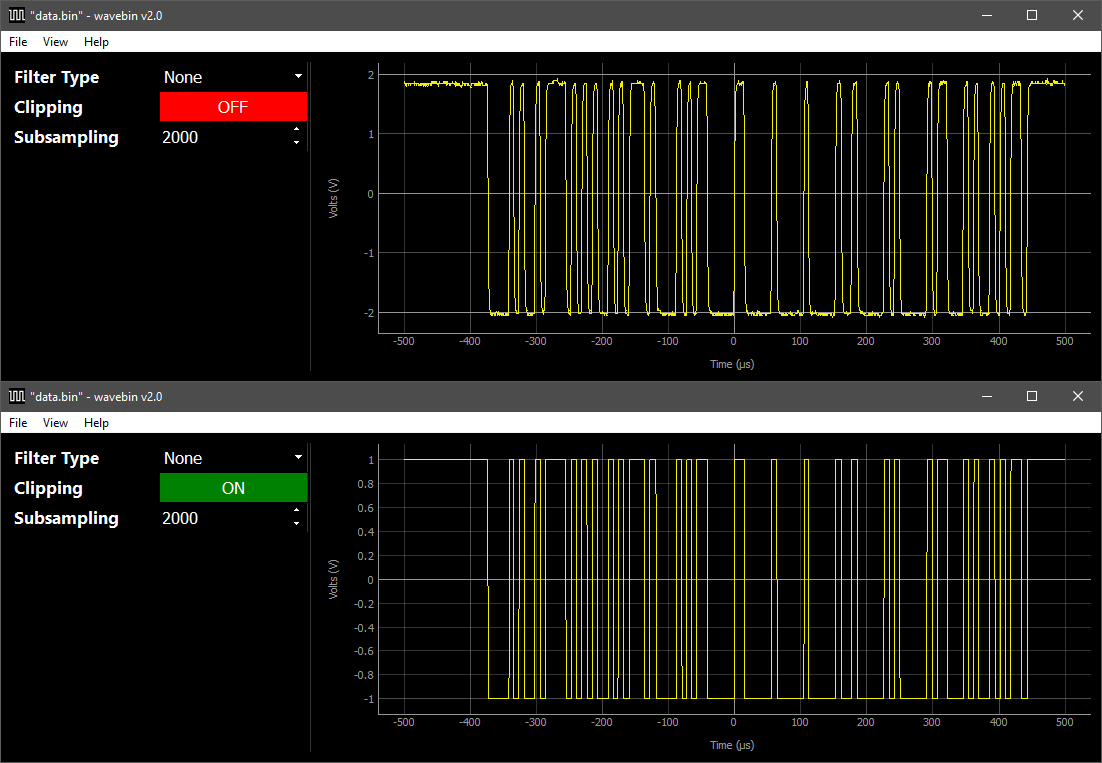
The clipping option converts analog waveforms to digital waveforms in a similar way to a Schmitt trigger.
The filtering and clipping options can be used simultaneously. Clipping is always applied after filtering.
Subsampling
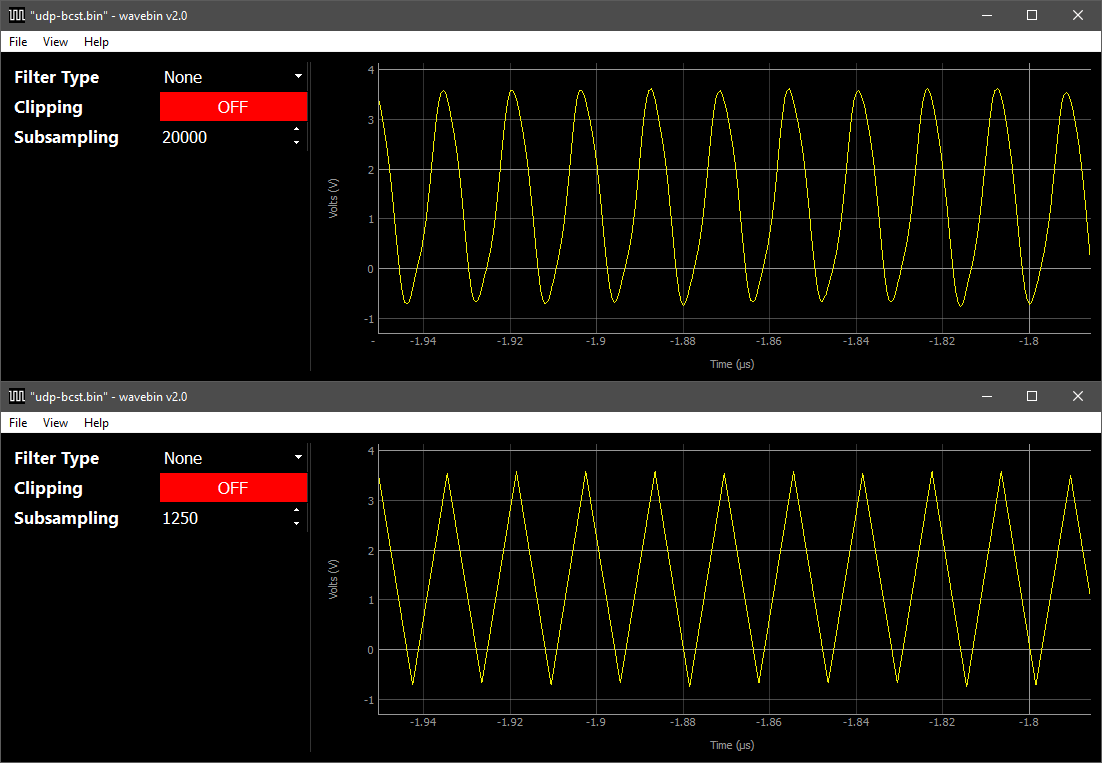
When a waveform capture is first loaded, all available sample points will be used to render the waveform. The subsampling option renders the waveform using an equally-spaced subset of points.
Below is a 62.5 MHz wave being rendered with all 20,000 points in the capture file, and then with only 1250 points.
By default, waveforms with over 50,000 points will automatically be subsampled. This can be overridden using the --no-limit switch.
Resources
1 maintainer

Metadata
1 maintainer
Release files for wavebin 2.3.1
For a detailed explanation of source distributions (sdists) and built distributions (wheels), please see the package formats documentation.
Source distribution (sdist)
| File | Size | Uploaded | |
|---|---|---|---|
| wavebin-2.3.1.tar.gz | 16.9 kB | Details |
Built distribution (wheel)
| File | Interpreter | ABI | Platform | Reset |
|---|---|---|---|---|
| wavebin-2.3.1-py3-none-any.whl | Python 3 | none | any | Details |
Total release size: 33.3 kB
Release files / wavebin-2.3.1.tar.gz
| Download URL | wavebin-2.3.1.tar.gz |
|---|---|
| Size | 16.9 kB |
| Tags | Source |
|
SHA-256 checksum How to use checksums |
d310996cae81d2023412491026cf8790ce80811ab942a00cd102d3b8cce1638e
|
|
BLAKE2b-256 checksum How to use checksums |
17719818bf582ea84a9acfe02146b2a199db63e8298a990375eba8e82ca7b9b2
|
| Upload date | |
|
Uploaded using Trusted Publishing? What is trusted publishing? |
No |
| Uploaded via |
twine/5.0.0 CPython/3.12.1
|
Release files / wavebin-2.3.1-py3-none-any.whl
| Download URL | wavebin-2.3.1-py3-none-any.whl |
|---|---|
| Size | 16.4 kB |
| Tags | Python 3 |
|
SHA-256 checksum How to use checksums |
fa35061776e30a909ef239912037e050039deaed81d2938308e26df33462bff5
|
|
BLAKE2b-256 checksum How to use checksums |
27f530d5f2cd86f858562f3b92331d6f23e4069d1ddd623df698f4c14adc8a74
|
| Upload date | |
|
Uploaded using Trusted Publishing? What is trusted publishing? |
No |
| Uploaded via |
twine/5.0.0 CPython/3.12.1
|














