
Wavy Tool
Wavy acquire signals from microphone input device, plot and saves as data (.csv) or exports as image (.png, .tif, etc). Wavy has two graphic areas, which represents the real time data from input (started when the software runs), and the recording area that starts when clicked on Record button. All saved data is relative to visible recording area.
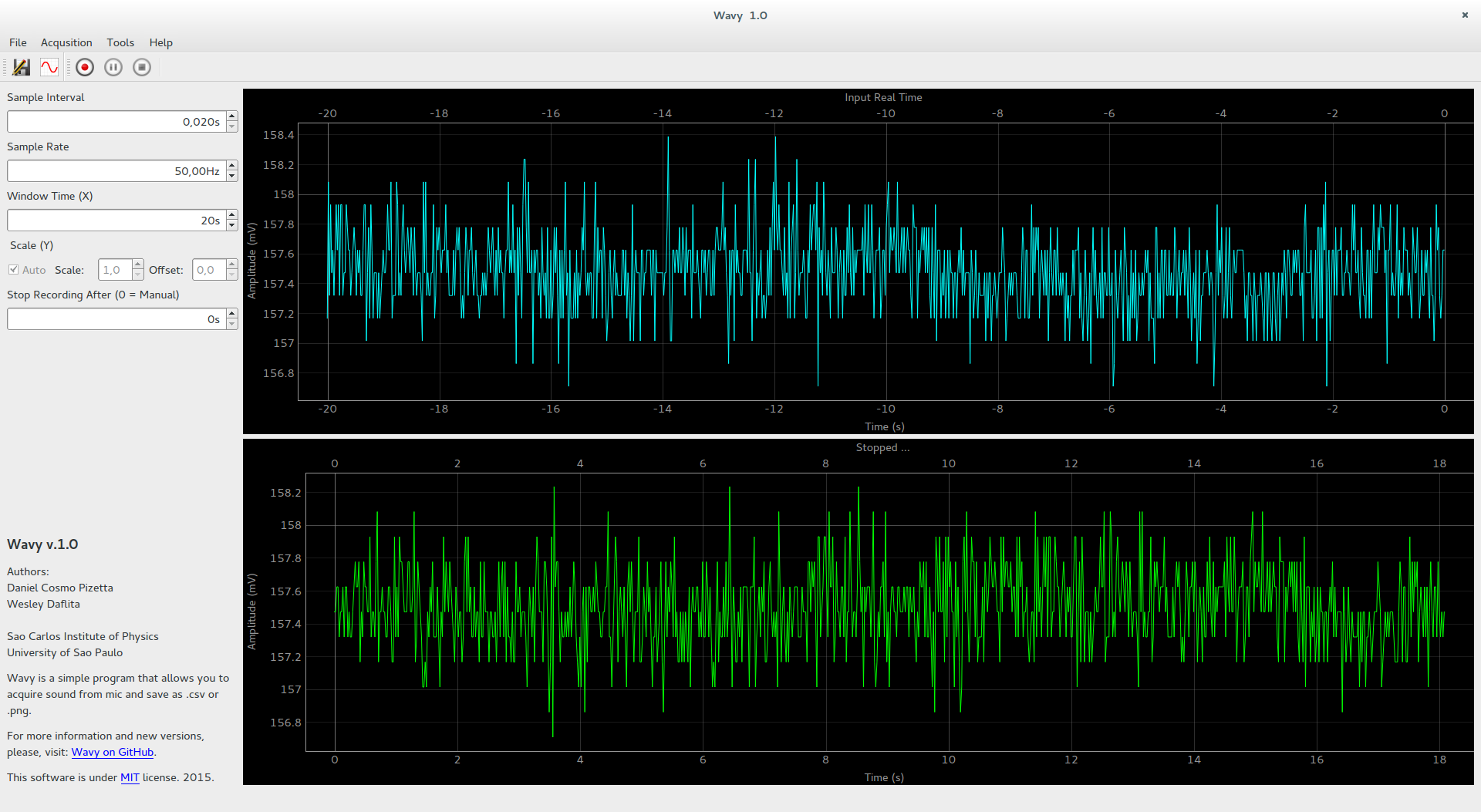
The recording area has three states: recording when the line is red, paused when the line is orange, and green when the recording was stopped. Wavy automatically suggests the name for your data when is saved as the new_wavy_data_yymmddHHMMSS.ext.
Please, if you use this software cite us:

You know Zenodo? A way to cite software using DOI!
Download binaries
To be practical, now we can provide binaries for Windows and Linux. The binaries are not small (200MB) but have everything you need. You don't need to install, just download and click to execute.
Please, see Releases page: https://github.com/dpizetta/wavy/releases
First steps with Wavy
After download Wavy you can extract the executable. We suggest you create a folder Wavy to put the executable and the configuration file that will be created, creating a link (icon) to access it from Desktop area. To run it, just double click.
When you run it the first time, it will let you to choose the default folder to place future data files. We suggest that you create a new folder "Wavy Data" in Documents or Desktop area for easy access. This procedure will create a file that stays with the executable called "wavy.config", to keep that information and future configurations.
The control of the program is very easy. The top plot show the real time data from input device. Then we can start recording by clicking the Record button.
Also, if you need, you can pause using the Pause button and start recording again by clicking on Pause once more.
And finally, you can stop recording by clicking on Stop button. Now, the buttons to save and export will be enabled.
By clicking on save button you can save data from recording area to CSV file. Also, you can export an image file using the exporter.
Note about saving recorded data
If you zoom in the recording plot, the data saved will represent just the data visible in the window. So make sure you not lost data.
Some other features on plots
The plots are provided by PyQtGraph, and if you right click on the plot you will see some nice features including other options to export data. Also you can zoom in and out using the mouse and move it.
Input device not found
If the is no input device plugged in (or internal microphone) the program will show a message and exit at this moment, we need future improvement in this way.
Problems and improvements
If you find any problems in this program, please let us know using the Issues System provided by GitHub. This is the correct way to keep us alert and how provide information about the development for you. Thanks in advance.
About
Wavy was developed to be a simple software to acquire data from microphone channel, plot and save data. The main use is to provide an acquisition software for Ruchardt's method in Physics Laboratory at Sao Carlos Institute of Physics - University of Sao Paulo.
Authors
- [Daniel Cosmo Pizetta] (https://github.com/dpizetta)
- [Wesley Daflita] (https://github.com/Wa59)
Acknowledgment
Professors
- PhD Fernando Fernandes Paiva
- PhD Valmor Roberto Mastelaro
Technicians
- Antenor Fabbri Petrilli Filho
- Cláudio Boense Bretas
- Jae Antonio de Castro Filho
Dependencies
- Python 3.4+
- PyQt5 or PySide2 or PyQt4 or PySide
- pyqtgraph
- numpy
- PyAudio (also PortAudio)
Notes: The easiest way to install all those things is:
- Install Python 2.7 (or Anaconda/Miniconda that comes with numpy and other better libraries)
- Use pip install pyqtgraph (installs PyQt4 automatically)
- Use pip install numpy
- Use pip install pyaudio
For Windows users, PyAudio requires more things, the better way is to download the .exe installer from PyAudio website (that includes PortAudio) and install it. If you are using Anaconda or Miniconda, replace the 'pip' command for 'conda'.
Running the code
To run wavy without installing, use
$ python run.py
Installing
To install it, do the following, inside main Wavy folder
$ pip install .
Installing as developer
To install it as a developer, which means install it like a library but keeping it in the same place it is and providing the auto update if any changes are made.
$ pip install -e .
1 maintainer

Metadata
1 maintainer
Release files for wavytool 2.1
For a detailed explanation of source distributions (sdists) and built distributions (wheels), please see the package formats documentation.
Source distribution (sdist)
| File | Size | Uploaded | |
|---|---|---|---|
| wavytool-2.1.tar.gz | 544.3 kB | Details |
Built distribution (wheel)
| File | Interpreter | ABI | Platform | Reset |
|---|---|---|---|---|
| wavytool-2.1-py3-none-any.whl | Python 3 | none | any | Details |
Total release size: 1.1 MB
Release files / wavytool-2.1.tar.gz
| Download URL | wavytool-2.1.tar.gz |
|---|---|
| Size | 544.3 kB |
| Tags | Source |
|
SHA-256 checksum How to use checksums |
dfb5279c8b8d9ec812c97b486614e12793b34a6b8a2d9777ec619048e66dd232
|
|
BLAKE2b-256 checksum How to use checksums |
c2bb2ad843d5ab938c8b8c74bad9bb7842548702d17bf2a7fe277cba15007b5d
|
| Upload date | |
|
Uploaded using Trusted Publishing? What is trusted publishing? |
No |
Release files / wavytool-2.1-py3-none-any.whl
| Download URL | wavytool-2.1-py3-none-any.whl |
|---|---|
| Size | 578.3 kB |
| Tags | Python 3 |
|
SHA-256 checksum How to use checksums |
df633d78744fc8a320965924230aff6de99bc927f9a1d05a174f9030490de99a
|
|
BLAKE2b-256 checksum How to use checksums |
5b361b698e22c5df8abd4c78af3b65031a893536357680bc50673944dc3576e4
|
| Upload date | |
|
Uploaded using Trusted Publishing? What is trusted publishing? |
No |














