


wd_fw_update

This is a firmware update tool for Western Digital SSDs on Ubuntu / Linux Mint.
It provides a user-friendly interface to select the firmware version for the update process.
It uses the Western Digital API and the NVME toolbox nvme-cli but is NOT associated in any case to them.
It was originally developed for Frame.Work laptops, but should work with any Ubuntu / Mint device with Western Digital NVME SSD.
See the discussion on: community.frame.work and juleskreuer.eu
Installation
Prerequisites
Make sure the following dependencies are installed on your system:
- sudo
- nvme-cli
Via source
Clone the repository:
git clone https://github.com/not-a-feature/wd_fw_update.git
cd wd_fw_update

pip install .
Via pypi:
The newest release is published on pypi.
pip install wd-fw-update
Usage
Run
wd_fw_update
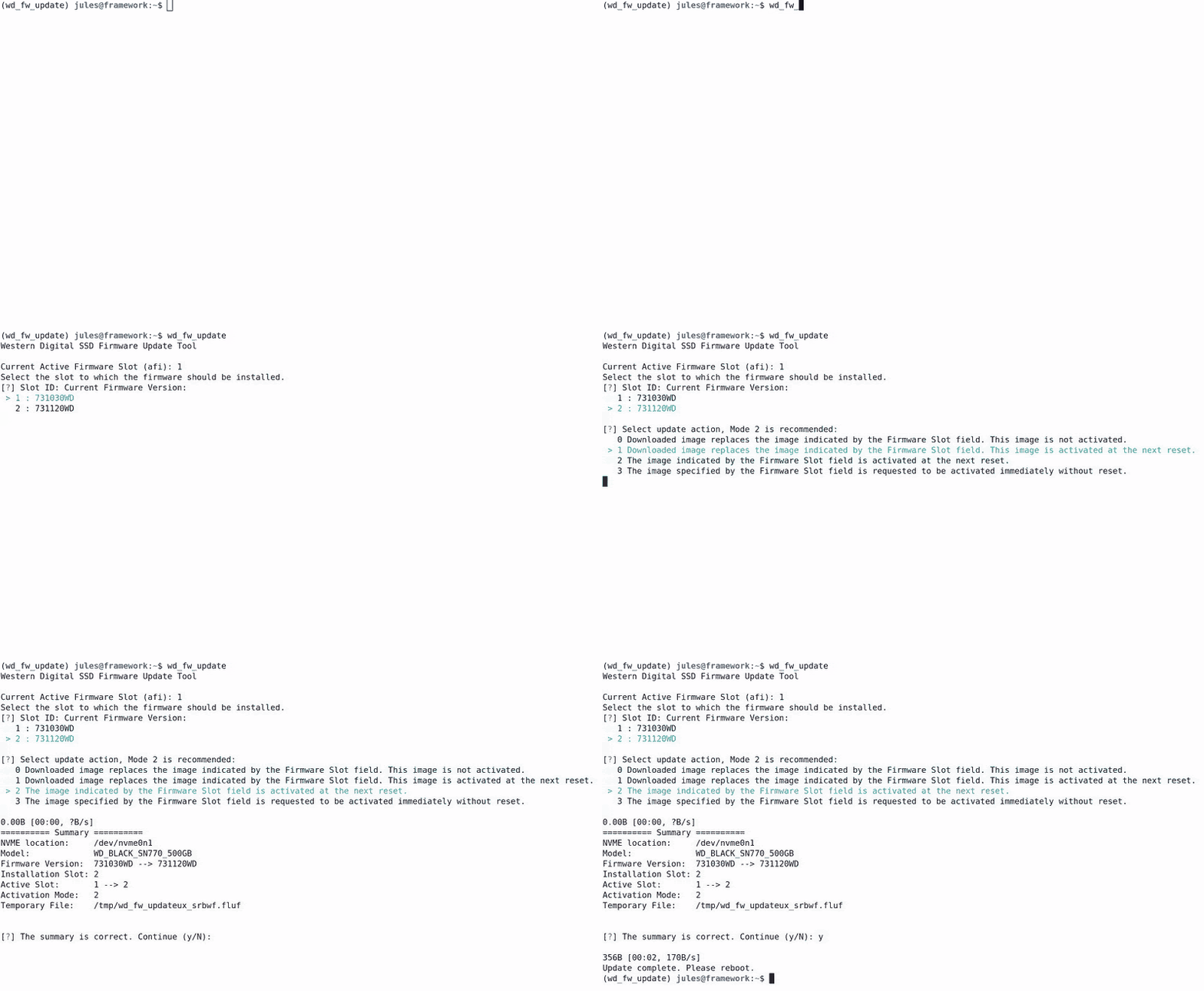
Follow the on-screen prompts to select the appropriate options for your firmware update. The script will guide you through the process, and once completed, it will provide a summary of the update. Depending on the update mode, it may prompt you to reboot or switch to the new slot.
Command-Line Options
--version: Display the version of the firmware update tool.
-i, --info: Display information about the available drives.
-m, --manual: Disable version and dependency checks.
--ignore_ssl_errors: Disable SSL check.
-v, --verbose: Set the log level to INFO.
-vv, --very-verbose: Set the log level to DEBUG.
-i, --info
The -i flag will display about the available drives.
Example:
========== Device Info ==========
Device                   : /dev/nvme0n1
Model                    : WD_BLACK SN770 500GB
Current fw version       : 731120WD
Slot 1 readonly          : False
Slot count               : 2
Current slot             : 2
Slots with firmware      : {1: '731030WD', 2: '731120WD'}
-m, --manual
The -m flag enables manual mode, bypassing several checks:
- Displays all available firmware versions for selection, not just newer ones.
- Allows selection of firmware versions that do not list the current version as a dependency.
Note
This project has been set up using PyScaffold 4.5. For details and usage information on PyScaffold see https://pyscaffold.org/.
Dependencies
License
Copyright (C) 2026 by Jules Kreuer - @not_a_feature and contributers. This piece of software is published unter the GNU General Public License v3.0 TLDR:
| Permissions | Conditions | Limitations |
|---|---|---|
| ✓ Commercial use | Disclose source | ✕ Liability |
| ✓ Distribution | License and copyright notice | ✕ Warranty |
| ✓ Modification | Same license | |
| ✓ Patent use | State changes | |
| ✓ Private use |
Go to LICENSE to see the full version.
1 maintainer

Metadata
1 maintainer
Release files for wd-fw-update 2.3.0
For a detailed explanation of source distributions (sdists) and built distributions (wheels), please see the package formats documentation.
Source distribution (sdist)
| File | Size | Uploaded | Provenance | Actions |
|---|---|---|---|---|
| wd_fw_update-2.3.0.tar.gz | 326.6 kB | Without provenance | Details for wd_fw_update-2.3.0.tar.gz |
Built distribution (wheel)
| File | Interpreter | ABI | Platform | Actions Reset |
|---|---|---|---|---|
| wd_fw_update-2.3.0-py3-none-any.whl | Python 3 | none | any | Details for wd_fw_update-2.3.0-py3-none-any.whl |
Total release size: 336.3 kB
Release files / wd_fw_update-2.3.0.tar.gz
| Download URL | wd_fw_update-2.3.0.tar.gz |
|---|---|
| Size | 326.6 kB |
| Tags | Source |
|
SHA-256 checksum How to use checksums |
555b3be14b3d774d04acd9adee50441ee52b63c45b39c3104e6deda3880b153b
|
|
BLAKE2b-256 checksum How to use checksums |
c696d8c2d08b38f28a908932a3bef11e38227a250b002572858a368b52b6d3c2
|
| Upload date | |
|
Uploaded using Trusted Publishing? What is trusted publishing? |
No |
| Uploaded via |
twine/6.1.0 CPython/3.13.7
|
Release files / wd_fw_update-2.3.0-py3-none-any.whl
| Download URL | wd_fw_update-2.3.0-py3-none-any.whl |
|---|---|
| Size | 9.7 kB |
| Tags | Python 3 |
|
SHA-256 checksum How to use checksums |
7b3ad29d6f5305a29d74e6b37b5bf2d35b91f255e22a731f9fc5bbb9587fe650
|
|
BLAKE2b-256 checksum How to use checksums |
c6bce1586c2a6f60705cb9ac26b2ec7235015f76a2c2b10197756f4bf54abe4b
|
| Upload date | |
|
Uploaded using Trusted Publishing? What is trusted publishing? |
No |
| Uploaded via |
twine/6.1.0 CPython/3.13.7
|
Security for wd-fw-update 2.3.0
Provenance
Provenance describes where a file came from. On PyPI, provenance is shared via attestations, which provide a verifiable record of the build or publishing details. View details, limitations and caveats.
No provenance found
None of the files in this release were uploaded with provenance metadata.
A note on package security
PyPI is a repository for distributing packages, not a service for auditing them. While third-party security researchers and our staff do their best to detect and remove malicious packages, PyPI cannot guarantee the quality, security or suitability of any given package.
To learn more about protecting yourself from malicious actors, visit our package security documentation.














