







wearablehrv is a Python package that comes in handy if you want to validate wearables and establish their accuracy in terms of heart rate (HR) and heart rate variability (HRV). wearablehrv is a complete and comprehensive pipeline that helps you go from your recorded raw data through all the necessary pre-processing steps, data analysis, and many visualization tools with graphical user interfaces.
Documentation
For the complete documentation of the API and modules, visit:

Examples
Getting Started
Individual Pipeline
- How to prepare your data for the individual pipeline
- Preprocess your data
- Analyze your data
- Plot your data
- Learn more about the compatibility of wearablehrv with other platforms (Labfront, VU-AMS, Empatica)
Group Pipeline
- How to prepare your data for the group pipeline
- Determine the signal quality of your wearables
- Perform four major statistical analyses to determine validity
- Descriptive plots for your group data
You can also explore the example notebooks directly in your browser without installing any packages by using Binder. Simply click the badge below to get started:
User Installation
The package can be easily installed using pip:
pip install wearablehrv
The repository can be cloned:
git clone https://github.com/Aminsinichi/wearable-hrv.git
Development
wearablehrv was developed by Amin Sinichi, during his PhD at Vrije Universiteit Amsterdam.
Contributors
How to Cite:
The package is published in the Journal of Open Source Software (JOSS). Please cite it as follows:
Sinichi et al., (2024). WearableHRV: A Python package for the validation of heart rate and heart rate variability in wearables. Journal of Open Source Software, 9(100), 6240, https://doi.org/10.21105/joss.06240
Overview
The package is divided into two broad ranges of functionalities:
- Individual Pipeline: You use it for a single participant to process your raw data.
- Group Pipeline: You use it when you have multiple participants, and you have processed them through the Individual Pipeline.
Below, we offer a quick overview of the main functionalities.
Data Collection
When one wants to establish the validity of a wearable, let's say a smartwatch, that records heart rate and heart rate variability, they should use a "ground truth" device. This is usually a gold-standard electrocardiography (ECG) that measures HR and HRV accurately.
Note: We call this gold-standard a "criterion" device in our pipeline.
Then, a participant wears this ECG, together with the smartwatch, and starts recording data simultaneously. It is beneficial if we test the subject in various conditions, so we get a better sense of how well the device works.
Usually, validating multiple devices at once is a cumbersome task, requiring a lot of data preparation, processing, different alignments, etc. A powerful feature in wearablehrv is that it does not matter how many devices in how many conditions you want to test a participant! You just record your data, and the pipeline walks you through this data to the final decision on whether a device is accurate compared to the ground truth or not.
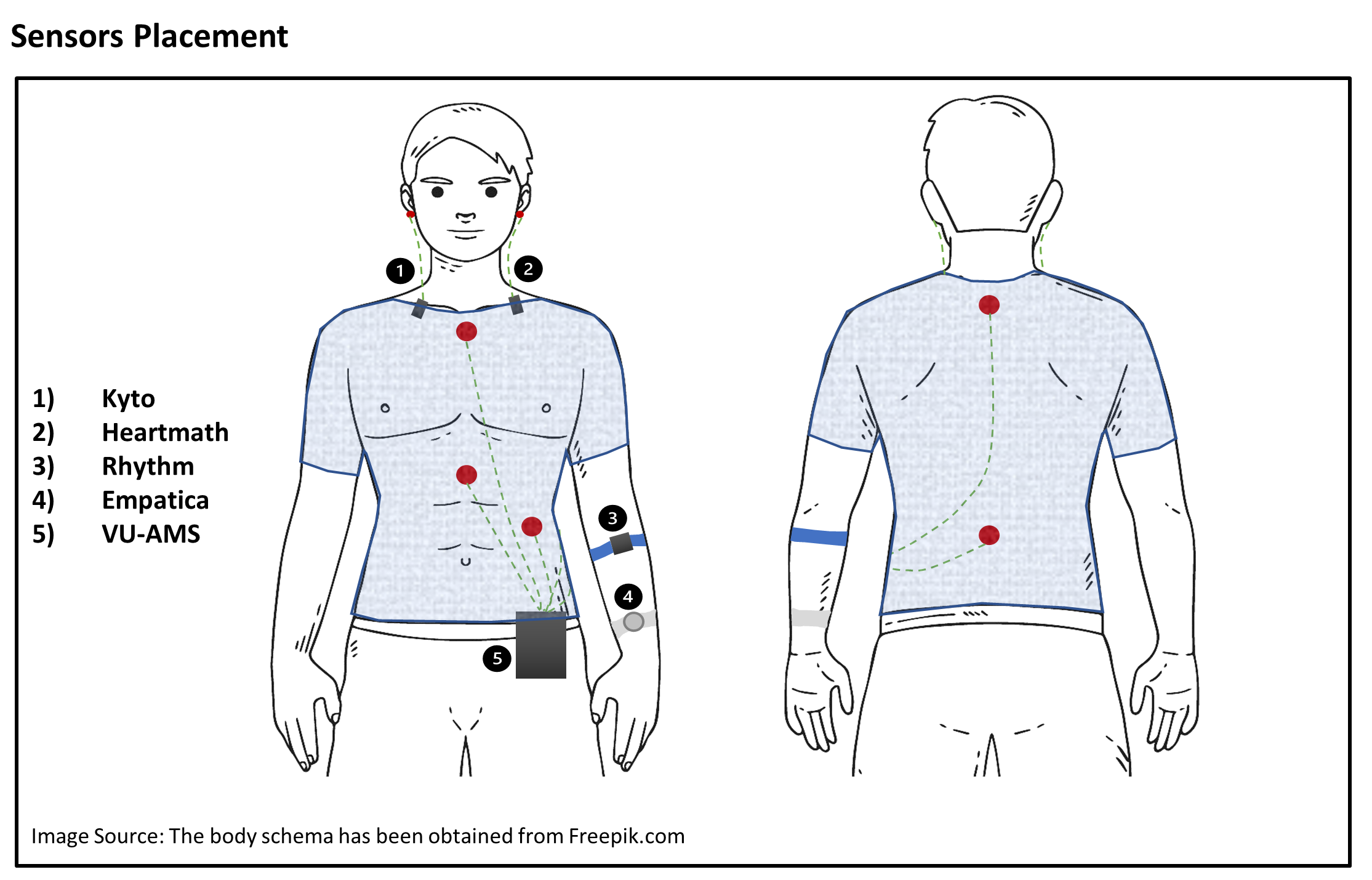
This is how your experiment may look like: a participant wearing a few wearables named Kyto, Heartmath, Empatica, Rhythm, together with a gold-standard ECG (VU-AMS), with electrodes on the chest, and will perform different tasks in different conditions (e.g., sitting for 5 minutes, standing up for 3 minutes, walking for 3 minutes, and biking for 3 minutes, while having all the devices on):
1. Individual Pipeline
1.1 Prepare Data
It is easy to read your data and experimental events with the pipeline from all your devices in one go.
# Importing Module
import wearablehrv

# downloading some example data
path = wearablehrv.data.download_data_and_get_path()
# Define the participant ID
pp = "test"
# Define your experimental conditions, for instance, sitting, standing, walking, and biking
conditions = ['sitting', 'standing', 'walking', 'biking']

# Define the devices you want to validate against the criterion.
devices = ["kyto", "heartmath", "rhythm", "empatica", "vu"]

# Redefine the name of the criterion device
criterion = "vu"

# Read data, experimental events, and segment the continuous data into smaller chunks
data = wearablehrv.individual.import_data (path, pp, devices)
events = wearablehrv.individual.define_events (path, pp, conditions, already_saved= True, save_as_csv= False)
data_chopped = wearablehrv.individual.chop_data (data, conditions, events, devices)
1.2 Preprocess Data
You have various methods to properly preprocess your raw data.
Correct the Lag, Trim Data
With a user-friendly GUI, correct the lag between devices, align data by cropping the beginning and the end of each of your devices, and have full control over each device and condition.
wearablehrv.individual.visual_inspection (data_chopped, devices, conditions,criterion)

Detect Outliers and Ectopic Beats
Easily perform different types of detection methods for each device and in each condition. This is an important advantage that allows you to easily run this within a condition, for a specific device, to make the preprocessing independent.
data_pp, data_chopped = wearablehrv.individual.pre_processing (data_chopped, devices, conditions, method="karlsson", custom_removing_rule = 0.25, low_rri=300, high_rri=2000)
Diagnostic Plots
Check how well you performed the preprocessing by comparing the detected outliers in the criterion and your selected device.
wearablehrv.individual.ibi_comparison_plot(data_chopped, data_pp, devices, conditions, criterion, width=20, height=10)

1.3 Analyze and Plot
Easily calculate all relevant outcome variables (e.g., RMSSD, mean HR, frequency domain measures) in all your devices and conditions, and use various plotting options.
time_domain_features, frequency_domain_features = wearablehrv.individual.data_analysis(data_pp, devices, conditions)
wearablehrv.individual.bar_plot(time_domain_features, frequency_domain_features, devices, conditions, width=20, height=25, bar_width = 0.15)

2. Group Pipeline
2.1 Prepare Data
Easily load all processed data that you have put through the Individual Pipeline.
wearablehrv.data.clear_wearablehrv_cache()
path = wearablehrv.data.download_data_and_get_path(["P01.csv", "P02.csv", "P03.csv", "P04.csv", "P05.csv", "P06.csv", "P07.csv", "P08.csv", "P09.csv", "P10.csv"])
conditions = ['sitting', 'standing', 'walking', 'biking']
devices = ["kyto", "heartmath", "rhythm", "empatica", "vu"]
criterion = "vu"
features = ["rmssd", 'mean_hr', 'nibi_after_cropping', 'artefact']
data, file_names = wearablehrv.group.import_data(path, conditions, devices, features) # Select the features you are interested in
data = wearablehrv.group.nan_handling(data, devices, features, conditions)
2.2 Signal Quality
A powerful tool to assess and report signal quality in all your wearables, in all conditions. You just need to define a few thresholds.
data, features, summary_df, quality_df = wearablehrv.group.signal_quality(data, path, conditions, devices, features, criterion, file_names, ibi_threshold = 0.30, artefact_threshold = 0.30)
wearablehrv.group.signal_quality_plot2(summary_df, condition_selection=False, condition=None)

2.3 Statistical Analysis
Perform four of the most common statistical methods for validation, and create plots, again, for all your devices, in all conditions, just by running a few functions.
Mean Absolute Percentage Error
mape_data = wearablehrv.group.mape_analysis(data, criterion, devices, conditions, features)
wearablehrv.group.mape_plot(mape_data, features, conditions, devices)

Regression Analysis
regression_data = wearablehrv.group.regression_analysis(data, criterion, conditions, devices, features, path)
wearablehrv.group.regression_plot(regression_data, data, criterion, conditions, devices, features, marker_color='red', width=10, height_per_condition=4)

Intraclass Correlation Coefficient
icc_data = wearablehrv.group.icc_analysis(data, criterion, devices, conditions, features, path, save_as_csv=False)
wearablehrv.group.icc_plot(icc_data, conditions, devices, features)

Bland-Altman Analysis
blandaltman_data = wearablehrv.group.blandaltman_analysis(data, criterion, devices, conditions, features, path, save_as_csv=False)
wearablehrv.group.blandaltman_plot(data, criterion, conditions, devices, features)

2.4 Descriptive Plots
There are many options for you to meaningfully plot your group data and make an informed decision on the accuracy of your devices.
wearablehrv.group.violin_plot (data, conditions, features, devices)

Questions
For any questions regarding the package, please contact:
1 maintainer

Metadata
1 maintainer
Release files for wearablehrv 0.2.1
For a detailed explanation of source distributions (sdists) and built distributions (wheels), please see the package formats documentation.
Source distribution (sdist)
| File | Size | Uploaded | Provenance | Actions |
|---|---|---|---|---|
| wearablehrv-0.2.1.tar.gz | 48.0 kB | Without provenance | Details for wearablehrv-0.2.1.tar.gz |
Built distribution (wheel)
| File | Interpreter | ABI | Platform | Actions Reset |
|---|---|---|---|---|
| wearablehrv-0.2.1-py3-none-any.whl | Python 3 | none | any | Details for wearablehrv-0.2.1-py3-none-any.whl |
Total release size: 94.1 kB
Release files / wearablehrv-0.2.1.tar.gz
| Download URL | wearablehrv-0.2.1.tar.gz |
|---|---|
| Size | 48.0 kB |
| Tags | Source |
|
SHA-256 checksum How to use checksums |
b2e9bd54d241f7214b51e6df104854975852cabee06bb187e11125d031bc2700
|
|
BLAKE2b-256 checksum How to use checksums |
5e5dc045045610c3db9d68b52428b432fcfbc6c9adcf308f2bdcba7ab25db656
|
| Upload date | |
|
Uploaded using Trusted Publishing? What is trusted publishing? |
No |
| Uploaded via |
twine/5.1.1 CPython/3.9.20
|
Release files / wearablehrv-0.2.1-py3-none-any.whl
| Download URL | wearablehrv-0.2.1-py3-none-any.whl |
|---|---|
| Size | 46.1 kB |
| Tags | Python 3 |
|
SHA-256 checksum How to use checksums |
69898c58e0dff815348d3906e36400f26e528563cf40268a9a9113acc31368e5
|
|
BLAKE2b-256 checksum How to use checksums |
aad3cc431ae26eb2c04038b2c4871b249a0827cfa6ffff88e79047b6c1e95c20
|
| Upload date | |
|
Uploaded using Trusted Publishing? What is trusted publishing? |
No |
| Uploaded via |
twine/5.1.1 CPython/3.9.20
|
Security for wearablehrv 0.2.1
Provenance
Provenance describes where a file came from. On PyPI, provenance is shared via attestations, which provide a verifiable record of the build or publishing details. View details, limitations and caveats.
No provenance found
None of the files in this release were uploaded with provenance metadata.
A note on package security
PyPI is a repository for distributing packages, not a service for auditing them. While third-party security researchers and our staff do their best to detect and remove malicious packages, PyPI cannot guarantee the quality, security or suitability of any given package.
To learn more about protecting yourself from malicious actors, visit our package security documentation.














