
WebCronMon
Shows websites monitored on Webcron.org in kiosk mode.
At Seantis we use Webcron.org to monitor our sites. For our customers, as well as for our office monitor screen, we wanted a simple auto-refreshing page that shows the status of our sites at a glance. We therefore wrote this small Flask application looking like this:
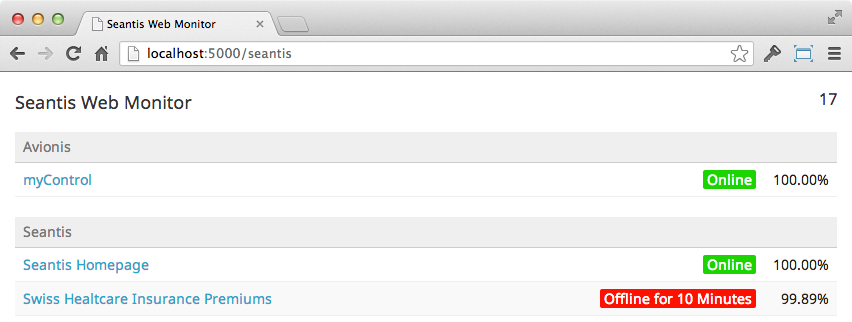
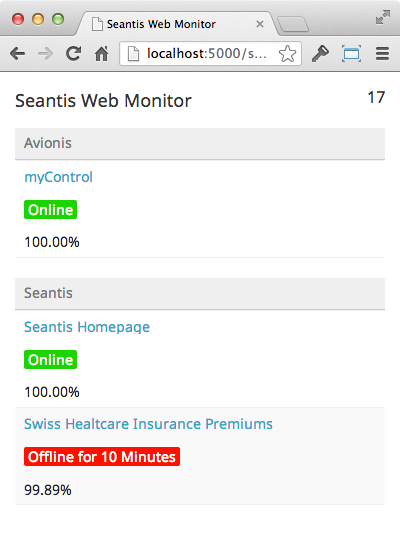
The monitor only shows the bare minimum of information to keep things simple:
list monitors by group
link the monitors to the actual website
show the current state (online / offline since)
show the uptime of the last 30 days
The site will update the list every 60 seconds by default, unless configured otherwise or unless the timer on the upper right is toggled with a mouse-click.
Demo
Requirements
Python 2.7
Installation
Create a new folder:
mkdir webcronmon
Open it:
cd webcronmon
Initialize a virtual environment:
virtualenv --no-site-packages -p python2.7 .
Install webcronmon:
pip install webcronmon
Initialize the configuration:
init-webcronmon
Configuration
Before you run webcronmon you need to edit the config.ini file created by init-webcronmon. At the least you need to enter your webcron API credentials, but there are other configuration entries you might wish to adjust.
All the configuration options are described in the config.ini that was created for you.
Running
To start webcronmon simply execute run-webcronmon in the folder in which you have edited your config.ini
Deployment
We recommend to only run one webcronmon instance and offer it through a reverse proxy. Personally we use Circus by Mozilla with the following circus.ini:
[watcher:webcronmon]
gid = webcronmon
uid = webcronmon
cmd = /home/webcronmon/app/bin/run-webcronmon
virtualenv = /home/webcronmon/app
working_dir = /home/webcronmon/app
numprocesses = 1
singleton = True
copy_env = True
As a reverse proxy we use Nginx as follows:
server {
    server_name monitor.seantis.ch;

    listen      80;

    location / {
        proxy_pass http://localhost:8081;
        proxy_set_header Host $host;
        proxy_set_header X-Real-IP $remote_addr;
        proxy_redirect off;
    }
}
To start the server reload nginx:
sudo /etc/init.d/nginx reload
And start webcronmon through circus:
sudo circusctl start webcronmon
Copyright
License
MIT
History
1.0.2 (2014-01-22)
Fixes wrong monitor urls when the protocol is defined redundantly.
Adds clickable group-headers for groups defined in routes. Fixes #2.
1.0.1 (2013-05-03)
Fixes the app crashing when a monitor reports an offline server.
1.0 (2013-04-22)
Initial Release
1 maintainer

Metadata
1 maintainer
Release files for webcronmon 1.0.2
For a detailed explanation of source distributions (sdists) and built distributions (wheels), please see the package formats documentation.
Source distribution (sdist)
| File | Size | Uploaded | |
|---|---|---|---|
| webcronmon-1.0.2.tar.gz | 96.1 kB | Details |
Release files / webcronmon-1.0.2.tar.gz
| Download URL | webcronmon-1.0.2.tar.gz |
|---|---|
| Size | 96.1 kB |
| Tags | Source |
|
SHA-256 checksum How to use checksums |
a064100cd7979ec3fbc0878d1fa2b1068b0373e5663597ae7631b7f2ea45476b
|
|
BLAKE2b-256 checksum How to use checksums |
a82768507dd32c5e44578ebc5b43ff7eee90aedbe49423a136f089a90330086b
|
| Upload date | |
|
Uploaded using Trusted Publishing? What is trusted publishing? |
No |














