
Wechaty-Meme-Bot 



Preface
This project is supported by Wechaty Community and Institute of Software of Chinese Academy of Sciences.


PowerPoint Demonstration: https://www.bilibili.com/video/BV1kZ4y1M7F6/
Demo Live Video on bilibili: https://www.bilibili.com/video/BV17f4y197ut/
My community mentor is Huang, contributor of python-wechaty. I won't make such progress without his support.
Introduction
I was required to build a meme bot based on python-wechaty, which should possess at least following functions:
- receive & save meme image from specific contact
- analyse received meme image
- response meme image accordingly based on analysis given above
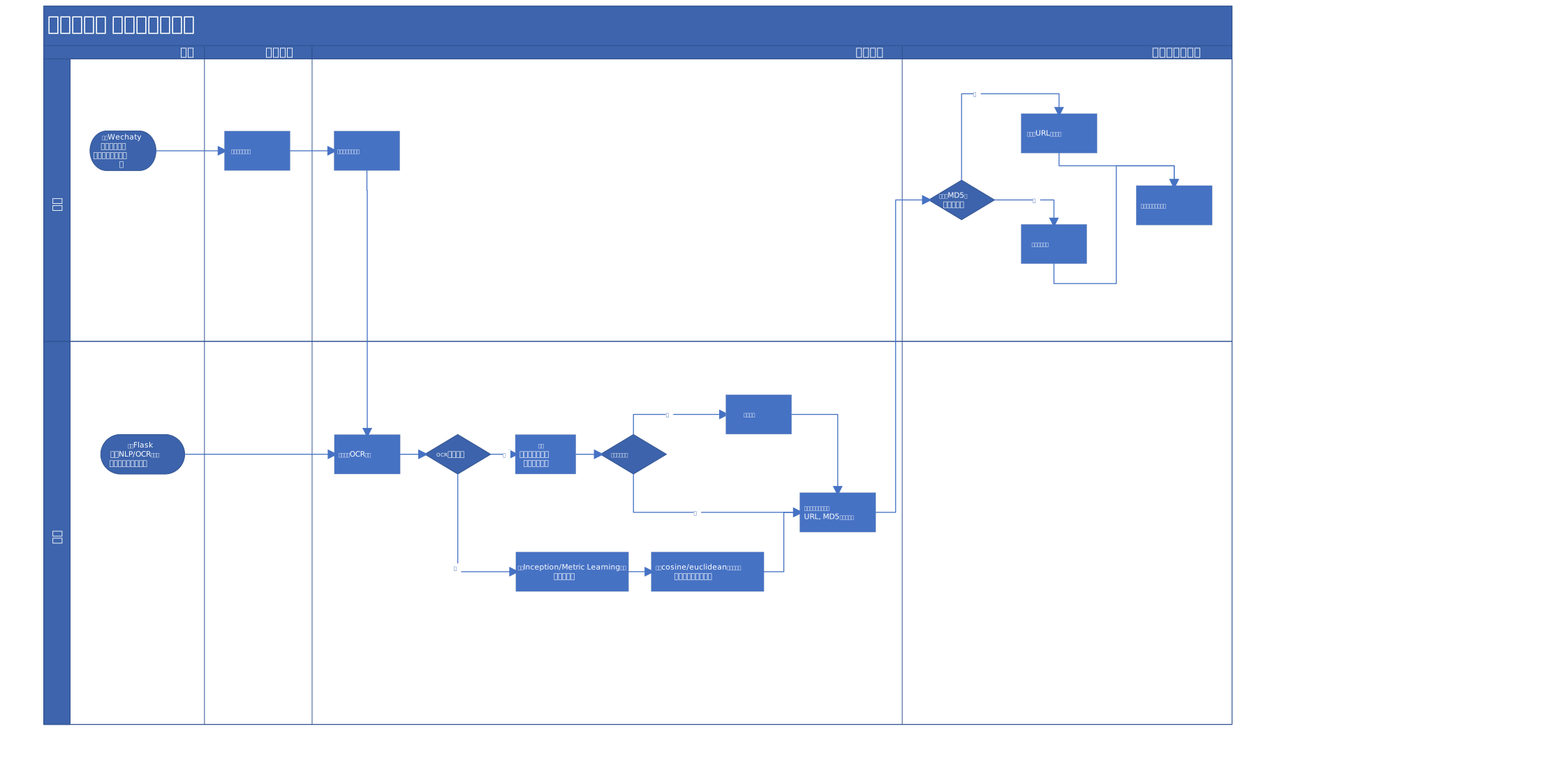
To achieve such requirements, I came out with a cross-functional diagram below to assist my development(written in Chinese):
Some Concepts
- Frontend: Run on user end, be in charge of communicating with python-wechaty-puppet and backend, acting as a middleware.
- Backend: Run on server end equipping a NVIDIA GPU, be in charge of analyzing meme image and choose response meme based on certain strategy.
Directory Layout
$ tree -L 3 -I '__pycache__'
.
├── LICENSE
├── Makefile
├── README.md
├── backend  # backend files
│   ├── chineseocr_lite  # modified OCR module
│   │   ├── Dockerfile
│   │   ├── LICENSE
│   │   ├── __init__.py
│   │   ├── angle_class
│   │   ├── config.py
│   │   ├── crnn
│   │   ├── model.py
│   │   ├── models
│   │   ├── psenet
│   │   └── utils.py
│   ├── config.yaml   # config file in yaml format
│   ├── conversation  # conversation GPT2 model path (~600MB), download from GDrive mentioned before
│   ├── cosine_metric_net.py  # definition of CosineMetricNet
│   ├── cosine_train  # CosineMetricNet Training scripts
│   │   ├── dataset.py
│   │   ├── metric.py
│   │   └── train_and_eval.py
│   ├── dataset.py  # Common training dataset module
│   ├── feature_extract.py  # feature extract module
│   ├── hanlp_wrapper.py  # NLP wrapper
│   ├── logs  # log dir
│   ├── meme  # default dir for meme import
│   │   ├── classified
│   │   ├── others
│   │   └── unclassified
│   ├── meme_importer.py
│   ├── ocr_wrapper.py
│   ├── requirements.txt
│   ├── response
│   │   ├── __init__.py
│   │   ├── conversation.py
│   │   ├── dispatcher.py
│   │   └── feature.py
│   ├── spider  # custom spider dir, any spiders should derive from BaseSpider
│   │   ├── BaseSpider.py
│   │   └── FaBiaoQingSpider.py  # example spider to crawl FaBiaoQing
│   ├── stopwords.txt  # stop words list for NLP tokenizer
│   ├── utils.py  # backend public utils
│   └── web_handler.py  # backend Flask module
├── frontend
│   ├── config.py  # frontend configuration
│   ├── image  # image cache dir
│   ├── logs  # log dir
│   ├── main.py
│   └── meme_bot.py
├── gdrive.sh   # bash to download from GDrive
├── image  # static image files
│   ├── logo.png
│   ├── summer2020.svg
│   └── wechaty-logo.svg
├── orm.py  # orm module
├── test.db   # SQLite database
└── tests  # unittests using pytest
    ├── conftest.py
    ├── test_conversation.py
    ├── test_dataset.py
    └── test_orm.py
Deploy Tutorial
git clone https://github.com/MrZilinXiao/python-wechaty-meme-bot.git
Frontend
Via PyPi (Pending...)
pip3 install wechaty-meme-bot
Manually
1.Correctly configure backend settings in frontend/config.yaml
general:
  image_temp_dir: './image'
  allow_img_extensions: ('.jpg', '.png', '.jpeg', '.gif')

backend:  # change to your backend server
  backend_upload_url: 'http://192.168.10.102:5000/meme/upload'
  backend_static_url: 'http://192.168.10.102:5000/static'
2.Run lines below in your shell:
export WECHATY_PUPPET=wechaty-puppet-hostie
export WECHATY_PUPPET_HOSTIE_TOKEN=your-donut-token   # replace `your-donut-token` with your wechaty donut token
make run-frontend
# if no `make` in your system, try run `pip3 install -r frontend/requirements.txt`, `python3 frontend/main.py`
Backend
Currently we only get backend tested on Ubuntu, while frontend possesses cross-platform feature.
You may refer to Github Action Configuration to learn how we deploy backend when you encounter issues.
Nvidia-docker
Pending...
Manually
pip3 install -r backend/requirements.txt
python backend/web_handler.py  # this will trigger chineseocrlite compiling process
Open-Source Reference
- chineseocr_lite: Powerful Chinese OCR module with accurate results and fast inference.
- HaNLP: Multilingual NLP library for researchers and companies, built on TensorFlow 2.0.
- Transformers: State-of-the-art Natural Language Processing for Pytorch and TensorFlow 2.0.
- GPT2-Chinese: Chinese version of GPT2 training code, using BERT tokenizer.
Academic Citation
# in backend/cosine_metric_net.py
[1]N. Wojke and A. Bewley, “Deep Cosine Metric Learning for Person Re-identification,” in 2018 IEEE Winter Conference on Applications of Computer Vision (WACV), Lake Tahoe, NV, Mar. 2018, pp. 748–756, doi: 10.1109/WACV.2018.00087.
# GPT2 Original Paper
[2]Radford, Alec, et al. "Language models are unsupervised multitask learners." OpenAI Blog 1.8 (2019): 9.
1 maintainer

Metadata
1 maintainer
Release files for wechaty-meme-bot 0.0.1
For a detailed explanation of source distributions (sdists) and built distributions (wheels), please see the package formats documentation.
Source distribution (sdist)
| File | Size | Uploaded | |
|---|---|---|---|
| wechaty-meme-bot-0.0.1.tar.gz | 6.9 kB | Details |
Built distribution (wheel)
| File | Interpreter | ABI | Platform | Reset |
|---|---|---|---|---|
| wechaty_meme_bot-0.0.1-py3-none-any.whl | Python 3 | none | any | Details |
Total release size: 13.5 kB
Release files / wechaty-meme-bot-0.0.1.tar.gz
| Download URL | wechaty-meme-bot-0.0.1.tar.gz |
|---|---|
| Size | 6.9 kB |
| Tags | Source |
|
SHA-256 checksum How to use checksums |
afe7282e4b4604eefa80c1191482457ac2b3cc6f0d4a4c0c310aa4de5a5d8520
|
|
BLAKE2b-256 checksum How to use checksums |
3410758710603b5cfb019e43b7e4d22dcf6db96b443ab0955440f5adbdc9c98b
|
| Upload date | |
|
Uploaded using Trusted Publishing? What is trusted publishing? |
No |
| Uploaded via |
twine/3.2.0 pkginfo/1.5.0.1 requests/2.24.0 setuptools/47.1.0 requests-toolbelt/0.9.1 tqdm/4.49.0 CPython/3.7.9
|
Release files / wechaty_meme_bot-0.0.1-py3-none-any.whl
| Download URL | wechaty_meme_bot-0.0.1-py3-none-any.whl |
|---|---|
| Size | 6.6 kB |
| Tags | Python 3 |
|
SHA-256 checksum How to use checksums |
077c6c3de9c8c8ca0bf8dfd4b21c7fde0617e3d1c7cccb044cf65c59cb6c7780
|
|
BLAKE2b-256 checksum How to use checksums |
9b10903efa95c65e85e71631c0e8c58a640631657f2035aedb5267e54725ec83
|
| Upload date | |
|
Uploaded using Trusted Publishing? What is trusted publishing? |
No |
| Uploaded via |
twine/3.2.0 pkginfo/1.5.0.1 requests/2.24.0 setuptools/47.1.0 requests-toolbelt/0.9.1 tqdm/4.49.0 CPython/3.7.9
|













