
whatstyle finds a code format style that fits given source files.

Project description
whatstyle finds a code format style that fits given source files.
Code formatters like clang-format or uncrustify usually need a specific style definition how to reformat the code. This program looks at your source code and generates a style definition that the reformatted source fits its original formatting as closely as possible.
It should help programmers to begin using a formatting tool right away without the need to invest hours of reading the formatting tool documentation.
The currently supported formatters are clang-format, YAPF, Tidy, indent, Artistic Style, Uncrustify, scalariform, scalafmt, rfmt and rustfmt.
How to run
First you choose one or more of your source files whose style you find representative of the style you want to keep. The source files should cover a wide range of language constructs and to keep runtime down not exceed a few thousand lines if possible.
You specify the formatter and source files as follows:
$ whatstyle.py -f clang-format tests/examples/gumbo-parser/utf8.cwhatstyle will then try different options while reporting intermediate results. After a while you get back a result like this:
### This style was chosen for your .clang-format - it perfectly matches your sources.
BasedOnStyle: Google
AlignAfterOpenBracket: DontAlign
SpaceAfterCStyleCast: true
Adding the option --mode resilient will usually add more options to your style so that a heavily out of shape version of your sources can be better retransformed into your style.
Style difference effects vs options documentation
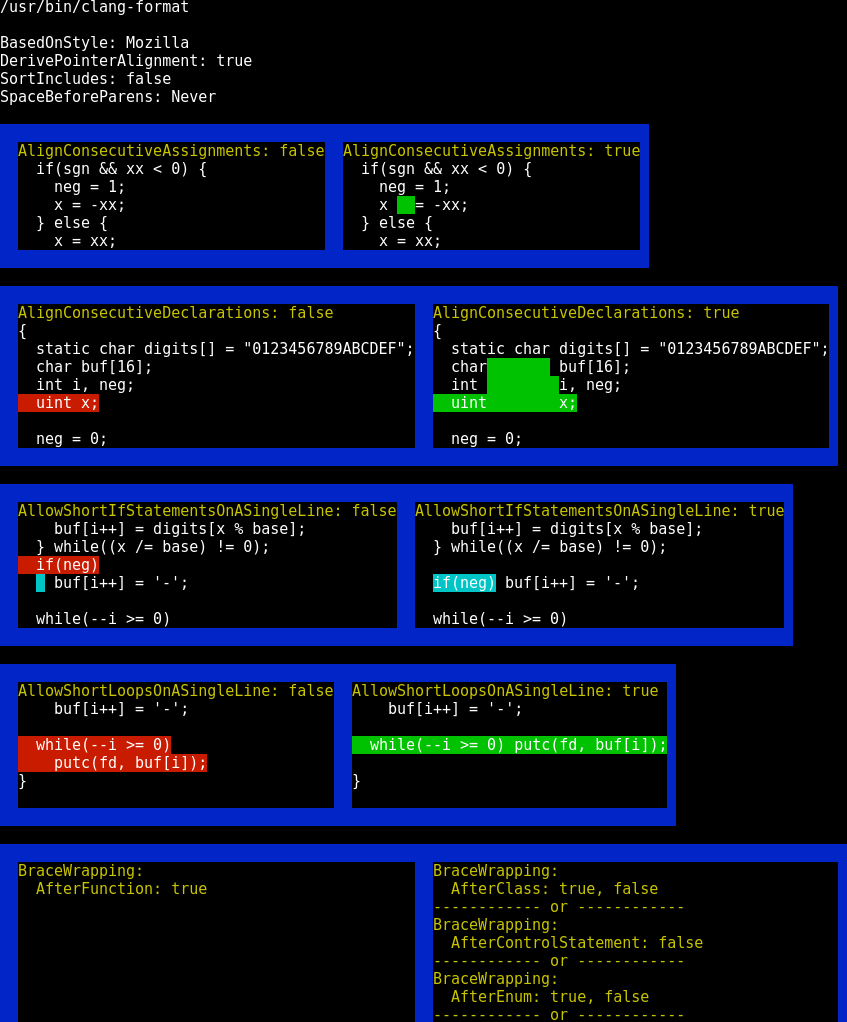
Reading the documention of the invidual options of a formatter takes time and does not necessarily make clear how an option influences the formatting. You can try something like this instead:
$ whatstyle.py --variants tests/examples/xv6/printf.cFirst the best matching style is chosen and then every option is replaced or augmented by every possible value. All combinations that actually made a difference are grouped and displayed side by side. The variant on the left is the original from the best style, on the right is another option setting that usually makes things worse. Below the option values, differing code fragments are shown, you can use --numhunks to show more diff hunks per variation. Use --ansi to display the variants table in an ANSI terminal, --html to open it in a browser or --ansihtml for a darker look in a browser.
Usage scenarios
For information about some useful scenarios run:
$ whatstyle.py --usage-examplesor read the text at the beginning of whatstyle.py.
Requirements
whatstyle needs at least Python 2.7 and it works as well with Python 3.2, 3.3, 3.4 and 3.5. Jython and pypy are supported.
Also whatstyle needs at least one code formatter in the current PATH.
The presence of either diff or git is optional but useful because the diff quality of both of them may be better than Python’s difflib and this results in a different and usually better matching style.
This program should work on OS X, Windows, Linux, FreeBSD and OpenBSD.
How it works
The program basically works by reformatting the source with many combinations of options and running a diff between the original and the reformatted source code.
First the major standard styles (e.g. WebKit, GNU, LLVM) are evaluated and the closest one chosen as a baseline.
Successively every choice of every style option is added to test if the additional option further reduces the differences. When no more option settings can improve the result the most appropriate style has been found.
Among a number of candidate styles with the same diff quality the one with the least number of explicit options is chosen to keep the style definition brief.
License
whatstyle is available under the MIT license. See the LICENSE file for more info.
The project specific Open Source licenses of the source codes in tests/examples are present in their respective directories.
See also
Unformat: Python3 utility to generate a .clang-format file from example code-base.
Release history Release notifications | RSS feed


Download files
Download the file for your platform. If you're not sure which to choose, learn more about installing packages.
Source Distribution
Built Distribution
Filter files by name, interpreter, ABI, and platform.
If you're not sure about the file name format, learn more about wheel file names.
Copy a direct link to the current filters
File details
Details for the file whatstyle-0.1.9.tar.gz.
File metadata
- Download URL: whatstyle-0.1.9.tar.gz
- Upload date:
- Size: 183.9 kB
- Tags: Source
- Uploaded using Trusted Publishing? No
- Uploaded via: twine/3.2.0 pkginfo/1.6.1 requests/2.22.0 setuptools/51.0.0 requests-toolbelt/0.9.1 tqdm/4.54.1 CPython/3.8.1
File hashes
| Algorithm | Hash digest | |
|---|---|---|
| SHA256 |
9866e896f59c0f8181330a8ad762bfb376a5709eb11fc0ec24d156c72d7764fa
|
|
| MD5 |
6084b0be567a954b1dce71ae298d3796
|
|
| BLAKE2b-256 |
051bcc74177cfdd21a78fda1b6d9b60e93f2e46df26aaab989aa6e7be5bd799d
|
File details
Details for the file whatstyle-0.1.9-py2.py3-none-any.whl.
File metadata
- Download URL: whatstyle-0.1.9-py2.py3-none-any.whl
- Upload date:
- Size: 68.9 kB
- Tags: Python 2, Python 3
- Uploaded using Trusted Publishing? No
- Uploaded via: twine/3.2.0 pkginfo/1.6.1 requests/2.22.0 setuptools/51.0.0 requests-toolbelt/0.9.1 tqdm/4.54.1 CPython/3.8.1
File hashes
| Algorithm | Hash digest | |
|---|---|---|
| SHA256 |
b5c35464ddfbc3961274392bff93a8a899fc47abcfe0db17bb4c48e0ee690dff
|
|
| MD5 |
0593dde7eca05635d3fe320d2a02cda3
|
|
| BLAKE2b-256 |
30885bdfe65fe1565448502579fd6e1456314da7437b94e9441385672d06e4e2
|






