
Whisper command line client that uses CTranslate2

Project description


Introduction
Whisper command line client compatible with original OpenAI client based on CTranslate2.
It uses CTranslate2 and Faster-whisper Whisper implementation that is up to 4 times faster than openai/whisper for the same accuracy while using less memory.
Goals of the project:
- Provide an easy way to use the CTranslate2 Whisper implementation
- Ease the migration for people using OpenAI Whisper CLI
Installation
Just type:
pip install -U whisper-ctranslate2
Alternatively, the following command will pull and install the latest commit from this repository, along with its Python dependencies:
pip install git+https://github.com/jordimas/whisper-ctranslate2.git
Usage
Same command line that OpenAI whisper.
To transcribe:
whisper-ctranslate2 inaguracio2011.mp3 --model medium
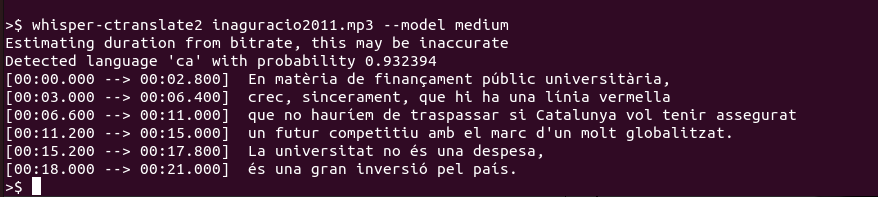
To translate:
whisper-ctranslate2 inaguracio2011.mp3 --model medium --task translate

Additionally using:
whisper-ctranslate2 --help
All the supported options with their help are shown.
CTranslate2 specific options
On top of the OpenAI Whisper command line options, there are some specific options provided by CTranslate2 .
--compute_type {default,auto,int8,int8_float16,int16,float16,float32}
Type of quantization to use. On CPU int8 will give the best performance.
--model_directory MODEL_DIRECTORY
Directory where to find a CTranslate Whisper model, for example a fine-tunned Whisper model. The model should be in CTranslate2 format.
--device_index [DEVICE_INDEX ...]
Device IDs where to place this model on
--vad_filter VAD_FILTER
Enable the voice activity detection (VAD) to filter out parts of the audio without speech. This step is using the Silero VAD model https://github.com/snakers4/silero-vad.
--vad_min_silence_duration_ms VAD_MIN_SILENCE_DURATION_MS
When vad_filter is enabled, audio segments without speech for at least this number of milliseconds will be ignored.
Whisper-ctranslate2 specific options
On top of the OpenAI Whisper and CTranslate2, whisper-ctranslate2 provides some additional specific options:
--print-colors PRINT_COLORS
Adding the --print_colors True argument will print the transcribed text using an experimental color coding strategy based on whisper.cpp to highlight words with high or low confidence:

Need help?
Check our frequently asked questions for common questions.
Contact
Jordi Mas jmas@softcatala.org
Release history Release notifications | RSS feed


Download files
Download the file for your platform. If you're not sure which to choose, learn more about installing packages.
Source Distribution
Built Distribution
Filter files by name, interpreter, ABI, and platform.
If you're not sure about the file name format, learn more about wheel file names.
Copy a direct link to the current filters
File details
Details for the file whisper-ctranslate2-0.1.6.tar.gz.
File metadata
- Download URL: whisper-ctranslate2-0.1.6.tar.gz
- Upload date:
- Size: 14.2 kB
- Tags: Source
- Uploaded using Trusted Publishing? No
- Uploaded via: twine/4.0.1 CPython/3.10.7
File hashes
| Algorithm | Hash digest | |
|---|---|---|
| SHA256 |
55e117a06e849883b9b5d031b1922f0f673860e550eb3385bd605e81e56ce643
|
|
| MD5 |
2664d52beaf46f10b5b03bf86f405ba6
|
|
| BLAKE2b-256 |
816d34dc453f3d186ce9791c360cc42fb3c84f3946c886d77e5a60ef998d1e2a
|
File details
Details for the file whisper_ctranslate2-0.1.6-py3-none-any.whl.
File metadata
- Download URL: whisper_ctranslate2-0.1.6-py3-none-any.whl
- Upload date:
- Size: 16.9 kB
- Tags: Python 3
- Uploaded using Trusted Publishing? No
- Uploaded via: twine/4.0.1 CPython/3.10.7
File hashes
| Algorithm | Hash digest | |
|---|---|---|
| SHA256 |
fe28030c6f21ce42b085ccc09740138cdf419bd236bd0cf1fff485ae6bf11f27
|
|
| MD5 |
4584627c983afddc940d1f9ad19376d9
|
|
| BLAKE2b-256 |
95dc63bd3f6a99576b96e546e717aec87a51fb0eaff865e3febb37fda278827c
|






