
WHite-box Adversarial Toolbox (WHAT)





A Python Library for Deep Learning Security that focuses on Real-time White-box Attacks.

Installation
pip install whitebox-adversarial-toolbox
Usage (CLI)
Usage: what [OPTIONS] COMMAND [ARGS]...

  The CLI tool for WHitebox-box Adversarial Toolbox (what).

Options:
  --help  Show this message and exit.

Commands:
  attack   Manage Attacks
  example  Manage Examples
  model    Manage Deep Learning Models
Useful commands:
# List supported models
$ what model list

# List supported Attacks
$ what attack list

# List available examples
$ what example list
Available models:
[x] 1 : YOLOv3      (    Darknet    )   Object Detection        YOLOv3 pretrained on MS COCO dataset.
[x] 2 : YOLOv3      (   Mobilenet   )   Object Detection        YOLOv3 pretrained on MS COCO dataset.
[x] 3 : YOLOv3 Tiny (    Darknet    )   Object Detection        YOLOv3 Tiny pretrained on MS COCO dataset.
[x] 4 : YOLOv3 Tiny (   MobileNet   )   Object Detection        YOLOv3 Tiny pretrained on MS COCO dataset.
[x] 5 : YOLOv4      (    Darknet    )   Object Detection        YOLOv4 pretrained on MS COCO dataset.
[x] 6 : YOLOv4 Tiny (    Darknet    )   Object Detection        YOLOv4 Tiny pretrained on MS COCO dataset.
[x] 7 : SSD         ( MobileNet  v1 )   Object Detection        SSD pretrained on VOC-2012 dataset.
[x] 8 : SSD         ( MobileNet  v2 )   Object Detection        SSD pretrained on VOC-2012 dataset.
[x] 9 : FasterRCNN  (     VGG16     )   Object Detection        Faster-RCNN pretrained on VOC-2012 dataset.
[x] 10 : YOLOX X-Large                  Object Detection        YOLOX-X pretrained on MS COCO dataset.
[x] 11 : YOLOX Large                    Object Detection        YOLOX-L pretrained on MS COCO dataset.
[x] 12 : YOLOX Medium                   Object Detection        YOLOX-M pretrained on MS COCO dataset.
[x] 13 : YOLOX Small                    Object Detection        YOLOX-S pretrained on MS COCO dataset.
A Man-in-the-Middle Hardware Attack
The Universal Adversarial Perturbation (UAP) can be deployed using a Man-in-the-Middle Hardware Attack.
[ Talk ] [ Video ] [ Paper ] [ Code ]

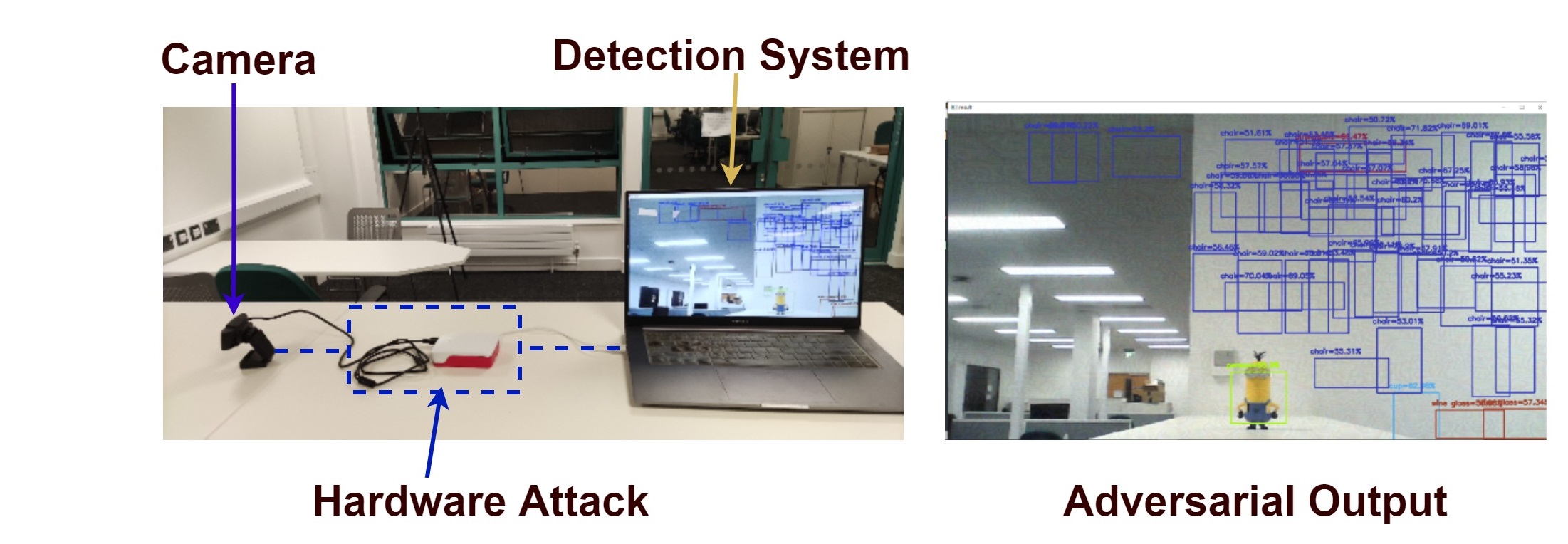
The Man-in-the-Middle Attack consists of two steps:
- Step 1: Generating the perturbation.
- Step 2: Deploying the perturbation.
1 maintainer

Metadata
1 maintainer
Release files for whitebox-adversarial-toolbox 0.2.2
For a detailed explanation of source distributions (sdists) and built distributions (wheels), please see the package formats documentation.
Source distribution (sdist)
| File | Size | Uploaded | Provenance | Actions |
|---|---|---|---|---|
| whitebox_adversarial_toolbox-0.2.2.tar.gz | 133.8 kB | Without provenance | Details for whitebox_adversarial_toolbox-0.2.2.tar.gz |
Built distribution (wheel)
| File | Interpreter | ABI | Platform | Actions Reset |
|---|---|---|---|---|
| whitebox_adversarial_toolbox-0.2.2-py3-none-any.whl | Python 3 | none | any | Details for whitebox_adversarial_toolbox-0.2.2-py3-none-any.whl |
Total release size: 325.1 kB
Release files / whitebox_adversarial_toolbox-0.2.2.tar.gz
| Download URL | whitebox_adversarial_toolbox-0.2.2.tar.gz |
|---|---|
| Size | 133.8 kB |
| Tags | Source |
|
SHA-256 checksum How to use checksums |
889508ad703ee2398d8fc697b3496f466d50058d9f747524b2eefccad7e3c02a
|
|
BLAKE2b-256 checksum How to use checksums |
54be17834c242d82e6506243ef85df79f0d1bc901e6421cbb2345119588f0ca5
|
| Upload date | |
|
Uploaded using Trusted Publishing? What is trusted publishing? |
No |
| Uploaded via |
twine/5.1.0 CPython/3.8.0
|
Release files / whitebox_adversarial_toolbox-0.2.2-py3-none-any.whl
| Download URL | whitebox_adversarial_toolbox-0.2.2-py3-none-any.whl |
|---|---|
| Size | 191.2 kB |
| Tags | Python 3 |
|
SHA-256 checksum How to use checksums |
d24578facb11565f791367c0b843b6d8482d4234a0d6268fef691051a99db4ea
|
|
BLAKE2b-256 checksum How to use checksums |
f1aa27cab17c7a0491b5d529222a8095fdf13a503ccc11aaa2f2f75bab03fe77
|
| Upload date | |
|
Uploaded using Trusted Publishing? What is trusted publishing? |
No |
| Uploaded via |
twine/5.1.0 CPython/3.8.0
|
Security for whitebox-adversarial-toolbox 0.2.2
Provenance
Provenance describes where a file came from. On PyPI, provenance is shared via attestations, which provide a verifiable record of the build or publishing details. View details, limitations and caveats.
No provenance found
None of the files in this release were uploaded with provenance metadata.
A note on package security
PyPI is a repository for distributing packages, not a service for auditing them. While third-party security researchers and our staff do their best to detect and remove malicious packages, PyPI cannot guarantee the quality, security or suitability of any given package.
To learn more about protecting yourself from malicious actors, visit our package security documentation.














