
whitebox-python











Important Note

This repository is related to the WhiteboxTools Python Frontend only. You can report issues to this repo if you have problems installing this Python package. If you encounter any tool functioning specific errors, please open an issue on Dr. John Lindsay’s WhiteboxTools repo.
Links
Authors: Dr. John Lindsay (https://jblindsay.github.io/ghrg/index.html)
Contributors: Dr. Qiusheng Wu (https://wetlands.io)
GitHub repo: https://github.com/giswqs/whitebox-python
WhiteboxTools: https://github.com/jblindsay/whitebox-tools
User Manual: https://www.whiteboxgeo.com/manual/wbt_book/intro.html
conda-forge: https://anaconda.org/conda-forge/whitebox
Documentation: https://whitebox.readthedocs.io
Free software: MIT license
Contents
Description
The whitebox Python package is built on WhiteboxTools, an advanced geospatial data analysis platform developed by Prof. John Lindsay (webpage; jblindsay) at the University of Guelph’s Geomorphometry and Hydrogeomatics Research Group. WhiteboxTools can be used to perform common geographical information systems (GIS) analysis operations, such as cost-distance analysis, distance buffering, and raster reclassification. Remote sensing and image processing tasks include image enhancement (e.g. panchromatic sharpening, contrast adjustments), image mosaicing, numerous filtering operations, simple classification (k-means), and common image transformations. WhiteboxTools also contains advanced tooling for spatial hydrological analysis (e.g. flow-accumulation, watershed delineation, stream network analysis, sink removal), terrain analysis (e.g. common terrain indices such as slope, curvatures, wetness index, hillshading; hypsometric analysis; multi-scale topographic position analysis), and LiDAR data processing. LiDAR point clouds can be interrogated (LidarInfo, LidarHistogram), segmented, tiled and joined, analyized for outliers, interpolated to rasters (DEMs, intensity images), and ground-points can be classified or filtered. WhiteboxTools is not a cartographic or spatial data visualization package; instead it is meant to serve as an analytical backend for other data visualization software, mainly GIS.
Installation
whitebox supports a variety of platforms, including Microsoft Windows, macOS, and Linux operating systems. Note that you will need to have Python 3.x installed. Python 2.x is not supported. The whitebox Python package can be installed using the following command:
pip install whiteboxIf you have installed whitebox Python package before and want to upgrade to the latest version, you can use the following command:
pip install whitebox -UIt is recommended that you use a Python virtual environment (e.g., conda) to test the whitebox package. Please follow the conda user guide to install conda if necessary. Once you have conda installed, you can use Terminal or an Anaconda Prompt to create a Python virtual environment. Check managing Python environment for more information.
conda create -n wbt python
source activate wbt
conda install whitebox -c conda-forge
If you encounter an GLIBC errors when installing the whitebox package, you can try the following command:
import whitebox
whitebox.download_wbt(linux_musl=True, reset=True)
Alternatively, you can set the environment variable WBT_LINUX to MUSL before installing the whitebox package. It will automatically download the MUSL version of WhiteboxTools.
import os
os.environ["WBT_LINUX"] = "MUSL"
whitebox Tutorials
Launch the whitebox tutorial notebook directly with mybinder.org now:
Quick Example
Tool names in the whitebox Python package can be called either using the snake_case or CamelCase convention (e.g. lidar_info or LidarInfo). See below for an example Python script (example.py). If you are interested in using the WhiteboxTools command-line program, check WhiteboxTools Usage.
import os
import pkg_resources
import whitebox

wbt = whitebox.WhiteboxTools()
print(wbt.version())
print(wbt.help())

# identify the sample data directory of the package
data_dir = os.path.dirname(pkg_resources.resource_filename("whitebox", 'testdata/'))

wbt.set_working_dir(data_dir)
wbt.verbose = False
wbt.feature_preserving_smoothing("DEM.tif", "smoothed.tif", filter=9)
wbt.breach_depressions("smoothed.tif", "breached.tif")
wbt.d_inf_flow_accumulation("breached.tif", "flow_accum.tif")
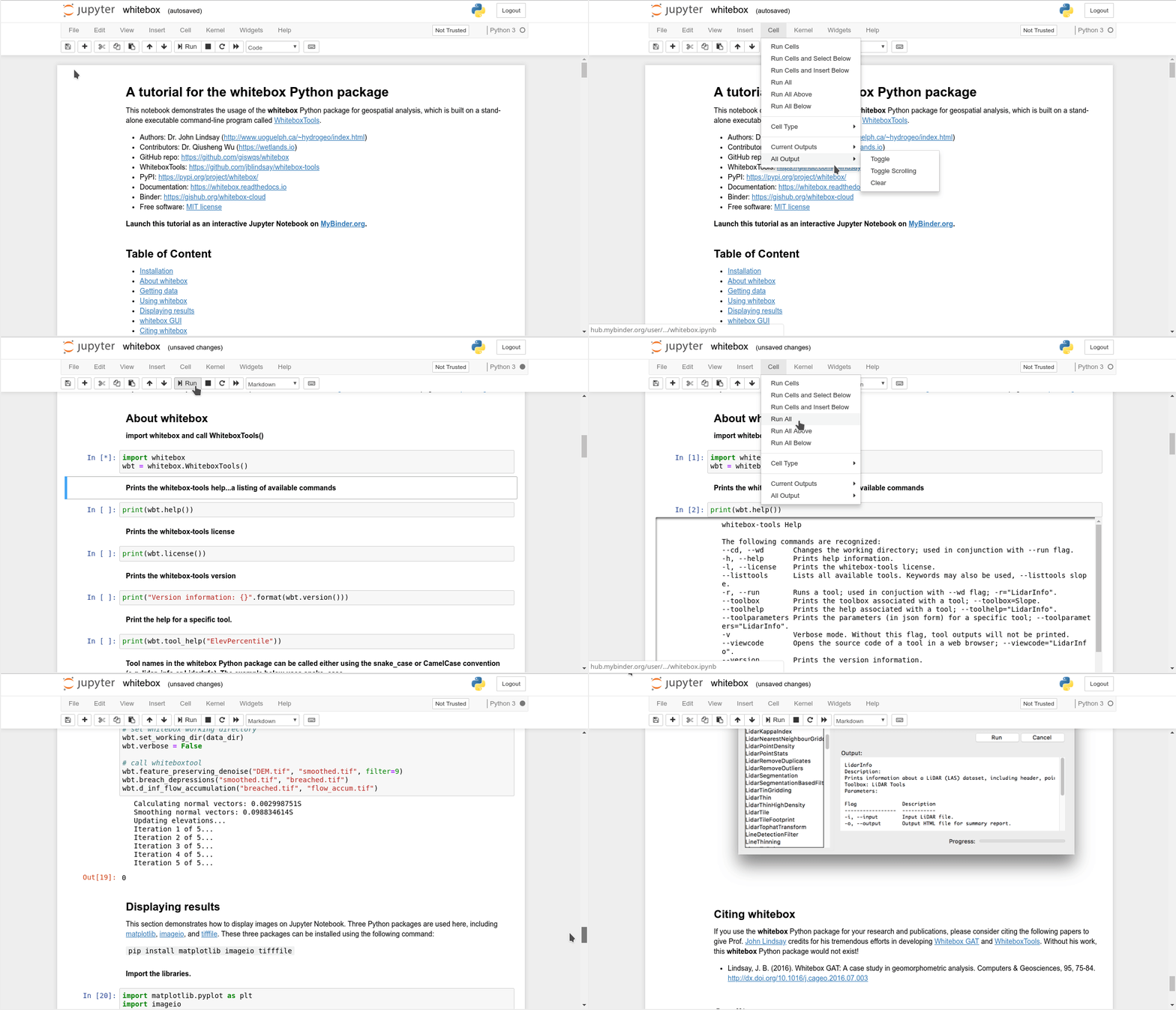
A Jupyter Notebook Tutorial for whitebox
This tutorial can be accessed in three ways:
HTML version: https://gishub.org/whitebox-html
Viewable Notebook: https://gishub.org/whitebox-notebook
Interactive Notebook: https://gishub.org/whitebox-cloud
Launch this tutorial as an interactive Jupyter Notebook on the cloud - https://gishub.org/whitebox-cloud.
whitebox GUI
WhiteboxTools also provides a Graphical User Interface (GUI) - WhiteboxTools Runner, which can be invoked using the following Python script:
import whitebox
whitebox.Runner()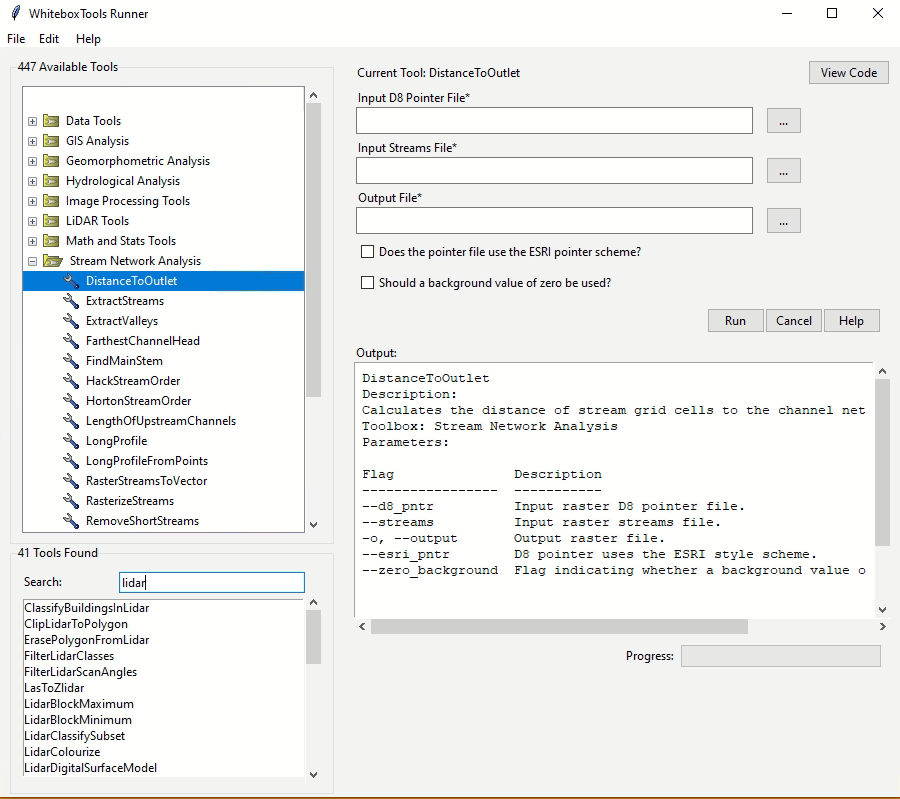
Troubleshooting
Linux
When using import whitebox, if you get an error that says No module named '_tkinter', please install the python3-tk package, you can try the following solution:
For Ubuntu, Linux Mint, etc: sudo apt-get install python3-tk
For Manjaro, Arch Linux: sudo pacman -S tk
Available Tools
The library currently contains 518 tools, which are each grouped based on their main function into one of the following categories: Data Tools, GIS Analysis, Hydrological Analysis, Image Analysis, LiDAR Analysis, Mathematical and Statistical Analysis, Stream Network Analysis, and Terrain Analysis. For a listing of available tools, complete with documentation and usage details, please see the WhiteboxTools User Manual.
Supported Data Formats
The WhiteboxTools library currently supports read/writing raster data in Whitebox GAT, GeoTIFF, ESRI (ArcGIS) ASCII and binary (.flt & .hdr), GRASS GIS, Idrisi, SAGA GIS (binary and ASCII), and Surfer 7 data formats. At present, there is limited ability in WhiteboxTools to read vector geospatial data. Support for Shapefile (and other common vector formats) will be enhanced within the library soon.
Contributing
If you would like to contribute to the project as a developer, follow these instructions to get started:
Fork the whitebox project (https://github.com/giswqs/whitebox-python)
Create your feature branch (git checkout -b my-new-feature)
Commit your changes (git commit -am ‘Add some feature’)
Push to the branch (git push origin my-new-feature)
Create a new Pull Request
License
The whitebox package is distributed under the MIT license, a permissive open-source (free software) license.
Reporting Bugs
Report bugs at https://github.com/giswqs/whitebox-python/issues.
If you are reporting a bug, please include:
Your operating system name and version.
Any details about your local setup that might be helpful in troubleshooting.
Detailed steps to reproduce the bug.
Credits
This package was created with Cookiecutter and the audreyr/cookiecutter-pypackage project template.
History
0.2.0 (2018-06-08)
0.1.0 (2018-06-06)
First release on PyPI.
1 maintainer

Metadata
1 maintainer
Release files for whitebox 2.3.1
For a detailed explanation of source distributions (sdists) and built distributions (wheels), please see the package formats documentation.
Source distribution (sdist)
| File | Size | Uploaded | |
|---|---|---|---|
| whitebox-2.3.1.tar.gz | 76.6 kB | Details |
Built distribution (wheel)
| File | Interpreter | ABI | Platform | Reset |
|---|---|---|---|---|
| whitebox-2.3.1-py2.py3-none-any.whl | Python 3, Python 2 | none | any | Details |
Total release size: 148.7 kB
Release files / whitebox-2.3.1.tar.gz
| Download URL | whitebox-2.3.1.tar.gz |
|---|---|
| Size | 76.6 kB |
| Tags | Source |
|
SHA-256 checksum How to use checksums |
6b4080bc8181f0876cda6c9093bcb463faa4ab8a8c2c631c06b579d3ec1131ba
|
|
BLAKE2b-256 checksum How to use checksums |
d7f4cb1462db1ac226a6e57668a0cc3d922707bd9d779e87d0c4e78103970a2d
|
| Upload date | |
|
Uploaded using Trusted Publishing? What is trusted publishing? |
No |
| Uploaded via |
twine/4.0.2 CPython/3.11.2
|
Release files / whitebox-2.3.1-py2.py3-none-any.whl
| Download URL | whitebox-2.3.1-py2.py3-none-any.whl |
|---|---|
| Size | 72.1 kB |
| Tags | Python 2 Python 3 |
|
SHA-256 checksum How to use checksums |
38becfa894091c0adcebb162ffe7eb8b735e9a52f91376d36cb1a554bd10544d
|
|
BLAKE2b-256 checksum How to use checksums |
6f2bf331bd4ca99067200cf845afd7c94817929d7fe7d83aa53c7bdfe96ad654
|
| Upload date | |
|
Uploaded using Trusted Publishing? What is trusted publishing? |
No |
| Uploaded via |
twine/4.0.2 CPython/3.11.2
|














