


The open standard for data logging
Documentation • Slack Community • Python Quickstart






What is whylogs
whylogs is an open source library for logging any kind of data. With whylogs, users are able to generate summaries of their datasets (called whylogs profiles) which they can use to:
- Track changes in their dataset
- Create data constraints to know whether their data looks the way it should
- Quickly visualize key summary statistics about their datasets
These three functionalities enable a variety of use cases for data scientists, machine learning engineers, and data engineers:
- Detect data drift in model input features
- Detect training-serving skew, concept drift, and model performance degradation
- Validate data quality in model inputs or in a data pipeline
- Perform exploratory data analysis of massive datasets
- Track data distributions & data quality for ML experiments
- Enable data auditing and governance across the organization
- Standardize data documentation practices across the organization
- And more
whylogs can be run in Python or Apache Spark (both PySpark and Scala) environments on a variety of data types. We integrate with lots of other tools including Pandas, AWS Sagemaker, MLflow, Flask, Ray, RAPIDS, Apache Kafka, and more.
If you have any questions, comments, or just want to hang out with us, please join our Slack Community. In addition to joining the Slack Community, you can also help this project by giving us a ⭐ in the upper right corner of this page.
Python Quickstart
Installing whylogs using the pip package manager is as easy as running pip install whylogs in your terminal.
From here, you can quickly log a dataset:
import whylogs as why
import pandas as pd

#dataframe
df = pd.read_csv("path/to/file.csv")
results = why.log(df)
And voila, you now have a whylogs profile. To learn more about about a whylogs profile is and what you can do with it, read on.
Table of Contents
- whylogs Profiles
- Data Constraints
- Profile Visualization
- Integrations
- Supported Data Types
- Examples
- Usage Statistics
- Community
- Contribute
whylogs Profiles
What are profiles
whylogs profiles are the core of the whylogs library. They capture key statistical properties of data, such as the distribution (far beyond simple mean, median, and standard deviation measures), the number of missing values, and a wide range of configurable custom metrics. By capturing these summary statistics, we are able to accurately represent the data and enable all of the use cases described in the introduction.
whylogs profiles have three properties that make them ideal for data logging: they are efficient, customizable, and mergeable.

Efficient: whylogs profiles efficiently describe the dataset that they represent. This high fidelity representation of datasets is what enables whylogs profiles to be effective snapshots of the data. They are better at capturing the characteristics of a dataset than a sample would be—as discussed in our Data Logging: Sampling versus Profiling blog post—and are very compact.

Customizable: The statistics that whylogs profiles collect are easily configured and customizable. This is useful because different data types and use cases require different metrics, and whylogs users need to be able to easily define custom trackers for those metrics. It’s the customizability of whylogs that enables our text, image, and other complex data trackers.

Mergeable: One of the most powerful features of whylogs profiles is their mergeability. Mergeability means that whylogs profiles can be combined together to form new profiles which represent the aggregate of their constituent profiles. This enables logging for distributed and streaming systems, and allows users to view aggregated data across any time granularity.
How do you generate profiles
Once whylogs is installed, it's easy to generate profiles in both Python and Java environments.
To generate a profile from a Pandas dataframe in Python, simply run:
import whylogs as why
import pandas as pd

#dataframe
df = pd.read_csv("path/to/file.csv")
results = why.log(df)
What can you do with profiles
Once you’ve generated whylogs profiles, a few things can be done with them:
In your local Python environment, you can set data constraints or visualize your profiles. Setting data constraints on your profiles allows you to get notified when your data don’t match your expectations, allowing you to do data unit testing and some baseline data monitoring. With the Profile Visualizer, you can visually explore your data, allowing you to understand it and ensure that your ML models are ready for production.
In addition, you can send whylogs profiles to the SaaS ML monitoring and AI observability platform WhyLabs. With WhyLabs, you can automatically set up monitoring for your machine learning models, getting notified on both data quality and data change issues (such as data drift). If you’re interested in trying out WhyLabs, check out the always free Starter edition, which allows you to experience the entire platform’s capabilities with no credit card required.
Data Constraints
Constraints are a powerful feature built on top of whylogs profiles that enable you to quickly and easily validate that your data looks the way that it should. There are numerous types of constraints that you can set on your data (that numerical data will always fall within a certain range, that text data will always be in a JSON format, etc) and, if your dataset fails to satisfy a constraint, you can fail your unit tests or your CI/CD pipeline.
A simple example of setting and testing a constraint is:
import whylogs as why
from whylogs.core.constraints import Constraints, ConstraintsBuilder, MetricsSelector, MetricConstraint

profile_view = why.log(df).view()
builder = ConstraintsBuilder(profile_view)

builder.add_constraint(MetricConstraint(
    name="col_name >= 0",
    condition=lambda x: x.min >= 0,
    metric_selector=MetricsSelector(metric_name='distribution', column_name='col_name')
))
constraints: Constraints = builder.build()
constraints.report()
To learn more about constraints, check out: the Constraints Example.
Profile Visualization
In addition to being able to automatically get notified about potential issues in data, it’s also useful to be able to inspect your data manually. With the profile visualizer, you can generate interactive reports about your profiles (either a single profile or comparing profiles against each other) directly in your Jupyter notebook environment. This enables exploratory data analysis, data drift detection, and data observability.
To access the profile visualizer, install the [viz] module of whylogs by running pip install whylogs[viz] in your terminal. One type of profile visualization that we can create is a drift report; here's a simple example of how to analyze the drift between two profiles:
import whylogs as why

from whylogs.viz import NotebookProfileVisualizer

result = why.log(pandas=df_target)
prof_view = result.view()

result_ref = why.log(pandas=df_reference)
prof_view_ref = result_ref.view()

visualization = NotebookProfileVisualizer()
visualization.set_profiles(target_profile_view=prof_view, reference_profile_view=prof_view_ref)

visualization.summary_drift_report()
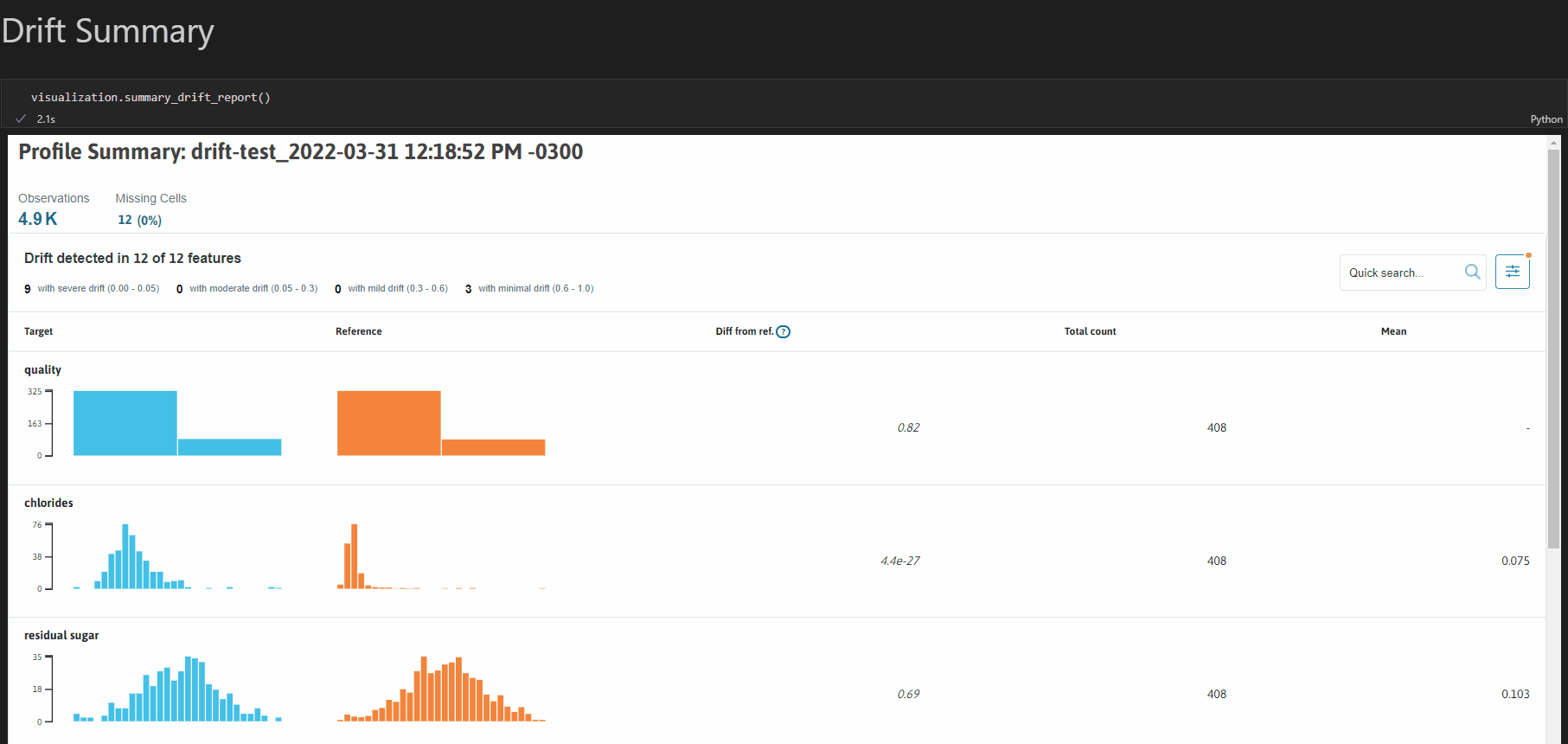
To learn more about visualizing your profiles, check out: the Visualizer Example
Data Types
whylogs supports both structured and unstructured data, specifically:
| Data type | Features | Notebook Example |
|---|---|---|
| Tabular Data | ✅ | Getting started with structured data |
| Image Data | ✅ | Getting started with images |
| Text Data | ✅ | String Features |
| Embeddings | 🛠 | |
| Other Data Types | ✋ | Do you have a request for a data type that you don’t see listed here? Raise an issue or join our Slack community and make a request! We’re always happy to help |
Integrations
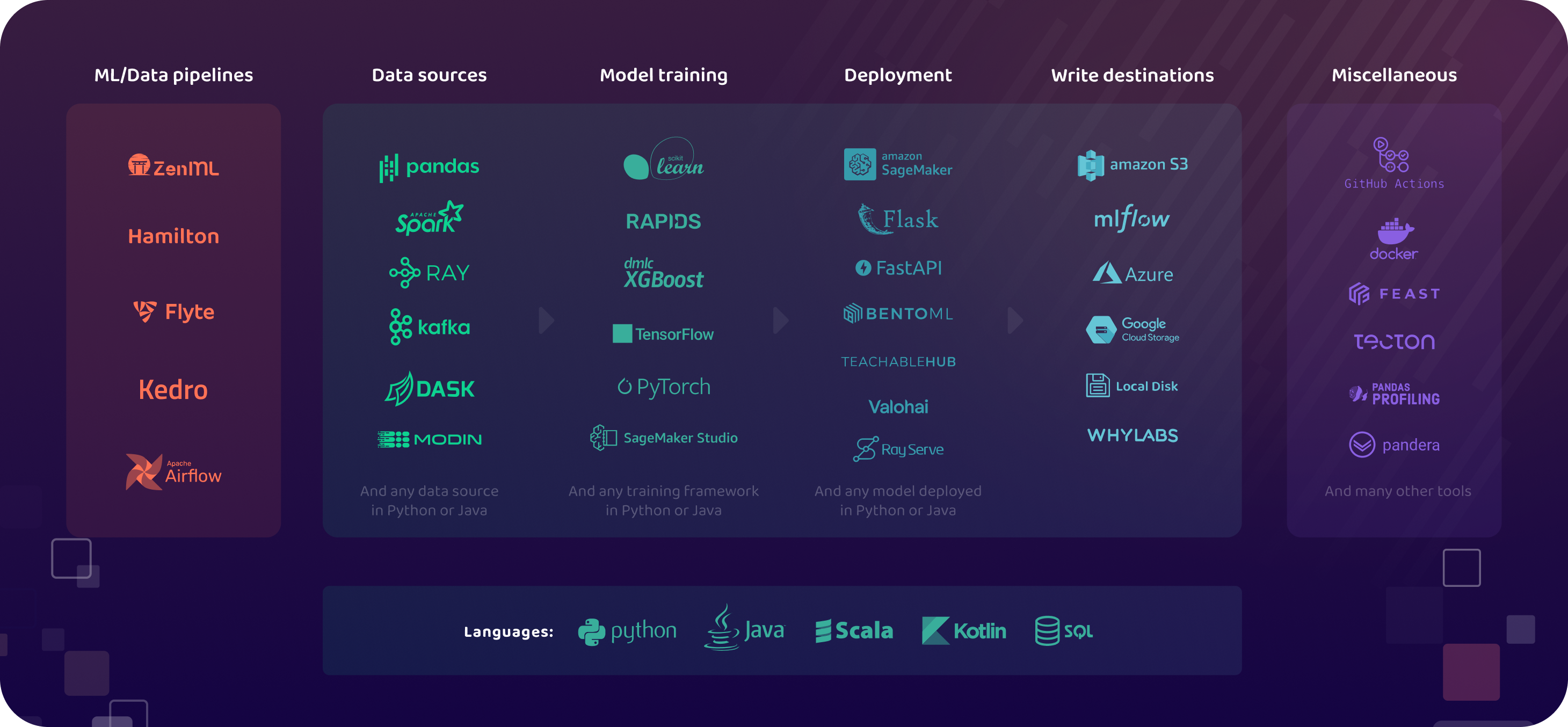
| Integration | Features | Resources |
|---|---|---|
| Spark | Run whylogs in Apache Spark environment | |
| Pandas | Log and monitor any pandas dataframe | |
| MLflow | Enhance MLflow metrics with whylogs: | |
| Java | Run whylogs in Java environment | |
| Docker | Run whylogs as in Docker | |
| AWS S3 | Store whylogs profiles in S3 |
Examples
For a full set of our examples, please check out the examples folder.
Check out our example notebooks with Binder:

Usage Statistics
Starting with whylogs v1.0.0, whylogs collects anonymous information about a user’s environment. These usage statistics do not include any information about the user or the data that they are profiling, only the environment that the user in which the user is running whylogs.
To read more about what usage statistics whylogs collects, check out the relevant documentation.
To turn off Usage Statistics, simply set the WHYLOGS_NO_ANALYTICS environment variable to True, like so:
import os
os.environ['WHYLOGS_NO_ANALYTICS']='True'
Community
If you have any questions, comments, or just want to hang out with us, please join our Slack channel.
Contribute
How to Contribute
We welcome contributions to whylogs. Please see our contribution guide and our development guide for details.
Contributors

Made with contrib.rocks.


Release files for whylogs 1.0.10
For a detailed explanation of source distributions (sdists) and built distributions (wheels), please see the package formats documentation.
Source distribution (sdist)
| File | Size | Uploaded | |
|---|---|---|---|
| whylogs-1.0.10.tar.gz | 1.7 MB | Details |
Built distribution (wheel)
| File | Interpreter | ABI | Platform | Reset |
|---|---|---|---|---|
| whylogs-1.0.10-py3-none-any.whl | Python 3 | none | any | Details |
Total release size: 3.5 MB
Release files / whylogs-1.0.10.tar.gz
| Download URL | whylogs-1.0.10.tar.gz |
|---|---|
| Size | 1.7 MB |
| Tags | Source |
|
SHA-256 checksum How to use checksums |
cf4068d632e8fc16c01435740fe3336ded20357cde872030b2f2121199ef8fd8
|
|
BLAKE2b-256 checksum How to use checksums |
a3945fff8dc30f76accffc134eebdae0dae423cf2d8410596220344f364b9f9f
|
| Upload date | |
|
Uploaded using Trusted Publishing? What is trusted publishing? |
No |
| Uploaded via |
poetry/1.1.12 CPython/3.8.10 Linux/5.10.16.3-microsoft-standard-WSL2
|
Release files / whylogs-1.0.10-py3-none-any.whl
| Download URL | whylogs-1.0.10-py3-none-any.whl |
|---|---|
| Size | 1.7 MB |
| Tags | Python 3 |
|
SHA-256 checksum How to use checksums |
533b6fb0c717f124d5a7643c91a32ade5566d86a2582ee1a548740a2713d1ec6
|
|
BLAKE2b-256 checksum How to use checksums |
da7b8863f8f06d80ce23cac01d303928f1f49db17c896050a5aea0bccea942c4
|
| Upload date | |
|
Uploaded using Trusted Publishing? What is trusted publishing? |
No |
| Uploaded via |
poetry/1.1.12 CPython/3.8.10 Linux/5.10.16.3-microsoft-standard-WSL2
|














