
WikiData Plain SPARQL Client
This package allows to query the WikiData database. For example this package is intended for people who need to be able to query WikiData in plain SPARQL while staying whithin a Jupyter Notebook.
Currently data can be returned as a dataframe or as a map. See examples
Install
pip install wikidata_plain_sparql
Usage
The module only has one function which is named query which has two parameters:
- query: a sparql query
- view: should data be displayed as a map, function will return a data frame if
viewisNone(see examples for map use)
# import the module
import wikidata_plain_sparql as wikidata

wikidata.query(query, view=None)
Examples
The following examples are also available on Google Colab and can be executed without any additional setup: https://colab.research.google.com/github/jelleschutter/wikidata-plain-sparql/blob/assets/wikidata_plain_sparql_examples.ipynb
Data Frame
# query WikiData
wikidata.query('''
SELECT ?actor ?actorLabel
WHERE
{
  # tv series "Person of Interest" has actor
  wd:Q564345 wdt:P161 ?actor.
  # actor has won a Golden Globe Award
  ?actor wdt:P166 wd:Q1011547.
  SERVICE wikibase:label { bd:serviceParam wikibase:language "en". }
}
''')
Which will result in the following pandas data frame:
| actor | actorLabel |
|---|---|
| http://www.wikidata.org/entity/Q3295000 | Sterling K. Brown |
Map
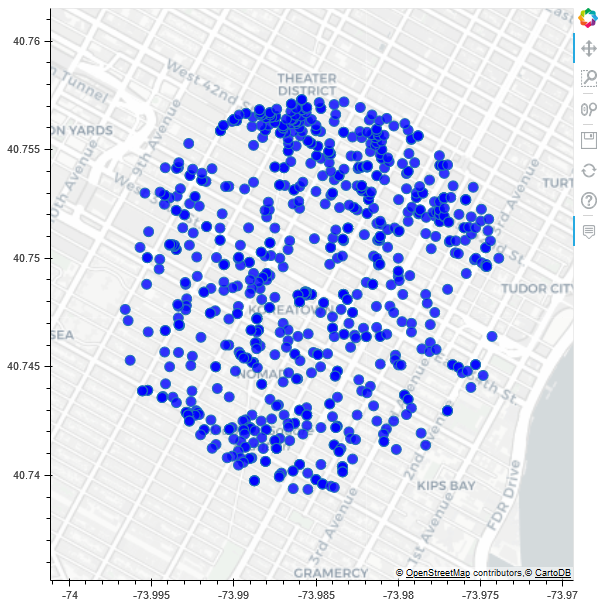
The following query was copied from the offical WikiData Examples and shows all places within 1km of the Empire State Building:
# query WikiData
wikidata.query('''
#Places within 1km of the Empire State Building
SELECT ?place ?placeLabel ?location ?instanceLabel
WHERE
{
  wd:Q9188 wdt:P625 ?loc .
  SERVICE wikibase:around {
      ?place wdt:P625 ?location .
      bd:serviceParam wikibase:center ?loc .
      bd:serviceParam wikibase:radius "1" .
  }
  OPTIONAL {    ?place wdt:P31 ?instance  }
  SERVICE wikibase:label { bd:serviceParam wikibase:language "en" }
  BIND(geof:distance(?loc, ?location) as ?dist)
} ORDER BY ?dist
''', view='map')
Which will result in the following map:
Credits
- requests - used for sending query to WikiData server
- bokeh - used for displaying map data
- pandas - used for returning data as data frame
- @jelleschutter - development of this package
1 maintainer

Metadata
1 maintainer
Release files for wikidata-plain-sparql 0.0.6
For a detailed explanation of source distributions (sdists) and built distributions (wheels), please see the package formats documentation.
Source distribution (sdist)
| File | Size | Uploaded | |
|---|---|---|---|
| wikidata_plain_sparql-0.0.6.tar.gz | 4.2 kB | Details |
Built distribution (wheel)
| File | Interpreter | ABI | Platform | Reset |
|---|---|---|---|---|
| wikidata_plain_sparql-0.0.6-py3-none-any.whl | Python 3 | none | any | Details |
Total release size: 9.3 kB
Release files / wikidata_plain_sparql-0.0.6.tar.gz
| Download URL | wikidata_plain_sparql-0.0.6.tar.gz |
|---|---|
| Size | 4.2 kB |
| Tags | Source |
|
SHA-256 checksum How to use checksums |
ac34a247fc4321514e39d829bcdbead0c3b1ba1a9fe059b9e2037a815bd3d904
|
|
BLAKE2b-256 checksum How to use checksums |
70ae68a22bedd90be08c5e4571a79a1ce5fd4dc81bf48a7393c8119db17ad968
|
| Upload date | |
|
Uploaded using Trusted Publishing? What is trusted publishing? |
No |
| Uploaded via |
twine/3.2.0 pkginfo/1.6.1 requests/2.25.0 setuptools/51.0.0 requests-toolbelt/0.9.1 tqdm/4.54.1 CPython/3.8.6
|
Release files / wikidata_plain_sparql-0.0.6-py3-none-any.whl
| Download URL | wikidata_plain_sparql-0.0.6-py3-none-any.whl |
|---|---|
| Size | 5.1 kB |
| Tags | Python 3 |
|
SHA-256 checksum How to use checksums |
d7cdadbfe271a40bf8569366039a4f654cb329cfcf11a5537dc5d5f1fa341eb9
|
|
BLAKE2b-256 checksum How to use checksums |
7b615912a8937b3c7e7ac51c33a5763e15e8302d9378606696cf3b72c3ebe58f
|
| Upload date | |
|
Uploaded using Trusted Publishing? What is trusted publishing? |
No |
| Uploaded via |
twine/3.2.0 pkginfo/1.6.1 requests/2.25.0 setuptools/51.0.0 requests-toolbelt/0.9.1 tqdm/4.54.1 CPython/3.8.6
|














