
Winotify
A pure python module to show notification toast on Windows 10.
No dependencies, no requirements, all you need is PowerShell installed on your machine (which in every Windows computer have it).
Installation
Install winotify using pip
pip install winotify
Features
- Notification stays in action center
- Clickable notification with 5 additional buttons
- Use function as a callback when clicking the notification
Usage
A simple notification with icon
from winotify import Notification

toast = Notification(app_id="windows app",
                     title="Winotify Test Toast",
                     msg="New Notification!",
                     icon=r"c:\path\to\icon.png")

toast.show()
Result:
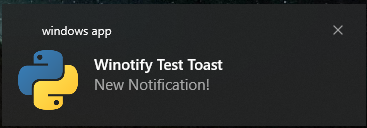
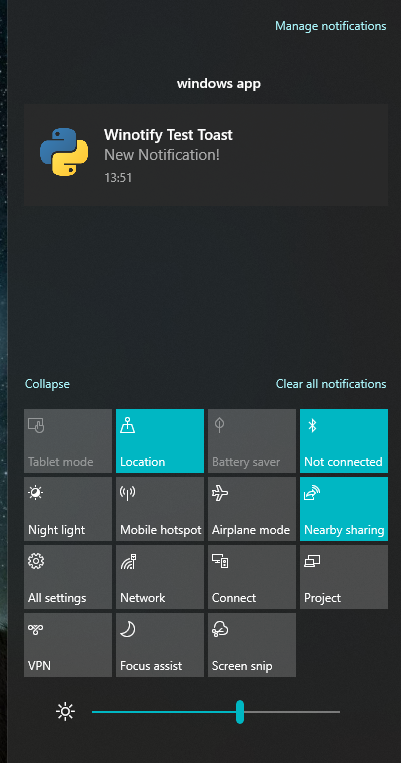
The notification stays in the action center!
Note that the icon path must be absolute otherwise the notification will not show
Set sound of the notification
All supported audio are in the audio module
from winotify import Notification, audio

toast = Notification(...)
toast.set_audio(audio.Mail, loop=False)
Add action button
from winotify import Notification

toast = Notification(...)
toast.add_actions(label="Button text",
                  launch="https://github.com/versa-syahptr/winotify/")
You can add up to 5 buttons each notification
CLI
winotify ^
-id myApp ^
-t "A Title" ^
-m "A message" ^
-i "c:\path\to\icon.png" ^
--audio default ^
--open-url "http://google.com" ^
--action "open github" ^
--action_url "http://github.com"
Use
winotify-ncinstead ofwinotifyto hide the console window.
Contributing
Pull requests are welcome. For major changes, please open an issue first to discuss what you would like to change.
Please make sure to update tests as appropriate.
Licence
1 maintainer

Metadata
1 maintainer
Release files for winotify 1.1.0
For a detailed explanation of source distributions (sdists) and built distributions (wheels), please see the package formats documentation.
Source distribution (sdist)
| File | Size | Uploaded | |
|---|---|---|---|
| winotify-1.1.0.tar.gz | 10.1 kB | Details |
Built distribution (wheel)
| File | Interpreter | ABI | Platform | Reset |
|---|---|---|---|---|
| winotify-1.1.0-py3-none-any.whl | Python 3 | none | any | Details |
Total release size: 25.1 kB
Release files / winotify-1.1.0.tar.gz
| Download URL | winotify-1.1.0.tar.gz |
|---|---|
| Size | 10.1 kB |
| Tags | Source |
|
SHA-256 checksum How to use checksums |
f8a0d6ff00cb2c1b3dcdfe825431f46f6aa5dc8ce84ffc59e8fda8c7e36687fe
|
|
BLAKE2b-256 checksum How to use checksums |
a1b01b304fdd8fd810f1f8e81a2708f8bf72e0987de1a763f0ee81f6d08bcae7
|
| Upload date | |
|
Uploaded using Trusted Publishing? What is trusted publishing? |
No |
| Uploaded via |
twine/3.3.0 pkginfo/1.6.1 requests/2.25.1 setuptools/58.5.3 requests-toolbelt/0.9.1 tqdm/4.55.1 CPython/3.7.3
|
Release files / winotify-1.1.0-py3-none-any.whl
| Download URL | winotify-1.1.0-py3-none-any.whl |
|---|---|
| Size | 15.0 kB |
| Tags | Python 3 |
|
SHA-256 checksum How to use checksums |
13aa9b1196b02ab3e699645b4407371ca73348421f8662565100d70c7cf552d9
|
|
BLAKE2b-256 checksum How to use checksums |
72856cc4c738080d60b62cad59d0f32386b8277d40e2bf8c06fd1e4101a17238
|
| Upload date | |
|
Uploaded using Trusted Publishing? What is trusted publishing? |
No |
| Uploaded via |
twine/3.3.0 pkginfo/1.6.1 requests/2.25.1 setuptools/58.5.3 requests-toolbelt/0.9.1 tqdm/4.55.1 CPython/3.7.3
|














