


Command Line Interface for developing WSGI application. This library has following features.
Run WSGI Application in wsgiref
Run wsgi application with specified host and port.
Serving Static files.
Live reloading.
line by line profiling.
Validating your WSGI application complying with PEP3333 compliance.
Run python interpreter
Supported interpreters are python(plain), ipython, bpython, ptpython and ptipython.
Automatically import SQLAlchemy and peewee models when run the interpreter.
Commands
Run command
Synopsis
$ wsgicli run [FILEPATH] [WSGIAPP] [Options]No |
Arguments |
Environment Variable |
Description |
|---|---|---|---|
1 |
FILEPATH |
WSGICLI_FILE |
The file path for your WSGI application. |
2 |
WSGIAPP |
WSGICLI_WSGI_APP |
The variable name of your wsgi application object. |
Options |
Environment Variable |
Default |
Description |
|---|---|---|---|
-h --host |
WSGICLI_HOST |
127.0.0.1 |
The hostname to bind to. |
-p --port |
WSGICLI_PORT |
8000 |
The port to bind to. |
--reload / --no-reload |
WSGICLI_RELOAD |
False |
Enable live reloading. |
--interval |
WSGICLI_INTERVAL |
1 |
Interval time to check file changed for reloading (sec). |
--static / --no-static |
WSGICLI_STATIC |
False |
Enable static file serving. |
--static-root |
WSGICLI_STATIC_ROOT |
/static/ |
URL path to static files. |
--static-dirs |
WSGICLI_STATIC_DIRS |
['./static/'] |
Directories to static files (multiple). |
--lineprof / --no-lineprof |
WSGICLI_LINEPROF |
False |
Enable line profiler. |
--lineprof-file |
WSGICLI_LINEPROF_FILE |
WSGIAPP(2nd arg) |
The filename profiled by line-profiler. |
--validate / --no-validate |
WSGICLI_VALIDATE |
False |
Validating your WSGI application complying with PEP3333. |
--help |
Show help text. |
Example
$ wsgicli run main.py app -p 8080 --reload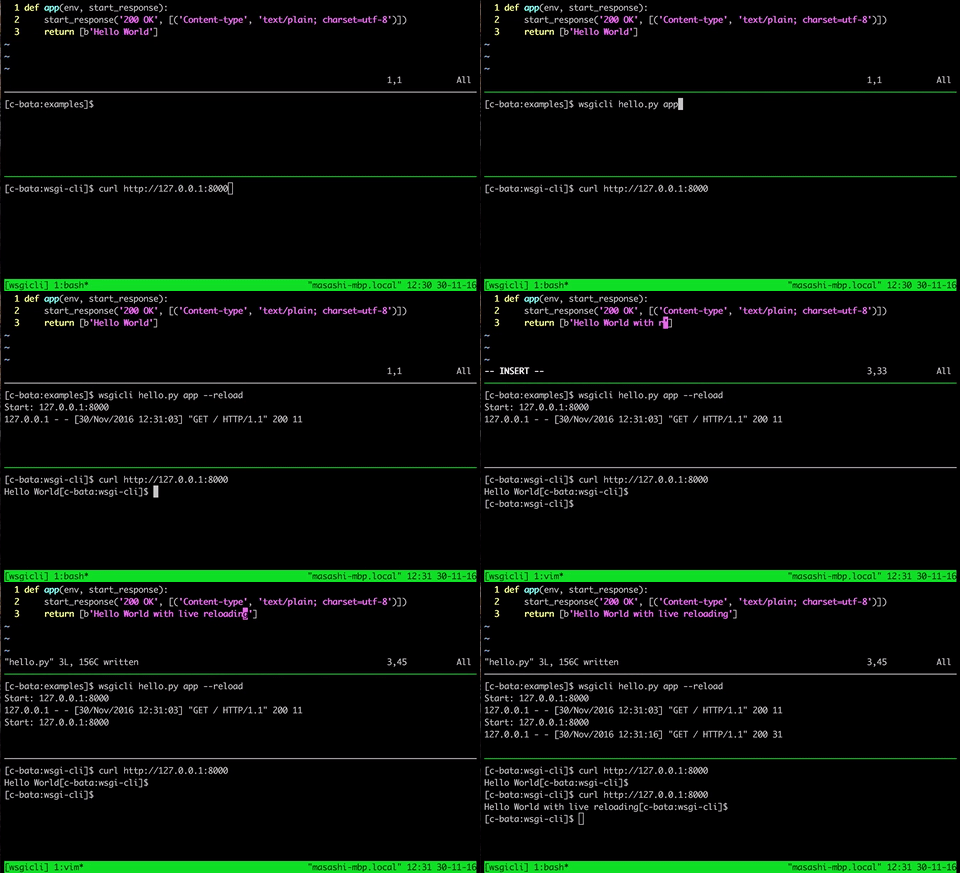
Shell command
Synopsis
$ wsgicli shell [FILEPATH] [WSGIAPP] [Options]No |
Arguments |
Environment Variable |
Description |
|---|---|---|---|
1 |
FILEPATH |
WSGICLI_FILE_PATH |
The file path for your WSGI application. |
2 |
WSGIAPP |
WSGICLI_WSGI_APP |
The variable name of your wsgi application object. |
Options |
Environment Variable |
Default |
Description |
|---|---|---|---|
-i --interpreter |
WSGICLI_INTERPRETER |
'python' |
Supported interpreters are ipython, bpython, ptpython and ptipython. |
--models / --no-models |
WSGICLI_MODELS |
True |
Automatically import ORM table definition from your app. |
--help |
Show help text. |
Example
$ wsgicli shell main.py app --interpreter ipython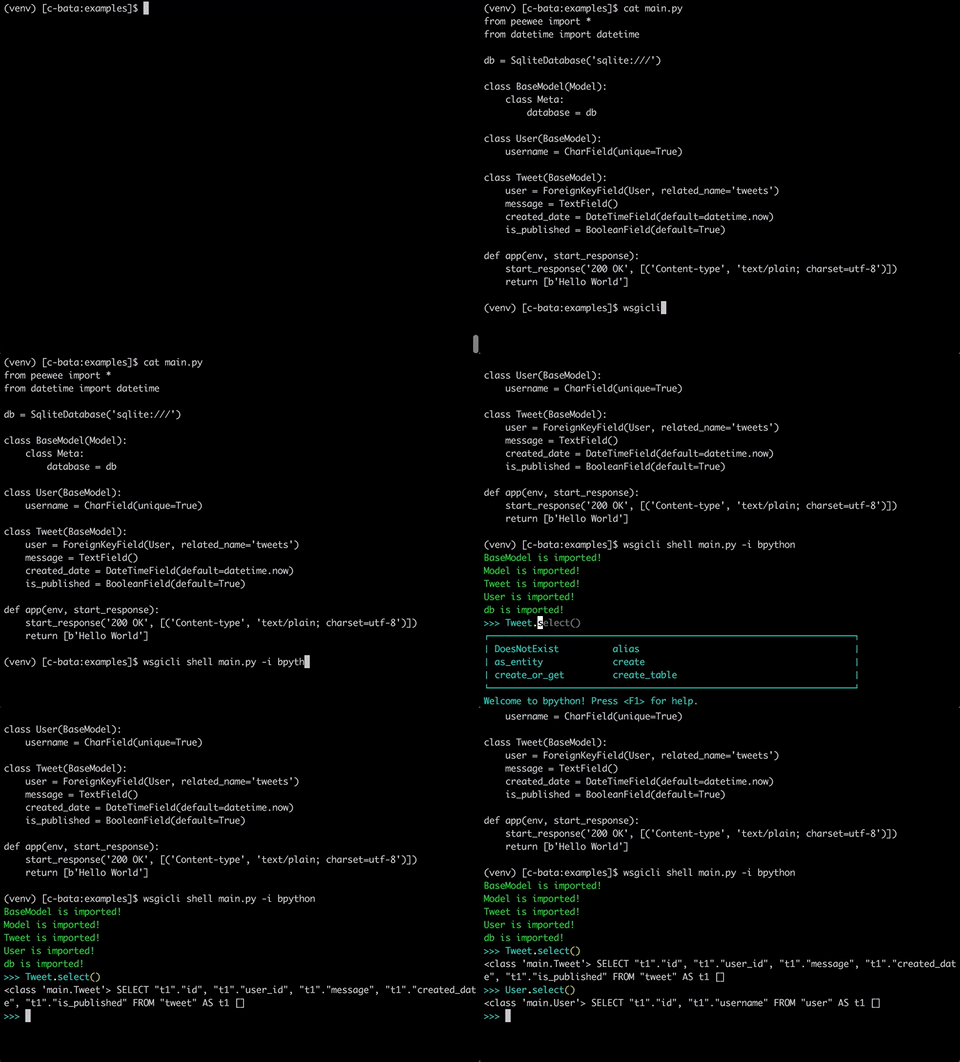
Requirements
Python 3.3 or later
click
wsgi-static-middleware
wsgi-lineprof
License
This software is licensed under the MIT License.
1 maintainer

Metadata
1 maintainer
Release files for wsgicli 0.4.0
For a detailed explanation of source distributions (sdists) and built distributions (wheels), please see the package formats documentation.
Source distribution (sdist)
| File | Size | Uploaded | |
|---|---|---|---|
| wsgicli-0.4.0.tar.gz | 7.2 kB | Details |
Built distribution (wheel)
| File | Interpreter | ABI | Platform | Reset |
|---|---|---|---|---|
| wsgicli-0.4.0-py3-none-any.whl | Python 3 | none | any | Details |
Total release size: 16.2 kB
Release files / wsgicli-0.4.0.tar.gz
| Download URL | wsgicli-0.4.0.tar.gz |
|---|---|
| Size | 7.2 kB |
| Tags | Source |
|
SHA-256 checksum How to use checksums |
e57298ebcf7859a5e07d6b65f61764c3ef9ab6806bc9ea5ed1bf8c63ac91a663
|
|
BLAKE2b-256 checksum How to use checksums |
aa4746a201c94642225cde0239377d037e3e0bdd0ce7891233fe48cfbfac4203
|
| Upload date | |
|
Uploaded using Trusted Publishing? What is trusted publishing? |
No |
Release files / wsgicli-0.4.0-py3-none-any.whl
| Download URL | wsgicli-0.4.0-py3-none-any.whl |
|---|---|
| Size | 9.0 kB |
| Tags | Python 3 |
|
SHA-256 checksum How to use checksums |
fce5ca5d982c17910f7fbd2b4e577d3aaa48770759aab9f917fc1051c6f8ed34
|
|
BLAKE2b-256 checksum How to use checksums |
e666d020321d4b2185ba40c1e89f22b10d66b38dba50f2d5d06972430d8bb5d1
|
| Upload date | |
|
Uploaded using Trusted Publishing? What is trusted publishing? |
No |














