
General
This is a stripped down version of XFOIL, presented in the form of a Python module. What's unique about this package w.r.t. many others out there allowing an interface to XFOIL, is the fact that the Python code talks directly to a compiled Fortran library. This approach avoids having to read/write in-/output files to the disk and communicating with the XFOIl executable. Eliminating the need for constant disk I/O operations can significantly speed up parallel frameworks in particular, giving this approach a clear advantage.
Building and Installing the Python Module
If you are on a Windows machine (64bit) with Python 3.6, installing XFoil is a simple matter of running:
pip install xfoil
If you are using a different type of machine, or a different version of Python, you will have to make sure some software is installed on your system in order for the package to be successfully built. First of all, the module targets Python 3, and does NOT support Python 2. So make sure a Python 3 environment is installed and available. Furthermore, working compilers for C and Fortran have to be installed and on the PATH. On Windows, the build and installation have ONLY been tested with MinGW, using gcc and gfortran.
Then, installing XFoil should be as simple as running
pip install .
from the root of the downloaded repository.
On Windows, you may have to force the system to use MinGW. To do so, create a file named distutils.cfg in
PYTHONPATH\Lib\distutils with the following contents:
[build]
compiler=mingw32
If you are not able to create this file for your Python environment, you can instead create a file named setup.cfg in
the root of the repo with the same contents. It is also possible to force the use of MinGW directly when invoking
pip by calling:
pip install --global-option build_ext --global-option --compiler=mingw32 .
Using the Module
All XFoil operations are performed using the XFoil class. So the first step when using this module is to create an
instance of this class:
>>>  from xfoil import XFoil
>>>  xf = XFoil()
If this does not produce any errors, the installation should be functioning properly.
The symmetric NACA 0012 airfoil is included as a test case. It can be loaded into the XFoil library like this:
>>>  from xfoil.test import naca0012
>>>  xf.airfoil = naca0012

 Number of input coordinate points: 160
 Counterclockwise ordering
 Max thickness =     0.120008  at x =   0.308
 Max camber    =     0.000000  at x =   0.033

  LE  x,y  =  -0.00000   0.00000  |   Chord =   1.00000
  TE  x,y  =   1.00000   0.00000  |

 Current airfoil nodes set from buffer airfoil nodes ( 160 )
Once the airfoil has been loaded successfully it can be analyzed. Let's analyze it for a range of angles of attack, at a Reynolds number of one million. Let's limit the maximum number of iterations to 40 (the default is 20) as well. For the range of angles of attack, we will go from -20 degrees to 20 degrees with steps of 0.5 degrees:
>>>  xf.Re = 1e6
>>>  xf.max_iter = 40
>>>  a, cl, cd, cm = xf.aseq(-20, 20, 0.5)
The XFOIL library should produce a lot of output, which should be familiar to those who have used the original XFOIL
application before. The final result are lists of angles of attack, a, and the corresponding lift coefficients, cl,
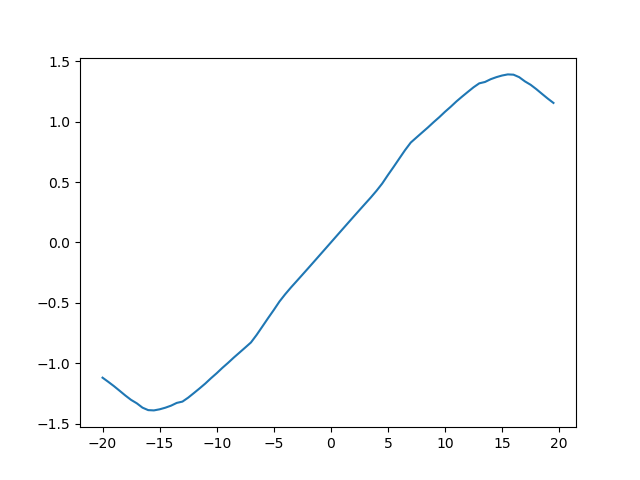
drag coefficients, cd, and moment coefficients, cm. We can now, for example, plot the lift curve for this airfoil:
>>>  import matplotlib.pyplot as plt
>>>  plt.plot(a, cl)
>>>  plt.show()
This should produce the following figure:
Just like in the original XFOIL application, an airfoil can also analyzed for a single angle of attack, single lift coefficient, or a range of lift coefficients. The commands for these operations are
>>>  cl, cd, cm = xf.a(10)
>>>  a, cd, cm = xf.cl(1)
>>>  a, cl, cd, cm = xf.cseq(-0.5, 0.5, 0.05)
to analyze for an angle of attack of 10 degrees, a lift coefficient of 1.0, and for a range of lift coefficients from -0.5 to 0.5 with steps of 0.05.
For other features and specifics, see the documentation in the Python source files.
1 maintainer

Metadata
1 maintainer
Release files for xfoil 1.1.1
For a detailed explanation of source distributions (sdists) and built distributions (wheels), please see the package formats documentation.
Source distribution (sdist)
| File | Size | Uploaded | |
|---|---|---|---|
| xfoil-1.1.1.tar.gz | 12.8 kB | Details |
Built distributions (wheels)
| File | Interpreter | ABI | Platform | Reset |
|---|---|---|---|---|
| xfoil-1.1.1-cp37-cp37m-win_amd64.whl | CPython 3.7 | CPython 3.7 pymalloc | Windows x86-64 | Details |
| xfoil-1.1.1-cp37-cp37m-macosx_10_7_x86_64.whl | CPython 3.7 | CPython 3.7 pymalloc | macOS 10.7+ x86-64 | Details |
Total release size: 728.4 kB
Release files / xfoil-1.1.1.tar.gz
| Download URL | xfoil-1.1.1.tar.gz |
|---|---|
| Size | 12.8 kB |
| Tags | Source |
|
SHA-256 checksum How to use checksums |
0601a125fff8eae68882451485297de04573b83bd08326a6f925d8ec5389b6d7
|
|
BLAKE2b-256 checksum How to use checksums |
04602dd764444b07772e3be5f9b109c5e554da09262ff73795c5b55e5cae62f9
|
| Upload date | |
|
Uploaded using Trusted Publishing? What is trusted publishing? |
No |
| Uploaded via |
twine/1.15.0 pkginfo/1.5.0.1 requests/2.22.0 setuptools/41.2.0 requests-toolbelt/0.9.1 tqdm/4.36.1 CPython/3.7.3
|
Release files / xfoil-1.1.1-cp37-cp37m-win_amd64.whl
| Download URL | xfoil-1.1.1-cp37-cp37m-win_amd64.whl |
|---|---|
| Size | 443.0 kB |
| Tags | CPython 3.7 CPython 3.7 pymalloc Windows x86-64 |
|
SHA-256 checksum How to use checksums |
fa5f3065677316aef8a8d68bf466183d5cbe1f7fed1c25ae9c45522de81b9312
|
|
BLAKE2b-256 checksum How to use checksums |
b0582b86550d347c69f0a1f395c34c8925903abf8ecb6a7caa78ce101abe0ab2
|
| Upload date | |
|
Uploaded using Trusted Publishing? What is trusted publishing? |
No |
| Uploaded via |
twine/1.15.0 pkginfo/1.5.0.1 requests/2.22.0 setuptools/41.2.0 requests-toolbelt/0.9.1 tqdm/4.36.1 CPython/3.7.3
|
Release files / xfoil-1.1.1-cp37-cp37m-macosx_10_7_x86_64.whl
| Download URL | xfoil-1.1.1-cp37-cp37m-macosx_10_7_x86_64.whl |
|---|---|
| Size | 272.6 kB |
| Tags | CPython 3.7 CPython 3.7 pymalloc macOS 10.7+ x86-64 |
|
SHA-256 checksum How to use checksums |
d34e595fcd822089c411586cc9f2a06866e345b1c94ae7b87ce16166a904d82a
|
|
BLAKE2b-256 checksum How to use checksums |
32a16966260a28405e7a2aa95b2584fd5e881d6027a28d75271f31a311019838
|
| Upload date | |
|
Uploaded using Trusted Publishing? What is trusted publishing? |
No |
| Uploaded via |
twine/2.0.0 pkginfo/1.5.0.1 requests/2.22.0 setuptools/40.8.0 requests-toolbelt/0.9.1 tqdm/4.36.1 CPython/3.7.3
|














